


DreamUP (V1.3.3.11)
Posts by cazuela
-
-
Hardware-Update for Dreamboxes
18.07.2013
Release-Image planned for OE2.0
QuoteDisplay MoreHong Kong, 18. July 2013.
Leontech, responsible for the distribution of the Dreambox brand of Linux-based set-top boxes, is launching three existing models of Dreamboxes into the trade with improved hardware.
The DM500 HD as well as the DM800 HD se and the DM7020 HD will be equipped with new memory modules, increasing the performance of these boxes, which have won many awards.
In addition a release image will be published for the OE2.0 software for this second generation of Dreamboxes.
To date, the DM500 HD and the DM800 HD se have come equipped with a 64 MB flash memory.
The random access memory used to be 256 MB.
The new hardware components mean that the flash memory in both Dreamboxes is increased to 1 GB. The random access memory capacity is doubled to 512 MB.
The increased memory capacity will allow users to install significantly more plug-ins and other extensions, thus increasing the range of functions of their Dreambox.
This means that both the compact DM500 HD and the DM800 HD se now feature the same memory capacity as the DM7020 HD.
This Dreambox, too, is being equipped with new memory modules, as the modules used previously are no longer available from the suppliers.
To coincide with the new hardware in the second generation Dreamboxes, Leontech will make available a release image for the OE2.0 software.
To date, only a beta version of the software has been available, which, among other features, supports the HbbTV standard.
Leontech spokesperson Louis Lee: „This hardware update ensures the DM500 HD and the DM800 HD se remain at the cutting edge of technology.
The expansion of memory capacity allows users to adapt their Dreamboxes even better to their individual preferences.source: Dreambox
-
i want osccam for cuberevo 250 hd v 904-r13791 sifteam dgs ?
and is compatible for the device, how can i install manually osccam by dcc y1.60 thanks
### ubb This Forum Is For Working Oscam Files Only ! Do Not Post Questions Or Ask For Support Here ! ### -
Quote
giving the broadcaster what it describes as ‘exclusive’ rights through to the 2015-2016 season.
and they are adding 3 extra channels to their HD1 and HD2 channels ... -
i try to klick on those links and getting a nice massage says you don´t have right to accsess this page !!! reson that u sxxxted on a white spot
could you please clarify what you mean?? which links??
in other words if you want/need help make sense please... -
I´ve just loaded on the catseye motor settings with no difference to any other catseye I have ever loaded over the past years..
Cheers for that Catseye -
put it on flush drive but the system when boot don`t ask for update after pressing the on button ??
any idea ?
got vu+solo2 with last vix image
BlackHole have nothing to do with Vix images...
-
Thanks again for your help, when using the program can you add an internet explorer link as in http://linuxsat-support.com/enigma2-plugin-support/www...........
if you look in the userstream.xml you will see similar to what/where you have to add:Code<channel> <id>3</id> <name>NGeo</name> <piconname>dummy.png</piconname> <stream_url><![CDATA[[COLOR='#FF0000']rtmp://50.7.168.106[/COLOR]/live playpath=natgeo swfUrl=http://www.tv-msn.com/player/player.swf pageUrl=[COLOR='#FF0000']http://tv-msn.com/natgeo.html[/COLOR] live=1]]></stream_url> <ts_stream/> <buffer_kb>512</buffer_kb> </channel> -
put an ac timer on the plug..
-
In DCC search for the stbIP and save,,
it sounds like the ip has changed or you have DHCP activated...
assign an IP for it an unactivate the DHCP button, restart. -
Guys does anyone know how to add URL's into the 1channel list for download/streaming and which are best
quoted from the plugin 1channel located at /usr/lib/enigma2/python/Plugins/Extensions/1channel there you will see plugin.pyo ,
I suggest you read it...QuoteHELP:
To add links to this plugin check urllist.txt file in plugin folder.
urlist.txt is also inside the 1channel folder..
To find the right method and format of the url you want to add, you first need to find it ( the file listing) using another player like xbmc....
All this has already been documented elsewhere on the site.... -
things htat come to mind....:
right connecters on right connections,,,
stb connected to satfinder connected to lnb,,,
reception settings_ config mode: advanced... LNB 1..
ahh and possibly,,, make sure you have a sat.xml file loaded or a settings loaded... -
Just a reminder,,,
it seems that some users dont seem to understand that everything on servers, plugins, etc need to be updated and maintained ,
by non-lucrative interested persons, just like this and many other sites,
people who spend their free-from-commitments time to help others ,etc....
So , please enjoy all that is working and think :
¿"where do they get the time to make my hobby more enjoyable"????
If a plugin server stops/freezes/crashes then look for an alternative, if there is no alternative then be patient.
or do something about it and put in your 10cents for the benefit of all users......
It really would be appreciated.....
:thumbsup: -
I'll report in this thread - though the issue probably belongs somewhere else!
There is a bug in BH2.0.4 which was causing my DNS not to be saved. I use a fixed ip. Upon installing 2.0.4 the initial setup gives the option of restoring settings - if I say "no" then everything works fine DNS is saved etc. However if I respond "yes" my network adapter setting, minus the DNS, are restored, but DNS is lost everytime I reboot. I have no way of fixing this so my 2.0.4 build is on hold (back to 2.0.3) until either a fix/workaround is found, or I have the time to start again.
If it were me ,I´d install the v2.0.4 , then install any plugins, emu, settings that I might have still in IPK format for easy install,
Once our addons plugin is installed there are some if not all decent /recent plugin versions..
Then FTP over my .config file(s) above channelinfo...
most important, although frustrating it may seem, it´ll be worth it as you "mod" your image to your likings..
I would respond NO.
enjoy -
try TSMedia... its working fine
-
the idea of a big dish is to acompany a motor to be able to pick up most of European ,etc ,sats..
if you are going to get into this hobby, go for what the pocket can afford and reading is the start
of what could be a long lasting pleasurable pastime,,
and meeting people like minded and making friends,,,
ask any sat widow....
the more you get into it the less tv viewing you do... -
not sure if you can see the image fully ot be able to read the bottom notice:
Quotethe drive must be mounted in rw.if you cant see your device here its probably mounted as a read only or autofs handle it only in read only.
in case of mount it manually and try again....
Note : I have it saved to media/usb on an external usb 4gbs stick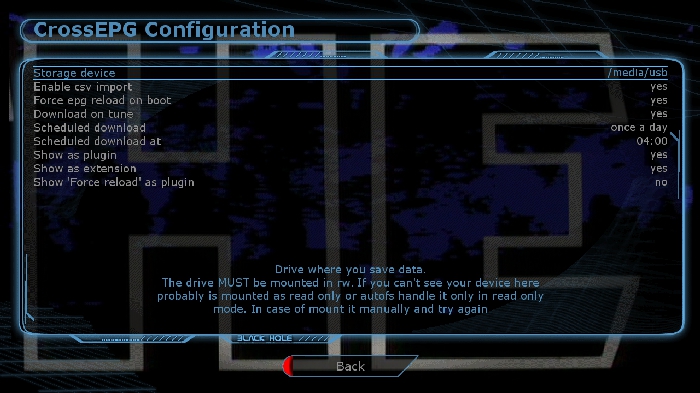
-
-
GREEN-YELLOW ( BH addons manager)
ADDONS download manager
BH addons plugins
Go through the list and you will see both versions : v6.1.0 + v6.4.0
you decide which one you want to use...download and it will auto-install
full reboot after and then enter plugins and set it up as you want it...
DNS settings need to be saved and a full restart is required ... -
Start reading this section : Forum Gateway - Powered by DnP Firewall
especially this thread :http://linuxsat-support.com/ca…nes-clines-beginners.html
this section can give you an idea of whats happening : Forum Gateway - Powered by DnP Firewall


