

The new released as 9/2/2019
Download from official website ...
http://pur-e2.club/OU/images/index.php?dir=6.2/fulan/



The new released as 9/2/2019
Download from official website ...
http://pur-e2.club/OU/images/index.php?dir=6.2/fulan/

OSCam svn11.494- Emu -r788 as at 6/2/2019

Oscam svn11.494Emu -r787 -Build
Thanks to audi06_19
Thanks toDreamOSat

oscam-svn11494-sh_4-webif-oscam-emu-patched.tar.gz
oscam-svn11494-sh4-webif-oscam-emu-patched.tar.gz
Good luck

NCam 8.5-sh4 Emu -r787for sh4 spark

Ncam V 8.5
06-02-2019
-Improvements emu
-enhance function anticascading or SIDs count
-[streamserver] Re-zero variable for every ts packet
-[streamserver] Add missing Rosscrypt1 caid to cdata
-[nemu] New config option to control SoftCam.Key linking in binary
-Try to support SH4 device with ipk install file (With Only open source images none neutrino)



The new released as 4/2/2019
Download from official website ...
http://pur-e2.club/OU/images/index.php?dir=6.2/fulan/
The new released as 4/2/2019
Download from official website ...
http://pur-e2.club/OU/images/index.php?dir=6.2/fulan/
My friend / andy37
Moved as the next pictures step step down and went down to plugins and and click Ok to around it from not visible to visible
809785a8410.jpga5e35e3c6422.jpg
Good luck

OSCam svn11.494- Emu -r787 as at 3/2/2019
Oscam svn11.494Emu -r787 -Build
Thanks to audi06_19
Thanks toDreamOSat
oscam-svn11494-sh_4-webif-oscam-emu-patched.tar.gz
oscam-svn11494-sh4-webif-oscam-emu-patched.tar.gz
Good luck
My friend / andy37
where is the problem Explanation above is clear to install all the things I mentioned and the files that need to be installed successfully
OSCam svn11.493- Emu -r786 as at 3/2/2019
Oscam svn11.493Emu -r786 -Build
Thanks to audi06_19
Thanks toDreamOSat
oscam-svn11493-sh_4-webif-oscam-emu-patched.tar.gz
oscam-svn11493-sh4-webif-oscam-emu-patched.tar.gz
Good luck
OSCam svn11.492- Emu -r786 as at 2/2/2019
Oscam svn11.492Emu -r786 -Build
Thanks to audi06_19
Thanks toDreamOSat
oscam-svn11492-sh_4-webif-oscam-emu-patched.tar.gz
oscam-svn11492-sh4-webif-oscam-emu-patched.tar.gz
Good luck

I have been successfully modified & updated all Emus on version of Neutrino Image and became working by firing up channels AFN on Spark Devices

Do not look for the truth in people - but look for the truthful
I have been successfully modified & updated all Emus on version of Neutrino Image and became working by firing up channels AFN on Spark Devices
We know that the Image does not accept the additions
and of course the subject was difficult because the version does not accept the additions and after a number of experiences and especially the settings of the other ideas and other tricks on the system and of course you will find attachments and special file settings at the end of the subject but I will explain the subject to benefit everyone is the most important commitment to explain until the minds work for all
The attachments are consists of The latest version of the following :-
- oscam-svn11491-sh4-webif-oscam-emu-patched
- The official version of emu is NCam_1.9-r1.sh4
- emu gcam-1.9-emu.sh4
- emu wicardd-1.19 .sh4
We start on oscam-svn11491-sh4-webif first update version i have modified the name of the emu and modified the file config
1 - oscam-svn11491-sh4-webif-oscam-emu-patched renamed oscam only mean that delete any name next to the emu
2 - dcc program go to the var / emu track and Delete the old emu first and then the new emu and get it the ATTRIBUTES permission 775
3 - After the update Go to the list of blue panel and activating Emu oscam and then save until the EMu and do not forget to activate the softcam down below the same menu when updating servers and conservation is updated the softcam only every time the servers speak Freecam
Second, the official version of the NCam_1.9-r1.sh4 i have modified the name of the emu and modified the file config
1 - NCam_1.9-r1.sh4 -emu- renamed ncam only mean that delete any name next to the emu
2 - dcc program go to the var / emu track and Delete the old emu first and then the new emu and get it the ATTRIBUTES permission 775
3 - After the update Go to the list of blue panel and activating Emu oscam and then save until the EMu and do not forget to activate the softcam down below the same menu when updating servers and conservation is updated the softcam only every time the servers speak Free cam
Thirdly the official version of theemu Gcam-1.9-EMU.sh4
1 - of course you know that the Image does not accept the additions and there is no version of this emu but there is an emu named gbox and to circumvent the system we called the gcam-1.9-emu.sh4 imo gbox with the delet of the following files from the keys file cs2gbox.cfg and gbox_cfg
2 - dcc program go to the var / emu track and Delete the old emu first and then the new emu and get it the ATTRIBUTES permission 775
3 - After the update Go to the list of blue panel and activating Emu oscam and then save until the EMu and do not forget to activate the softcam down below the same menu when updating servers and conservation is updated the softcam only every time the servers speak Freecam
Fourthly emu wicardd-1.19 i have modified the name of the emu and modified the file config
1 - wicardd-1.19 renamed wicard only mean that delete any name next to the emu
2 - dcc program go to the var / emu track and Delete the old emu first and then the new emu and get it the ATTRIBUTES permission 775
3 - After the update Go to the list of blue panel and activating Emu oscam and then save until the EMu and do not forget to activate the softcam down below the same menu when updating servers and conservation is updated the softcam only every time the servers speak Free cam
You will find all the files and attachments with attachments after decompressing them move their contents according to the following
The contents of the emu file in the dcc program to the var / emu path
The contents of the keys file in the dcc program are to the var / keys path
And follow the steps above and especially the declaration of each Emo and Servic guest file ncam.server / oscam.server / gcam.server / wicard config can find servers attachments works because it is transferred from the file that is working now and when you add Servec leave the part of the file and its configuration data and not only part servers only

channels AFN opening by oscam emu do not forget to update softcam see To the pictures of my My device

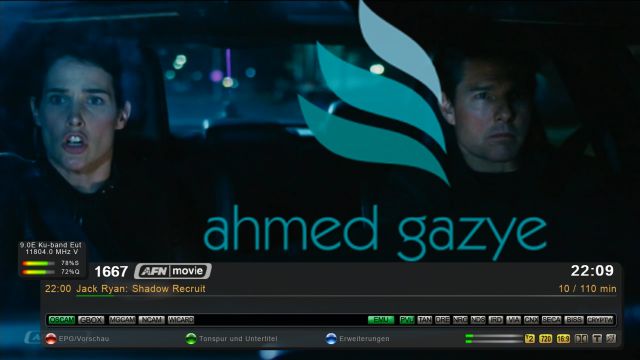

The following is an explanation of the activation of the EMUS of the version
Go to the main menu and choose plugins and click Ok
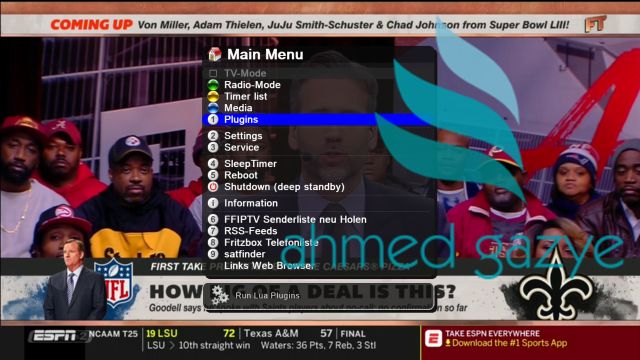
You will move to this menu and select the blue panel then click OK
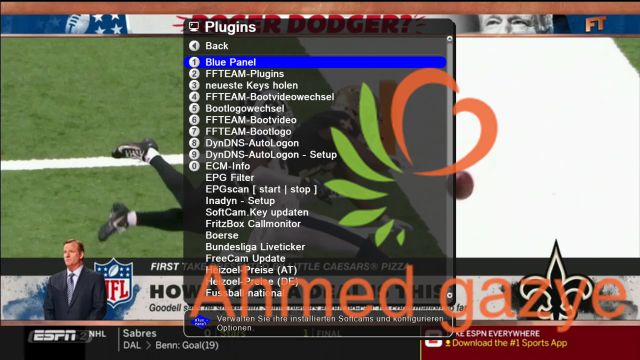
You will be redirected to this list and downloaded to Soft cam as picture and then click Ok open you a list of all the minds choose what you like then click OK
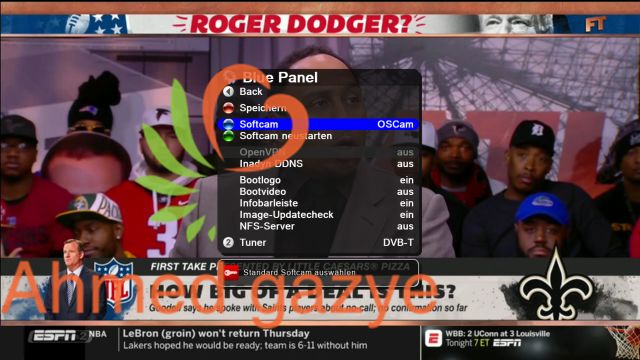
You will move to this list and scroll down as picture, then click OK and wait for it to load

Then go up to the top as in the picture and then click Ok and wait until the download and then press exit and click Yes on the message of the conservation that will appear you are now ready to move between the channels and choose what you want and will open the code this way every time working when the change of the EMu either when the server changed For the same emo, the previous two steps are done and the first one is chosen to choose the emo as long as it does not change
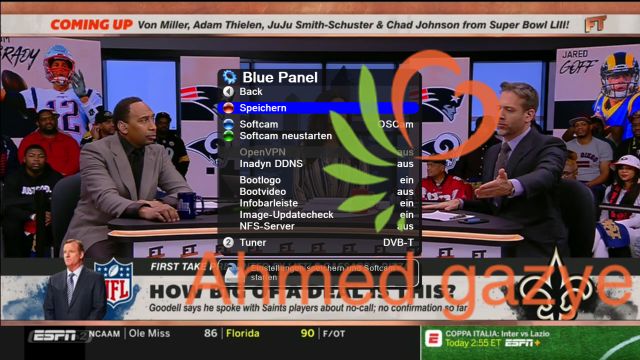
do not forget The link FOR my Knowledge about
Good luck to all of you
NCam 8.4-sh4 Emu -r786 for sh4 spark
Ncam V 8.4
01-02-2019
-Improvements emu
-extended fix for orf global emm
-dont disable global emms or set in config blockemm-g = 0
-caid 0x0D96 & 0x0D98
OSCam svn11.491- Emu -r786 as at 31/1/2019
Oscam svn11.491Emu -r786 -Build
Thanks to audi06_19
Thanks toDreamOSat
oscam-svn11491-sh_4-webif-oscam-emu-patched.tar.gz
oscam-svn11491-sh4-webif-oscam-emu-patched.tar.gz
Good luck


Thanks fairbird & Linuxsat - support .com Team & Admin oktus
Ncam V15.7 compiled and patched READ as at 15/2/2026
Update ...
Ncam V15.7
- Resolve 'Loadbalancer - fallback adjustment'
* Allow lb_nfb_readers to be set to zero (previously minimum was 1). This means you can configure the system to have no fallback readers if desired.
* If only one reader matches and double_check is enabled (and the CAID matches), the patch forces a fallback check by setting force_reopen = 1.
thx to @lpm11
cherry-pick > https://git.streamboard.tv/common/oscam/-/commit/0fd204fd7ec7728bc47520e560cdb8290007933a
- Use fixed-width 64-bit integer format macros
* Use fixed-width 64-bit integer format macros
Replaced all hardcoded %lld format specifiers with the portable
inttypes.h macros PRId64 (for printing) and SCNd64 (for scanning).
This ensures correct 64-bit integer handling across 32-bit and
64-bit systems, improves cross-platform compatibility, and avoids
potential issues with long long size differences on various compilers
or architectures.
cherry-pick > https://git.streamboard.tv/common/oscam/-/commit/a93e1a0c0eef7baa2fef3af30a3a0f1f634f12c1
- Add support Tiger EMM eassembly support for Nagra/Tiger smartcards (Thank's CodecCarrier)
- Merged ecmbd into emu
Removed external bin conversion
Automatic data value recognition via filename
Added direct mode and memory mode
Priority: emu first, ecmdb as fallback
Various bug fixes (Thank's didou07)
- Forcing the card to use a specific CAID (#58)
* Fix Validation files
* Forcing the card to use a specific CAID
Some modified Conax cards require a specific CAID for proper ECM handling (Thank's didou07)
- dvbapi: add support for more net send clients (#60)
* connections established with client_proto_version = 3 and extended_cw_api >= 1 can now also process CW_ALGO_CSA_ALT independently
* proper handling of dvbapi_ioctl commands in this case
* fix rerouting of msgid back to client
* support each videoguard caid
* make sure ecm.info is created (Thank's WXbet)
- Add Task Scheduler for Local API Calls. (#61)
scheduling to execute NCam web interface URLs automatically without external dependencies. Jobs are defined in task.cfg using simple format.
- streamrelay: improve ecm_mode handling
* add get_ecm_mode() inline function to extract the lower nibble from
  last ECM byte for VideoGuard CAIDs
* move select_csa_alt() from module-dvbapi.c to globals.h for shared use
* allow empty CAID setting in streamrelay config to autodetect csa-alt ecm
* disconnect stream client immediately when CAID is not allowed
* fix 'caid not enabled' log message to show actual CAID instead of FFFE
* log ecm_mode changes and libdvbcsa table feedback (if available)
* simplify streamrelay support output in version info
* add msgid to DVBAPI_ECM_INFO message, so the client can correctly assign the ecm information to the requesting service (Cherry from oscam source)
- dvbapi: add serverip setting to bind listener to specific IP address
* add dvbapi_srvip configuration option to bind TCP listener to a
  specific IP address instead of all interfaces (ADDR_ANY)
* supports both IPv4 and IPv6 addresses
* default: none (binds to all interfaces, same behavior as before)
* add webif configuration and documentation
(thx Basic.Master) (Cherry from oscam source)
- dvbapi: fix support for more net send clients
* do not open ca device when ca_soft_csa is active (Cherry from oscam source)
- webif: display 'camd.socket' and 'local' instead of null/localhost IP
* display 'camd.socket' for dvbapi socket connections
* display "local" for local card readers (Cherry from oscam source)
- dvbapi: fix listen_port not showing up in webif config after restart
The configured listen_port value was reset to 0 in dvbapi_detect_api()
for incompatible boxtypes, which caused the webif to show an empty field
after restart even though the value was correctly saved in oscam.conf.
Introduce separate runtime variable dvbapi_listenport_active for the
actual port used by dvbapi logic, preserving cfg.dvbapi_listenport for
config storage and webif display. (Cherry from oscam source)
- warnings: fix gcc16 -Wunused-but-set-variable warnings
* remove or restructure unused loop counter variables that trigger warnings with GCC 16+
* ncam-config-account.c: remove unused 'i' in account_allowedprotocols_fn()
* ncam-conf-chk.c: remove unused 'i' in chk_cacheex_hitvaluetab() and chk_tuntab()
* module-stat.c: wrap 'count' in #ifdef WITH_DEBUG (only used for debug logging)
* module-webif.c: remove unused 'i' in send_ncam_status() and send_ncam_api(), move 'i' into #ifdef CS_CACHEEX_AIO block in send_ncam_cacheex()
cherry-pick > https://git.streamboard.tv/common/oscam/-/commit/1f50f8066706c3b5c07288cad7866175e808a2f4
- cardreader: add amlogic smc internal smartcard reader support
Add support for amlogic smc internal smartcard reader interface.
This enables NCam to use the built-in smartcard slot on amlogic-based
set-top boxes and media players that use the native amlogic smartcard driver which exposes /dev/smc0. (thx rozpruwacz)
Changes:
- CMakeLists.txt: add amlogic cross-compile target and USE_AMSMC flag
- Makefile: add ifd_amsmc.c to build, help text and example
- config.h: add CARDREADER_INTERNAL_AMSMC preprocessor logic
- config.sh: add USE_AMSMC and WITH_AMSMC flag handling
- csctapi/cardreaders.h: declare cardreader_internal_amsmc
- csctapi/ifd_amsmc.c: new file - amlogic smartcard reader driver
- module-webif-tpl.c: add AMSMC to webif template conditionals
- ncam.c: register amlogic cardreader in version info and cardreaders array
cherry-pick > https://git.streamboard.tv/common/oscam/-/commit/a16a76032ffa03622b4837264756e4d74a6df85b
- Fix aio_version buffer size mismatch in cacheex feature exchange
* fix break indentation
* fix ancient build
* Fix aio_version buffer size mismatch in cacheex feature exchange
Co-authored-by: default avatarWXbet <4-WXbet@users.noreply.git.streamboard.tv>
cherry-pick > https://git.streamboard.tv/common/oscam/-/commit/a16a76032ffa03622b4837264756e4d74a6df85b
- Fix pages gen prid64 warning
cherry-pick > https://git.streamboard.tv/common/oscam/-/commit/eaab5437282f2d5558be5c3903705f9e99926798
- fix: module monitor
* print date|time instead of time twice
cherry-pick > https://git.streamboard.tv/common/oscam/-/commit/53e664fa299dae72bfd7953db5c10ad3f0ee55e5
- webif: add service counter
cherry-pick > https://git.streamboard.tv/common/oscam/-/commit/71dd98989c98b6d3eb2abad5ad98d621c48a076d
- Remove dead code, simplify functions, drop libm dependency
- eliminate dead code: ifd_azbox.c while(ret), ifd_sci.c sh4_stb,
  reader-dre-st20.c verbose, module-cccam.c is_dcw_corrupted
- remove constant parameters: chk_is_null_nodeid len (always 8),
  CAK7do_cmd len (always 0x10)
- simplify: NULLFREE macro (free(NULL) is safe), cs_strlen,
  tolower/toupper without isupper/islower check, ifd_stinger.c
  mhz assignment, ifd_sci.c tries++ refactoring
- use MIN/MAX macros in module-cccam.c rating clamping
- refactor reader-conax.c CWPK_CNX with memcpy
- replace fmod with pure C in reader-nagracak7.c, drop libm dependency
- Makefile/CMakeLists.txt: remove libm, keep ,
  ,  variables for toolchain flexibility
thx to @lpm11
Co-authored-by: default avatarWXbet <4-WXbet@users.noreply.git.streamboard.tv>
cherry-pick > https://git.streamboard.tv/common/oscam/-/commit/ea61ff6686a2c1fc2f148e2fa217a43c05b14c44
- cleanup deadcode clocktypes * Remove librt dependency clock_gettime no longer used after cleanup deadcode clocktypes patch. CLOCKFIX now only uses gettimeofday() which doesn't require librt. * cleanup deadcode clocktypes
thx to @lpm11
Co-authored-by: default avatarWXbet <4-WXbet@users.noreply.git.streamboard.tv>
cherry-pick > https://git.streamboard.tv/common/oscam/-/commit/731e29ea4f5b919292163b33b55aa7015d0d7a34
- fix: security crash guard - Harden DVBAPI filter handling: require a valid curpid before touching ECM fields and abort section-filter setup when the demux PID lookup fails, preventing null-pointer crashes. - WebIF robustness sweep: gate every popen/fopen/access use and preserve pointer assignments so the UI now reports missing scripts/files instead of dereferencing null handles. - Reader safety: add missing allocation checks in Conax/DRE code paths and keep Nagra readers’ csystem_data alive after failed init to avoid double-free crashes. - Crash/diagnostics fixes: protect cs_dumpstack()/detect_valgrind() against failed file opens and clamp the CoolAPI status lookup to stay inside the cnxt_status[] table.
thx to @lpm11
cherry-pick > https://git.streamboard.tv/common/oscam/-/commit/c63a56cf59017be69512965cc480012dec7b4734
- build: fix is_defined.txt generation for proper webif template filtering
The is_defined.txt file is used by pages_gen to filter templates based on enabled config options. Previously, this file was only created when explicitly calling config.sh with --enable/--disable/--restore, but not during normal builds.
The 'webif clean' added in 96debcd7 ('Fix webif compression parameter') ensured pages.c was always rebuilt, but also deleted is_defined.txt which broke the filtering mechanism.
Changes:
- Call write_enabled() in make_config_mak() to ensure is_defined.txt is generated on every build
- Remove redundant 'webif clean' from Makefile and CMakeLists.txt (write_enabled already deletes pages.c when needed)
- Add config.h dependency to pages.c target to trigger rebuild when config options change
This ensures proper filtering works for:
- Fresh checkouts with default config
- Builds after direct config.h modifications
- Builds after config.sh --enable/--disable changes
cherry-pick > https://git.streamboard.tv/common/oscam/-/commit/5b7ec3c95e673879499853af5c37fba4097c631d
- webif: add BOTTOM navigation link
- css.css: add BOTTOM navigation link and adjust TOP link position
  - Both links positioned on the right side (right:10px)
  - TOP link: bottom-right in footer
  - BOTTOM link: top-right in menu area
  - Arrow symbols after text for both links
- menu.html: add BOTTOM link element with class 'bottom_link'
  - Link anchors to #statusfooter for navigation to page footer
cherry-pick > https://git.streamboard.tv/common/oscam/-/commit/573dab3eafe9d14f72d929e32fb678b70a8bdafd
- webif: fix BOTTOM navigation link
* define bottom_link as a html div container like top_link
cherry-pick > https://git.streamboard.tv/common/oscam/-/commit/e1a6947308e617b62689bc465338f4ad04f6ee11
- webif: fix PCSC devices not shown on scanusb.html
The write_enabled() function generates is_defined.txt which pages_gen
uses to filter templates based on enabled config options. However, it
only wrote config.h defines and missed USE_FLAG based card readers.
CARDREADER_PCSC is controlled via USE_PCSC flag passed at build time,
not a config.h define. Since it was never written to is_defined.txt,
pages_gen filtered out scanusb_pcscbit.html template, causing PCSC
devices to not appear on scanusb.html.
Fixes regression introduced in 9a5d4d0
cherry-pick > https://git.streamboard.tv/common/oscam/-/commit/98e5f92f229edd29f84a20859ca074d71a750524
- dvbapi: remove obsolete dvbapi config options
Remove deprecated [dvbapi] section options that have been obsolete for over 10 years:
- priority
- ignore
- cw_delay
These options were migrated to oscam.dvbapi file long ago.
Remove dvbapi_caidtab_fn() function and related extern declaration
as they are no longer needed.
Users with ancient configs will now see 'unknown setting' warnings,
prompting them to migrate to oscam.dvbapi.
(cherry picked from commit e281dfb9)
Co-authored-by: default avatarWXbet <4-WXbet@users.noreply.git.streamboard.tv>
cherry-pick > https://git.streamboard.tv/common/oscam/-/commit/5742897609220e43d98a4cc3ed4e58114a973699
- reader: add maxparallel feature to limit simultaneous services per reader
This feature allows limiting the number of services that can use a reader
simultaneously, essential for card readers with slot restrictions.
=== NEW CONFIGURATION OPTIONS ===
maxparallel (default: 0 = unlimited)
  Maximum number of active services per reader. When reached, the reader
  is skipped and other readers are tried (fallover).
paralleltimeout (default: 1000 ms)
  Buffer added to the measured ECM interval for slot expiration.
  A slot expires when no ECM is received within (measured_interval + timeout).
parallelfactor (default: 1.5)
  Multiplier for pending slots to support zapping without blackscreen.
  Set to 0 to disable pending slots (strict maxparallel enforcement).
=== ARCHITECTURE ===
Dual-slot system with active and pending services:
- Active slots (size: maxparallel)
  Confirmed services actively receiving CWs from this reader.
- Pending slots (size: maxparallel * parallelfactor)
  Temporary overflow during channel zapping. Pending services are
  promoted to active when slots free up (FIFO), or dropped when
  active services need the capacity.
Slot reservation timing:
  Slots are reserved when a reader DELIVERS a CW, not when the request
  is sent. This prevents readers from blocking capacity for services
  they don't end up serving when multiple readers are queried in parallel.
=== BLOCKLIST FOR CLEAN FALLOVER ===
When a pending service is dropped, the client+service combination is
added to a per-reader blocklist. This causes:
- Subsequent ECM requests for blocked combinations to skip this reader
- Clean fallover to other readers without repeated drop cycles
- No log spam from services repeatedly going to pending and getting dropped
Blocklist lifecycle:
- Added: when service is dropped from pending
- Removed: when client zaps to a different service
- Cleared: when an active slot becomes free
=== TYPICAL USE CASE ===
- Reader 1: maxparallel=1 (card allows only 1 service)
- Receiver records Service A on Reader 1, user zaps to Service B
- Service B goes to pending slot (no blackscreen during zap)
- Service A sends ECM -> Service B dropped from pending
- Service B blocklisted on Reader 1 -> falls over to Reader 2
- User stops Service B -> block cleared, Reader 1 available again
cherry-pick > https://git.streamboard.tv/common/oscam/-/commit/c0b080cd0735848e3c71c0c3cf523bfaec40ee03
- streamrelay: fix fallback host comparison and resource leaks
- Fix fallback host comparison using streq() instead of pointer comparison
- Fix socket leaks in connect_to_stream() on setsockopt/connect failures
- Add safety checks for glistenfd before close operations
- Fix remove_newline_chars() to also handle carriage returns
- NULL key pointers after dvbcsa_bs_key_free() to prevent double-free
- Rework stream_server() using do-while(0) pattern for cleaner error handling
- Some code formatting according to CODING.RULES.txt
cherry-pick > https://git.streamboard.tv/common/oscam/-/commit/6fb8ad91dffdb3c35cd13954e4604874ef081beb
- dvbapi: use SERVICE_TYPE_MASK descriptor to fix CW delivery for shared services
When stream_write_cw() successfully delivers a CW to a stream client,
it returns true and prevents the same CW from being written via the
CA device (ioctl/netsend). This exclusive routing causes a CW gap
on demuxers that require CA device delivery until the next cw cycle,
because stream_write_cw() consumes the CW before the stream client
has fully disconnected.
Parse the SERVICE_TYPE_MASK descriptor (0x85) from the CA PMT to
identify whether a demux serves a stream client (type 7/8) or requires
direct CA device or netsend descrambling. For demuxers that require
CA device or netsend delivery, always write the CW via dvbapi_write_cw
regardless of whether stream_write_cw() consumed it. For stream-only
demuxers and clients that don't send descriptor 0x85, preserve the
original exclusive behavior.
cherry-picked > https://git.streamboard.tv/common/oscam/-/commit/c656fef9b74e90533a1d756eb2e1c344ce4bbfccNote the following
pmt_mode = 0 #[ Use 6 the Best value for (opensource) images only ]
extended_cw_api = 1 #[ (1) = OE2.2/2.5 AND (2) = OE2.0 ] boxtype
= dreambox #[ For enigma2 use (dreambox) And spark and neutrino use (duckbox) ]
config_ SH4-Only for spark and neutrino

Do not look for the truth in people - but look for the truthful


Exclusive Neutrino3.7.1-MP-DDT-FFTeam-6-12-2018-Spark7162 Receiver.zip
This version has not been found in any other forum I carried it from the previous version on 23/11/2018 by entering the update from within, which allows you to download the new version and install it, but beware of entering the update and installation without experience or knowledge because the version after downloading The installation allows you to install on the internal flash only, either the place of the copy of Alnjma on the internal flash or the location of the copy of the Espark on the internal flash and that is of course the attached version of the raw version of the processor 7162 is a device processor and therefore can be downloaded and I can not download the version of the processor 7111 because the version occurs on the type together The device has the previous version on the external flash device processor 7111, but must be very careful as already explained because the version is focused on the internal flash only in case it was installed and the solution is simple to enter the update on the net from the machine will allow you to download the version and install the approved version will be downloaded With the tmp file, when the download is completed with the file, you will be prompted for the installation location. You can not agree on the installation and then exit with the dcc program. Enter the tmp file and drag the version onto your computer so you have a raw copy on the computer that you can install with the plugin2-plugin-extensions-imagemanager on the external flash The copy is dated 23/11/2018 The image and the light and the work of the remote and open the encrypted and otherwise does not match any other version of the Alnigma teams feel that this special version of the team dedicated to the devices I think of the best versions of the Spark devices were prepared by the team of these devices lightness and beauty of the image and a wonderful knife speed and open the encrypted and compatible with the defect The only one that does not accept the additions but contains a special add-on that can be dispensed with the additions except the translation See the following image of my device for the version on the external flash was installed -plugin enigma2-plugin-extensions-imagemager
download link on my account Mediafire File size49.2 MB
http://download1078.mediafire.…12-2018-7162-Receiver.zip
Neutrino3.7.1-MP-DDT-FFTeam
login : root
password : root

OSCam svn11.490- Emu -r786 as at 29/1/2019
Oscam svn11.490Emu -r786 -Build
Thanks to audi06_19
Thanks toDreamOSat
oscam-svn11490-sh_4-webif-oscam-emu-patched.tar.gz
oscam-svn11490-sh4-webif-oscam-emu-patched.tar.gz
Good luck
The new released as 27/1/2019
Download from official website ...
http://pur-e2.club/OU/images/index.php?dir=6.2/fulan/
The new released as 27/1/2019
Download from official website ...
http://pur-e2.club/OU/images/index.php?dir=6.2/fulan/
OSCam svn11.488- Emu -r785 as at 26/1/2019
Oscam svn11.488 Emu -r785 -Build
by. audi06_19
Thanks to DreamOSat
oscam-svn11488-sh_4-webif-oscam-emu-patched.tar.gz
oscam-svn11488-sh4-webif-oscam-emu-patched.tar.gz
Good luck

