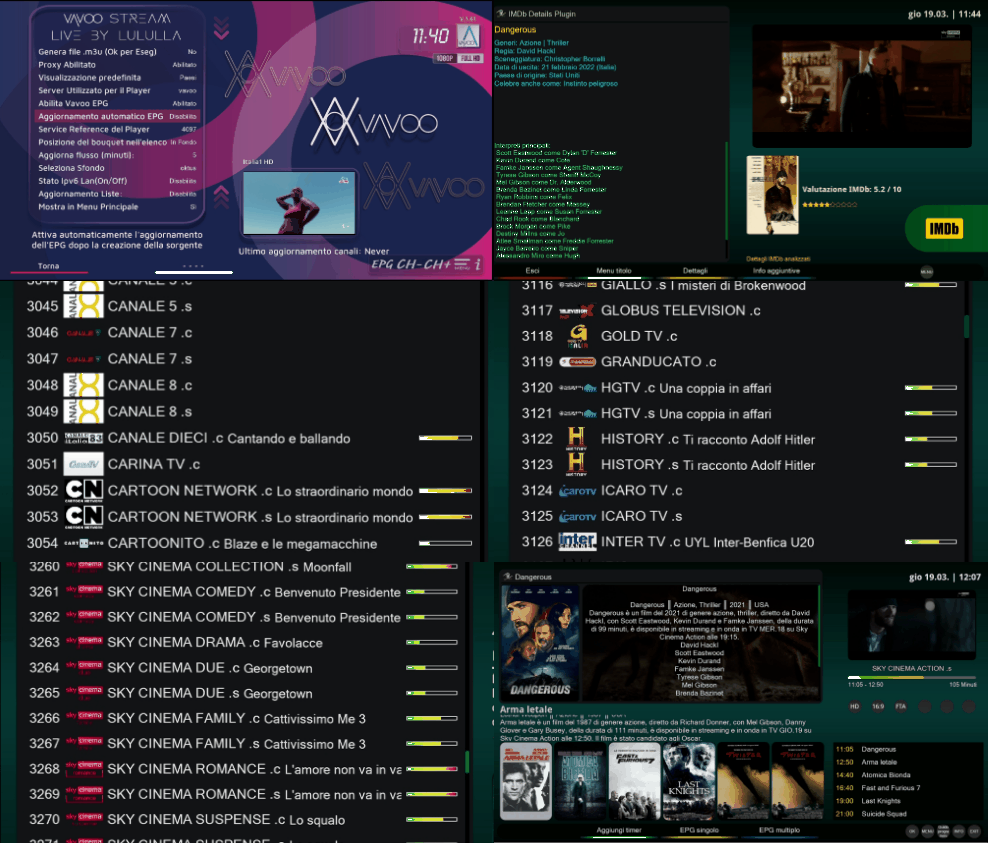
📺 Streaming & Playback
- 🎥 Live TV Streaming from multiple servers (Vavoo, Oha, Kool, Huhu)
- 🔄 Auto-refresh streams with configurable intervals
- 🎭 Multiple Player Support: GStreamer, Exteplayer3, ServiceApp
- 🌐 IPv6 Support with toggle option
- ⚡ Fast Channel Switching with next/previous navigation
🗂️ Content Organization
- 🌍 Dual View Modes: Countries view & Categories view
- 🏴 Country Flags with automatic icon detection
- 📑 Hierarchical Bouquet Export with container structure
- 🔍 Search Functionality within categories
- 📊 Channel Filtering by country and genre
⚙️ Configuration & Management
- 🛠️ Comprehensive Settings: DNS, servers, update intervals
- 💾 Automatic Bouquet Updates with scheduling
- 📁 M3U File Generation for external players
- 🎨 Customizable UI: Backgrounds, fonts, layouts
- 🔄 Auto-update System with version checking
🔧 Technical Features
- 🐍 Python 2.7/3.x Compatible
- 📱 Multi-resolution Support (HD, FHD, WQHD)
- 🌍 RTL Language Support (Arabic, etc.)
- 🔒 Authentication Handling
- 📝 Comprehensive Logging
Thank's oktus for great desiner :.. He's a great
There is not much to say, we had already talked about this little plugin in another topic.
The plugin is free, anyone can implement anything else in development.
While maintaining the current form and credits.
GITHUB community share
I'm not saying that you have to offer a coffee
to the community or to me,
but at least a Like. is due!!!
DEBIAN FILE / IPK FILE
CHANGELOG:
v.1.0 init version (thank's KiddaC for suggestion
v.1.1 fix dreamos (Title in to skin/plugin "undigested")
v.1.2 fix language - fonts - skin remake ( oktus) - player with CH+/CH+ & minor fix
v.1.3 add Search Channels - add Check IPV6 (On/Off)
v.1.4 add Search Channels - add Check IPV6 (On/Off) - fonts fix
v.1.5 add Config setup: schedule task for export channels
v.1.6 fix export loop bouquet -change raise server - add. reference on config
v.1.7 fix new code for export to bouquet list channels favorite
v.1.8 fix player and conversion bouquet
v.1.9 fix skin issue: finally work atv and open image only for yourself configuration
v.1.10 fix : finally work on CVS image with configuration tested from me..(gp4.2) - fix ssl_certificate
v.1.11 fix minor - startup - add your font here pluginFolder--> /fonts" and select from config - add HALIGN for arabic language (Right)
v.1.12 fix server default(not None) - removed popup
v.1.13 test(ok zipped)
v.1.14 minor fix - fix crash on exit from config - suggestions
v.1.15 fix skin Vti - update locale
v.1.16 thank's pQu4k3r for Updater Online
v.1.17 minor fix
v.1.18 local lang fix
v.1.19 test for epg and logo channels - infolong = Force Update Plugin
v.1.20 stable version
v.1.21 Add Picons-Epg - Fix Block Stream on Player (test)
v.1.22 Add Language Locale - Add many Background screen
v.1.23 (test upgrade)
v.1.24 minor fix (export bouquet remove)
v.1.25 fix HDD screen - recovery export bouquet!
v.1.26 Fix Export Bouquet - Fix Crash on menu dreamOs (Thank's Tittisat)
v.1.27 Minor Fix
v.1.28 Fix Screen Hd - Fix Menulist
v.1.29 add set Dns net
v.1.30 minor fix
v.1.31 Fix server token
v.1.32
v.1.33
v.1.34
v.1.35
v.1.36
v.1.37
v.1.38
v.1.39 generate category and cowntry
v.1.40 recoded all sources..
v.1.41 fix crash parse - fix search
READ FIRST
Post
RE: [Plugin] Vavoo Stream Live.
Maybe it's not a clear concept, before leaving this topic forever there are some rules that should be respected.
It's not all a given.
-the key it takes on the server: it is not certain that it is still active or is correct. In this case, you should close and reopen the plugin.
-we have seen that the plugin works, but it always works and it is not certain that it will work with the configuration that I have on my receiver and that I have made available.
You don't need to do a thousand tests.

In…
LOCALE POT FILE:
Make your locale language ;)
put folder language (en - it - ar - uk) compiled to .mo in to ftp
Eg:
/usr/lib/enigma2/python/Plugins/Extensions/vavoo/locale/en/LC_MESSAGES/vavoo.mo
FOR BLACK SCREEN TRY THIS COMMAND FROM TELNET
thank's rambo
Post
RE: Vavoo Stream Live - discussion & support
Try this script and it should work for those who can't see
(Code, 4 lines)

echo '#!/bin/bash
echo 1 > /proc/sys/net/ipv6/conf/all/disable_ipv6' > /etc/init.d/ipv6dis.sh
chmod 755 /etc/init.d/ipv6dis.sh
ln -s /etc/init.d/ipv6dis.sh /etc/rc3.d/S99ipv6dis.sh
SCRIPT ATTACHED INSTALL VAVOO ALL BOUQUETS (MOD BY LULULLA)
*chmod 775 all files
Quote
Vavoo-Script on an idea of Clever999 modified by Demosat
thx to MasterX, giniman and Oyster for the authkey
more info https://www.digital-eliteboard…ript-vavoo-auf-e2.513335/
READ HERE IF YOU ARE DIFFICULTY
Post
RE: Vavoo Stream Live - discussion & support
(Quote from ZEUS IVAYLO)
I suggest if you read and did not understand anything, check the link on your computer -this is the first thing to do-if the channels do not work, then DNS substitution in the network or VPN plug-in. if the app service opens, install the system plugin and try to change the playback player. and most importantly, where is the login of the plugin that you were supposed to show here?
Good luck!!!
P.S. When the author makes this plugin paid, then you can even shout and demand.…
EPG AND PNG PICONS
ESSENTIALLY
FOR EPGIMPORT I ATTACHED FOLDER TO PUT
/etc/epgimport
ADD LIBRARY NECESSARY DEPENDENCES:
check your python version in telnet:
python -V
FOR DREAMOS 2.5/2.6
apt-get update
apt-get install wget
apt-get install python-requests
FOR OE IMAGE 2.0
opkg update
opkg install wget
[ -e "/usr/bin/python3" ] && PY="python3" || PY="python"; opkg update; opkg install "${PY}-requests"
Alternative for install this plugin:
wget -q --no-check-certificate https://raw.githubusercontent.com/Belfagor2005/vavoo/main/installer.sh -O - | /bin/sh
Thread
Vavoo Stream Live - discussion & support
[Plugin] Vavoo Stream Live.I've already made it clear to all my forum friends that I'll only respond to those who provide detailed information about the problem, including a debug or photo, or something else.As long as I'm available to do so, since it's not mandatoryEven if blocked, you can access it via FTP to:- remove the plugin folder ---> /usr/lib/enigma2/python/Plugins/Extensions- recover the debug log file, which will go to /tmp/output.logSo use these commands from telnet and don't give…
PC VERSION ARE HERE
https://mega.nz/file/XFgFjb7Z#Q6QtqYNliFVzfolx5-bovSiRRdjBlHa2ugvnnScX9dM




FOR ERROR OR NO BOUQUET OR IMAGE VBOX ETC ETC
Post
RE: Vavoo Stream Live - discussion & support
telnet command
opkg remove enigma2-plugin-extensions-vavoo
reboot
install
wget -q "--no-check-certificate" https://raw.githubusercontent.com/Belfagor2005/vavoo/main/installer.sh -O - | /bin/sh
log from telnet and put on pm me files in /tmp/log_vavoo:
(Code, 3 lines)
While debugging you need to open the plugin and use it:
To stop debugging you have to type
ctrl+c
and... restart box
(Code, 3 lines)
I've already made it clear to all my forum friends that I'll only respond to those who provide detailed information about the problem, including a debug or photo, or something else.
As long as I'm available to do so, since it's not mandatory
Even if blocked, you can access it via FTP to:
- remove the plugin folder ---> /usr/lib/enigma2/python/Plugins/Extensions
- recover the debug log file, which will go to /tmp/output.log
So use these commands from telnet and don't give me a headache. 
for Dreambox and CVS images.
systemctl stop enigma2.service
killall -9 enigma2
journalctl -f -u enigma2 >> /tmp/output.log 2>&1 &
for OpenPLi or Atv images .. etc.. instead use
init 4
killall -9 enigma2
ENIGMA_DEBUG_LVL=4 enigma2.sh > /tmp/debug.log 2>&1 &