Posts by odem2014

    Ok , I will revert back to the old EPG style

    Curve radius was already included, now with top bot etc.


    but background gradient wasn't there at the beginning.


    I think you also didn't use the latest version.

    The latest ATV skin updates , the gradient attributes working by backgroundColor not backgroundGradient, , so the latest OSD 4.1.0.0 is depending on backgroundGradient to make the app renderer preview the gradient color, and if used backgroundColor , it preview Fuschia color as it read the attribute as one value , so it is better to update the OSD to deal with the new updates and deal with the attribute as more than one value if there are more than one value seperated by "," .


    As regard Curve radius , it is included in 4.1.0.0 but it deals with radius as one value , the new ATV skin updates deals with the radius as more than one value separated by ";" .


    4.2.0.0 - Gradient backgroundColor and cornerRadius mask support


    Added

    • Added support for Enigma2-style backgroundColor gradients on eLabel.
    • Added support for 3-part gradient syntax:
      • backgroundColor="#00101010,#00303030,vertical"
      • backgroundColor="red,green,vertical"
      • backgroundColor="#00ff0000,#0000ff00,vertical"
    • Added support for preserving extended cornerRadius syntax:
      • cornerRadius="30;topLeft,topRight"
      • cornerRadius="30;bottomLeft,bottomRight"
      • cornerRadius="30;left"
      • cornerRadius="30;right"


    Changed

    • Improved color parsing so comma-separated gradient values are no longer treated as invalid single colors.
    • Updated eLabel background handling so backgroundColor can be used for both normal colors and gradients.
    • Updated cornerRadius handling to save the original raw value instead of reducing it to a plain numeric radius.
    • Improved preview rendering so corner-radius edge masks are respected visually.


    Fixed

    • Fixed saving of backgroundColor="#00101010,#00303030,vertical".
    • Fixed saving of backgroundColor="red,green,vertical".
    • Fixed saving of backgroundColor="#00ff0000,#0000ff00,vertical".
    • Fixed saving of cornerRadius="30;topLeft,topRight".
    • Fixed preview issue where cornerRadius="30;topLeft,topRight" was displayed as rounded on all four corners.


    Notes

    OSD_v4.2.0.0.zip

    • Existing normal color values such as backgroundColor="#00ffffff" and backgroundColor="red" continue to work.
    • Existing simple radius values such as cornerRadius="30" continue to round all corners.


    thanks for Lululla

    New Update

    Aglare-FHD v7.6


    * add color function preview in aglare setup .

    * fix modern channel selection

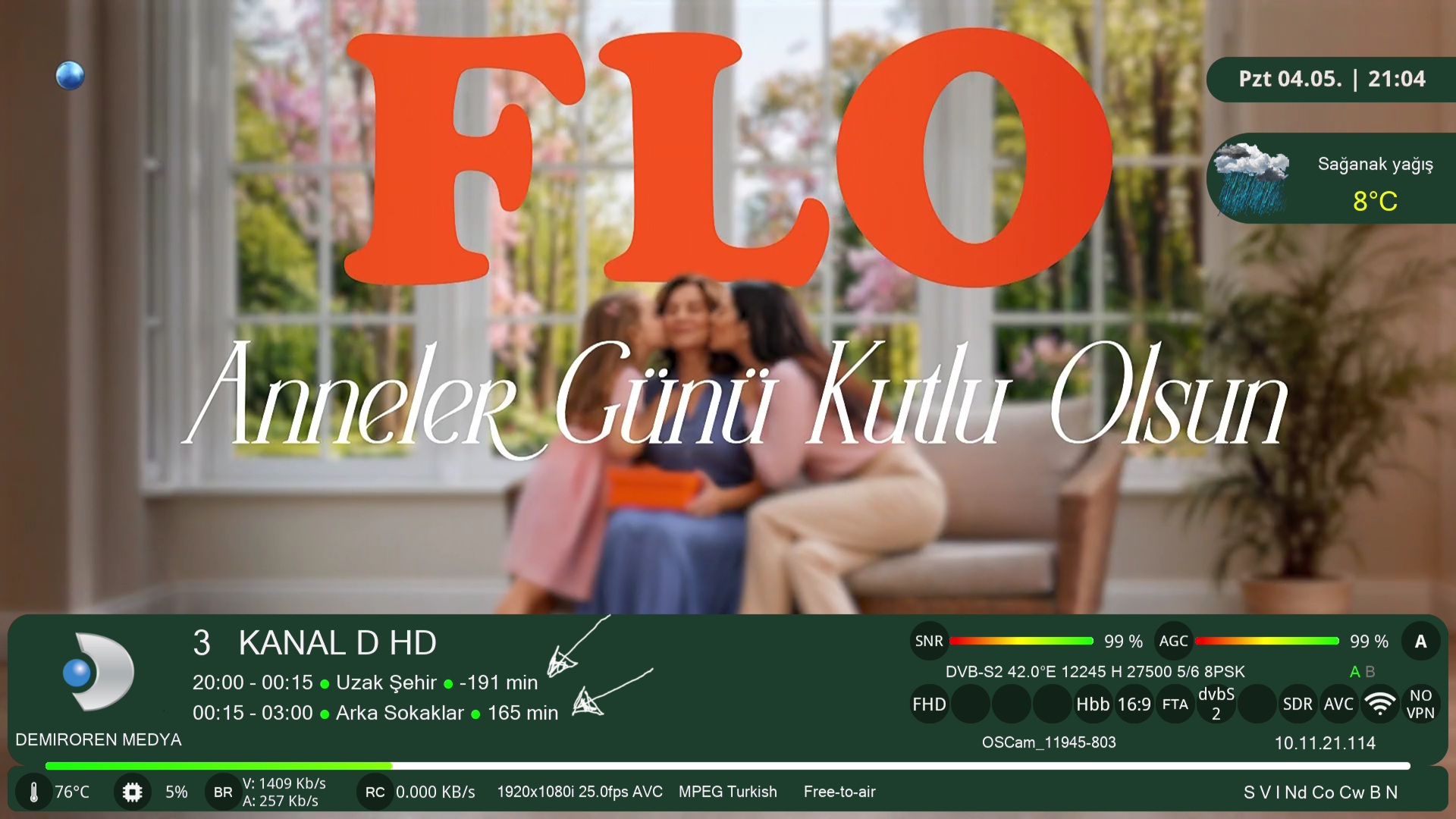
    * event remaining time in infobar is changed to +

    * posterx info in second infobar will be present only in second infobar style test


    ipk download

    Code
    https://www.mediafire.com/file/2wyypq8vb39d4v3/enigma2-plugin-skins-aglare-fhd_7.6_all.ipk/file


    online update is also available


    IPK ON FIRST POST OF TOPIC

    I will check the files after using the aglare plugin .

    Why is the EPG display in the infobar shortened, and EPG scrolling disabled? And, in the display of the remaining time for the current EPG, a dash (minus) sign is displayed, when a plus should be displayed.

    Ver 7.4

    Screenshot please

    XStreamity v5.44_20260429

    New files on post 1


    FIxed none Western characters in graphic file names that was crashing my plugin.

    Nobody will ever have this issue other than odem2014

    Only joking can effect arabic and cyrillic, and probably chinese file names. But naming files like that in IPTV plugins is rare. So rare this is the first time I have ever seen it.

    thanks , it works now

    are you sure you are using AGLARE skin , as from your log , i can not see anything related to aglare , but i see this

    Code
    11:05:53.6777 2026-04-28 11:05:53,676 - DEBUG - Checking file: /usr/share/enigma2/xDreamy/sample/head-head.xml
    11:05:53.6880 2026-04-28 11:05:53,687 - DEBUG - Checking file: /usr/share/enigma2/xDreamy/skin.xml
    11:05:53.6956 2026-04-28 11:05:53,695 - WARNING - No changes detected in skin templates.
    11:05:53.7012 2026-04-28 11:05:53,700 - DEBUG - No changes needed for /usr/lib/enigma2/python/Components/Renderer/iPosterX.py
    11:05:53.7034 2026-04-28 11:05:53,702 - DEBUG - No changes needed for /usr/lib/enigma2/python/Components/Renderer/iPosterXDownloadThread.py
    11:05:53.7057 2026-04-28 11:05:53,705 - DEBUG - No changes needed for /usr/lib/enigma2/python/Components/Renderer/iBackdropX.py
    11:05:53.7078 2026-04-28 11:05:53,707 - DEBUG - No changes needed for /usr/lib/enigma2/python/Components/Renderer/iBackdropXDownloadThread.py

    Aglare-FHD v7.4

    * fix movie selection and movie player screen


    ipk download

    Code
    https://www.mediafire.com/file/c70b2e5xe788hlm/enigma2-plugin-skins-aglare-fhd_7.4_all.ipk/file

    New Great Update

    Aglare-FHD v7.3

    Updates for AGP Renderers of PosterX

    • Improved title cleaning.
    • Added support for Arabic, Bulgarian, and Polish titles.
    • Added an excluded-title list to save traffic and improve poster appearance.
    • Updated the replace list for more accurate posters. This list will be updated regularly.
    • Added logo support.
    • Added XEMC files, which are PosterX files specifically for EMC.
    • Fixed the ElCinema provider, which is useful for Arabic titles.

    Updates for Aglare Setup Plugin

    • Fixed the description widget.
    • Added a custom color style.

      When you select Custom Color, you will be able to edit the main 16 colors of the skin, from odem1 to odem16.

      You can know the function of the selected color from the description.

      The color should be written in HEX format. You can ignore the #.

      For example, to select green without transparency:

      1. Press OK to open the virtual keyboard.
      2. Write 0000ff00.
      3. Press the green button to save.
      4. You can see the color in the preview widget.
    • Added export and import functions for the HEX codes of the custom colors.

      After selecting the 16 main colors, you can save them in:

      Code
      /etc/enigma2/aglare

      With the import function, you can import them back at any time on any image.

      If you save the custom color JSON file, you can restore it on any other image or installation.

      If anyone creates a good custom color mix and sends me the JSON file, I will add it to the main colors.

    • Added new Infobar Style 6, which is designed to include the new AGP additions such as posters, backdrops, logos, stars, and more.

      For any other infobar style, you can select Infobar PosterX Test to test the new AGP additions.

      You can also test them using Second Infobar Test.

    • Added new Channel Selection 6 PosterX Test to test the new AGP file on channel selection.
    • Added new Event View Style Test to test the new AGP file on event view.
    • Added option ECM Short Format to select how the emu information appears.
    • Added option Bitrate Unit to select MB or KB.
    • The new AGP files depend mainly on the TMDB API key, so this provider is enabled by default.

    Skin Updates

    • Added a new Android-style design for ECM screens.


    IPK download :

    Code
    https://www.mediafire.com/file/3u90kx484edyesf/enigma2-plugin-skins-aglare-fhd_7.3_all.ipk/file


    Telnet install :

    Code
    wget -q "--no-check-certificate" https://raw.githubusercontent.com/popking159/skins/refs/heads/main/aglareatv/installer.sh -O - | /bin/sh


    online update is also available .


    Finally great thanks for Lululla the author of AGP files.

    Send screenshot for the screen you want