Posts by biko

    It will be fixed soon.

    Try again after running:

    opkg update


    If it fails again, try:

    opkg --force-depends install /tmp/*.ipk

    biko added a new version:

    biko added a new version:

    Quote

    updates & fix :lolz:

    v10.2.0 .. 2024-12-01


    - Added Long-PVR (Long-Playlist) key to take a screenshot.


    - Added "Delete Reader" (Red Button) to the option "NCam/OSCam Readers" to delete readers.


    - Added new options to "OSCam/NCam Status" (in Blue Button) to delete a reader and clean inactive and duplicate readers.


    - Improved Download Manager resume process.


    - Improved Filter in "Download/Install Packages (from image feeds)" to filter packages per feed.


    - Improved Player Bar to forward/rewind while subtitle is running (without showing the bar).


    - Improved Player-Bar Buttons.

    .. Added PVR/Playlist button to show System Channel Selection.

    .. OK-Button will show Channel List (if no active service).

    .. Long-Stop and Long-Power buttons will stop current service and zap to the last used service (or show Channel List).


    - Improved Stream Relay handling for images with Stream Relay Patch (to handle PIcons/Signal/Data/etc.).


    - Fixed changing AJPanel font on DreamOS.


    - Fixed "M3U/M3U8 File Browser" to handle unicode files.


    - Fixed Playlist timeout problem (when reading categories for some servers).


    - Fixed File Manager error when converting .mvi files to jpg/png.

    .. Note: this option may not work on some images if the provided ffmpeg does not support mvi.

    ❀❀ Skin AL_AYAM_FHD from Nitro Team ❀❀


    The Nitro team presents us with a new skin, and I apologize for the absence... But as you know, hobbies can sometimes conflict with the demands of life.


    The Skin AL AYAM is a skin designed by zelda77, who shared the file with me in 2022 after he designed the main covers for the skin. Circumstances kept him busy abroad, and the Nitro team has been trying to finish it, but every time something happens, it goes back to the storage box.


    Until, God willing, the team, through my brother @bo-hlala, and my brother Kaleem Kimoo1987, modified the skin interfaces with new designs alongside the original designs to present the skin in the form that will be offered to you.


    ◄◄◄ skins Have three colors ► ►►


    - Pink

    - Brown

    - Green

    And have also The pink color with different screens to meet the acceptance of various tastes.


    ♡♡ All thanks and appreciation to my dear brothers, who are closest to my heart, for their continuous support and loving partnership through this great team ♡♡


    The skin is suitable for all open-source Python 2 and 3 images.

    The new addition, which is specific to displaying the channel list, is now supported by the new versions of the two distinguished images that are most up-to-date (OpenATV - Egami).

    Control over switching between skins and interfaces via the Nitro Team Control Center.


    An attempt has been made to provide various data that may interest some users, such as the channel's CAID and the active CAID, as sometimes a channel may have more than one CAID (channel identifier), and only one of them works while the others do not.

    A new design has been created for vertical menus, unlike horizontal menus.

    New screens have been created for time shift and translation plugin in a new way.

    The strength of the satellite signal and the quality of the broadcast have been displayed through an analog indicator in a distinctive aesthetic on the info bar and the second info bar.

    New designs have been created for the new feature of displaying channel lists in the completely new full channel selection grid.

    A script has been integrated to fetch the aesthetics of the poster and backdrop for Sky channels to appear in the background of the main menu, and it can be updated manually from the plugin or permanently via the timer in a cron way (thanks to the developer KiddaC for providing this wonderful addition).

    An info bar has been created with new designs, showing the channel beacons on the right, center, and left.

    From the plugin control options, you can choose the skins built by fetching aesthetics from the extra event, and the same skins are also available through the component X.


    ♦▬ ▬ ▬ ▬ ▬ ▬ ▬ ▬ ▬ ▬ ▬ ▬ ▬ ▬ ▬ ▬ ▬ ▬ ▬ ▬ ▬ ▬ ▬ ▬ ▬ ▬ ▬ ▬ ▬ ▬ ▬ ▬ ▬ ▬▬ ♦


    Now screenshots :


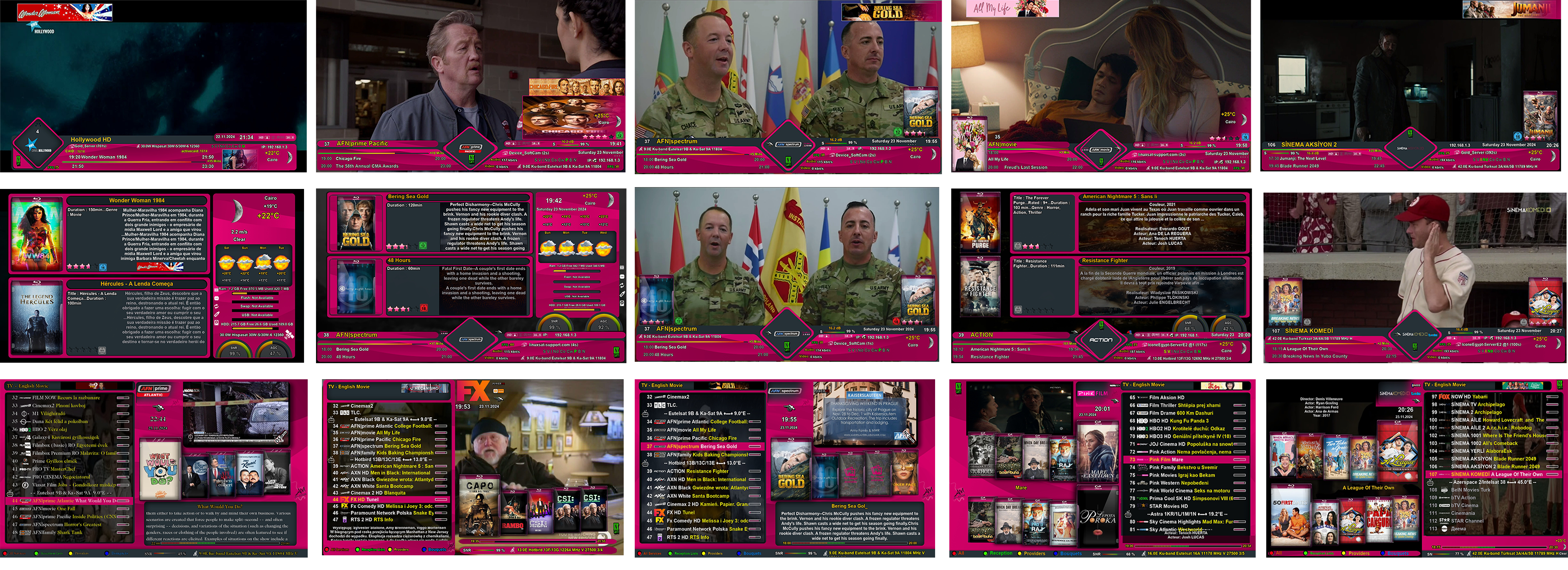
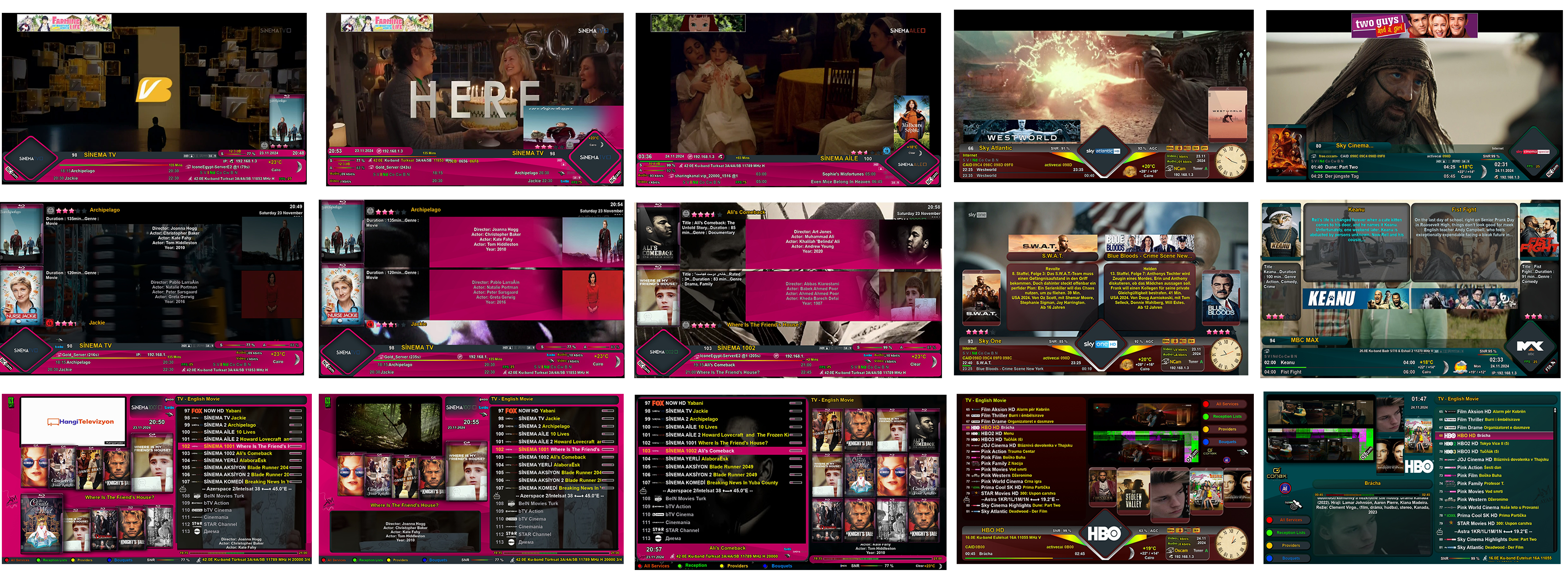
    ☞ Info bar - second info bar - channel list


    -------- Default -------Pink 1 Xtra, Pink1 XPink 2 Xtra, Pink2 XPink 3 Xtra, Pink3 XPink 1 Xtra, Pink4 X


    111.png

    Pink 5 Xtra, Pink5 XPink 6 Xtra, Pink6 XPink 7 Xtra, Pink7 X-------- Brown ---------------- Green --------

    222.png


    Channel Selection Full VIEW Grid


    Ch-Selec-FV.png


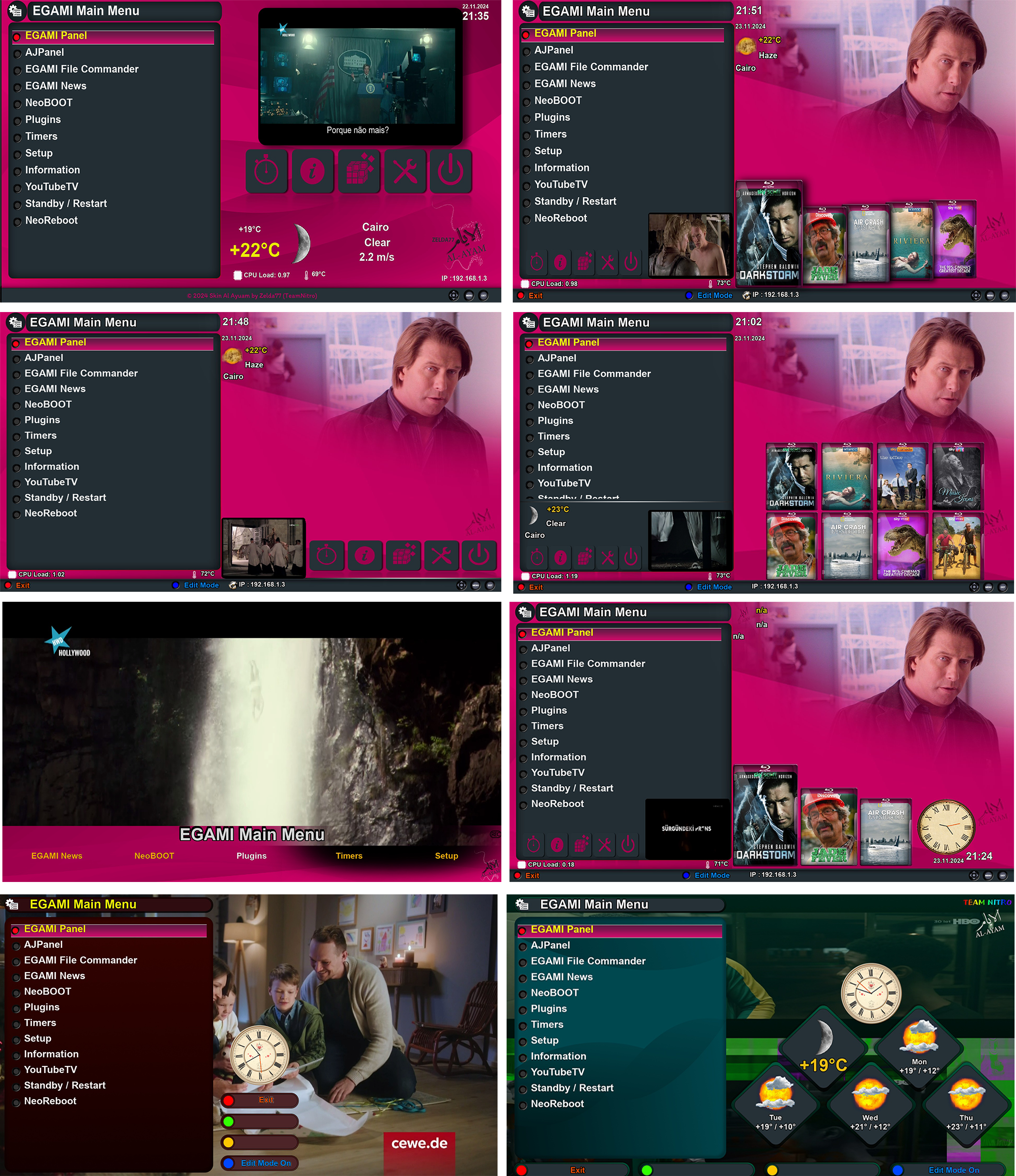
    Main menu


    Menu.png


    Plugin browser


    Plugin-browser.png


    Electronic program guide screens

    - EPG Selection
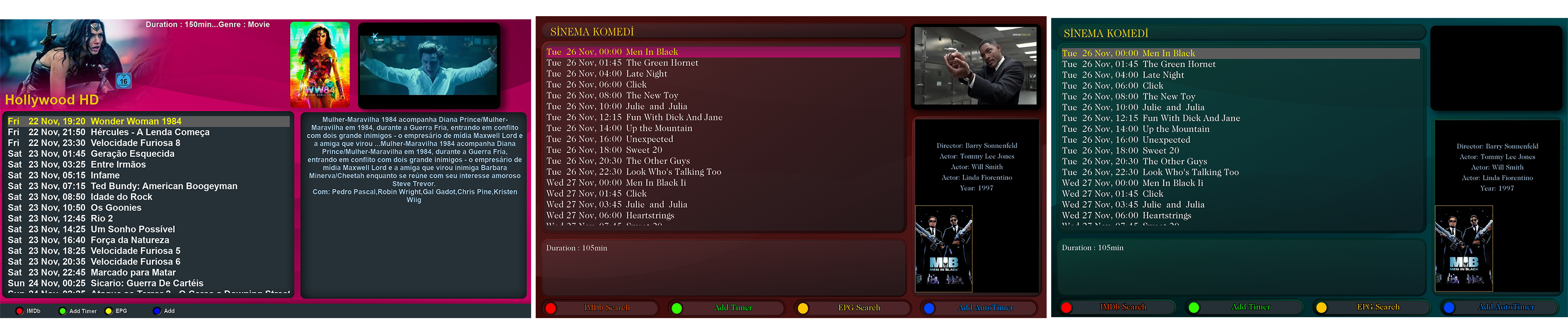

    EPGSelection.png


    - Event-View


    Event-View-3.png


    - Graphical EPG


    Graphical-EPG.png


    A new design for the appearance of the translation bar for the SubsSupport plugin.
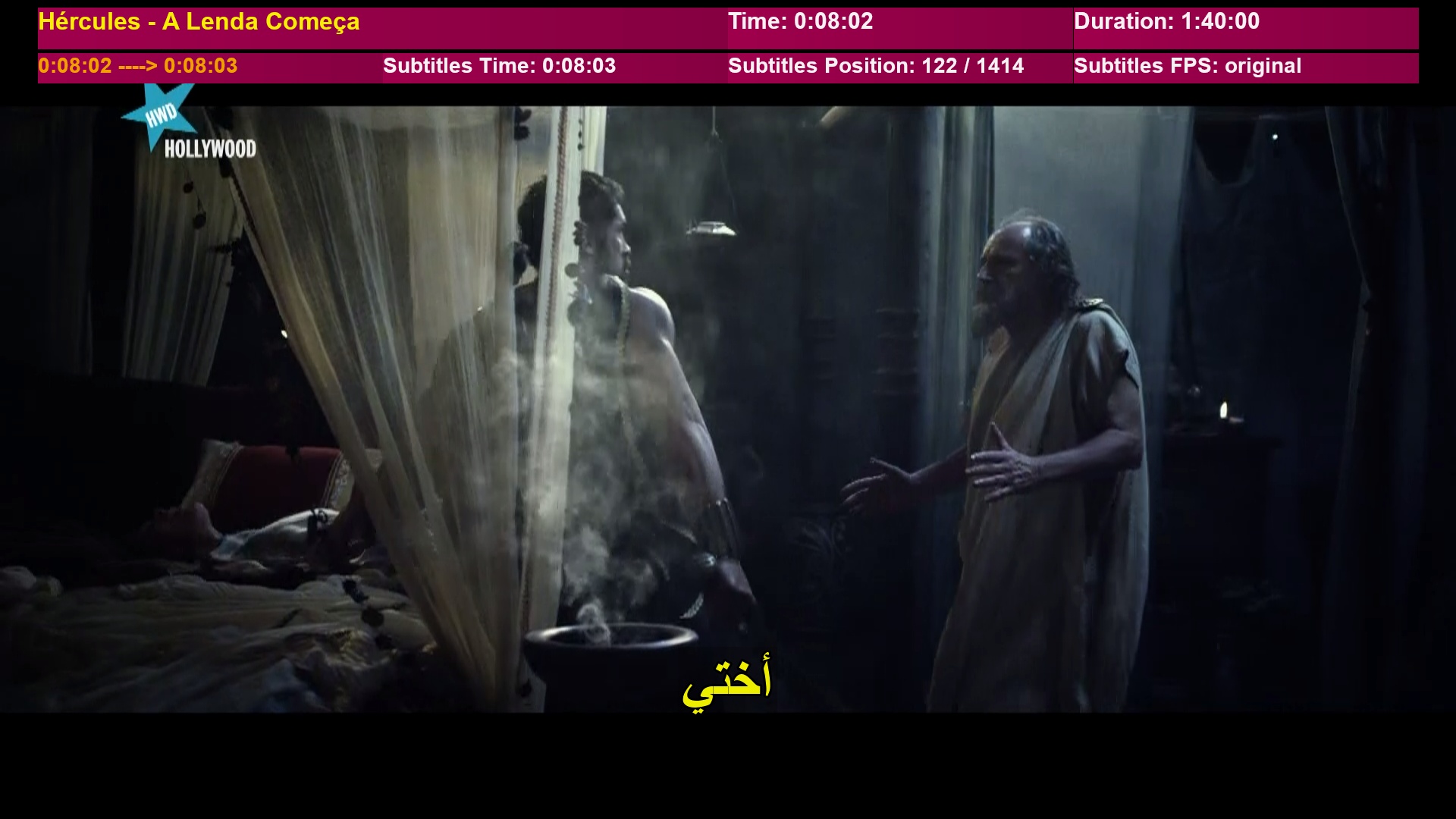

    subtitle.jpg


    ♦▬ ▬ ▬ ▬ ▬ ▬ ▬ ▬ ▬ ▬ ▬ ▬ ▬ ▬ ▬ ▬ ▬ ▬ ▬ ▬ ▬ ▬ ▬ ▬ ▬ ▬ ▬ ▬ ▬ ▬ ▬ ▬ ▬ ▬▬ ♦


    ★★ Instructions for downloading the Sky script via the team plugin ★★


    Enter the add-on and select the function to download skins.
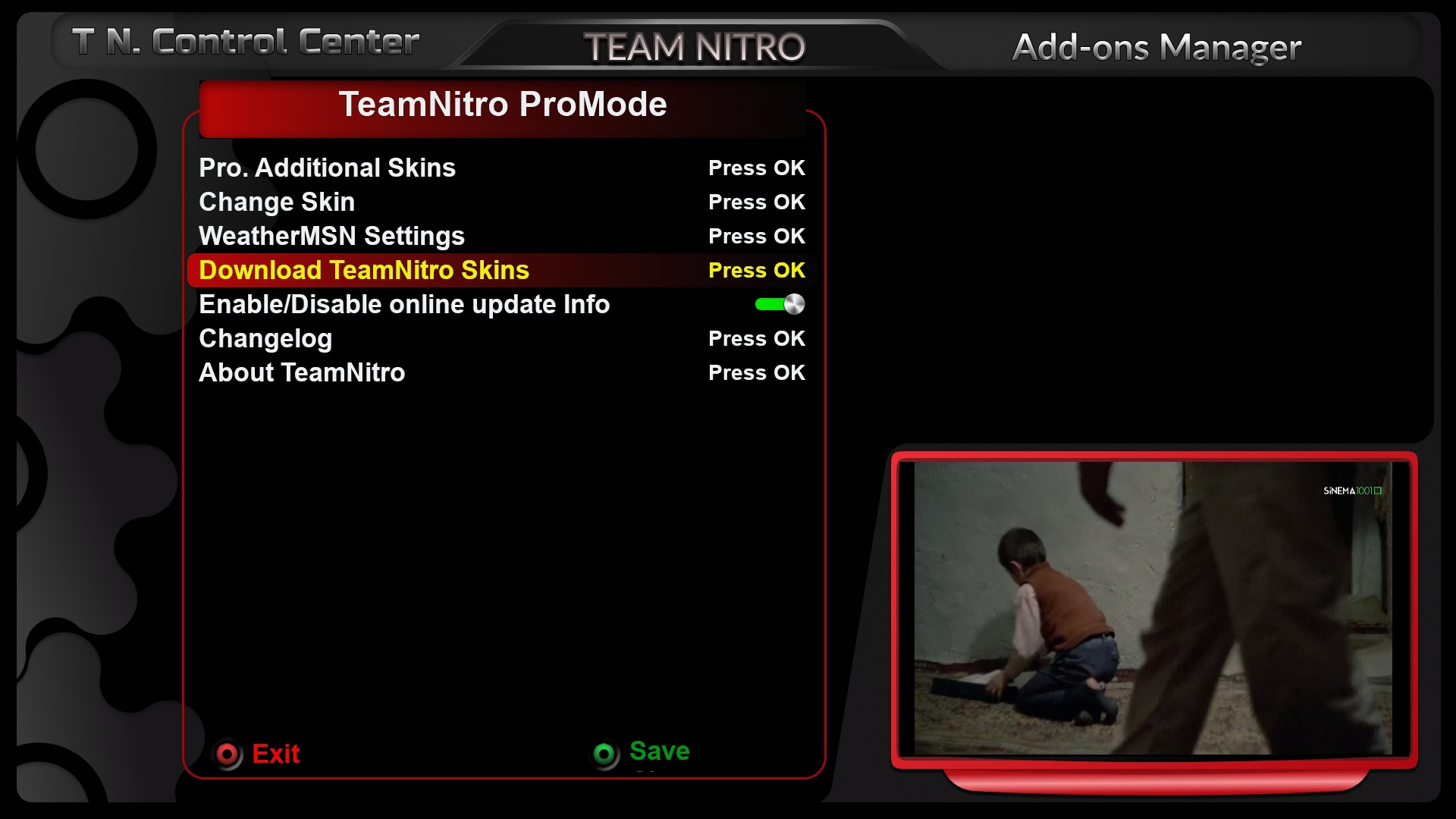

    S1.jpg


    Choose SKY T Team Nitro.


    S2.jpg


    Agree to the download by selecting yes.
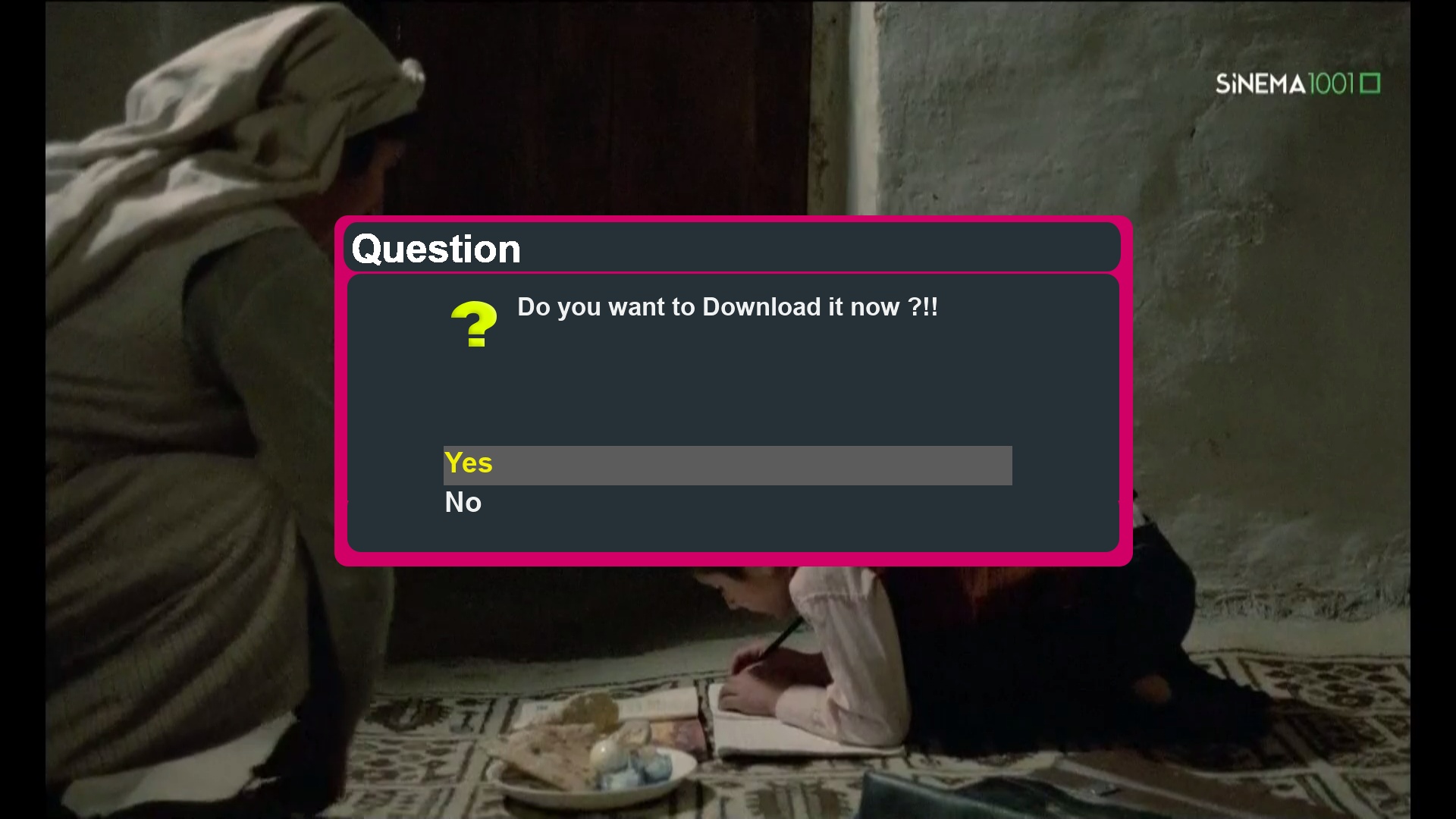

    S3.jpg


    Start the download until it successfully completes.
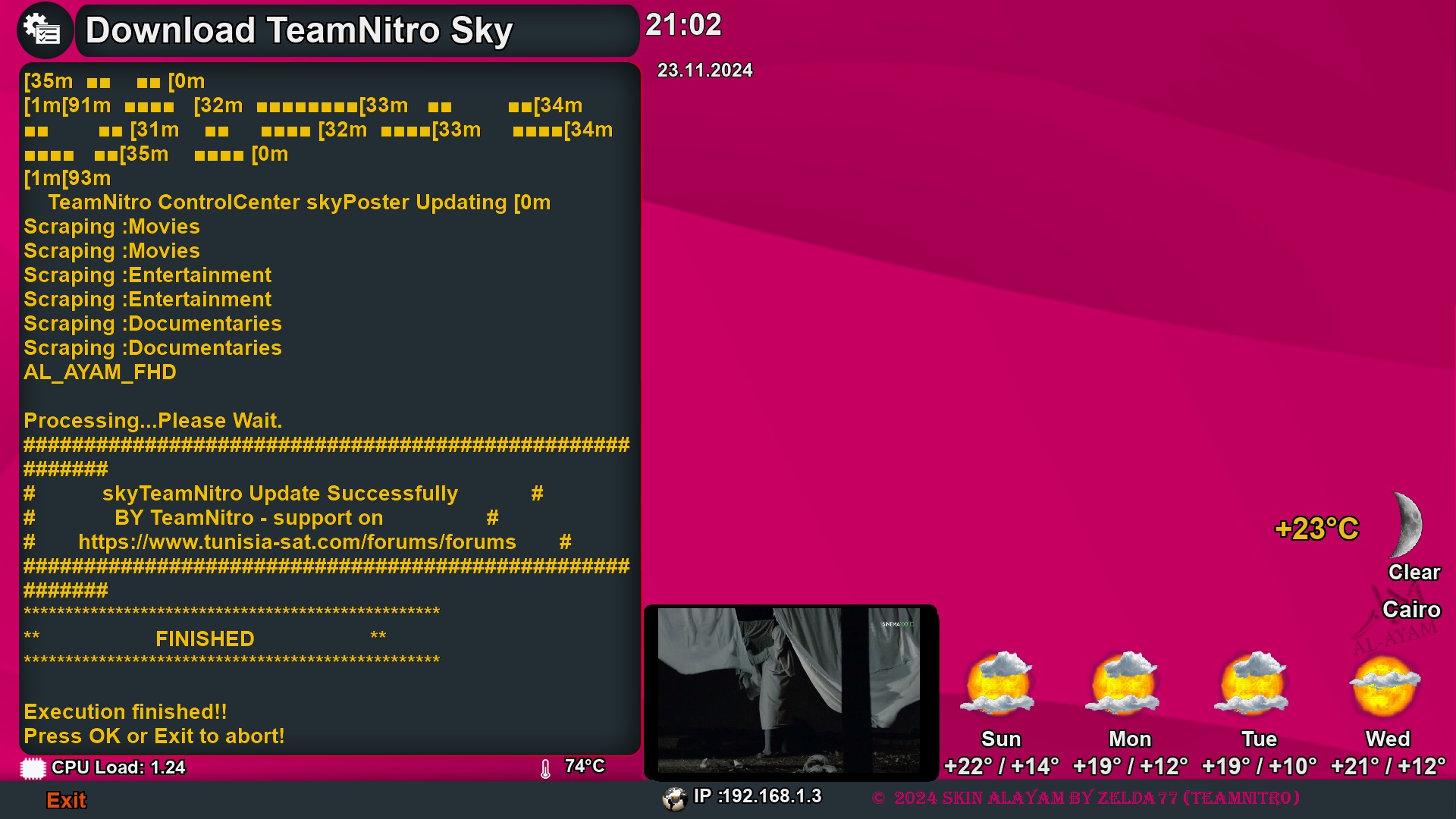

    S4.jpg


    The aesthetics have been updated from the poster and backdrop backgrounds on the menu list of the skin as follows.
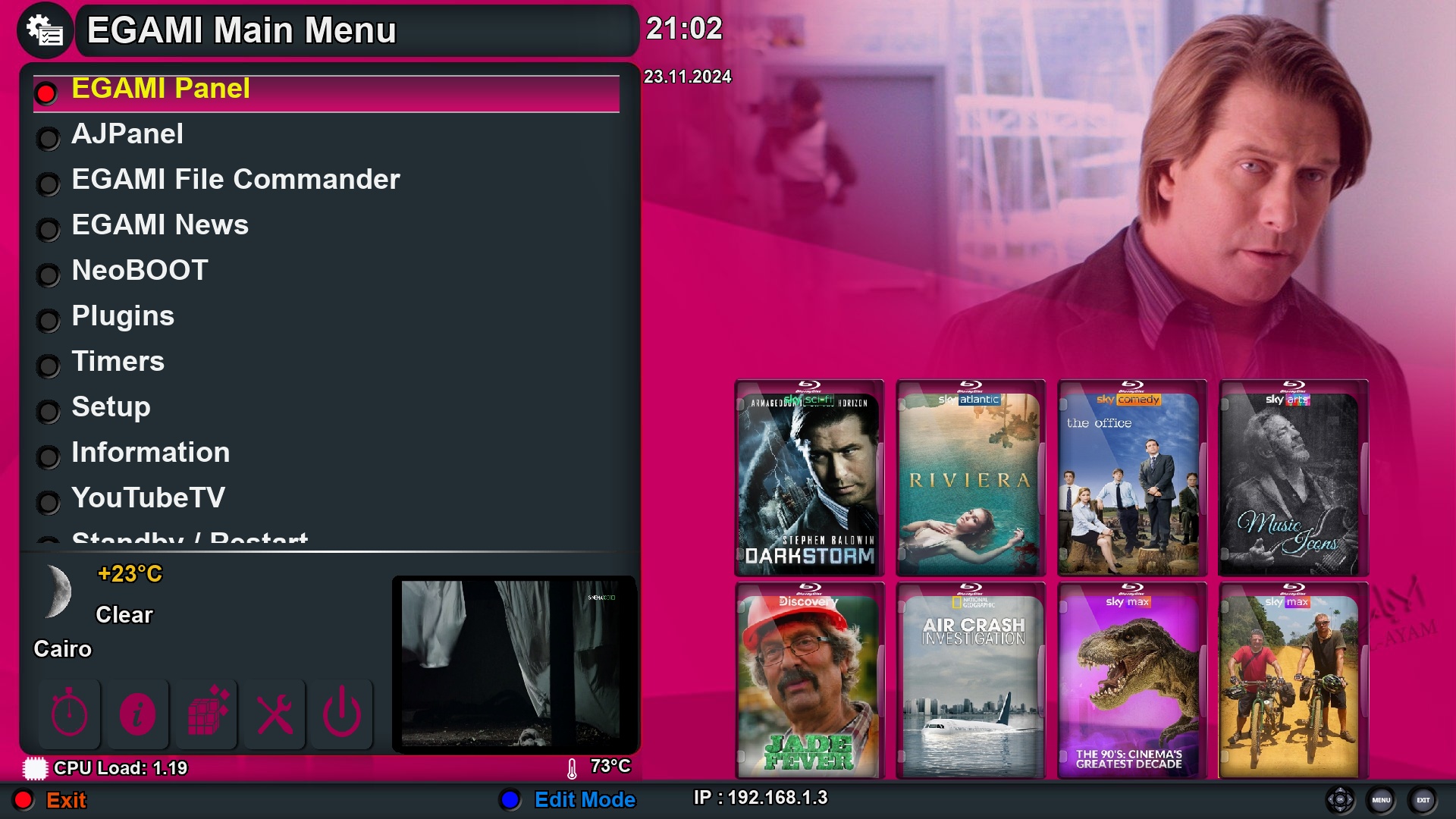

    S0.jpg


    download via the following Telnet code directly for the skin, and there are no files available for the skin in IPK format.

    Code
    wget https://raw.githubusercontent.com/biko-73/TeamNitro/main/script/installerAL.sh -O - | /bin/sh


    Team Nitro hope to Enjoy by new skin al ayam

    Sorry..for Everybody...after the last upgrade of openatv 7.5 for me its impossibile to open IPTV server browser from playlist and from portale list...the spinner remains Always running...like the picture under...

    If the image and your storage are OK, try changing the search-path from settings (see pictures). This will restrict the search to apecific directories of your choice instead of searching in all you storage media.

    I have the same problem and I also don't have images of movie and series covers using ajpanel

    what we discussed with gigafox72 as he have problem with image openatv 7.5 !!


    Now you describe your problem as don't have images of movie and series covers using ajpanel

    which is other issue !

    try different portal or play list and make sure you already install dependences of request

    Sorry..for Everybody...after the last upgrade of openatv 7.5 for me its impossibile to open IPTV server browser from playlist and from portale list...the spinner remains Always running...like the picture under...

    ..so i have to reboot my octagon SF 8008.. :face with steam from nose:

    Openatv 7.5 are not stable image it for develop and add new

    i use AJPanel on the image for my vu+ and work great

    maybe you have issue for your stb

    you can try optv 7.4

    Is it possibble to do that quicker, for example on the pc with some text editor?

    For do that for every channel seems take a lot of time.

    yes you can use other program by pc

    That out of our topic for ajpanel

    Also I would like to aks for EPG ie.

    what XML-TV Tools and Copy EPG between Channels actually do and how it works?

    I have other iptv provider where I have epg for a week ahead, can I use this as a source somehow?

    For sure, names are different for be same channel.

    - All IPTV channels can also be changed to correspond with satellite channels with the click of a button, provided that the channel names match through the function.


    aj2.jpg


    ☆☆ New explanation of the EPG electronic guide fetching feature ☆☆


    ☜ The feature will display XML files in the "epg" path (if found in the path you designated as the save folder for the panel in the settings menu).

    ☜ It works to identify files with a Reference tag if the file is a channel reference or an Events tag if the file is for the electronic guide.


    ☜ Through the "Save Current Channel-Group EPG" option, you can save the electronic guide for the channel you are currently on and all channels in its group. Here, the meaning of the word group... refers to relying on the source of the channel's operation.....

    - If it was played from Favourites, the Group will be the package.

    - If it was played from Provider, Satellite, or All, the Group will be what was selected.


    ☜ The "Read Current Channel EPG" feature allows you to change the timing to synchronize the guide and send it back to the device (the time can be set from 15 minutes to hours).


    ☜ By having the channels.xml file available, it can be used from the panel to link channels to the XML-TV file so that the guide can be fetched automatically via the Import EPG (Auto) feature. You can create a channels.xml file using the Export Services feature to "Channels.xml".


    - To use the file, it is transferred to the epg path.

    - Through the XML-TV Tools function, then More Options, then the Channel-Reference option.

    - Follow the steps to open the mentioned linking file, for example, channels_badr&nilesat.xml.

    - Repeat step 2 to see the contents of the file (and if needed later, you can change the file).


    ☜ If the user has links to a source of electronic guide files, the panel provides a file named "ajpanel_epg_source" in your save path for the panel, where links can be added to allow downloading files from their links and extracting them automatically if they are compressed in .gz or .xz formats.


    ☜ The "Filter EPG to File" feature allows creating smaller XML-TV files based on what is specified from the file and saving it.


    ☜ The "EPG for Current Channel" feature filters the electronic guide data by searching for similar channel names with a search accuracy ranging from 40% to 100%. This means that the higher the value, the more the panel will search for the exact matching name, and the lower the percentage, the more it will widen the search for similar names.


    ►► Fetching the electronic guide from a link source or from a saved file of guide data and then sending it to the device through a single fetch ◄◄


    ♦♦ Some information about how the developed plugin works ♦♦


    ✎ When reading an XML file and before displaying the names of channels or events, the panel removes any duplicates of the same channel or event, as well as removing any event whose end time is old.


    ✎ Adding modified times will not remove any old ones but will add the new times to it, but it will write on the event if the times are equal.


    ✎ Enigma only supports removing the EPG that is actually present on a channel in the device for all channels at once (not for a single channel or a group of channels). It is known that the epg.dat is the storage for the EPG during the device's shutdown, and upon startup after a restart, the information from epg.dat is transferred to memory for the image to use. When the device is turned off or restarted, what is in memory from the EPG is transferred to the epg.dat file for later use upon startup.


    aj3.png

    yes, if you mean by another source than what server provide ok


    There are "Share Reference with Satellite / C / T Channel" function on AJPanel you can try

    To change the individual IPTV reference to an existing channel (for sharing PIcon and EPG), this feature allows you to share any IPTV channel with the data and components of the satellite channel (which is equivalent to the function of Iptosat).

    By selecting a channel from local IPTV live, provided that there is a similar channel available on the satellite with its components and information, you can then choose the same channel name from the yellow button and then share, and finally go to the satellite channel and select it.


    aj.png

    If from the server I can download only next four event/channel by epg, is there any simple method to download much more epg, for next week or at least next few days?

    dear bro only you have what server provide to you

    if he have epg source for month then you will get that, if he have for day or more ---> you will get that

    Hello,

    I have Neoboot 9.78 and several images installed.

    (VTI in flash)

    Unfortunately the clean install no longer works.

    Which settings do you use?

    Recommendation from gutosie as the plugin developer are to use openpli on internal flash for VU+ devices & Egami boot for other devices

    That for avoid any problem about compatibility image installation via NeoBoot

    There is currently no option to update the EPG automatically.


    No, I want you to use the method I mentioned in my post #932 which in my case downloads EPG events but not PIcons.

    Create a bouquet from IPTV server and select the "Update Current Bouquet EPG/PIcons (from IPTV Server)" option.

    As you can see in my next post, I can download PIcons in the way you describe.

    When you are inside IPTV tables, there are a lot of data from the server including URLs for the PIcons. So, downloading them is easier here.


    The option you are using is outside the tables, and we have no links for the PIcons there. So, the panel requests the links fron the server. Some servers respond with links and don't (like in your case). This occurs mostly with Live channels.


    Solution:

    Since downloading PIcons is only required once, you can enter the tables and just use the download option to get them.