


I would highly recommend the Vu+ Duo still the best and most stable linux twin tuner
Posts by phonix
-
-
There is a new ***box/openbox S12 out now
Product Information
The brand new ***box S12 has landedSuper small size but great features Less than half the size of the S10 / S11
Can be used both Horizontally or Vertically
HDMI Output to 1080i
LAN Ethernet connection
USB 2.0 port to attach USB hard drives etc for updating firmware, channel lists, and also Recording and pausing live tv
External 12 volt power supply so no overheating issues
LNB IN and Loop Out
One Smart card Reader at side
Componet Audio and Video Output via 3.5mm socket, lead supplied
IR input for remote extender etc
-
Great little boxes are the openboxes had all of them the s11 is very nice with a scart socket and cost the same as the older s9/s10
the biggest problem/downside is they only have now and next epg
-
-
Never do online update for OpenPLi as you have found out it brakes your working image.
OpenPLi is never a finished image its in a perpetual BETA status! with nightly builds always trying to fix something that they broke in the last nightly build
always make a backup of a working image before doing any updates for any image
-
The eagle mini/eagle 800hd/openbox only have now and next epg so best to avoid these boxes
you could get a cheap clone dm800 or the tm800 the price seems to have dropped a lot at some retailers
-
This guide aims to show you how to stream your VU+ Duo over the web
This is my first guide so be gentle!!
If someone knows a better way or wants to improve this quide feel free
I am using VLC version 0.8.6i as I have tried later versions and they don't seem to work
1 Access you VU+ WEB control http://yourbox ip: (port number) usually 80
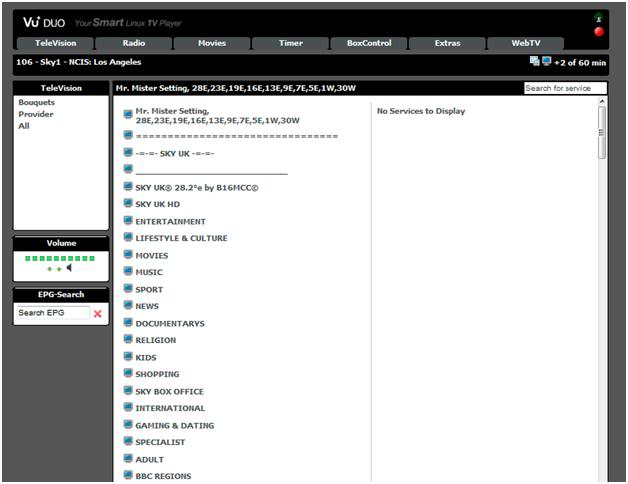
2 Right click on TV icon (top right of screen) picture and Select copy shortcut
3 This is the URL to the for the channel currently selected
4 Open VLC Select FILE & OPEN NETWORK STREAM
5 Select HTTP and paste your link & Click Settings
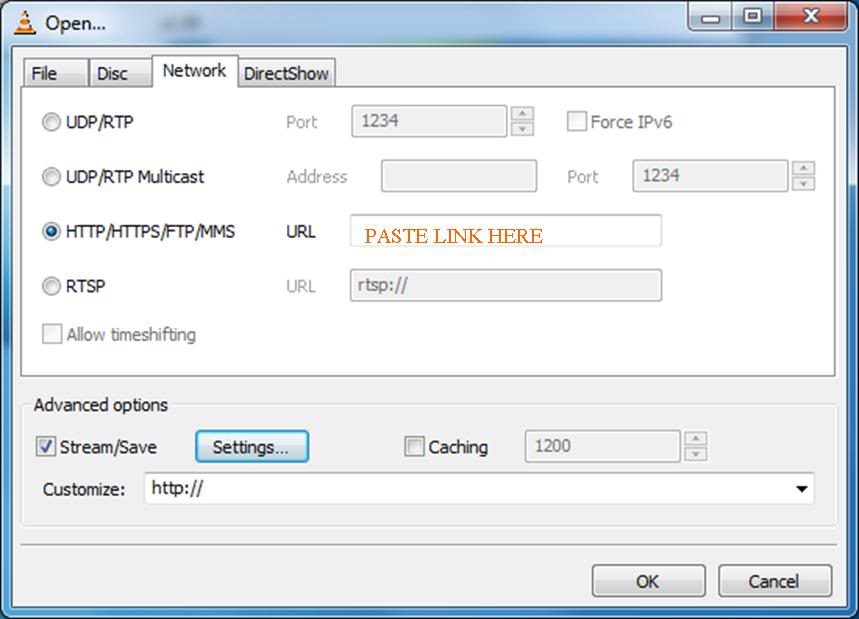
6 Fill in the boxes as shown below & click OK
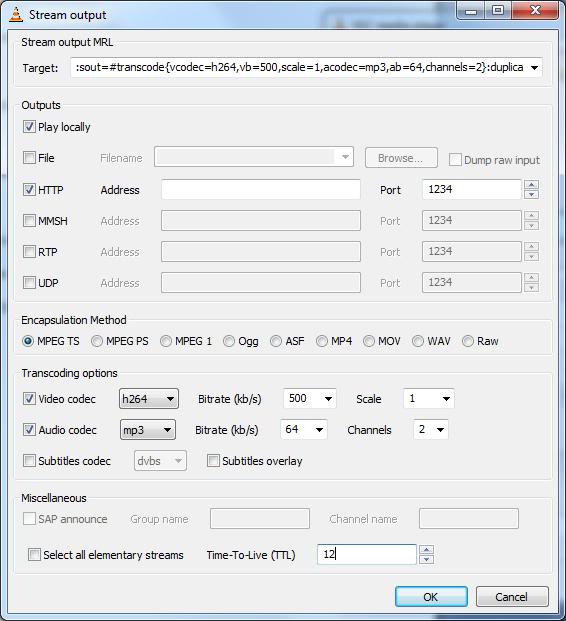
You can adjust the Bitrate/Codecs to see what works best for your connection speed
You should now see a RE-Encoded (lower quality) file playing on VLC
8 Check that this can be accessed from your internal network first
to access the stream type http://YourPC'sIP:1234 into VLC on another machine9 Providing that has worked next go into your router setup (this procedure varies on you Router type)and make sure port 1234 is forwarded to the address of the machine running VLC doing the re-encoding
(You can change this to another port if you prefer in VLC Stream setting)
10 To access from the web you need to know your Broadband IP if it is fixed (if not regisiter youself with Managed DNS | Outsourced DNS | Anycast DNS) where you can get a fixed address even if you have a dynamic IP
11 To Acess the stream over the net enter you address & port number
some thing like http://myname.dyndns.org:1234
or http://MY.ADSL.IP:1234The only limatation of this method is that if you want to change channel you need to copy the new channel address into VLC and start the stream again.
So you should set up remote desktop to access the PC from over the Net also
Ok I've got a bit of an update I found a better way to do this using the latest VLC, instead of using the .m3u link from the web interface. Use the Webinterface to pick your channel but use the actual channel address eg.
http://your.boxIP:8001/1:0:1:125f:7ee:2:11a0000:0:0:0 this is ***1 the complete list of channel address are stored in etc/enigma2 on your box in the bouquets files for each sat.Thanks to Ojustaboo for this info!!
Big thx to hifial
-
The English Premier League may restrict the number of European countries that can screen its live matches if Europe’s most senior judges rule that it must sell its broadcast rights on a single market basis.
The European Court of Justice next week hands down its judgment in the so-called “’pub landlady case’ a ruling that will be watched closely by all sports and event rights holders.
In February the ECJ’s advisory advocates-general, backed the landlady who had been using a subscription to a Greek service to show EPL football in a Portsmouth pub.
The advocate general said by selling its rights on a country-by-country basis the league was undermining the European Union’s internal market. The ECJ adheres to the opinions of advocates-general in four out of five cases.
According to some analysts, a negative ECJ ruling for the Premier League which forces it to sell its European rights on a pan-European basis could cost B***B up to £70m (€80.7m) a year in revenues from pubs and clubs as it would push down prices in the UK.
One scenario, according to people with knowledge of the situation, is for the Premier League to forgo the distribution of its live matches in some European countries where interest in the Premier League is not as strong as in other countries and where decoder cards are relatively cheap.
Depending on the ECJ ruling, Premier League insiders believe it could still sub-license its European rights, but price levels would have to be comparable with those in the UK market in order to avoid pubs and clubs shopping around Europe for the cheapest decoder
-
I use openTV providers in CrossEPG use the *** 28.2 one
-
Try out ViX Team Enigma 2 settings for 28.2E
*All Channels correspond perfectly to the SLY HD Box.
*Sly Box Office completely fixed all 52 SBO channel numbers correspond perfectly to the SLY HD Box.
*Sly Anytime SD and HD channels added in own bouquet. Tested and working
*A test bouquet has been added with channels in test.
*Radio channels have been added and channel numbers added to corespond perfectly to SLY HD Box.Freesat:
A full fledged Freesat Bouquet added. Numbered according to a freesat HD Receiver
Added Free to Air in Sly FTA Bouquet
Added Free to Veiw in Sly FTV Bouquet -
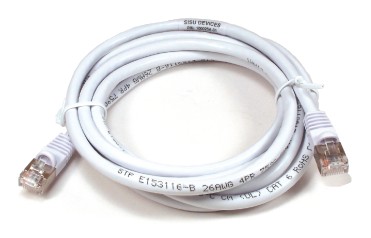
This Keela Network CAT5E RJ45 Ethernet LAN Cable Patch Lead is made using premium materials for longevity and high performance. It is used for connecting PCs/ laptops to Ethernet devices such as hubs, routers, network switches, DSL and ADSL modems.
A Keela Category 5E Patch Cable with RJ-45 male connectors crimped onto each end. This cable is used to provide connectivity between any two category-5E female outlets. . This Keela cable is commonly used to provide internet connectivity for a PC, Laptop, Switches, Modems, Nintendo Wii, XBox 360 and a Sony Playstation Consoles by connecting them to a Broadband Router
Keela Brand
Length: 20 Metre/ Twenty meters
-
sim2 ssl84a for dm800se is released from sim2 to fix sound problems in playing MP4 files
how to use this ssl-with original image
in setup or stop mode( power on dreambox while pressing front button)
1-flash sim ssl84a for dm800se
2-reboot dreambox again to setup mode
3-flash original image(do not reboot)
4-flash sim2 ssl84a-dm800se.nfi
5-reboot dreambox-if flash image has sim2 ssl84 or older ssl(82 or 76)
just install the sim2-ssl84a-dm800se.ipk as any ipk file and by rebooting the dream the ssl84a will be loaded
other methods using internet explorer or dreamup with dreambox in setup mode just flash ssl nfi file
-also you can use already patched image with ssl84a with direct installation by internet explorer or dreamup**for installation and backup of sim2 images with ssl84a in multiboot,use sim2-barryallen 3.0
**for backup flash image with ssl84a integerated use TSFlashBackup 3.0
**sim2-ssl84a-dm800se.ipk is also available for direct installation from TSpanel-addons-sim201 addons-sim2-secondstage
files used only for sim2 dm800se,do not use in other sim2 models or other none sim2 models
-
fixed minor bugs when playing multimedia files(mp4)
attached file include
nfi
bin-for -back up purposes
ipk-for direct install to current flash image-reboot dream is required to load new sslThanks Mfarja57
-
was some great boxing on last night
-
enigma2-plugin-extensions-tsflashbackup_3.0_mipsel
-add support for backup with sim2-ssl84-dm500hd
-add support for backup with sim2-ssl84a-dm800sethanks mfaraj57
-
WebInterface v1.6.8 Porting to QboxHD (mini)
Hi mates !
ready to download on Q.U.T server
from remote control menu/Installation menu/addons/download addons/Q.U.T/Updates/WebInterface v1.6.8ok for install it
reboot box
..I'm checking it will report as soon as possible
for who have not Q.U.T. server
go to : /usr/local/share/enigma2/addon_servers_download.xmland add this line
<server title="Q.U.T." description="Qbox Underground Team Addons Boilroom" link="http://qboxhd.pandasat.info" />
thx buio2005
-
Didn't try hard enough...:baffle: :wink:
Favourites edit>scroll to middle pane > scroll down to pen/disk icon, then rename as with previous fw
Just wish they would backup the Fav names, so they could be restored later after updates
Great work m8 the new panel is not very intuitive
-
Still wont boot after flashing this image just hangs on booting?
-
I like this new image and has better channel management
i just cant find out how to rename favorites lists like you could in older images
-
need openbox s10 firmware
Read first post in this thread Firmware Openbox S10HD 28/09/2011 !!!

