Just a quick post to let everyone know that the Formuler Z8 have arrived. All pre-orders shipping today.
We have loads of stock, a lot more than in the photo!
Orders can be placed HERE.


Just a quick post to let everyone know that the Formuler Z8 have arrived. All pre-orders shipping today.
We have loads of stock, a lot more than in the photo!
Orders can be placed HERE.
Edision OS Nino Pro, excellent tuner sensitivity and blindscan. Currently in our January sale that ends next week.
Hi, the problem you will have is theres not new model receivers with RF out.
You have a few options:
1) Feed your RF with this HDMI modulator: https://www.world-of-satellite…i-rf-modulator-with-9v-ir problem with is you wouldn't be able to set a 4K receiver output to 4K, the modulator doesn't support higher than 1080p input signal.
2) Provide a network feed to the main receiver, Zgemma H7C will with give you Twin Freeview and a single Freesat tuner. Then buy something like the Gigablue HD X2 for the bedroom without a Tuner. Give this bedroom box a network connection. Using OpenViX install the plugin call Channels Importer, this will import the channels from your mainbox and use the tuners from main box over your network.
3) Give the Bedroom box its own aerial feed and buy the Gigablue HD X2 for the bedroom will be completely independent https://www.world-of-satellite.co.uk/GiGaBlue/gigablue-hd-x2

Just arrived in stock the Zgemma H7 Series, dual core 1.7GHz 4K UHD Triple tuner receivers.
Zgemma H7S comes with 2x DVB-S2X tuners + 1x Hybrid DVB-C/T2 tuner.
Zgemma H7C comes with 2x Hybrid DVB-C/T2 tuners + 1x DVB-S2X tuner.
These models support QT Stalker IPTV plugin, Kodi plugin, Multi-Stream, support for internal 2.5" SATA HDD, Multi-boot FOUR different images + more!
Enigma 2 support from OpenViX, OpenATV, OpenPLi + more!
BROADCOM BCM7251S DUAL CORE 1.7GHz CPU!
GIGABIT ETHERNET!
1GB DDR3 RAM!
4GB eMMC NAND FLASH!
Sold with a TWO year Hardware warranty!
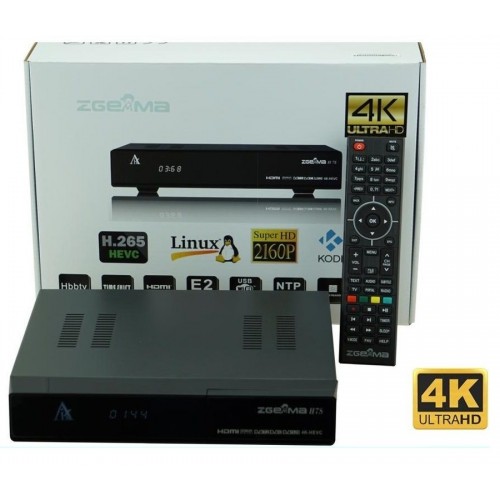
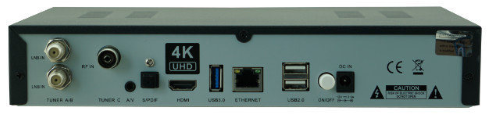
ZGEMMA H7S TRIPLE TUNER COMBO.
2X SATELLITE DVB-S2X TUNERS + 1X HYBRID CABLE / TERRESTRIAL DVB-C/T2 TUNER.
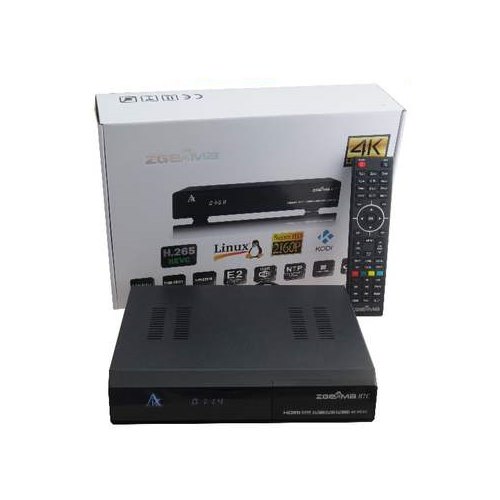
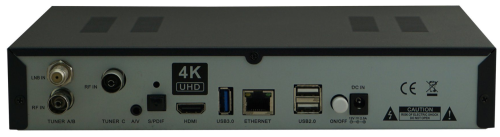
ZGEMMA H7C TRIPLE TUNER COMBO.
2X HYBRID CABLE / TERRESTRIAL DVB-C/T2 TUNERS + 1X SATELLITE DVB-S2X TUNER.
EURO-WIDE SHIPPING AVAILABLE!
LOW COST EUROPEAN SHIPPING RATES TO REPUBLIC OF IRELAND, BELGIUM, DENMARK, FRANCE, GERMANY, LUXEMBOURG, NETHERLANDS, POLAND, SPAIN AND MORE!
WORLD-WIDE SHIPPING AVAILABLE!
If your Country is not listed in our online cart system contact us HERE.
seems there is no support for openpli image ;(
No, but there are images from about 14 more other Enigma 2 teams :)

NEW FOR 2019!
FORMULER Z7+ 5G WITH DUAL BAND WIFI!
ONLY £104.95!
UK NEXT WORKING DAY SHIPPING!
WORLDWIDE SHIPPING AVAILABLE!
SPECIAL DEALS FOR TRADE AND RE-SELLERS, CONTACT US FOR DETAILS!
ANDROID 7.0!
DUAL BAND WIFI 2.4GHz / 5.0GHz!
HISILICON QUAD CORE 15000 DMIPS CPU!
2GB RAM + 8GB eMMC FLASH!
FORMULERS EXCLUSIVE MYTYONLINE IPTV APP PRE-LOADED!
SUPERB FAST PERFORMANCE WITH KODI AND PLEX!
SUPPORTS UP TO 5 STALKER / XTREAM PORTALS!
FORMULER Z SERIES ARE OUR BEST SELLING IPTV SET TOP BOXES!
SEE THE FULL FORMULER IPTV RANGE HERE.
EURO-WIDE SHIPPING AVAILABLE!
LOW COST EUROPEAN SHIPPING RATES TO REPUBLIC OF IRELAND, BELGIUM, DENMARK, GERMANY, LUXEMBOURG, NETHERLANDS, POLAND, SPAIN AND MORE!
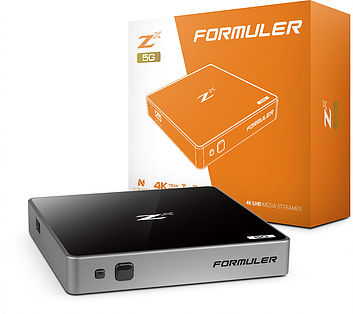
NEW FOR 2019!
FORMULER Zx 5G WITH DUAL BAND WIFI!
ONLY £94.95!
UK NEXT WORKING DAY SHIPPING!
WORLDWIDE SHIPPING AVAILABLE!
SPECIAL DEALS FOR TRADE AND RE-SELLERS, CONTACT US FOR DETAILS!
ANDROID 7.0!
DUAL BAND WIFI 2.4GHz / 5.0GHz!
HISILICON QUAD CORE 15000 DMIPS CPU!
1GB RAM + 8GB eMMC FLASH!
FORMULERS EXCLUSIVE MYTYONLINE IPTV APP PRE-LOADED!
SUPERB FAST PERFORMANCE WITH KODI AND PLEX!
SUPPORTS UP TO 5 STALKER / XTREAM PORTALS!
FORMULER Z SERIES ARE OUR BEST SELLING IPTV SET TOP BOXES!
CLICK HERE FOR FULL SPEC AND TO ORDER YOURS!
EURO-WIDE SHIPPING AVAILABLE!
LOW COST EUROPEAN SHIPPING RATES TO REPUBLIC OF IRELAND, BELGIUM, DENMARK, GERMANY, LUXEMBOURG, NETHERLANDS, POLAND, SPAIN AND MORE!
SEE THE FULL FORMULER IPTV RANGE HERE.
Hello again! Do you send to Norway? Regards POS
Yes we can export to Norway. Please open a pre-sales support ticket: https://www.world-of-satellite.co.uk/support/
Include what you want to purchase and your full address, we will then get a shipping quotation. We will supply excluding VAT as Norway is not part of the EU.
It's just a standard basic universal LNB, whats special about it?
Our best selling LNB's have always been the Technomate range: https://www.world-of-satellite…icable-lnb/Technomate-LNB
Tried many other brands including Inverto, we had more returned faulty Inverto LNB's than any other brand.
Mutant HD51 is one of best sellers: https://www.world-of-satellite.co.uk/mut@nt-mutant-hd51
Enigma 2, has Kodi and QT Stalker plugin for IPTV.
Ferguson FBOX ATV 4K ticks the boxes https://www.world-of-satellite…Digital/ferguson-fbox-atv
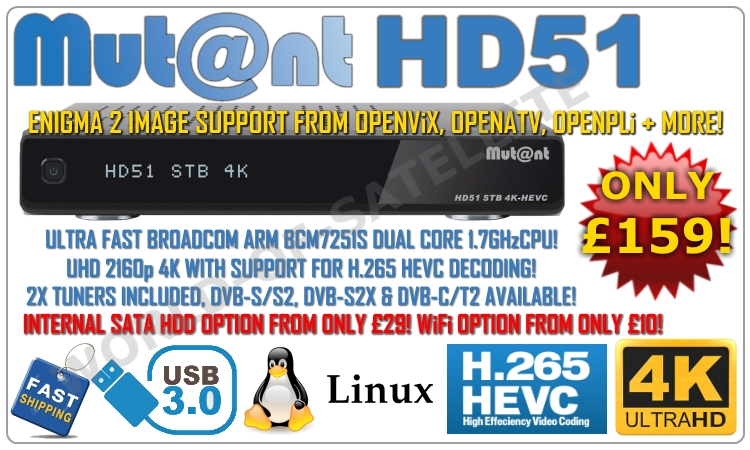
MUTANT HD51 4K UHD TWIN TUNER RECEIVER IN STOCK!
CRAZY PRICE! NOW ONLY £159!
INCLUDING TWO TUNER MODULES OR YOUR CHOICE!
DVB-S2X TUNER NOW INCLUDED AS STANDARD!
DVB-S2X MULTISTREAM CAPABLE RECEIVER!
TWO PLUG AND PLAY TUNER SLOTS!
CHOOSE FROM EITHER DVB-C/T2, DVB-S/S2 OR DVB-S2X TUNERS!
ULTRA FAST DUAL CORE 1.7GHZ BROADCOM ARM CPU!
INTERNAL 2.5" SATA HDD OPTION!
ENIGMA 2 SUPPORT FROM OPENViX, OPENATV, OPENPLi + MORE!
2 YEARS HARDWARE WARRANTY!
FREE ENGIMA 2 IMAGE FLASHING!
FAST UK NEXT WORKING DAY DELIVERY!
CLICK HERE FOR FULL SPEC AND TO ORDER!
EURO-WIDE SHIPPING AVAILABLE!
LOW EUROPEAN SHIPPING RATES TO REPUBLIC OF IRELAND, GERMANY, BELGIUM, LUXEMBOURG, NETHERLANDS, SPAIN AND MORE!
Discussion of article How to install Sundtek USB tuners using Sundtek Control Center:
QuoteThis guide is based using OpenViX images.Display More
1) Power off your receiver.
2) Connect your Sundtek tuner to USB port of your receiver and power on.
3) First we need to install Sundtek Control Center via the OpenViX online plugin feeds. Menu > Plugins > Press Green to download plugins > Select Extensions and press OK, then select sundtekcontrolcenter and press ok. Suntek Control Center will now be installed.
4) Now exit out of all screens and go to Menu > Plugins > Select Sundtek Control Center…
Discussion of article How to setup and use OpenViX ‘Client Mode’:
QuoteClient mode allows you run a client Enigma 2 receiver over an existing network without the need for any signal feeds. All channels and EPG data will be imported from main Server receiver.
1) Only certain skins currently show Client mode setup button. Switch to default ViX Night HD skin to setup. Once setup you can switch back to your preferred skin. To re-access Client Mode setup switch back to ViX Night HD skin.
2) Menu > Setup > Service Searching > Tuner Configuration > See ‘Client Mode’…
Discussion of article How To Flash A VU+ DUO 4K Linux Enigma2 Receiver:
QuoteFlashing the Receiver:Display More
1) Power off the receiver
2) Ensure no other USB devices are plugged into the receiver whilse flashing.
3) Insert the USB stick containing the image files into one of the usb ports on the receiver, rear usb port is advised if possible.
4) Power the receiver on.
5) As your Duo 4k starts to power up you should see a update prompt on the receivers display asking you to press the power button, at this point you touch the power button which is located to the…
Discussion of article How To Flash A VU+ ZERO 4K Linux Enigma2 Receiver:
QuoteFlashing the Receiver:Display More
1) Power off the receiver
2) Ensure no other USB devices are plugged into the receiver while flashing.
3) Insert the USB stick containing the image files into one of the usb ports on the receiver, rear usb port is advised if possible.
4) Power the receiver on.
5) The WHITE L.E.D VU+ logo to the left front on the receiver will quickly flash two or three times then start to fade in and out slowly.
6) Once completed the WHITE L.E.D will flash rapidly.
7) If in doubt…
Discussion of article How To Flash A VU+ UNO 4K SE Linux Enigma2 Receiver:
QuoteFlashing the Receiver:Display More
1) Power off the receiver
2) Ensure no other USB devices are plugged into the receiver while flashing.
3) Insert the USB stick containing the image files into one of the usb ports on the receiver, rear usb port is advised if possible.
4) Power the receiver on.
5) As your UNO 4K SE starts to power up you should see a update prompt on the receivers display asking you to press the power button, at this point you touch the power button which is located
6) The receivers…
Discussion of article How To Flash A VU+ ULTIMO 4K Linux Enigma2 Receiver:
QuoteFlashing the Receiver:Display More
1) Power off the receiver
2) Ensure no other USB devices are plugged into the receiver while flashing.
3) Insert the USB stick containing the image files into one of the usb ports on the receiver, rear usb port is advised if possible.
4) Power the receiver on.
5) As your VU+ Ultimo 4K starts to power up you should see a update prompt on the receivers display asking you to press the power button, at this point you touch the power button which is located to the left of…