Posts by ZYGA

    HOW- Set CCcam to read the file CCcam.cof by masterpolo
    I will share how to set CCcam CCcam.cfg file to read from a location other than / etc. This topic will be the location of the media / usb. If someone wants a different example. Media / usb / CCcam why not.


    The reaction is based on the three steps.
    1. Copy the biniarke CCcam (any version) to the standard location, or as in my case usr / CAMD (greetings tomadu :)), of course, attributes 755


    2. softcam.cccam need to edit the file as follows


    Copy to etc / init.d and attributes 755


    3. The last step is to copy the file CCcam.cfg to the location of the media / usb or what you wish for. And now beware, if you have CCcam.cfg file in the / etc then you have to delete it.


    Via telnet you log on as root tuner and you seem to command:


    Code
    [COLOR='Red']ln -s /media/usb/CCcam.cfg /etc/CCcam.cfg
    [/COLOR]


    You can log in via FTP to the tuner and enter the location / etc, there will be a shortcut to the file CCcam.cfg.
    CCcam fires and it should work. Similarly, each file can CCcam yes "podlinkować" or such. CCcam.channelinfo, CCcam.providers, CCcam.prio

    Black Hole PrismCube 2.1.1
    The Black Hole Prism image is based on the experimental development branch of the Prismcube image and for this reason, any bugs that you find in the official or development images, may also be present in the Black Hole Prism image.


    Whats New:


    [MODIFIED] XBMC PVR client addon update
    [MODIFIED] My record path in configuration ( Recording -> Storage )
    [MODIFIED] Polish translation update
    [FIXED] Connecting to XBMC web server
    [FIXED] Deleting recording files on NAS in Archive
    [FIXED] Checking XBMC addon update bug
    [FIXED] Saving advanced settings
    [FIXED] Media playback hang up in XBMC
    [FIXED] Python script error hang up in XBMC
    [FIXED] Mute bug on locked channel
    [FIXED] Block audio when switching from TV channel to locked radio channel


    Known Issues:


    [UNRESOLVED] PIP stability in fast scan fav group and scrambled channels
    [UNRESOLVED] Having trouble to connect to hidden wifi network
    [UNRESOLVED] Blind scan missing


    WARNING: Press i button on remote control to start update when system boots.
    Known bugs:
    The import / export e2 settings support is purely experimental.
    It may not work with long channel lists ( > 2 satellites) and could also lose the channel crypto system info. Anyway we strongly recommend you perform a new scan after importing a channel list.
    We want to thanks Marusys for the continued support to the Team and all the Beta testers (you know who you are)
    DISCLAIMER
    THE BLACK HOLE PRISM IMAGE IS BASED ON THE OFFICIAL FIRMWARE PUBLISHED BY MARUSYS AND IN ACCORDANCE WITH THE LAW IT CONTAINS ONLY SYSTEM ADDITIONS & GRAPHIC CHANGES.
    THE BLACK HOLE PRISM IMAGE DOES NOT CONTAIN ANY EMULATOR, KEYS, SOFTCAMS OR OTHER SYSTEM FOR VIEWING PAY - TV WITH OR WITHOUT A PAID SUBSCRIPTION.
    LASTLY, THE BLACK HOLE PRISM IMAGE DOES NOT CONTAIN ANY SYSTEM TO DOWNLOAD PLUGINS OR EMULATORS FROM EXTERNAL SERVERS OR SOFTWARE THAT MAY BE USED FOR ILLEGAL PURPOSES SUCH AS CARD SHARING.
    LICENSE
    THE BLACK HOLE PRISM IMAGE IS OPEN SOURCE. THE BLACK HOLE SOURCE REPOSITORIES ARE AVAILABLE @ http://git.prismcube-community.net.
    This is free hobbyist software and it comes with absolutely no warranty. Use it at your own risk
    Download

    [COLOR='Deep***Blue']VU+ Skin Blue Shadow 2 HD [/COLOR]


    Neues Update...


    NetDriveSetup, RemoteTimerScreen, InputDeviceSelection, FTP Server Editor....


    ipk enigma2-plugin-extensions-yweather-0.6_r.1_all.ipk (277.6 KB, Download
    rar enigma2-plugin-skin-blue-shadow2-hd_1.1_all.rar (1.07 MB, Download


    VU + Newmarket Multiboot image VTI 7x by gutosie can be tested on all Vu +


    At ultimo fully working Runs board starting with a choice of image They install the image of both the new and old kernelm 8) 8)


    MB_VTI_VU.tar.gz file to the / tmp directory tuner
    Start the telnet and command


    Code
    [COLOR='Red']-xzvf /tmp/*.tar.gz tar-C /[/COLOR]


    roazpakuje files as command


    Code
    [COLOR='Red']init 2; sleep 3; init 3[/COLOR]


    Or from the tuner do restart Gui (not to be confused with restart tuner)
    Install packages for your tuner] (Tuner will reboot itself at startup will not even start the game board multiboot)
    After restarting the tuner install multiboot on the selected device (no need to restart after installation is to choose the image Flash to run flash and check that start properly


    Amendment of 19-10-14 (added translation files multiboot and tools, added support for tuner solo se) Download

    PrismCube Official firmware 2.0.0_20141010


    Last Updated 10/10/2014
    V2.0.0
    [NEW] XBMC Gotham 13.2 support
    [NEW] Aeon Nox 5 skin for Gotham
    [NEW] Metropolis skin for Gotham
    [NEW] Bello skin for Gotham
    [MODIFIED] German OSD translation update
    [MODIFIED] Default EPG grid timeline ( 4 hour -> 2 hour )
    [FIXED] Connecting to XBMC web server
    [FIXED] Deleting recording files on NAS in Archive
    [FIXED] Unicable recording
    [FIXED] Standby hang-up issue
    [FIXED] Web interface remote control
    [FIXED] Focusing bug on EPG channel view
    [FIXED] Display extend EPG bugs
    [FIXED] Manual timer edition bug
    [FIXED] Updating pre and post recording time bug
    [FIXED] Focusing bug on recording path in installation menu
    [FIXED] Setting video and audio bug in first installation menu
    [FIXED] Drawing EPG grid timeline bug
    [FIXED] EPG update bug after tune in EPG grid mode
    [FIXED] Recording deletion issue on post recording time
    [FIXED] Audio language change bug
    [FIXED] Empty FTA/CAS list issue in channel list
    [FIXED] Broken character in web interface
    [FIXED] Slow PIG close in channel list
    [FIXED] Displaying Dolby/Dolby Plus icon on live plate
    [FIXED] Saving channels after channel update
    [FIXED] Live plate GUI
    [FIXED] Running record color bug on EPG
    [FIXED] Timeshift plate GUI
    [FIXED] Displaying CAS icon
    [FIXED] Displaying Lock/Unlock info
    [FIXED] Saving video output setting
    [FIXED] EPG update after changing channel
    [FIXED] Channel change by view timer bug
    [FIXED] Locked tv channel's audio issue after changing to radio mode


    Known Issues
    [UNRESOLVED] PIP stability in fast scan fav group and scrambled channels
    [UNRESOLVED] Having trouble to connect to hidden wifi network
    [UNRESOLVED] Blind scan missing


    Download

    HOW-POLISH EPG for PrismCube by Webkurier

    The installation package for Prismcube, capable of displaying Polish characters in EPG


    - Works in all versions of the software models Ruby and Jet


    - Allows the installation of more than 1,000 Polish and foreign additives xbmc and kodi


    Description of the installation:


    1 Archive copy it to / tmp
    2 Start Putty, SSH, enter the IP address of your prismcube and click on Open
    3 Username: enter root and press enter
    4 Password: leave the field blank and press enter
    5 Select the text below and paste it into Putty


    Code
    [COLOR='Magenta'] cd / tmp
         -xzvf /tmp/*.tar.gz tar-C /
         sleep 3
         rm /tmp/*.tar.gz [/COLOR]


    6 After the installation, start xbmc, settings, appearance, skin confluence and choose the font Polish
    7 Install repositories selecting xbmc, settings, add-ons, install the zip file Superrepo, Fusion, Xfinity
    8 Download the plug at the discretion of Download

    Prismcube Ruby Development version V2.1.0
    10/01/2014


    Last Updated 10/01/2014
    V2.1.0
    10/01/2014
    [NEW] XBMC Gotham 13.2 support
    [NEW] Aeon Nox 5 skin for Gotham
    [NEW] Metropolis skin for Gotham
    [NEW] Bello skin for Gotham

    [MODIFIED] German OSD translation update
    [MODIFIED] Default EPG grid timeline ( 4 hour -> 2 hour )
    [FIXED] Unicable recording
    [FIXED] Standby hang-up issue
    [FIXED] Web interface remote control
    [FIXED] Focusing bug on EPG channel view
    [FIXED] Display extend EPG bugs
    [FIXED] Manual timer edition bug
    [FIXED] Updating pre and post recording time bug
    [FIXED] Focusing bug on recording path in installation menu
    [FIXED] Setting video and audio bug in first installation menu
    [FIXED] Drawing EPG grid timeline bug
    [FIXED] EPG update bug after tune in EPG grid mode
    [FIXED] Recording deletion issue on post recording time
    [FIXED] Audio language change bug
    [FIXED] Empty FTA/CAS list issue in channel list
    [FIXED] Broken character in web interface
    [FIXED] Slow PIG close in channel list
    [FIXED] Displaying Dolby/Dolby Plus icon on live plate
    [FIXED] Saving channels after channel update
    [FIXED] Live plate GUI
    [FIXED] Running record color bug on EPG
    [FIXED] Timeshift plate GUI
    [FIXED] Displaying CAS icon
    [FIXED] Displaying Lock/Unlock info
    [FIXED] Saving video output setting
    [FIXED] EPG update after changing channel
    [FIXED] Channel change by view timer bug
    [FIXED] Locked tv channel's audio issue after changing to radio mode
    [FIXED] Opening Youtube TV


    Known Issues
    [UNRESOLVED] PIP stability in fast scan fav group and scrambled channels
    [UNRESOLVED] Having trouble to connect to hidden wifi network
    [UNRESOLVED] Blind scan missing Download

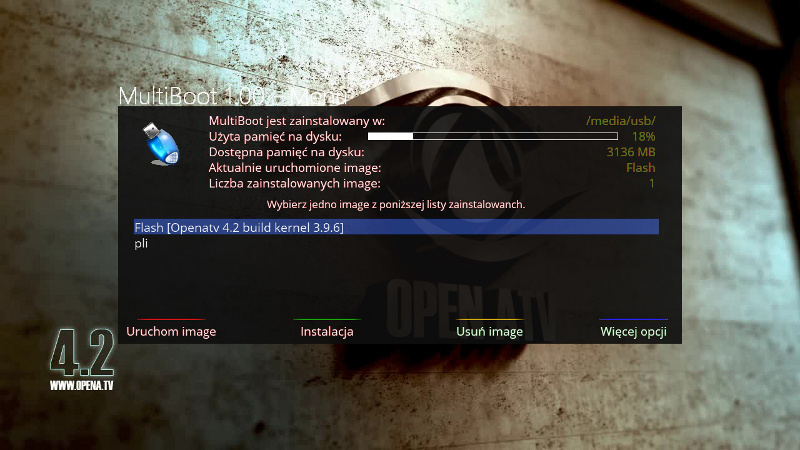
    VU + Another version Multiboot for opeATV (kernel 3.9.6 and 3.13.5) by madu Multiboot on ATV 4.2 (kernel 3.9.6 and 3.13.5) - all Vu +


    Click here to view the original image of 800x450px.


    Test MB_ATV_nowy_kernel.tar.gz - Speedy Share - upload your files here http://speedy.sh/mAWen/MB-ATV-nowy-kernel.tar.gz poprawkka of 05-09-14 (This should already work as All suggestions should be revised)


    How to install


    1 Up to / tmp copy the file "MB-ATV-new-tree.tar.gz"
    2 Run the telnet and command


    Code
    [COLOR='Red'] -xzvf /tmp/*.tar.gz tar-C /[/COLOR]


    3 Restart gui
    4 Menu Tuner will appear multiboot run and install the modules
    5 After installing the tuner module reboots itself
    6 After reboot, it is good to check your poo ftp as / media directory podmontowało (do not use mountmenagera ATV) If the usb as hdd and vice versa is a tuner disable switch on the rear USB ports and change the Run tuner and how to mount after restart is ok install meoboot on usb


    Working upload image to boot. You can also upload image with kernel 3.1.1


    8)
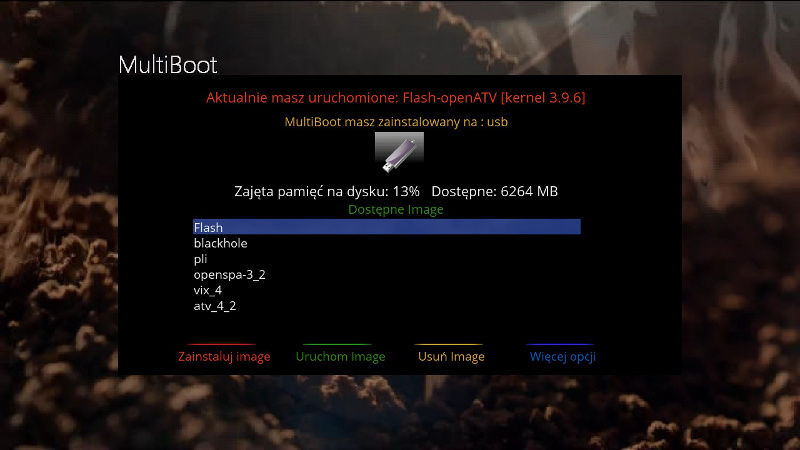
    Another version Multiboot for opeATV (kernel 3.9.6 and 3.13.5)


    Click here to view the original image of 800x450px.


    installation
    1 - file "MB_VU_ATV_4.2.tar.gz" / tmp tuner
    2 - telnet


    Code
    [COLOR='Red']  -xzvf /tmp/*.tar.gz tar-C /[/COLOR]


    3 - restart Gui
    4 - menu-MultiBoot-pakity (blue) and the new board choose your tuner and Ok (wait until the receiver reboots)
    5 - After reboot, install at / media / usb
    6 - Turn off the tuner with the current and reboot


    Mounting should already be correct


    http://speedy.sh/UahuK/MB-VU-ATV-4.2.tar.gz

    Oscam 9859-Emu


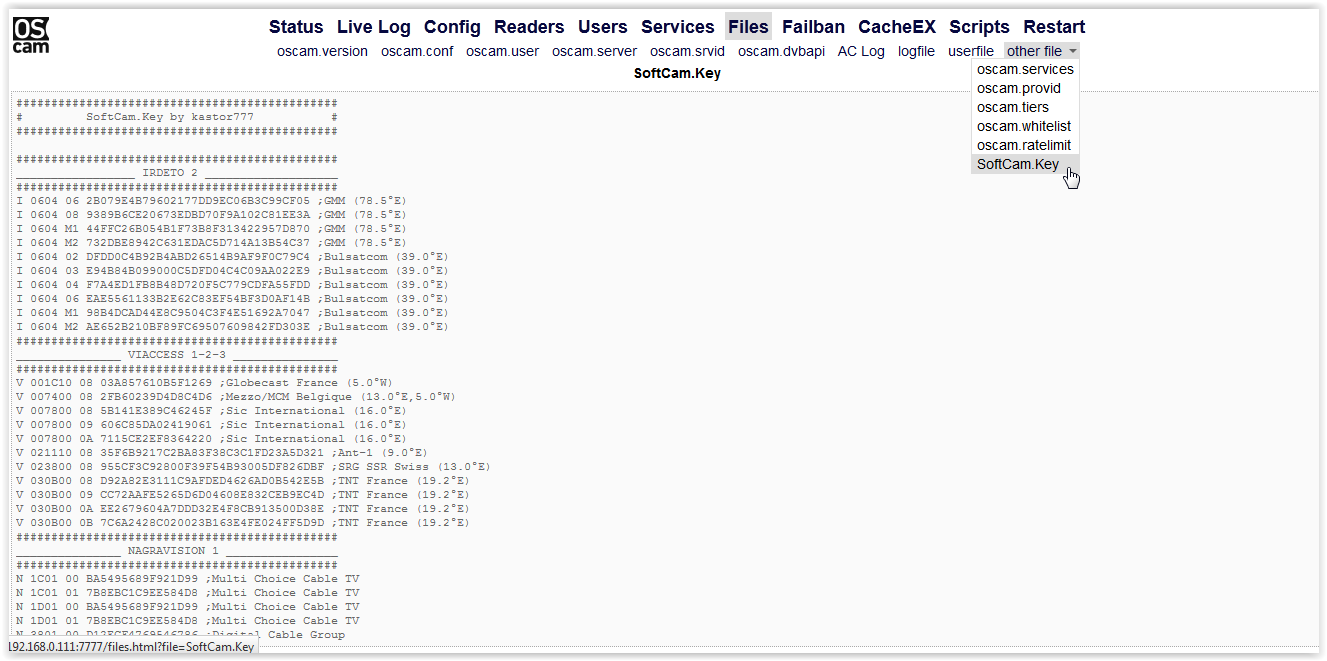
    Since the last version from the link above amendments were made to increase the stability of OSCAM and removed some bugs (no picture after a timeout ), and small changes in the preview oscam.W this version to preview file contents SoftCam.Key enter through the browser as shown below.

    In addition, more information about the changes can be found in oscam TU
    Oscam 9859 - Emu for each image


    Configuration files and SoftCam.Key are in the location /usr/keys

    How-VU+ Multiboot Open Spa,Open ATV, VTIOpenSpa 3.1


    The red text, type the name of your tuner in place marked on the color cyan enter the address corresponding to the held tuner


    DUO: http://openspa.info/resources/….392/download?version=724
    ULTIMO: http://openspa.info/resources/….402/download?version=738
    UNO: http://openspa.info/resources/….388/download?version=720
    SOLO: http://openspa.info/resources/….386/download?version=718
    SOLO 2: http://openspa.info/resources/….340/download?version=626
    DUO 2: http://openspa.info/resources/….385/download?version=717


    ________ OpenPLi 4__________


    In the script OpenPLi replaces only text red on your model tuner


    ________ OpenATV 4.1__________


    As OpenPLi replaces what red on his name tuner


    ________ VTI 6-0-8__________


    What red on your model tuner cyan color to what below


    UNO: http://sgcpm.com/vuimages/vti/uno/vuplus-image-vuuno-20140425185742_vti_6-0-8$MY
    SOLO: http://sgcpm.com/vuimages/vti/solo/vuplus-image-vusolo-20140425184841_vti_6-0-8$MY
    DUO: http://sgcpm.com/vuimages/vti/duo/vuplus-image-bm750-20140425184139_vti_6-0-8$MY
    ULTIMO: http://sgcpm.com/vuimages/vti/ultimo/vuplus-image-vuultimo-20140425183320_vti_6-0-8$MY
    SOLO 2: http://sgcpm.com/vuimages/vti/solo2/vuplus-image-vusolo2-20140425182600_vti_6-0-8$MY
    DUO 2: http://sgcpm.com/vuimages/vti/…5181759_vti_6-0-8_usb.zip

    PrismCube Softcam 0.1.41 - for sw ver. 1.2.0 and higher


    [/CODE]
    Thanks to matis


    >> Download <<

    VU+ HD Glass 16 -ver. 8.41


    - added screens 47,48,49,50,51
    - previews and extrascreens graphics updated in download
    - added new download options: ZZPicon (z/sk)
    - added new download options: ZZPicon (all) - download and unpack time
    cca 15 - 30 min !!!
    - updated pl, sk, cz, en, ru, de, it, uk, pt, tr, es, fa, al, ro, hu, nl


    update is available online Download

    How-Multiboot on ATV 4.2 (kernel 3.9.6) - for ultimo, uno solo and duo to gutosie, madu


    Here download Multiboot on ATV 4.2 (kernel 3.9.6) - for ultimo, uno solo and duo Download


    How to install similar to ATV 4.1


    How to install

    1 to / tmp copy the file "MB_ATV_4.tar.gz"
    2 Run the telnet and command


    Code
    [COLOR='Red']-xzvf /tmp/*.tar.gz tar-C /[/COLOR]


    3 Restart gui
    4 Menu Tuner will appear multiboot run and install the modules
    5 After installing the modules we restart (switch on the back of the tuner)
    6 After reboot, it is good to check the ftp as / media directory podmontowało (do not use mountmenagera ATV) If the usb as hdd and vice versa is a tuner disable switch on the rear USB ports and change the Run tuner and how to mount after restart is ok install meoboot on usb


    Working upload image to boot. You can also upload image with kernel 3.1.1


    How to install similar to ATV 4.1

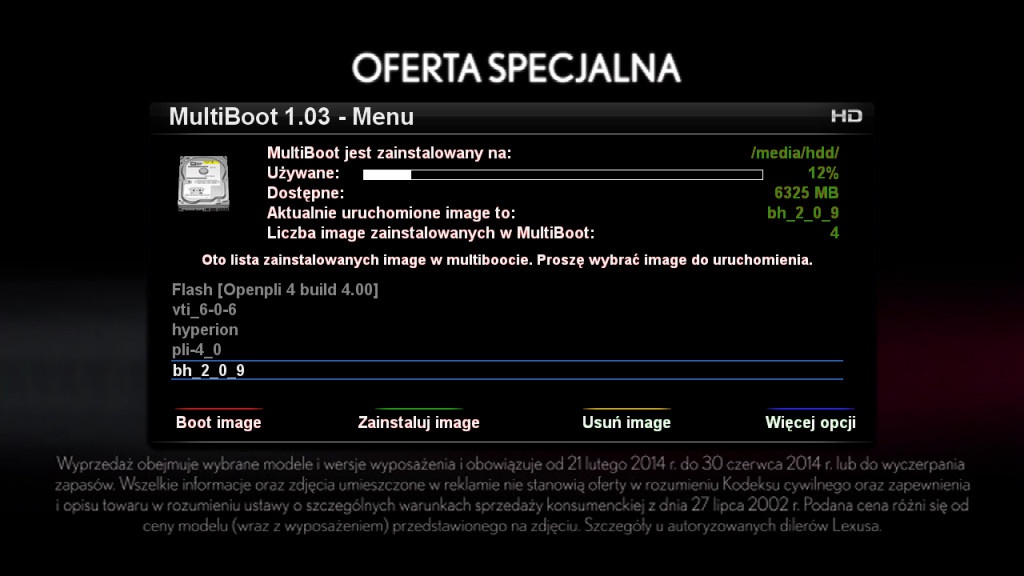
    How- VU + Multiboot image Pli by gutosie, madu

    : P
    some pics :)


    Description of the installation:


    To install the plugin must be connected to the network !!!
    charge of the zip cord and wypakowywujemy on our PC
    MultiBoot1.00.tar.gz file without using winrar extract wkjejamy the / tmp directory in our receiver in a form which we downloaded from the network, ie with the tip in the name tar.gz
    description of how to connect to an after FTP can be found on our forum topic
    now arranged and easy to send a command to our vu +:

    Code
    [COLOR='Red']tar -xzvf /tmp/*.tar.gz -C /[/COLOR]


    command will extract the plugin in the right place, it will last a few seconds
    to multiboot appeared in our menu with the remote control must restart enigma2
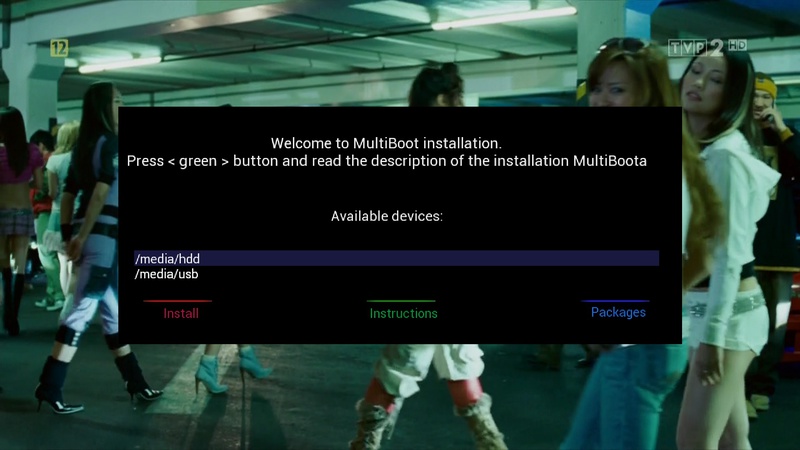
    after restart enigma go to multiboot plugin and install on the selected device.
    Important !!! that you install do a full restart of the receiver what we also inform the installer, reboot is needed in order to be updated the packages needed for multiboot in the image
    I would add that the recent changes in pli 4 libów no after reboot the board boot on pli3 should be
    Multibot He should also work on the image derived from PLLi such as. SPA, HYPERION-POINT can also ATV. Theoretically also VTI, BH and org. but this is not checked
    :)


    Installation in multiboocie image blackhole
    unfortunately image BlackHole did lock that checks if we have the kernel of bh and after installing it in multiboocie and reboot does not start, but there is a way
    please upload the same file to the kernel of a blackhole Flash memory in which we image pli
    to load the kernel in the same manner as the whole image except that in the final instance directory. vuplus Offers is to be only one file kernel_cfe_auto.bin and nothing more, just upload the kernel takes several skund
    important to upload the first image and the other at the end of a blackhole and only replaces the kernel image pli - Flasza


    Multiboot has been tested on ultimo, uno and duo on other models, I do not know how to be but I think it should work.


    To reinstall multiboot on the newly installed image should be removed from the hidden file .multiboot , which is located in / media / multiboot / MultiBootI and dodtakowo also delete the file [.multiboot_location folder / usr / lib / enigma2 / python / Plugins / Extensions / MultiBoot


    By default, the download image online network model is set to Ultimo but it can be easily changed. You must install the appropriate fix for our model vu
    Fix Uno: http://speedy.sh/Yd3pb/contrib.tar.gz [/ url]


    One Meoboot OpenPLi for all models vu +


    Added choice of modules for different tuners yellow button board with a choice of
    tuner module only appears when you first install Begin installation of ţprzycisku yellow (modules for your tuner) Then install multiboot on the selected device After installing the hard reboot tuner


    [URL=http://www.bild.me]


    [COLOR='Deep***Blue']All Vu +: [/COLOR]Download


    If you hire someone had multiboot installed before you install the tar.gz file give the command telnet:

    Code
    rm /media/usb/MultiBootI/.multiboot


    . big thanks for a friend Rango, Madu, Pingu without let multiboot would not be in such form as it is


    nfidump_gemini: nfidump_0.2.2-r0_mipsel.ipk - Speedy Share - upload your files here[/url replaces the bin


    to guzioli the remote control [url=http://speedy.sh/cREts/ConfigList.py]ConfigList.py - Speedy Share - upload your files here

    How- VU+The installation image in multiboocie


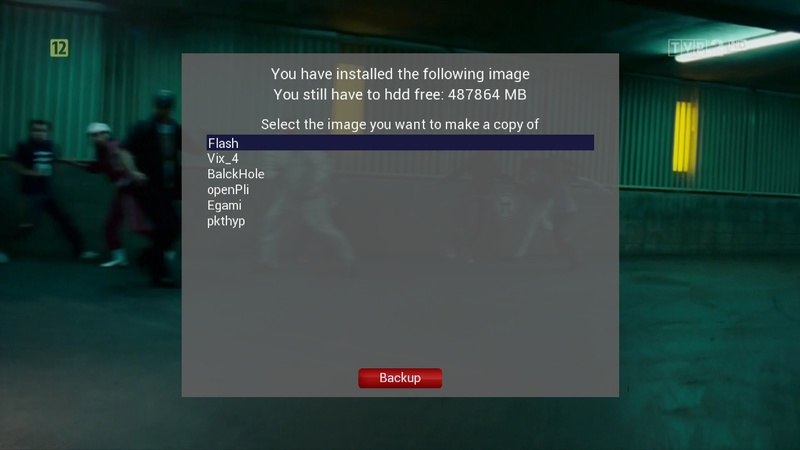
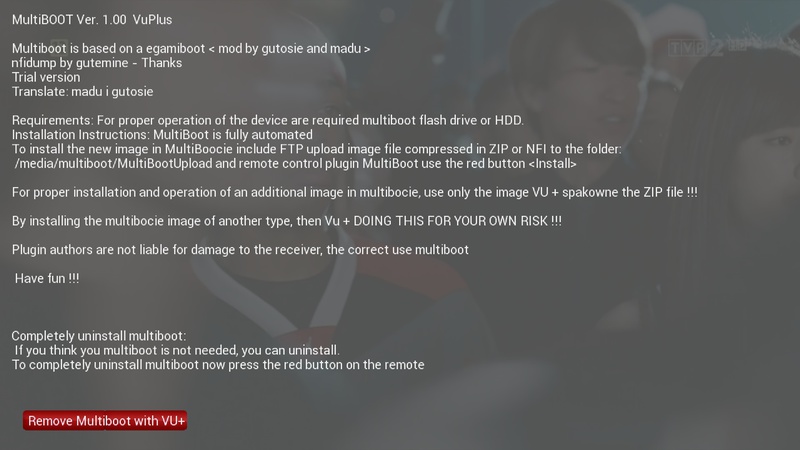
    If you already have in our image multiboot installed, we can also install other image on an external data medium, eg. Pendrive or HDD, this is what is created add-on multiboot
    We need the image will be suitable for our model vuplus packed in ZIP, image looking for the network,
    example for the correct name: OpenPLi-4.0-beta-vuultimo-20140905_usb.zip important not to unpack this image leave the tip in the name of the zip, which I marked in green :)


    If you already have on your computer ready image zip it now must be sent by the FTP protocol to our receiver vu, you can do such. Program FileZilla or another directory MultiBootUpload
    Product MultiBootUpload depending on the installation location multiboot can be at / media / usb or / media / hdd
    OK, after sending the file to the directory image.zip MultiBootUpload with the remote control, select from the menu MultiBoot Plugin
    further press the green button on the remote control, or Installation
    window will open to us a new installation image in multiboot
    and the first option is:
    Select image
    the remote control cursor left or right to choose our image to install on a data carrier :)


    below are our options:
    Change the name
    Note !!! image in its name can not be too long, or using the cursor must give it another shorter name, or change the name of the ftp program levels
    Example: OpenPLi-4.0-beta-vuultimo-20140905_usb.zip change on OpenPLi.zip tip in the name of the zip must be


    the next option:
    Copy the settings to a new image?
    Here if you choose so it will be copied to the installed image in multiboocie list kanaółw and network settings, etc ...
    IMPORTANT !!! personally advise against using the copy option because I do not always newly installed image fits with our settings and therefore best left to Off
    little explanation: you need to understand that, for example, if we have the memory of the receiver image pli to multiboot install a vti and choose copy to Yes after installing and rebooting image vti we do not start, or get a portion restart enigma that is green screen and it is because pli and vti are the other image (OpenPLi is not done on the official from the manufacturer)
    we can give the copy if you install the image, eg. derived from OpenPLi such as vix or atv etc ...


    OK, since we have already set it all go to the installation process :) press on the remote control button and the movement starts with the installation of the new image in multiboocie
    picture on the TV will be frozen for a few minutes, here a big impact on the speed unpack-install image is our data carrier, if you have a slow pen this process will take a lot longer, but if you have a good, fast pendrive it should take 3 to 5 minutes
    I describe it as when the installation multiboot doing so najpier unpack our image of ZIPA, later unpack the file to a directory root_cfe_auto.jffs2 ubi, further moves the entire image to the directory at the end of MultiBootI and completely restart the receiver running the installed image :)
    if properly run, the installation process can pry the ftp, in media / usb should be a new directory in the ubi image, if after 5mn this does not mean that it is a mistake
    in case you do not want us to run the install image must be restarted manually or by holding the receiver without interruption Power button (it's for lazy people like me: D) and the board start multiboot select a different image
    for example, image blackhole and new opensp secured before running it on another multiboocie than meoboot of bh flaszu, in this case, if someone insists to have and bh multiboocie you must replace the same kernel memory Flasza, or to load into memory vu + same kernel of blackole, we do it the same way as changing image, except that in the final catalog is to be only one file kernel_cfe_auto Important !!! to do so after installation bh or spa. To restore the kernel image Flasza, we can re-upload the same kernel_cfe_auto and boot_cfe_auto.jffs2


    I think that the description is useful :)

    VU+ Oscam-9823 emu


    Oscam 1.20 Unstable 9823-emu can be downloaded for image:


    When replacing the files to keep in mind that the above file was oscam.server entry:


    Black Hole


    VTi


    OpenPLi


    When replacing the files to keep in mind that the above file was oscam.server entry:

    [reader]
    label = Emulator
    protocol = constcw
    device = /usr/keys/SoftCam.Key
    group = 3


    [reader]
    label = Myconstantcw
    protocol = constcw
    device = /usr/keys/constant.cw
    group = 4


    Improved emu and error with displaying info in the preview OSCAM (Status, Live Log, logfile, etc.)

    Prismcube Ruby Stable version V1.8.0 Last Updated 8/10/2014


    Last Updated 8/10/2014
    V1.8.0
    8/10/2014

    [FIXED] TTX bug on 1080p50Hz resolution
    [FIXED] Hang up bugs on zapping
    [FIXED] Recording bug after changing OSD language
    [FIXED] Hang up after stopping recording
    [FIXED] Satellite longitute input bug
    [FIXED] YouTube and HbbTV menu operation in Advanced options
    [FIXED] Update the file list in Archive when USB is connected/disconnected
    [FIXED] Some minor issues on NAS recording
    [FIXED] Channel list bug in Show more EPG mode
    [FIXED] XBMC hangup on addon browser window
    [FIXED] Reloading channel list bug after changing OSD language
    [FIXED] Booting failure issue when all channellogos and "ChannelLogo.xml" file are deleted in folder "channellogo" via FTP
    [FIXED] AVSYNC Problem
    [FIXED] Diacritic issue on NAS recording
    [FIXED] OSD display bug when teletext is on
    [FIXED] NAS remount when IP address is changed
    [FIXED] PVR features when playback recording files from NAS
    [FIXED] Starting recording on NAS with a broken connection
    [FIXED] A hang up caused by disconnecting NAS while playing a file in Archive
    [FIXED] Occasionally not accepting a command from RCU
    [FIXED] Some minor Confluence and Aeon Nox skin bugs
    [FIXED] Some minor bugs on CrossEPG
    [MODIFIED] Added left and right button on Aeon Nox's numeric dialog
    [MODIFIED] Faster channel list loading in WebUI
    [MODIFIED] German, Czech, Slovak and Polish OSD translation update
    [MODIFIED] Pre-installed XBMC addons update
    [MODIFIED] Recommend a mount path when you entered inaccessible path
    [NEW] NAS mode on slide menu in Archive ( shown only when NAS is connected )
    [NEW] YouTube TV support
    [NEW] CrossEPG support
    [NEW] Recording on USB memory support
    [NEW] NAS and USB recording icons in Archive


    Known Issues
    [UNRESOLVED] PIP stability in fast scan fav group and scrambled channels
    [UNRESOLVED] Having trouble to connect to hidden wifi network
    [UNRESOLVED] Blind scan missing


    >> Download <<