Posts by musogeek

    Surprised you have made 31 posts and had the receiver for so long and still don't know something this basic - your Computer can connect to your receiver over your local network. All network devices have an IP address which for your local network will all start with 192.168 - like 192.168.1.50 for example. Your receiver will probably not have a password set unless you have set it or are using a backup image - so you need to firstly know what your receiver's IP address is. You can easily obtain this by pressing menu - selecting 'information' and then 'network' - the number next to 'IP:' is your receiver's IP address. so the IP address is what another device on your network such as your PC needs to use to speak to another device. Also the username for your receiver is 'root' and as I said there is probably no password set. With this in mind - take a look here;
    http://linuxsat-support.com/en…k-files-installation.html


    the above is a beginner's way to log in to the receiver - I prefer proper FTP apps or telnet - but above is a good place to start - has a tutorial too. You really need to read more. The info is all out there. Note often there is a disclaimer when you buy a linux receiver from a retailer that states they are for enthusiasts who have working knowledge of networking, FTP and Telnet, so it is stuff you really should know or you might as well have bought something from argos.

    Download the plugin - use ftp to connect to your receiver and drop it on the tmp directory of your receiver, then manually install it. Also you could install tspanel the same way and it gives you an easier way to install you want, including CCcam. Please explain what bits you are stuck on. Read a bit more because everything you need to know is out there.

    Am i right in saying that oscam is not your server, you are sharing your cards from oscam to CCcam with newcamd/nline? if that is the case and you are seeing reshare value of the cards as 6, then this will be controlled when you are sharing to your peers. Do you actually know what the reshare value is on their server?

    I am posting this because I came across some menus that I didn't know existed that make it very easy to install your required softcam. A good up-to-date selection, and configs too.


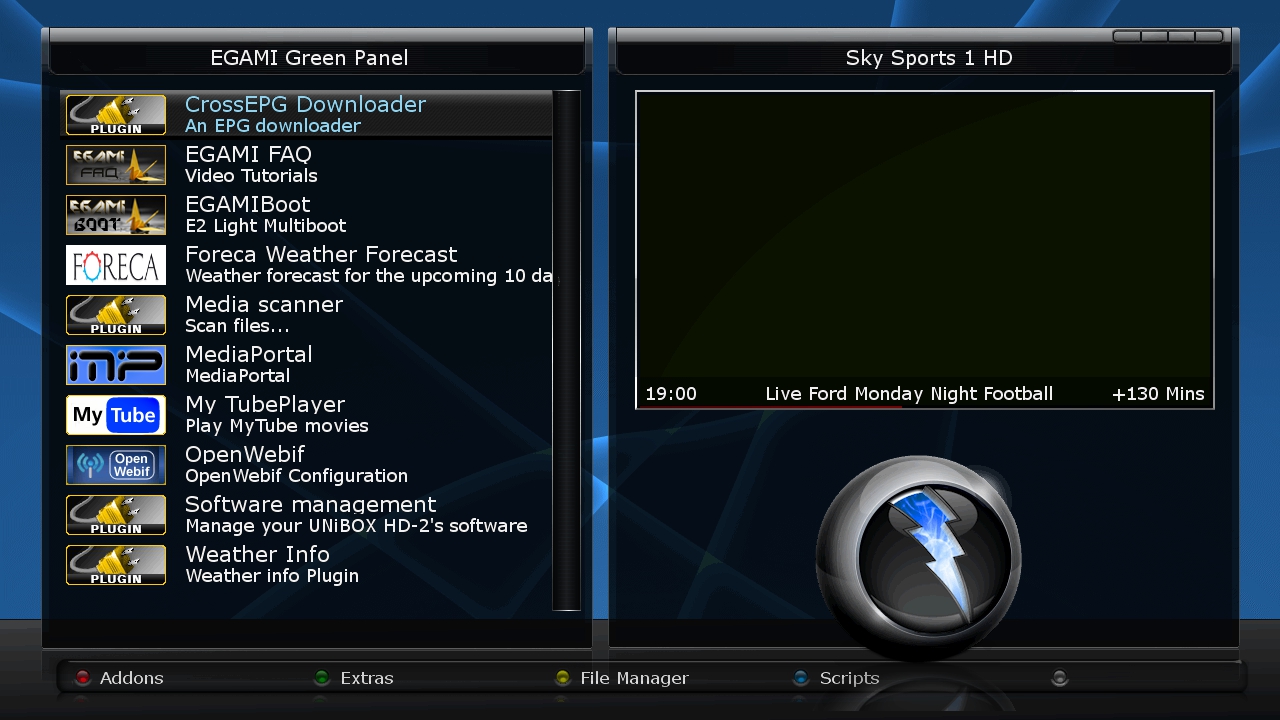
    Firstly, press the green button on the remote to get to the plugins screen


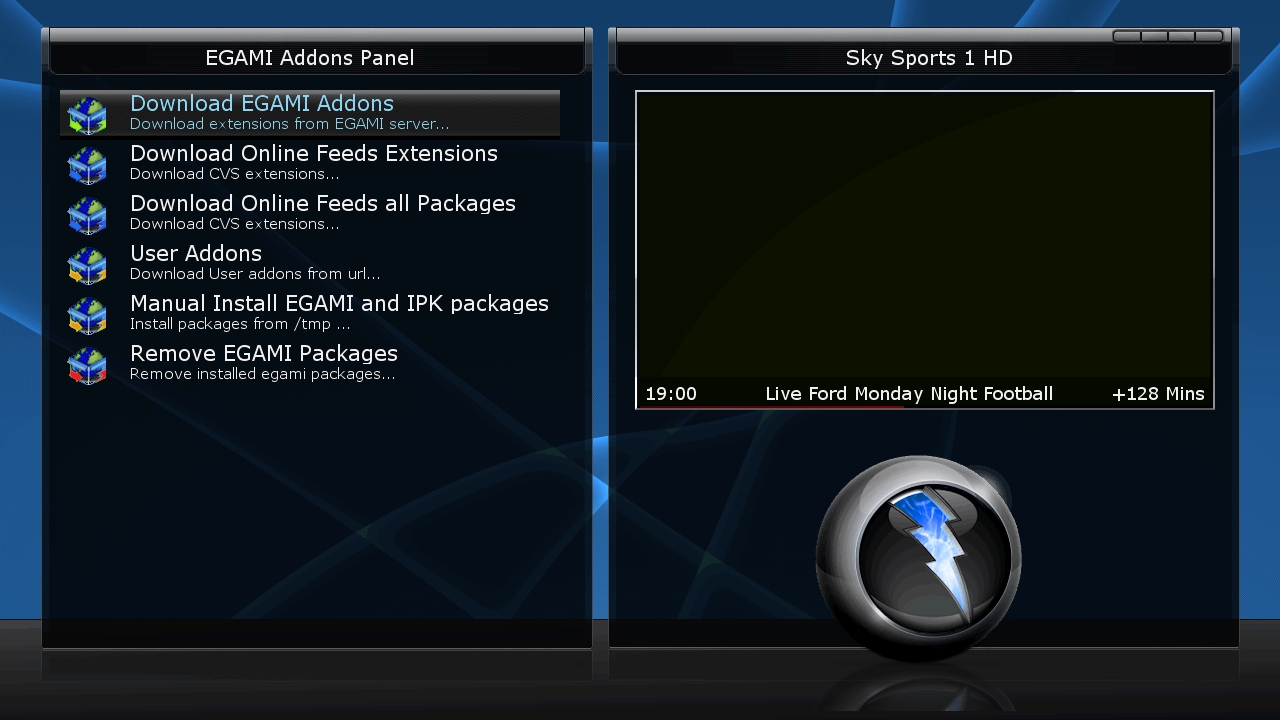
    then press the red button to get to the Addons menu


    then select 'Download EGAMI Addons'


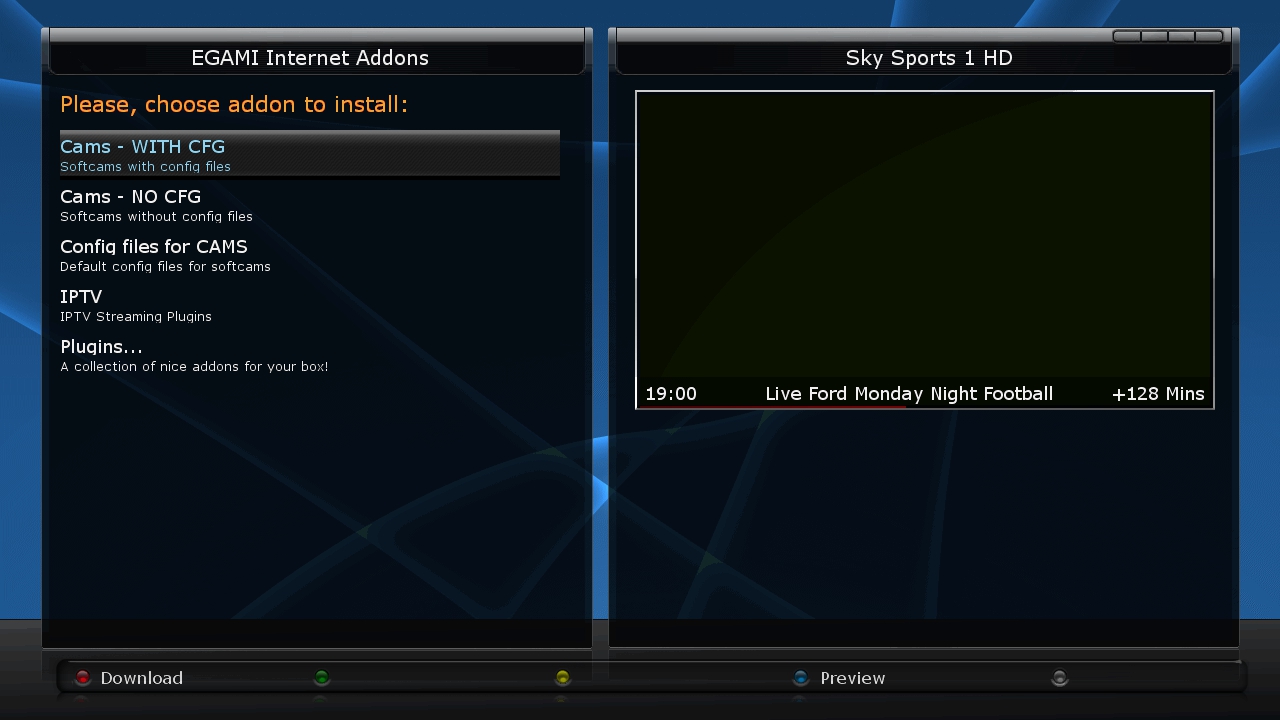
    Then you get to a selection of options, such as Cams, Cam configs, IPTV plugins and some other plugins. For this we select 'Cams - WITH CFG'


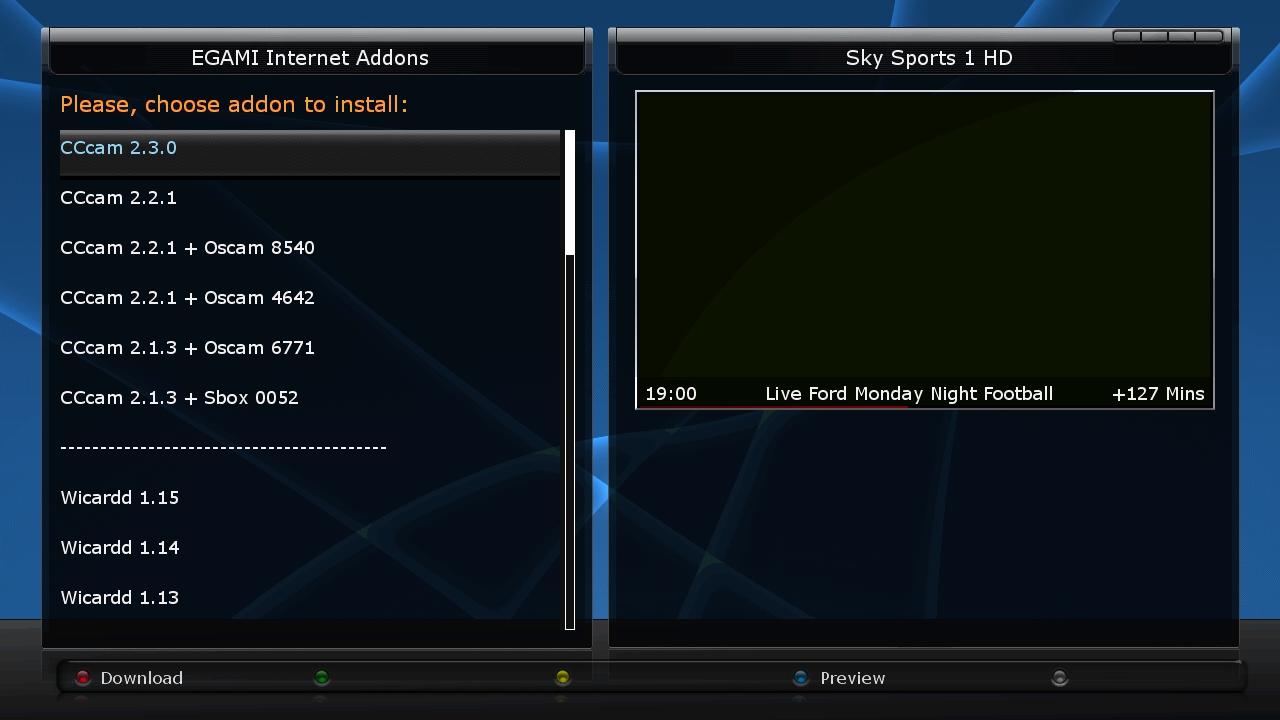
    As you can see, there are plenty here, also scroll down for the rest! - Just press the red button or 'OK' while the one you want is highlighted, confirm with a 'yes' and you have installed your chosen softcam.

    also I get the juddering on the HD sometimes, does anybody have auk supplier and list of the correct capacitors to buy if i decide to go down that route in the future (although so far so good on 1080p25hz


    If your box was modded by comet24uk (ebay) then it should already have the new capacitors, as far as I can see the juddering is there regardless of this as, and the 25hx 1080p is the workaround - not ideal as you get ghosting especially when you watch footie.


    I got a lot of crashes with hyperion on nand - but I managed to get it on to disk and boot from the disk. I am not using the NBOX now as I got fed up with the poor HD quality, and hopefully there will be a juddering fix eventually just like there has been for the amiko alien.

    maybe do a rescan and try again - you could always use a channel list editor to put them in the order you want but that is tedious and will take a while! Maybe a peculiarity of your particular recevier/image who knows!

    I need to sort out all the channels i.e for 28.2 , autobouquet , plugins and epg set up, unless someone has already started making a image for the masses , if not i`ll upload one when i`ve got one done.


    Thanks - but could you post an intro post as well please? - and jandial!
    Introductions
    Thanks!

    ok - when you are watching a channel - press the down button on your remote - when I say down button I mean the down button on the up down left right that surrounds the OK button. This will bring up the current bouquet list. Note at the bottom it tells you red for all, green for satellites, yellow for provider and blue for favourites. Your bouquet list if you have made one (either by creating your own, downloaded channel list or autobouquets) is the blue button. This is in the order that was sorted out by the settings on the autobouquets maker (usually in line with the provider channel numbering) or how it was organised by yourself or whoever made the bouquets. This generally will not be in alphabetical order as this is not how a provider would list channels. Now, rather than pressing the blue button for the favourites, you can press the red button, which will list your channels in alphabetical order - but the current channel will be highlighted - so if you are on sly sports it would be on 's' so you need to scroll to the beginning or press the '1' button on your remote. If you press the green button instead of the blue or red then you will get a list of scanned satellites - so if you have only scanned 28.2e this will be the only one there. - you will see 4 folders - current transponder, services, providers and new - select services, and you will get all the scanned satellites in alphabetical order - again with the current service highlighted so it might not start on a - as above - note that the numbers come before letters in the list.

    If you want an A to Z list then rather than accessing your channels through the favourites list (down button and blue) - press down and red button for all channels (which will be in 0-9-a-z) or down and green, then select the satellite (services) you want and again this will be presented 0-9-a-z

    Hi everyone who has tried this box is it anygood for streaming and multi sat please let me know im very intrested in one thanks


    They will probably do the job you are after - they are the same as the Openbox S6000HD - basically as pheonix said, although they are not pretending to be a Vu+ Solo, they fool the software that it is, so they are a bit controversial. If you do get one - make sure it is one that has a fan or it will give off a funny smell, like plastic burning! They are poor quality, like they could have come out of a xmas cracker... As an alternative - look at this one from our sponsor.
    Technomate TM-NANO-OE Enigma 2 Linux HD PVR Single Tuner Satellite Receiver

    Have you ever thought of streaming the sly channels through your home network? There is a plugin called 'remote channel stream converter' - If you have your sly card working on any E2 receiver, you can then use that plugin on another E2 receiver in your bedroom connected with wifi or homeplugs to the server receiver that the dish is connected to, and it will be able to see the bouquets of the server receiver as if it was from a satellite feed. Beware when looking in to this though, as soon the time will come where you can't use your card in a non sly receiver, but when that happens there is always the slingbox!


    Why not utilise the beauty of home networking!

    ok - seems as i thought it is 043800 - works in your Vu+ so is activated


    I have copied your configs you just posted and in red are where you need to add or change, and have deleted things you don't need - and try again


    because it is activated you don't need the au = sct in the oscam.user entry but it would be needed if you needed to do this so included it anyway!


    Not saying you can't use smargo reader, just I have never had one apart from the triple reader which didn't work properly in Oscam. As I said for help with your card configs please post in the correct section. This is the raspberry pi section.