

We don't have any support from dreambox, same as vuplus. If you get this contact, we are open to support dreambox devices.
Posts by sergiri
-
-

I don't know, but if hardware is identic, it must fit.
-

As a team, is there a project among your plans to share images for the Vu Plus Duo 4K SE device?
Not planned, vuplus is the only brand that has not helped us with support and samples, so we decided don't support more models of vuplus anymore. Last one was the Duo 4K.
-
OPENSPA 8.5.002
What is new
- New drivers:
- Gigablue Trio 4k Pro.
- update bt init script again, try to fix timing issue
- Qviart Lunix 4k, Qviart Lunix3 4k.
- Add kexec multiboot support.
- Octagon SF4008, Dinobot U5mini, Dinobot 4k+, Hitube 4K
- Add chkrootmb multiboot support.
- Mut@nt HD51.
- add support PVR descramble in standby, optimise ci.
- Update tailscale to 1.84.0
- Update rclone to 1.70.1
EPG (Electronic Program Guide)
- Automatic Event Search: Fixed crash when events have identical start and end times (minimum duration: 24 hours). Added option to delete the entire event list (long press RED button); short press deletes only the selected event.
- Timer Button Fix: Corrected issue where the GREEN button didn’t update to “Change Timer” when navigating the OpenSPA guide with an assigned timer.
- Timer Management Dialog: Now includes options to edit, enable/disable, delete, or go to the timer list. Also added to EPG Search (previously only allowed deletion).
- Cosmetic Fixes: Minor visual corrections in the “EPG Search” list.
- New Button Actions in EPG Views (Vertical, Graphical, Multi, InfoBarGraph, Simple):
- RED: IMDb Search (OpenSPA plugin, installable)
- YELLOW: Launch OpenSPA EPG Search
- BLUE: Launch OpenSPA Automatic Event Search See manual: New Button Functions
> Note: To access the EPG menu and switch between views, long-press the EPG button.
Channel List
- Fixed crash when rebooting after using the standard channel list via: Menu → Channel Selection Options → Standard Channel Selection.
- Added context menu to switch back to OpenSPA list if using the standard one. This option appears only if the standard list was selected from OpenSPA.
OpenSPA Recordings (Movie List)
- Added missing color button actions.
- If we access to “Internet Info” but plugin is not available, it now offers to install it.
- Fixed: “Disable OpenSPA Movie List” menu option.
- Fixed issue when playing and stopping/deleting a recording simultaneously (RED button).
Instant Recording Menu (REC Button)
- Fixed behavior when no event exists: Previously showed “Add recording (stop after current program)”; Now shows “No event info found – record (24 hours)” if no EPG cache.
Enigma – Recording Messages
- ServiceHisilicon active: Cannot record IPTV channels.
- ServiceApp active: Cannot record IPTV if ExtEplayer3 or GstPlayer is active.
- IPToSAT-synced satellite channel: Recording not possible; IPToSAT uses ServiceApp players.
- Client device using reserve tuner: Enigma will prompt to enter standby mode to allow recording.> Note: To record IPTV streams, use the Enigma ServiceMP3 player.
Enigma Standard Menu (Vertical)
- Fully functional now, with same actions as OpenSPA horizontal menu (except horizontal-specific ones).
- BLUE button: Access “OpenSPA Horizontal Menu” from vertical menu.
OpenSPA Options – Password Change
- Added detailed instructions and updated screen to hide data slider.
- GREEN button behavior fixed: If pressed after setting password, message actions now work correctly (stay or exit).
- Added descriptions for parameters requiring Enigma2 restart.
Customize Home Menu (Horizontal)
- The “Customize” menu is immutable (can’t be hidden).
- Always accessible to allow Home Menu personalization.
System Info
- Now displays the type of player in use.
spaQButton (Key Remapping)
TimeShift with Enigma (without OpenSPA plugin):
- Fixed dual action bug (play/pause icons flashing).
- TimeShift now starts independently depending on system used.
- Fixed crash when deleting a list item with YELLOW button and pressing it again with no item.
TimeShift
- OpenSPA TimeShift: Enabled by default if plugin is installed.
- Enigma TimeShift Settings:> Note: Enabling both “Auto-record” and “Start timeshift after X seconds” will record every channel change. Not recommended unless intentional.
Tuner Scan & Reception – Reserve Tuner Settings
- To import channels/EPG from server tuner, use this URL format: http://root:openspa@serverip:8001 Replace “openspa” with server password.
- For remote use (e.g., second home), replace IP with VPN or hostname.
- To decode from server (client installs nothing), enable: “Decode HTTP streams” in server’s Customize menu.
- Client tuners must be unconfigured.
- Security Tips:
- Enable “Require authentication for HTTP streams”
- Change default password if not on local network or using VPN.
- If server has tuner display, it will show tuner usage.
- Recommended: Enable client notifications to confirm successful channel import.
Enigma C++ Library
- Deprecated sigc++-2.0 removed. OpenSPA now uses sigc++-3.0 with C++20.
Kodi
- Kodi can now launch directly via remapped button (previously opened settings).
- Added missing menu: Menu → Receiver Settings → Kodi Configuration.
Foreca Weather
- Added missing translation.
ZeroTier
- Prevent crashes when server response is missing.
IPToSAT
- Can now copy/install binaries and camd control files. Useful for OSCam-based satellite/IPTV sync.
- satellites.xml updates now auto-load.
Backup/Restore
- Added missing color button actions (thanks @ujua).
Skins
- Fixed text clipping in Enigma Standard Menu for metrixJR and openSPA_JRLG HD-FHD.
- Fixed text clipping in “Settings” for estuaryHD.
- Minor fixes in OpenStarHD.
System Settings Backup (Software Management)
- Now includes camd binaries and control files if present. Backup runs after restore.
To report bugs : http://openspa.info/forums/reportes-de-fallos-en-openspa.265/
User : root
Pass : openspa

- Gigablue Trio 4k Pro.
-
Thanks for your interest and response..the Company no longer exists...
Has Dreambox disappeared? I didn't know.
-
Please...if possible add dreambox 900/920..
We only support brands with direct contact and communication. We did the only exception with vuplus, and we are not happy with them, so we won't support any new model from vuplus.
If you know some contact of dreambox, we can try to contact them.
-
OpenSPA 8.3.005
What is new
- New drivers :
- Gigablue Trio 4K Pro :
- Fix Wifi
- Update rclone to 1.65.2.
- Update tailscale to 1.60.1.
- Update gstreamer to 1.22.9.
- Update SABnzbd to 4.2.2.
- Fix deepsleep in Qviart Dual.
- Changes in network menu. Now the entry to network menu is shown directly in Setup menu. Apps or network services can be set or installed from network services entry inside network menu.
- New design of OscamInfo.
- Added in exteplayer3 set best video resolution & audio.
- Add Wireguard plugin to Ferguson Ariva and Vu+ Solo 4K boxes (this one not tested).
- Add option to update tailscale release and automatic load of auth key for Tailscale plugin.
- Fix Mytube search.
To report bugs : http://openspa.info/forums/reportes-de-fallos-en-openspa.265/
User : root
Pass : openspa

- Gigablue Trio 4K Pro :
-
PREVIOUS RELEASE OF OPENSPA 8.3, ONLY FOR INFO
Why 8.3? Because we decided to use OE 5.3 " Mickledore ", to be updated to last OE release.
IMPORTANT FOR JAMES DONKEY USERS : depending on OpenSPA installed release before update, flashonline may not work, so we recommend to install by USB.
What is new
- New drivers :
- Vuplus :
- Add wifirtl8192eu driver.
- Qviart Dual :
- TXT button issue(DUAL was blocked by the TXT button of RCU in live channel)
- OSD transperancy issue in 1080p skin
- AC3 audio passthrough
- fix issue lost audio when user switch AC3 audio from downmix to passthrough
- Octagon SF8008 :
- fixed atsc usb dongle issue
- fixed kernel lockup issue
- add avl62x1 tuner
- add 8822c USB BT
- Uclan Ustym 4K Pro :
- fix atsc usb tuner
- Gigablue Trio 4K Pro :
- Add bt audio support.
- fix atsc usb tuner issue
- New OE-Alliance Core 5.3
- Python 3.11.2
- Openssl 3.1.0
- Samba 4.15.13
- BusyBox v1.36.0
- Gstreamer 1.22.5
- ffmpeg 6.0
- Update Kodi to 20.2 Nexus
- Update rclone to 1.63.1.
- Update tailscale to 1.48.1.
- Update Zerotier to 1.12.1.
- Add FlashExpander in wizard for small flash boxes (flash 256 Mb o less).
- Add new screen for Plugin Manager.
- Extra Panel :
- SAT/TDT xml. Download always updated.
- Channel lists. Improve Jungle Team lists, last release always availabe from Github.
- Picon. Improve Jungle Team picons download, last release always availabe from Github.
- OnlineTV. Add new providers to create bookmarks (Plex TV, Xiaomi TV, TLC TV), fix list by country and OnlineTV list (list with channels included in Online TV module)
- spaQButton : Add action ScriptExecuter to assign buttons.
- Improve display of RAM use for Information module.
- Fix spaQButton crash when pressing Help.
- Add plugin IPtoSAT by norhap. You can find it in Extras menu, prior installation from OpenSPA Plugins.
- Remove RSS entry from OpenSPA menu.
- Adapt skins MetrixJR, OpenStarHD and BlackSPA to last e2 release.
- Add new LCD skins for LCD400.
- Fix issue with USB XBOX One Digital TV Tuner for Abcom receivers.
- Vuplus :
-
OpenSPA 8.3.002
What is new
- New drivers :
- Qviart Dual :
- update partition
- Update rclone to 1.64.0.
- Update tailscale to 1.48.2.
- Remove -x option in Wireguard.
- Add wlan drivers for small box.
- Remove IpToSat screens for Skin OpenStarHD.
- Fix Messagebox for MetrixJR and MetrixJRSD.
- Fix crash for language selection in Language Wizard.
- Fix tuner letter display in Wizard.
- Fix language selection screen for BlackSPA.
- Fix Openwebif terminal problem.
To report bugs : http://openspa.info/forums/rep…de-fallos-en-openspa.265/
User : root
Pass : openspa
- Qviart Dual :
-
Display More

First installation was done in Slot 11. Another installation was made in Slot 3. Got blue screen once again. New crashlog attached.
Can you send us a screenshot with all slots, it seems a crash analysing the slots, maybe the system doesn't like some name.
Thank you for your reply.
You are absolutely correct.
One of my installed Images, curiously enough,
is shown as None None None on the Multiboot Seletor.
I have already written about this about 2 weeks ago on this Forum:-
I have also reported this on the relative Forum.
After seeing your reply, I just hid that Image name and Openspa Multiboot
Selector works outright. Thanks for your help.
Yes, this is the problem, this image is taken by the system as None.
-
 Display More
First installation was done in Slot 11. Another installation was made in Slot 3. Got blue screen once again. New crashlog attached.
Can you send us a screenshot with all slots, it seems a crash analysing the slots, maybe the system doesn't like some name.
Hello sergiri
May I ask why you don't create the image for Vuduo4kse
is it a commercial choice or something else
I would be grateful of an answer
It's a team decission seeing the support and help from vuplus to other teams not like blackhole and VTI (nowadays not support BlackHole too). Other brands give support trough developer contact and give you a sample box to make tests, Vuplus not, and they are the only ones. So, after the vuplus duo 4k we decided to finish vuplus support to new models.
-
First installation was done in Slot 11. Another installation was made in Slot 3. Got blue screen once again. New crashlog attached.
Can you send us a screenshot with all slots, it seems a crash analysing the slots, maybe the system doesn't like some name.
-
Can they fix the Multiboot Selector on Octagon sf8008?
What's your problem with Multiboot selector? Can you explain?
-
OpenSPA 8.0.003

IMPORTANT FOR MAXYTEC MULTIBOX, MUTANT HD60 AND DEFINESAT (OCTAGON SF8008(m), GIGABLUE TRIO 4K AND UCLAN USTYM 4K PRO) BOXES : UPDATE ONLY BY USB WITH RECOVERY FILE TO UPDATE RECOVERY
What is new
- New drivers :
- Zgemma H8
- add skins1080 support
- rename usb image to recovery_usb
- Mut@nt HD60
- update recovery to version 359
- hisi update recovery fastboot and bootargs to the last version for Android
- Maxytec Multibox
- avl blindscan detection fix
- hisi update recovery fastboot and bootargs to the last version for Android
- Qviart Dual
- No. 1 : Time Jumps with key 9 takes 10 seconds for the picture and sound to be in sync.
- No. 49 : WHEN PLAYING A RECORDING: Jumps in time are no longer possible at all
- No. 65 : PLAYING A RECORDING FILE WITH E2PLAYER: if you have rewound in a recording or jumped in time, the sound and the picture are out of sync for a very long time (6-10 seconds, longer than other HISI boxes)
- update dvb-s snr info
- Uclan Ustym 4K pro
- add new demod avl6261 driver
- fixed a multistream channel unlock issue on AVL62X1
- linux update module space fix and new emmc
- Octagon SF8008 y SF8008m
- linux update module space fix and new emmc
- Fix Crash issue
- Fix Reboot issue
- Fix for FULL HD skin issues
- Fix Low Symbolrate unlock issue
- Fix for no Video after first boot
- Change PAGE+/- to CH+/- for rcu 03/05
- Change PAGE+/- to CH+/- buttons on RCU (SF and SX RCU)
- Gigablue Trio 4k
- linux update module space fix and new emmc
- fix reboot issue
- New support for Octagon SFX6008, SFX6018 and SX988 4K.
- Add Tailscale stable v. 1.34.1.
- Update zerotier to 1.10.2.
- Update rclone to 1.60.1.
- Add customization plugin for skin OpenSPA_JRLG.
- Add kodi for Qviart Dual.
- Fix full backup for Zgemma H8.
- Add setting date and time options for displays VFD such as Mut@nt HD51 one.
- Fix TimeSleep for Youtube plugin
- Improve and add screens for BlackSPA, OpenStarHD, OpenPlusHD and OpenSPA_JRLG skins.
- Add Basic_retro HD Skin.
- SinriConnect startup improvements
- Update multiboot and flashonline.
- New Bootlogo, thanks to EL_LARA
User : root
Pass : openspa
- Zgemma H8
-
OpenSPA 8.0.002
What is new
- New drivers :
- Qviart Dual:
- add multiboot recovery menu
- Add Tailscale stable v.1.30.2.
- Add Tailscale plugin. See manual at https://openspa.info/threads/manual-tailscale.57412/
- Add skins EstuaryHD and OpenPlusHD.
- Update zerotier to 1.10.1.
- Update rclone to 1.59.2.
- Update Hdmi-Cec.
- Improve achieved information from crashlog.
- Add Wireguard support for Vu+ Solo Se and Vu+ Duo2.
- Fix crash when go to Zerotier users.
- Fix crash when accessing to information of storage management.
- Fix error in aemet wind and humidity values.
- Fix downloading of picons from Panel Extra and add Jungle-Team picons.
- Fix vQuadMenu translations.
- Fix enigmalight.
- Add date and hour setting options for VFD displays such as Solo2 one.
- Fix crash when select default EPG.
- Fix flashonline.
- Fix multiboot for boxes which support it.
- Fix flashonline screen for MetrixJR skins.
- Fix blackmodern infobar for BlackSPA skin
- Fix CAM download for Zgemma H11S and H8.2H.
- Fix wifi adapter error for Ferguson Ariva ATV boxes and remove Wireguard support.
- New option at EPG download to disable enigmalight for downloading from standby.
- SinriConnect: Add more setting for inputs and add settings for HDMI1 to HDMI10 entries as well.
- New Bootlogo, thanks to @villak
To report bugs : http://openspa.info/forums/rep…de-fallos-en-openspa.265/
User : root
Pass : openspa
- Qviart Dual:
-
Hi all, we are glad to introduce SinriConnect plugin by OpenSPA. Through this plugin we can control our receiver with our voice using Amazon Alexa or Google Home assistant. It is based on the Sinric Pro server.
SINRIC PRO
This website allows us to create devices that can be controlled by Alexa or Google Home. It has all the integration with Alexa and Google done and has an API to receive the information. In addition, the account is free and allows us to have 3 devices according to the registration page, but I get 5. If we want more devices we must pay $3 a year for each extra device.
To start, we must go to their page https://sinric.pro and register. In the registry we only have to put our name, email, password, language and time zone.
Once we login with our email and password, we will find a menu on the left side that allows us to do several things, create scenes with our devices, see our credentials, create rooms, etc. The one we are interested in is Devices.
Once in Devices, we can find the button “Add Device”.
By clicking on the button, the device creation screen will be shown.
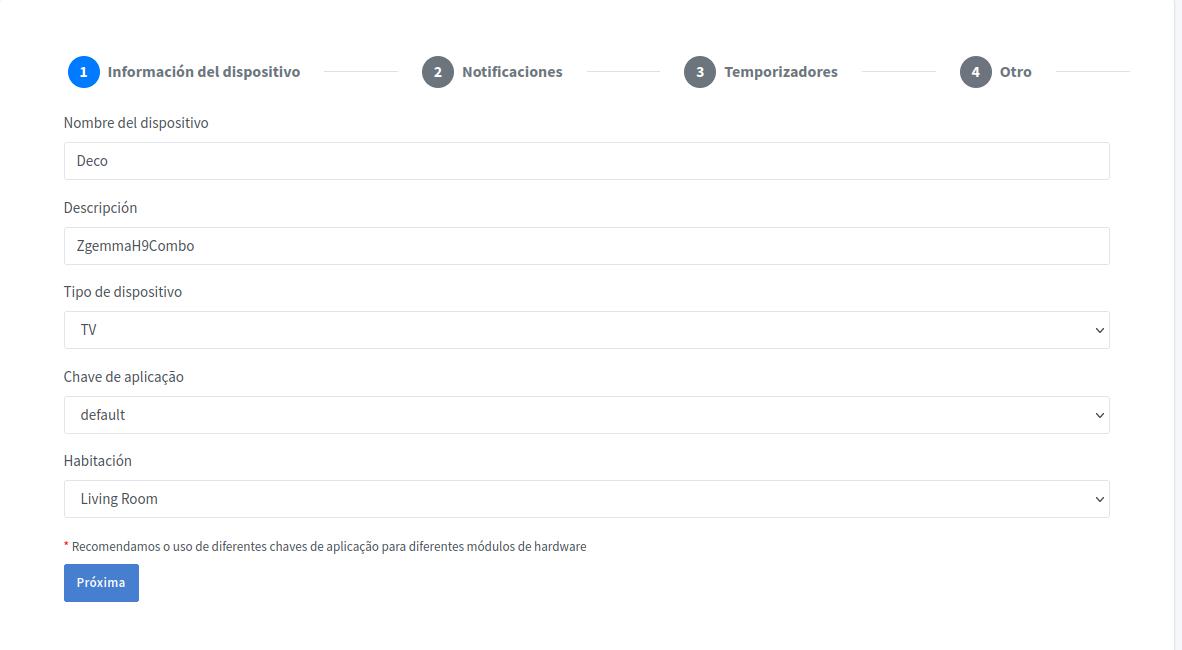
We must fill :
- In Device Name, the name by which we will call it in Alexa or Google Home
- In Description, what we want to know about the device.
- In type of device, select TV
The rest of the information can be left as default. By clicking Next, we go to other screens with Notifications, Timings and others that I have left with default values, all disabled. When finished a screen will appear with the codes we need.
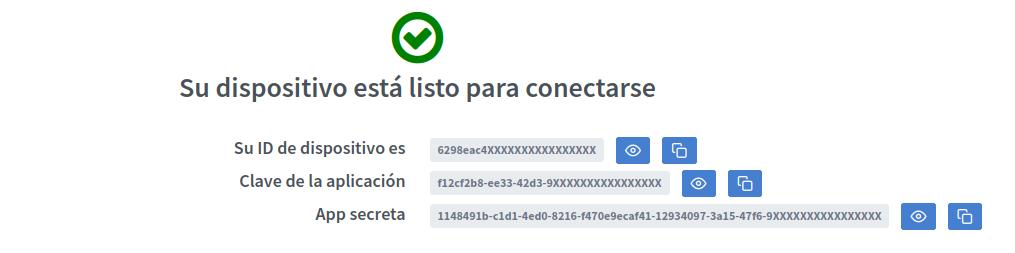
The codes are not complete, but as you can see, there are two buttons to their right, clicking on the one on the right you can copy the complete code to the clipboard.
Now we need to go to the receiver and edit the /etc/keys/sinric.keys file, which you can find once the plugin is installed and we will see the following inside:
APP_KEY=
APP_SECRET=
TV_ID=
We only have to put to the right of each symbol = the code that corresponds to it, the APP_KEY would be the Application Key, the APP_SECRET the application secret and the TV_ID the device ID.
The ID of each device can also be seen on the Devices page, it appears just below the name of each one and the other two codes on the credentials page.
SINRICONNECT
If you have entered the codes correctly, you could now execute the plugin and you will find the configuration page.
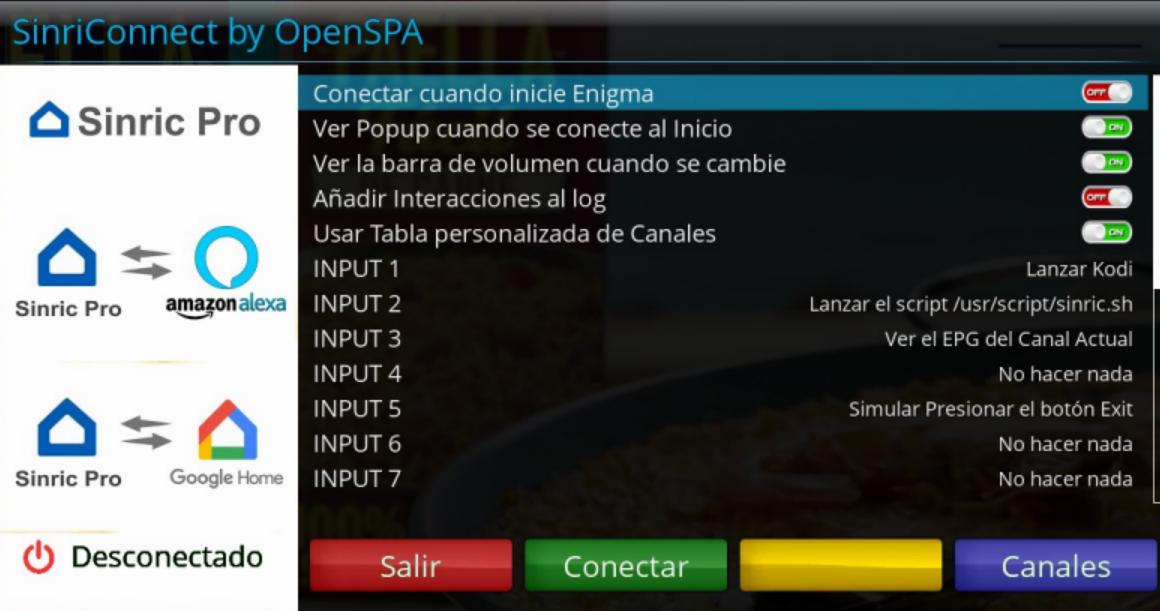
The first option connects automatically Sinric Pro when enigma2 starts. If you leave this option to OFF, you should enter the plugin to connect manually with the green button. On the lower left side of the screen you can see Disconnected, but it will change to Connected when push the green button and connect to the server.
When connecting at startup we can get a popup saying that it has been connected if we enable the second option.
Likewise, we can set whether or not the volume bar comes out when we change the volume through Alexa or Google Home.
The option to Add Interactions to the log is used for have a log with the information that the Sinric Pro server receives from Alexa or from the receiver.
The custom channel table is used because there are channels that Sinric Pro does not have and, therefore, does not recognize or interprets them as a number. For example, if we tell it to zap to channel four, it does not interpret it as a channel named four, but as channel number 4, if you have the channel on that number there is no problem, but if it is on another, yes. This list that we will see later is configured with the blue button.
Finally, there is a list of INPUTS from 1 to 10. Since you can't ask for custom things, only what Sinric Pro has set for TV, we thought of using the INPUTS to do something else that we use and that is configurable. For example, on the screen you will see that I have set INPUT 1 to launch Kodi, so if I tell Alexa to put INPUT 1 on the receiver, Kodi will start for me.
CHANNELS
By clicking on the blue button on the main screen we access the configuration of the customized channel table. It is a correspondence between a channel number that we are going to tell Alexa to zap and the channel to zap.
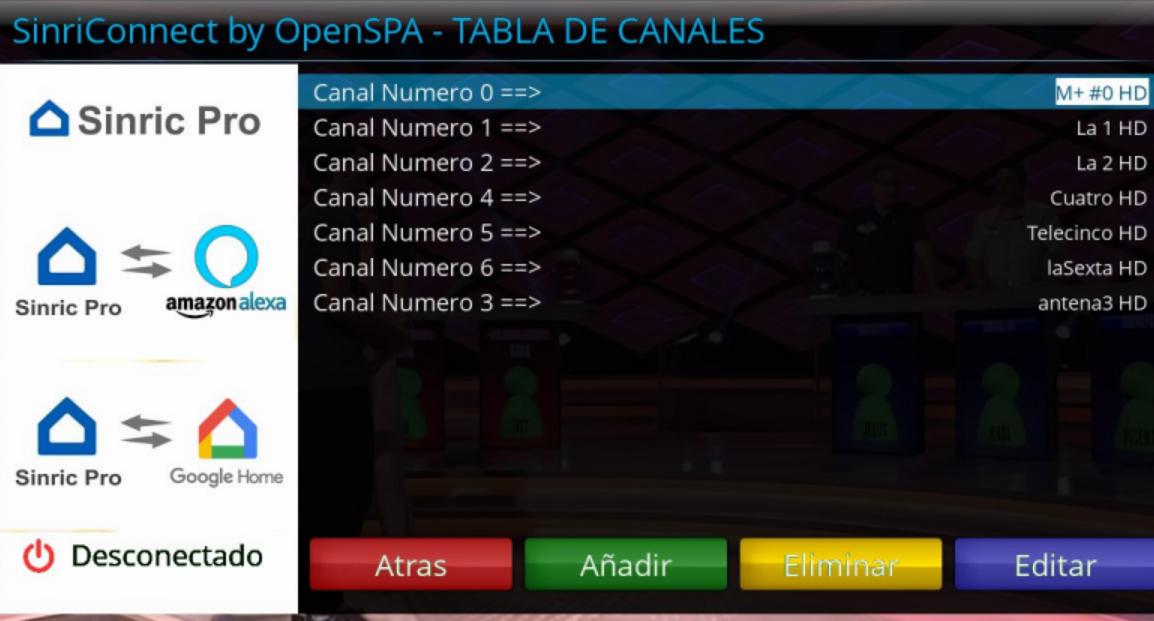
As you will see, I have put the M+ #0 channel in number 0 since it is not recognized by Sinric Pro and then I have put the basic DTT channels. It isn’t necessary to be in order. For example, LaLiga channel is recognized, but not LaLiga 1, LaLiga 2, etc. So that, I could add, for example, number 101 for LaLiga 1, number 102 for LaLiga 2 or whatever you want without enter all the previous numbers.
With the blue button we can edit the selected one, with the yellow one delete it and with the green one add a new one. On the editing or adding screen we have the following:
In the first option we will set the channel number and in the second one, pressing the ok key, we will access to the favorites list to look for the channel.
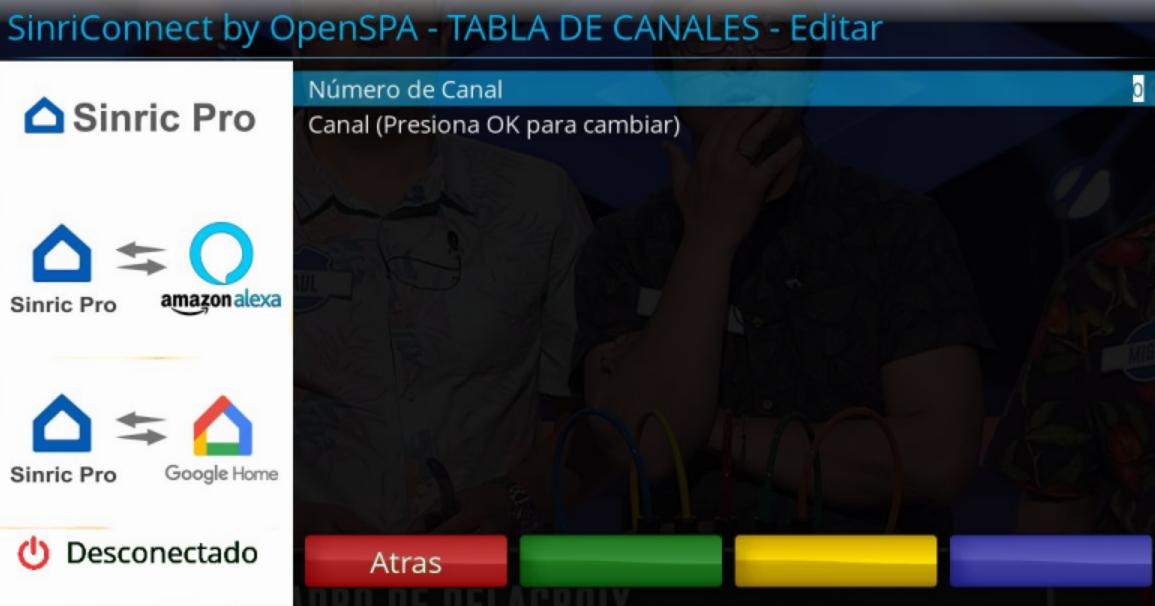
IMPORTANT: The channels must be in favorites lists, both to ask for it by name and by number.
Alexa Integration
To integrate it with Alexa we must open the Alexa app on the smartphone, go to Skill and games and look for the Sinric Pro skill, once selected click Activate. It will ask us to enter the email and password of the Sinric Pro account that we created and then it will start searching for devices. Probably, when finished the app says that it has not found devices, but if we check in devices, we should have it already added.
Integration with Google Home
In the case of Google Home, we go to the smartphone app, select Settings at the top and then in the list that appears, at the bottom we select Works with Google. In the list that appears, we look for Sinric Pro and follow the instructions to log in with our Sinric Pro account and it will add the device to the room that we have put in Sinric Pro (later it can be changed in the Google app).
What can we ask Alexa?
Assuming that we have named it Deco we can do the following:
- Alexa, turn on the Deco
- Alexa, turn off the Deco
- Alexa, increase the volume on the Deco
- Alexa, decrease the volume on the Deco
- Alexa, put the volume at 80 on the Deco (it would be at 80% of the total)
- Alexa, mute the Deco
- Alexa, enable the sound on the Deco
- Alexa, put Movistar Action on the Deco
- Alexa, put channel 25 on the Deco
- Alexa, put the next channel on Deco
- Alexa, put the previous channel on Deco
- Alexa, put Input 1 on Deco
In video playback:
- Alexa, pause the Deco
- Alexa, play on the Deco
- Alexa, rewind the video on the Deco
- Alexa, advance the video on the Deco
- Alexa, stop the video on
-
Hi all, we are glad to introduce SinriConnect plugin by OpenSPA. Through this plugin we can control our receiver with our voice using Amazon Alexa or Google Home assistant. It is based on the Sinric Pro server.
SINRIC PRO
This website allows us to create devices that can be controlled by Alexa or Google Home. It has all the integration with Alexa and Google done and has an API to receive the information. In addition, the account is free and allows us to have 3 devices according to the registration page, but I get 5. If we want more devices we must pay $3 a year for each extra device.
To start, we must go to their page https://sinric.pro and register. In the registry we only have to put our name, email, password, language and time zone.
Once we login with our email and password, we will find a menu on the left side that allows us to do several things, create scenes with our devices, see our credentials, create rooms, etc. The one we are interested in is Devices.
Once in Devices, we can find the button “Add Device”.
By clicking on the button, the device creation screen will be shown.
We must fill :
- In Device Name, the name by which we will call it in Alexa or Google Home
- In Description, what we want to know about the device.
- In type of device, select TV
The rest of the information can be left as default. By clicking Next, we go to other screens with Notifications, Timings and others that I have left with default values, all disabled. When finished a screen will appear with the codes we need.
The codes are not complete, but as you can see, there are two buttons to their right, clicking on the one on the right you can copy the complete code to the clipboard.
Now we need to go to the receiver and edit the /etc/keys/sinric.keys file, which you can find once the plugin is installed and we will see the following inside:
APP_KEY=
APP_SECRET=
TV_ID=
We only have to put to the right of each symbol = the code that corresponds to it, the APP_KEY would be the Application Key, the APP_SECRET the application secret and the TV_ID the device ID.
The ID of each device can also be seen on the Devices page, it appears just below the name of each one and the other two codes on the credentials page.
SINRICONNECT
If you have entered the codes correctly, you could now execute the plugin and you will find the configuration page.
The first option connects automatically Sinric Pro when enigma2 starts. If you leave this option to OFF, you should enter the plugin to connect manually with the green button. On the lower left side of the screen you can see Disconnected, but it will change to Connected when push the green button and connect to the server.
When connecting at startup we can get a popup saying that it has been connected if we enable the second option.
Likewise, we can set whether or not the volume bar comes out when we change the volume through Alexa or Google Home.
The option to Add Interactions to the log is used for have a log with the information that the Sinric Pro server receives from Alexa or from the receiver.
The custom channel table is used because there are channels that Sinric Pro does not have and, therefore, does not recognize or interprets them as a number. For example, if we tell it to zap to channel four, it does not interpret it as a channel named four, but as channel number 4, if you have the channel on that number there is no problem, but if it is on another, yes. This list that we will see later is configured with the blue button.
Finally, there is a list of INPUTS from 1 to 10. Since you can't ask for custom things, only what Sinric Pro has set for TV, we thought of using the INPUTS to do something else that we use and that is configurable. For example, on the screen you will see that I have set INPUT 1 to launch Kodi, so if I tell Alexa to put INPUT 1 on the receiver, Kodi will start for me.
CHANNELS
By clicking on the blue button on the main screen we access the configuration of the customized channel table. It is a correspondence between a channel number that we are going to tell Alexa to zap and the channel to zap.
As you will see, I have put the M+ #0 channel in number 0 since it is not recognized by Sinric Pro and then I have put the basic DTT channels. It isn’t necessary to be in order. For example, LaLiga channel is recognized, but not LaLiga 1, LaLiga 2, etc. So that, I could add, for example, number 101 for LaLiga 1, number 102 for LaLiga 2 or whatever you want without enter all the previous numbers.
With the blue button we can edit the selected one, with the yellow one delete it and with the green one add a new one. On the editing or adding screen we have the following:
In the first option we will set the channel number and in the second one, pressing the ok key, we will access to the favorites list to look for the channel.
IMPORTANT: The channels must be in favorites lists, both to ask for it by name and by number.
Alexa Integration
To integrate it with Alexa we must open the Alexa app on the smartphone, go to Skill and games and look for the Sinric Pro skill, once selected click Activate. It will ask us to enter the email and password of the Sinric Pro account that we created and then it will start searching for devices. Probably, when finished the app says that it has not found devices, but if we check in devices, we should have it already added.
Integration with Google Home
In the case of Google Home, we go to the smartphone app, select Settings at the top and then in the list that appears, at the bottom we select Works with Google. In the list that appears, we look for Sinric Pro and follow the instructions to log in with our Sinric Pro account and it will add the device to the room that we have put in Sinric Pro (later it can be changed in the Google app).
What can we ask Alexa?
Assuming that we have named it Deco we can do the following:
- Alexa, turn on the Deco
- Alexa, turn off the Deco
- Alexa, increase the volume on the Deco
- Alexa, decrease the volume on the Deco
- Alexa, put the volume at 80 on the Deco (it would be at 80% of the total)
- Alexa, mute the Deco
- Alexa, enable the sound on the Deco
- Alexa, put Movistar Action on the Deco
- Alexa, put channel 25 on the Deco
- Alexa, put the next channel on Deco
- Alexa, put the previous channel on Deco
- Alexa, put Input 1 on Deco
In video playback:
- Alexa, pause the Deco
- Alexa, play on the Deco
- Alexa, rewind the video on the Deco
- Alexa, advance the video on the Deco
- Alexa, stop the video on
-

Is vu uno4k supported for wireguard? I would like to try wireguard via my VPN provider. Thanks
Yes, you can try with last releases.
-
We are working on it, but at the moment python 2.
I love trying out new image versions so you can suggest a time for a new release? Are we talking about weeks or months.

We normally release new version every month o 2 months maximum. Last release was posted before Christmas, so I hope new one doesn't take too long to be public.
Now, working hard in py3 builds, so next py2 releases are not coming with big changes.
-
We are working on it, but at the moment python 2.


