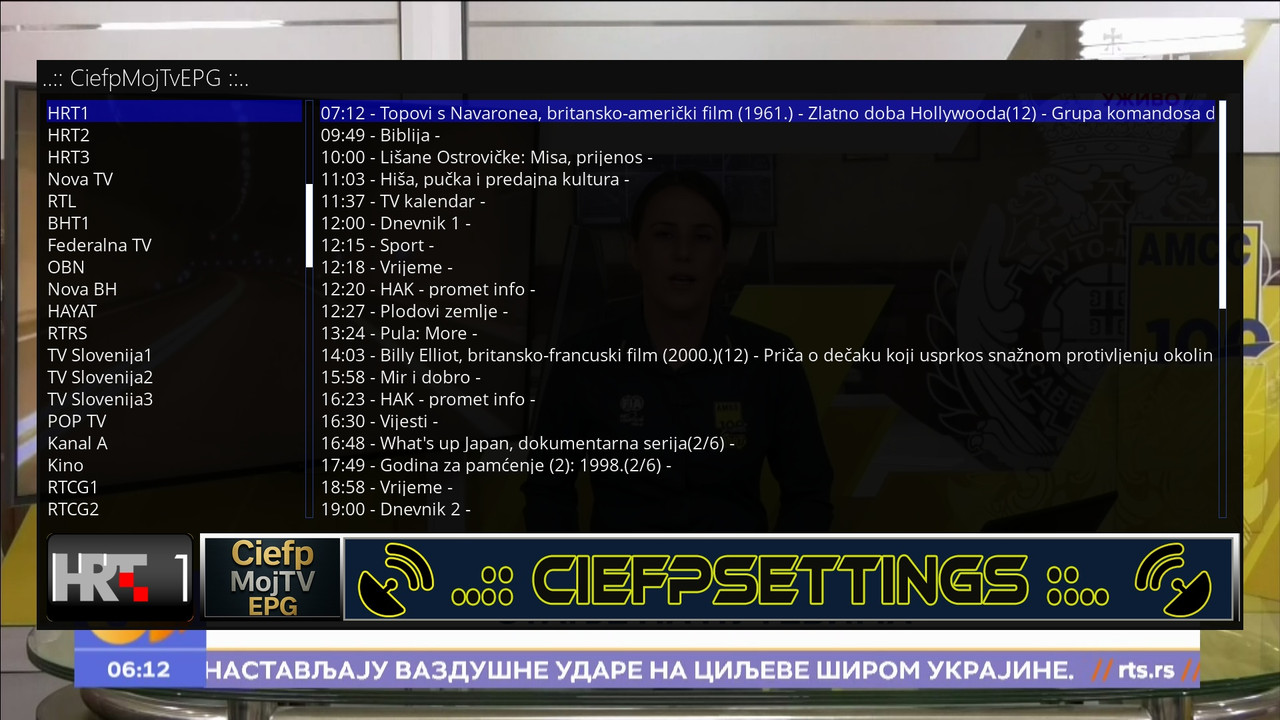
CiefpMojTvEPG (version 1.0)
CiefpMojTvEPG is an Enigma2 plugin that enables the display of an electronic program guide (EPG)
for a large number of TV channels using data from the MojTV website.
The plugin retrieves and displays information about the TV program, including broadcast time, show title and description, along with channel logos.
Supports regional channels (RTS, HRT, Nova, Pink, etc.) and international channels such as HBO, Cinemax and Discovery.
Usage:
Installation: Install the plugin on your Enigma2 device and check if the python3-requests package is installed.
Launch: Find the plugin in the plugins menu (Plugin Browser) and launch it.
Navigation:
Channel list: On the left side of the screen, select a channel using the up/down keys.
EPG data: On the right side, the program for the selected channel (time, title, description) is displayed.
Switch focus: Press "OK" to switch between the channel list and the EPG list.
Exit: Press "Cancel" to exit the plugin.
Logos: The plugin automatically retrieves channel logos and displays them at the bottom of the screen. If the logo is not available, a placeholder icon is used.
Caching: EPG data is cached in /tmp/CiefpMojTvEPG for faster access (refreshed every hour).
Note:
An internet connection is required for proper operation. If an error occurs, check the log file in /tmp/ciefp_mojtv_epg.log.
..:: CiefpSettings ::..