


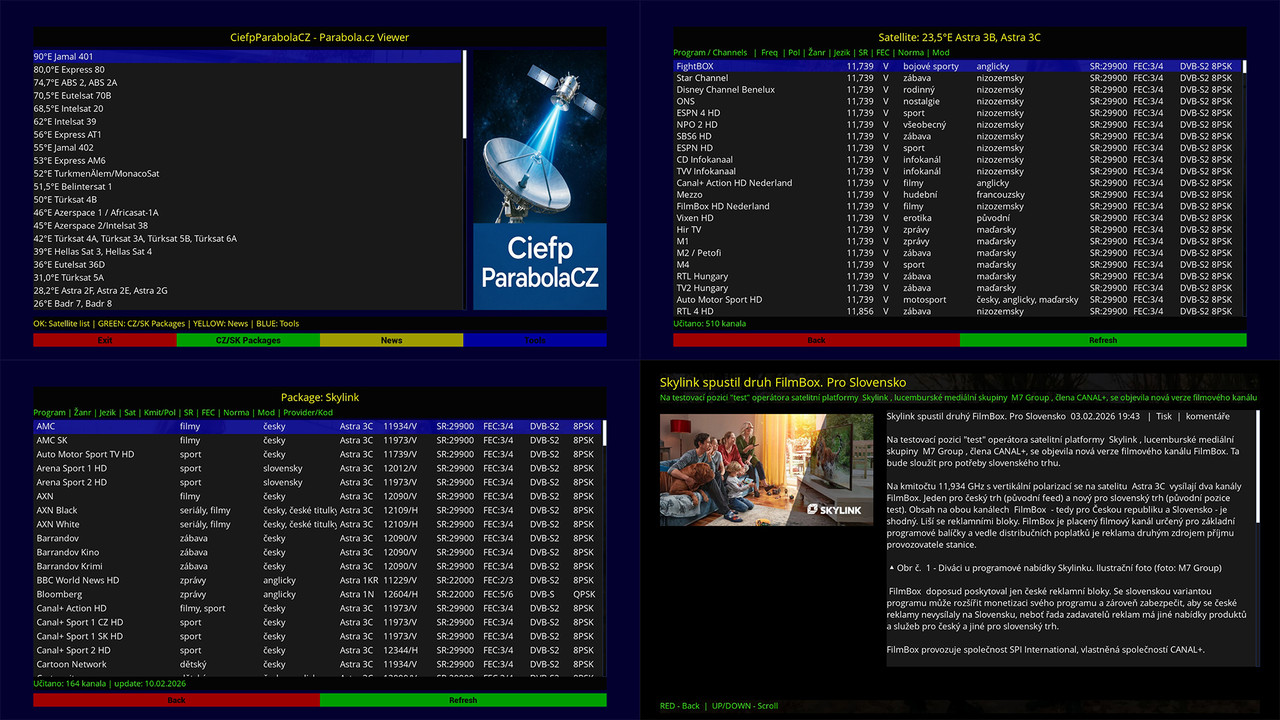
📦 CiefpParabolaCZ – Version 1.0
🛰 Parabola.cz Viewer for Enigma2 (FullHD Edition)
Version 1.0 introduces a fully redesigned and functional viewer for content
from Parabola.cz, optimized for FullHD Enigma2 environments.
🔹 Main Features
📰 News Module
- Latest articles (Články)
- Zprávičky section
- Automatic HTML parsing and content cleaning
- FullHD detail screen (1920×1080)
- Article cover image support (og:image / first image)
- Meta information line (date, category, tags)
- Scroll support (UP/DOWN)
- Stable loading without UI freezing
- Automatic removal of duplicated titles in article text
📡 Satellite & Channel Module
- Satellite list
- Channel list per satellite
- Technical parameters display:
Frequency
Polarization
SR
FEC
Standard
Modulation
Language
Genre
Loaded channel counter
Page navigation support
🎨 FullHD Redesign
- Fully optimized 1920×1080 skin
- Dark theme for improved readability
- Clearly separated header, meta, content, and footer sections
- Consistent color scheme
- Improved layout balance between image and text
- Optimized and stable content rendering
⚙ Technical Improvements
- Updated parser compatible with the current parabola.cz structure
- Layout fallback mechanisms
- Safe image handling (ePicLoad)
- Fixed navigation between list and detail screens
- Resolved crash issues
🚀 Status
Version 1.0 represents a stable and fully functional release featuring complete
News and Satellite modules, ready for daily use.
🔜 Planned for Version 1.1
🌍 Multi-language News Translation
AI-based translation integration (API key support)
Target language selection
API key input or load from file (e.g., groq_apikey.txt)
Local translation cache for faster access
Additional performance and stability optimizations
..::CiefpSettings ::..


-
Version 1.1
- ciefp
- 10.5 kB
- 48 Downloads
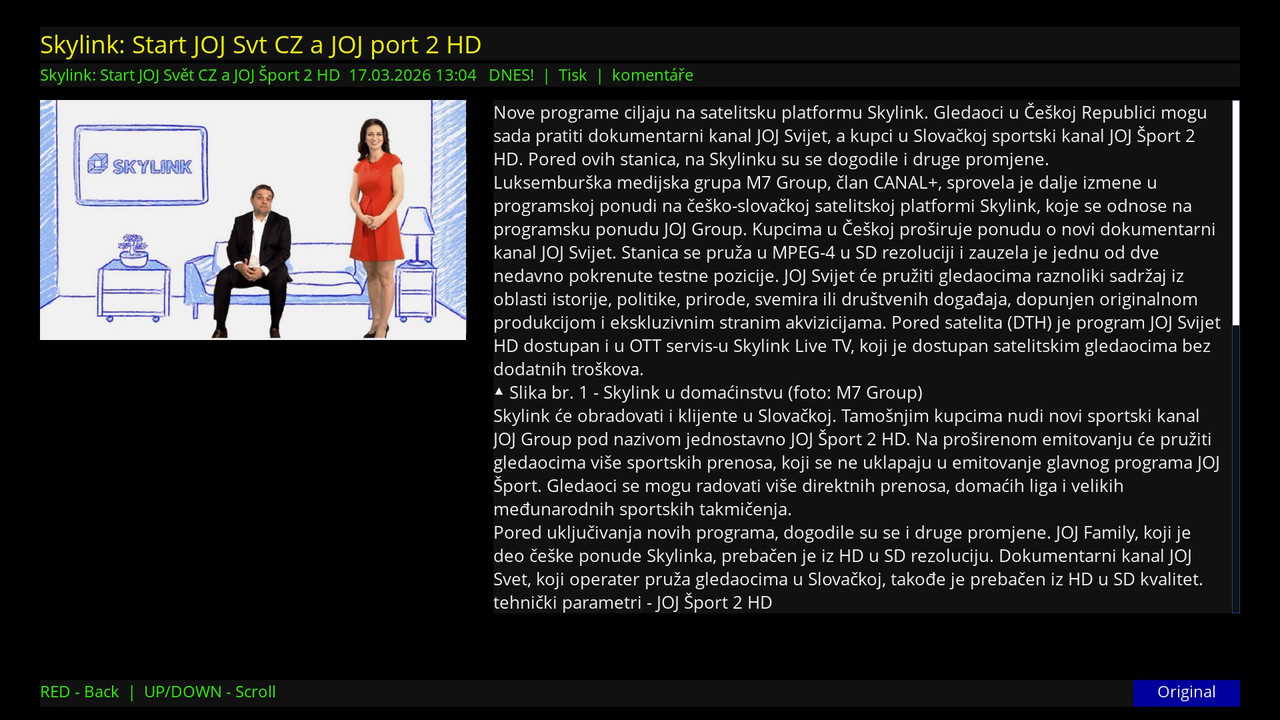
🚀 CiefpParabolaCZ - Version 1.1
📋 Description of changes
1. News translation (NEW!)
Added the ability to translate Czech news into multiple languages
Integrated Groq API for fast and high-quality translation
Supported models: llama-3.3-70b-versatile (recommended)
2. Supported languages for translation
Serbian, Croatian, Slovenian, Macedonian, Slovak
English, German, French, Italian, Spanish
Russian, Hungarian, Romanian, Bulgarian, Greek, Arabic
3. Translation settings
Tools menu → "Translation Settings" (blue button in the main menu)
News list screen → blue "Translate" button for quick settings
- Ability to enter Groq API key
- Selection of the desired language for translation
- Connection testing
- Deleting API key
4. Interface improvements
API key status indicator on the blue button
"Set API key" if the key is not set
"Translate set" if the key is set
Translated texts in news_detail screen
Possibility to switch original/translation with blue button
5. Technical improvements
Automatically load API key on startup
Save settings in /etc/enigma2/
Fixed connection testing
Fixed UnboundLocalError issues
Debug logs for easier tracking
🔑 Groq API Key Guide
📍 File Locations
File Path Contents
API Key--------/etc/enigma2/ciefp_translate.conf....Only API key (e.g. gsk_abc123...)
Selected language---/etc/enigma2/ciefp_language.conf.....Two-letter language code (e.g. sr, en, de)
📝 File format
ciefp_translate.conf (API key)
text
gsk_abcdefghijklmnopqrstuvwxyz123456
Only one line.No spaces.No quotes
ciefp_language.conf (Language)
text
sr
Only two-letter code
Supported codes: sr, hr, sl, mk, sk, en, de, fr, it, es, ru, hu, ro, bg, el, ar
🚀 How to get an API key
Open console.groq.com
Register (or log in)
Go to API Keys page
Click "+ Create API Key"
Give a name (e.g. "Ciefp Plugin")
Copy key (starts with gsk_)
Enter into plugin through menu or manually create file
💡 Using in plugin
Option 1: Via menu (recommended)
Run CiefpParabolaCZ plugin
Press blue button (Tools)
Select "Translation Settings"
Select "Enter Groq API key"
Enter key
Select "Choose a language for translation"
Select desired language
Test with "Test connection"
Option 2: Manually create files (telnet/SSH)
bash
# For API key (replace with your key)
echo "gsk_your_real_api_key" > /etc/enigma2/ciefp_translate.conf
# For Serbian language
echo "sr" > /etc/enigma2/ciefp_language.conf
# For English language
echo "en" > /etc/enigma2/ciefp_language.conf
# Check
ls -la /etc/enigma2/ciefp_*.conf
cat /etc/enigma2/ciefp_translate.conf
cat /etc/enigma2/ciefp_language.conf
⚡ Using translation
Open News → Zprávičky (or Články)
Open any news
Press the blue button to translate
The text is automatically translated into the selected language
Pressing the blue button again will return you to the original
Version 1.1 - March 2026.
-
Version 1.0
- ciefp
- 4.33 kB
- 52 Downloads

K Mm
There is no Polish language in the plugin translation. Please correct it.