
.
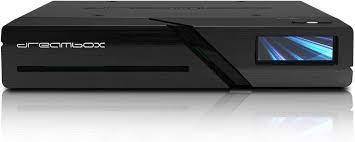
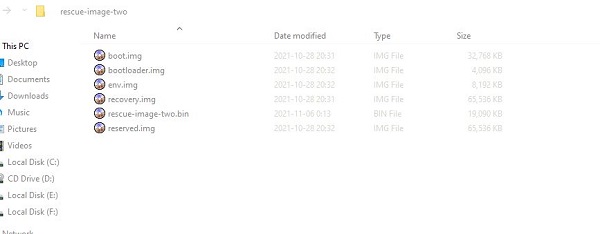
Bootloader restore sadece Dreambox Two (red led)
-
- Bootloaders
- hatak1971
- Thread is marked as Resolved.
There are 85 replies in this Thread which was already clicked 23,065 times. The last Post () by BigBoss1980.
-
-
Online Recovery
Code
Display More[*] legacy [*] Remounting '/dev/dreambox-data' to '/data' [*] Downloading 'http://dreamboxupdate.com/download/recovery/two/release/recovery.sig' % Total % Received % Xferd Average Speed Time Time Time Current Dload Upload Total Spent Left Speed 0 0 0 0 0 0 0 0 --:--:-- --:--:-- --:--:-- 0 100 169 100 169 0 0 446 0 --:--:-- --:--:-- --:--:-- 453 [*] Downloading 'http://dreamboxupdate.com/download/recovery/two/release/recovery' % Total % Received % Xferd Average Speed Time Time Time Current Dload Upload Total Spent Left Speed 0 0 0 0 0 0 0 0 --:--:-- --:--:-- --:--:-- 0 100 169 100 169 0 0 452 0 --:--:-- --:--:-- --:--:-- 459 [*] Verifying signature of 'recovery' gpgv: no valid OpenPGP data found. gpgv: the signature could not be verified. Please remember that the signature file (.sig or .asc) should be the first file given on the command line. Fatal: Failed to verify signature -
Where can I find a similar rescue procedure for Dreambox One? Only the red LED is blinking, no recovery mode.
-
Connect with the Rescue Loaders
The Rescue Loader can be activated with different procedures
A DHCP server is required in the network
If you see the Enigma2 web interface, instead of the Rescue Loader, delete the browser cache ( e.g. with Ctrl+F5 )
Switch on Dreambox One using the power switch on the back.
When the LED lights up red, place your finger on the power button and hold it down.
The LED starts to pulsate in different colors, if it lights up solid red the box is in Resuce mode.
Trying several times if it doesn't work straight away is a bit tricky.
The display of the Dreambox or the TV now shows the address through which the Rescue Loader can be reached.
Enter the address in your web browser (e.g. Firefox), e.g.: http://dreamone
-
Display More
Connect with the Rescue Loaders
The Rescue Loader can be activated with different procedures
A DHCP server is required in the network
If you see the Enigma2 web interface, instead of the Rescue Loader, delete the browser cache ( e.g. with Ctrl+F5 )
Switch on Dreambox One using the power switch on the back.
When the LED lights up red, place your finger on the power button and hold it down.
The LED starts to pulsate in different colors, if it lights up solid red the box is in Resuce mode.
Trying several times if it doesn't work straight away is a bit tricky.
The display of the Dreambox or the TV now shows the address through which the Rescue Loader can be reached.
Enter the address in your web browser (e.g. Firefox), e.g.: http://dreamone
i have problem with bootloader on my dreambox one. When i turn on my dreambox the red light is blinking and my dreambox is not booting and i can't go to the rescue mode, i get no output from putty. Cable and drivers to serial port are ok, because i was testing it on my dreambox 900 and there it is working ok. So i found on this forum original bootloader for dreambox one i burned it on the sdcard and my dreambox started booting (also i get the bootlog from putty), i'm able to go into rescue mode and i can flash new image. I thought after flashing new image everything goes back to the normal but, when i flash new image my dreambox is only booting and working when i have sdcard inside, When i remove sdcard from dreambox and then restart it the blinking red light comes back and can't boot to the firmware. How can i flash bootloader to the dreambox so it can work without bootloader on sdcard?
-
Hello friends, can you tell me how to solve the red light?
-
Is there an updated recovery file?
-
-
This file is not the same as the one in the first message and the installation commands are different, I honestly cannot understand it.
-
rescue-sdimage-dreamtwo-20230503213944.img.gz
Hello friends, can you tell me how to solve the red light?
Hold button, till you can read GO.
release button.
Dreambox showing an ip an LED flashing blue.
Just open a Webbrowser with given ip and select new firmware to flash.
-
You directed me to this file. Is this file the factory version software? Since it is not explained in detail how to install it, I am frankly worried that the device will become completely unusable.
-
You directed me to this file. Is this file the factory version software? Since it is not explained in detail how to install it, I am frankly worried that the device will become completely unusable.
Looks like same Orginal Files from Dreambox Source
There are Couple of Sorces how to Install Recovery Files on the Box
You can Load the Rescue Loader from dreambox Source its Online again since some months again
for Dreambox two use dreambox-rescue-image-dreamtwo-20200724.bootimg
for Dreambox One use dreambox-rescue-image-dreamone-20200724.bootimg
-
my problem is; I flashed Open ATV 2.0 and the kernel changed. The box opens, no problem. Dreambox software does not install
-
my problem is; I flashed Open ATV 2.0 and the kernel changed. The box opens, no problem. Dreambox software does not install
Ok Seems you have #106 or #104 Rescue Loader on your Box did switched from Legacy to GPT ???
-
I made gpt with Rescue Loader 117 installed.
-
Did you Created a SD Card Backup Before ??? Like Described in Openatv Forum Evrywhere ???
Like here https://www.opena.tv/viewtopic.php?t=64407
You need a SD Card with Rescue Loader with one is working with your Box if you have 117 Installed i cant say maybe someone have idea
to get it again to life and then to switch back to Legacy and Orginal Bootimage
There was an Undone Thread in Other Forum with 114 Bootloader you can Try that this will be the way to get it back to work
[COME UNDONE] Enhanced Rescue Image #114 for Dreambox one/two - BoxpiratesHier zur Installation und der neuen Lizenz aus dem README und dem copyright File die sonst KEINE andere Verteilung gestattet: [COME UNDONE] Enhanced Rescue…www.boxpirates.to
But you will need the Dumbo Script to get your Box Boot from SD CardHere is an Example how to Build it
Dumbo das dumme sd-card boot shellscript für die Dreambox one/two - BoxpiratesHi! Nachdem ich wie im Multibooting und Recovery for Dummies Threads versprochen zum Pride day am 7.6 das dumbo.sh shellscript public mache, hier der…www.boxpirates.to -
Display More
Did you Created a SD Card Backup Before ??? Like Described in Openatv Forum Evrywhere ???
Like here https://www.opena.tv/viewtopic.php?t=64407
You need a SD Card with Rescue Loader with one is working with your Box if you have 117 Installed i cant say maybe someone have idea
to get it again to life and then to switch back to Legacy and Orginal Bootimage
There was an Undone Thread in Other Forum with 114 Bootloader you can Try that this will be the way to get it back to work
https://www.boxpirates.to/inde…114-for-dreambox-one-two/
But you will need the Dumbo Script to get your Box Boot from SD CardHere is an Example how to Build it
Unfortunately there is no backup. I will continue researching, thank you
-
Unfortunately there is no backup. I will continue researching, thank you
The way is There i sent you the Links ;)
Booting with SD Card (Dumbo Script)
Loading the Rescue Image with Dumbo Script
Back to Legacy
Flashing the Orginal rescue Image
The Dumbo.sh Script can be found on Github too
GitHub - dream-alpha/dumboContribute to dream-alpha/dumbo development by creating an account on GitHub.github.com -
-
Hi, do you also have a bootloader for the Dreambox One? With a red LED?
Dreambox Two Ultra HD 2x DVB-S2X MIS Tuner 4K 2160p E2 Linux Dual Wifi H.265 HEVC
![]()
Download DreamTwo Dreambox Two 4K UHD Android CoreELEC, DreamOS Firmware and Enigma2 Images. Team Support from DemoniSat - Dream-Elite - Gemini Project GP4 - Merlin Project - NewNigma2 - Peter Pan Neverland - OpenBh - OpenPLi Japhar - OpenATV - OpenVision - PurE2 - SatLodge.
Participate now!
Don’t have an account yet? Register yourself now and be a part of our community!