
OpenSkin Designer (OSD)

There are 232 replies in this Thread which was already clicked 68,056 times. The last Post () by Lululla.

    • Official Post

    next version...

    But.. live edit.. if not possible..


    Code
    init 4
    init 3


    I believe that the problem is the system cache for the libraries, I don't think that reloadskin() or anything else can do what I would like to do...


    But I don't know, maybe Captain who knows the enigma code develop... could prove me wrong.. Then it could also be done. Naturally, after backing up the open skin (I remind you that the program now saves the open skin every 5 minutes)

  • Through my limited experience in skin modification, I used to modifying the skin and then transferring it directly to the box with a killall - 9 enigma2 command without following the steps stipulated earlier.


    init 4 & 3


    Even make live direct edit to box files using notepad.


    And I never had any problems with the process repeated thousands of times.


    But again, my knowledge is limited in enigma2 and may be my method is not the right way but it work for me.

  • - **Open Screen**: Open standalone screen XML files (without `<skin>` wrapper), edit them, and save back only the screen node – ideal for offline screen editing and version control.

    I tested this feature and it works effectively, but the proposed method was to make changes to the screen XML file in the skin environment not a standalone environment.


    Just for example


    I am using XDREAMY skin which include over 200 sample files my idea to add folder to my skin.xml


    And edit the xml files located in sample folder under the skin environment " color, font, parameter.... etc"


    I was easy to replace the preassumed environment to edit the standalone screen.xml file but just share with the original idea

  • If you are using this skin, could you please explain in more detail exactly what your problem is?#


    XDREAMY SKIN V 3.1 Green color - OE-Alliance Based Skins - Linux Satellite Support Community


    Is this the last one, or should I put it in here for now?


    Is that correct?


    You want to edit the skin directly on the box?


    Rather than on the PC—and then copying the skin.xml file?


    You always have to restart the GUI.

    • Official Post

    sure.. in setting configure direct link ftp of enigma.. simply.. load skin.. all screen are show--


    355012-pasted-from-clipboard-png


    At this moment I cannot make changes, unfortunately due to a serious problem in the family, concerning health. My wife is not well. But I really hope to return. Now rest and test, then we will do other things if you want. Now I can only read (every now and then) what you write. But I believe there has been a huge development from where we had left off until now... and thanks always for the beer.

    Regards

  • First of all, my sincere wishes for your wife's improvement and my prayers for her to be fully healed


    Indeed, the improvements that have been added to the program in such a short period of time are considered a huge leap in its capabilities that did not happen in a long time


    Thank you so much for the great additions and the undeniable effort.


    My regards to you

  • I didn't say it wasn't possible.

    I wouldn't work that way, and that surprised me.

    But everyone has to do it however they need to.

    While discussing some things with several developers of Enigma I was surprised by the amount of restrictions they impose on themselves and on users, especially image developers, why do you want this, why do you need this, why do you need this, and this is not for purpose. 😂

  • When I open a skin, make a change in the code window, and click Save, the changes are not saved within the code window. in the skin.xml in code window.

    The field where you can change the position doesn't work either—it only works if you change it in the code window.

    Error message: Format mismatch

    cu

    speedy005

  • The developer has worked hard, now you can edit the skin online, is it possible to add a restart GUI option in the menu bar on the top left corner, so that after editing the skin, restart the GUI to take effect.

    QQ20260518-182806.jpg

    • Official Post

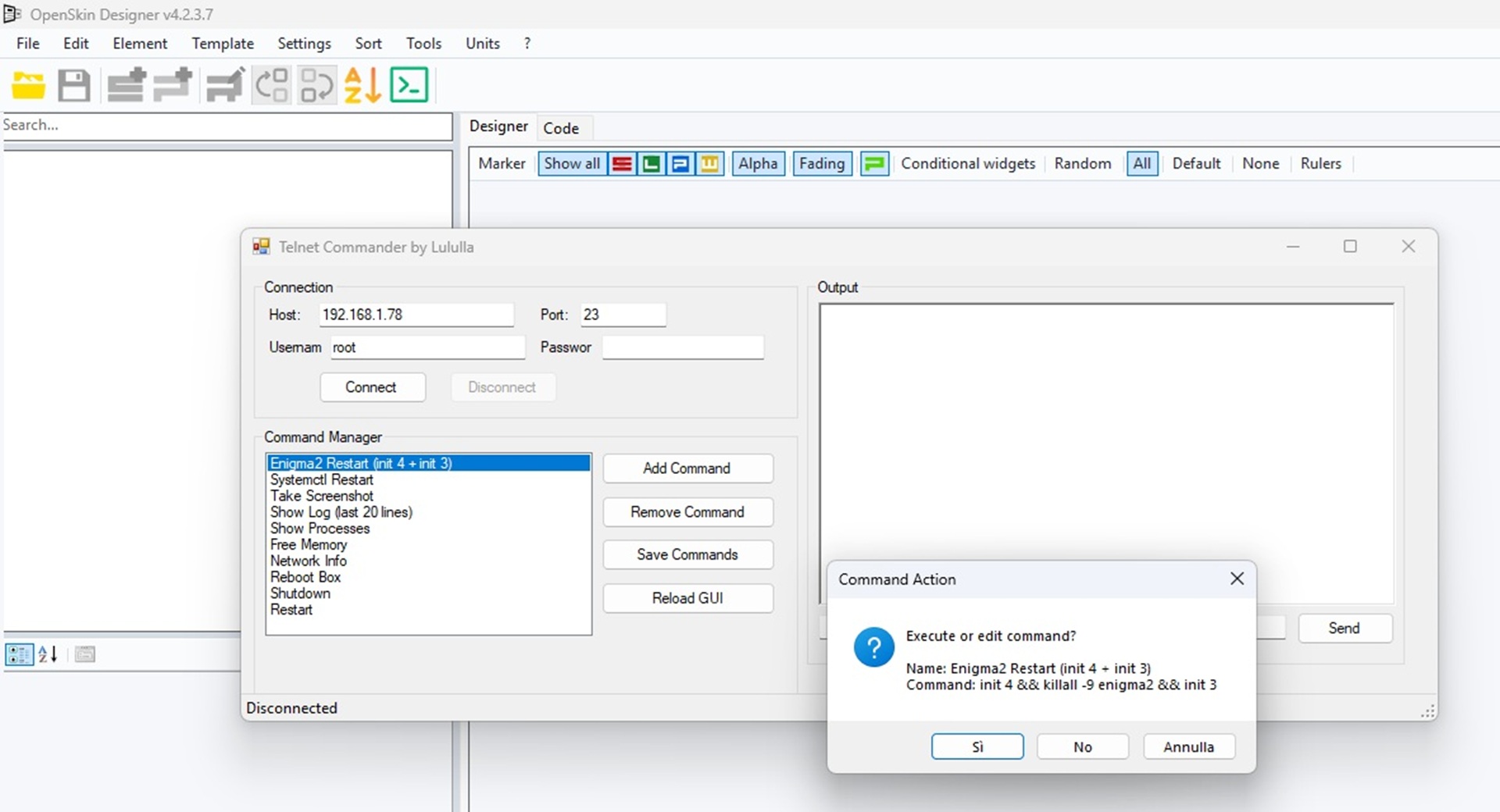
    ### ****** ## MOD v4.2.3.7 – Lululla


    **New Features**


    - **Telnet Commander**:

    - Added standalone Telnet module to connect to Enigma2/DreamOS boxes.

    - Execute common commands (init 4, killall -9 enigma2, systemctl stop/start, screenshot, tail logs, reboot, halt, etc.).

    - View real-time command output in a dedicated monitor (RichTextBox).

    - Custom commands can be added, removed, and saved/loaded from `Telnet/TelnetCommands.xml`.

    - Dedicated toolbar button (`telnet.png`) opens a resizable, user‑friendly window.

    - Supports user/password authentication (default: root / your box password).


    - **Translation updates**:

    - Added Italiano, English, Deutsch, Français, Español, Português, Polski, Português, Türkçe, Русский, العربية, Shqip, 中文(简体), 中文(繁體) translations for all Telnet strings and the new gradient properties.


    If you'd like, you can buy me a beer to celebrate this development; I'll toast you.

    It's not mandatory.

Your resource for Enigma2 skins and GUI customization

Download custom themes, get installation support, and find tools to modify your receiver's display. Customize your Enigma2 GUI. Discover and download custom skins, with dedicated support for installation and visual personalization.