


Did you Chmod 755 the renamed oscam binary ? If not it wont have the permissions to execute the binary file.
Posts by master G
-
-
Open oscam.conf and you will see details like below;
Code[webif] httpport = [COLOR='#00FF00']8888[/COLOR] httpuser = [COLOR='#FF0000']admin[/COLOR] httppwd = [COLOR='#FF0000']admin[/COLOR] httpallowed = 127.0.0.1,192.168.0.0-192.168.255.255Add this to your browser editting the ip address of your server;
Username: admin
Password: adminIf you still can get access then the version of oscam you are using doesnt have webinfo compliled.
Update your oscam binary in directory /usr/local/bin/, get the binary from HERE or the oscam download center.
-
been trying to install this image as recomended by glenview where am i going wrong peeps it all goes well but its just a basic pli version with no cccam or channels ect could someone talk me throught the prosess ? installed flash wiz pro drag image then press flash and were done but its like theres all the bits missing from the image also should the reciver be unpluged before i start or on ?
You have described the correct process for flashing but something has obviously went wrong, try using the .img version of that image with dreamup.
-
Hi Ten Below its a S*Y White card. I have one subscribed card and one S*Y freesat and this reader just won,t read them. I would like to stay with just CCcam for the time being till im a bit more experienced with the cams and linux. Think the Smargo is the way to go?
If your sticking with cccam only then it will have to be a smargo, bear in mind that cccam alone will not clear all channels ( pick tv & premier sports ) & the rest of the package will probably go the same way sooner rather than later. I would look into setting up oscam mate as you will need it in the future.
-
Smargo is the obvious choice, I use an Omnikey myself which is very good but will not work directly in cccam alone so need to use oscam to read it. Which card do you have ?
-
There is no step by step guide needed, install the plugin and it expands the /usr/ directory, allowing you more space to install plugins on your USB drive.
-
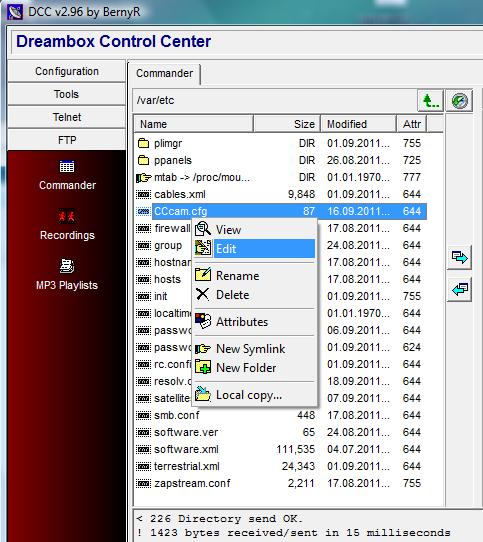
Like this mate
-
When i put a f or c line in can i do it in the dreambox using my remote?
No you need to edit the file using dcc mate.
ftp to var/ect right click on cccam.cfg & choose edit. -
Hi Ten Below i havent installed any usb drivers or nftytool. It is showing as ftdi device USB0 in dmesg. Do i need to with the TBS3102 usb? 5 Crystal Phoenix/Smartmouse Card Reader (TBS 3102)
This may be my problem coz i know you have to set up a infinity in windows. But this TBS3102 usb has dip switches for volts / pheonix/mouse and Hz. Bit confused! Thanks for you patienceIt certainly wont do any harm installing them, there doesnt seem to be that much info about your reader so i would give this a go.
-
I had the exact same problem with ViX image so i swapped to BlackHole instead.
I tried updating oscam version and added a check script to the script manager, but it never helped.
Oscam will update the entitlements for your card.
Hopefully someone has the answer for you buddy.
-
Its more than likely it hasnt installed properly thats why its not showing in blue panel. Make sure you use the compatable Mgcamd for your image.
-
-
If you have no oscam configs the card will never update.
In your CCcam.cfg you have everything related to cardreader # out and is set for smargo when you are using the internal slot on the Vu+.
-
True about the security, always avoided this webmin as it looked like it made things to easy, I like it though, should be very handy, nice one.
Very handy it is mate, anyone following your quick iptables guide will find it easy to manage using webmin, once the rules are entered it is just a case of clicking " Click this button to reset the configuration listed above to the one that is currently active "
Your quick guide is the best i have seen for newbies on iptables thats why it's sticky, your input is valued big style here. beer10 -
its good realy good stuff and if in future i want webmin to delete from my server then what is the easy and safe way to remove all these files?
Webmin makes it simple, any logs dont need just remove, any you need you decide how often they are cleared.
Webmin is a headwarp at first i admit, but soon you will love it,
Well worth the effort mate stick with it, -
Display More
i am just using
cccam.config
and this inside
ALLOW TELNETINFO: yes
ALLOW WEBINFO: yes
SERVER LISTEN PORT: xxxxx
TELNETINFO LISTEN PORT : xxxxx
WEBINFO LISTEN PORT: xxxxx
SOFTKEY FILE: /var/keys/SoftCam.Key
AUTOROLL FILE: /var/keys/AutoRoll.Key
STATIC CW FILE: /var/keys/constant.cw
CAID PRIO FILE: /var/etc/CCcam.prio
#SERIAL READER : /dev/ttyUSB0 smartreader+
#SMARTCARD CLOCK FREQUENCY: /dev/ttyUSB0 6000000
#CAMKEY: /dev/ttyUSB0 00 00 00 00 00 00 00 00
PROVIDERINFO FILE: /var/etc/CCcam.providers
CHANNELINFO FILE: /var/etc/CCcam.channelinfo
LOG WARNINGS: /tmp/warnings.txtDISABLE EMM: no
EXTRA EMM LEVEL: no
SHOW TIMING: yesmy card is in the bottom internal slot
Are you on the windup jjp ?
Your said card is read by oscam, post your oscam configs. -
Webmin - webmin configuration - ports and addresses
Really not that hard to find tbh mate.
I wouldn't suggest enabling the root account, should learn how to work in linux and you'll find it's easier than it's made out to be.
So long as you secure everything there is no problem enabling the root account, i see many linux forums saying the same but what we use it for is a different kettle of fish.
Make your own secure & you are perfectly safe, -
Have a read of this mate,
Enable Root Access To Your New Ubuntu Server -
read the turorial again & follow it exactly as it is, if it doesnt work look at the log message & try again adjusting accordingly,
lets not turn this into another 3 page thread, the best way to learn is via trial & error. -


