
1.0.1 updated
- Streaming is now possible even in standby
- Power State may be changed
- Mix It implements


1.0.1 updated
- Streaming is now possible even in standby
- Power State may be changed
- Mix It implements
Display Morethis is my oscam
i found it different
the only diffrent is cardmhz = 357
i have delete it
OSCAM CONF
CodeDisplay More[global] nice = -1 WaitForCards = 1 logfile = stdout preferlocalcards = 1 saveinithistory = 1 [webif] httpport = 8888 httpuser = admin httppwd = admin httpallowed = 127.0.0.1,192.168.0.0-192.168.255.255 # protocols [newcamd] key = 0102030405060708091011121314 port = 10000@0963:000000;10001@0963:000000
OSCAM SERVER
CodeDisplay More[reader] label = lower card enable = 1 protocol = internal device = /dev/sci0 caid = 0963:000000 # 0963 is *** UK. boxid = 0000000 # Oscam can read a *** card i.d, but you can also put this # in manually detect = cd # this helps the card run more smootly group = 1 # Oscam has the concept of groups. Only users in group 1 can # use this reader. I'm only using one group. emmcache = 1,3,2 ecmcache = 1 blockemm-unknown = 1 blockemm-g = 1 # these ensure smooth decrypting lb_weight = 101 # for load balancing - can be commented out.
OSCAM USER
In oscam.user you have au = 1
change this to
Hopefully you have the ethernet cable connected from the Vu+ to the router.
Menu > Setup > System > Network > Network Wizard.
Run the wizard and use DHCP to setup a connection to the router.
In Network Configuration you can test, restart and edit the network.
Use FlashExpander, it adds the /usr/ directory to the USB drive which allows you to install all plugins on the USB drive instead of flash.
Its best to use this when you have just flashed a new image, as any plugins etc you have already installed now will stay in flash.
If you have setup mountpoints in device manager properly it should show the option to use the USB, the path should be /media/usb/.
If mountpoints is ok then maunaully setup a swapfile using telnet. Manually Creating a Swapfile on VU+DUO/SOLO
Theres nothing in that log referring to JSC, is there more log you can post ?
[newcamd]
key = 0102030405060708091011121314
port = 10000@0963:000000;34001@0BAA:000000;15001@0500:424 00
The JSC caid is 0500:42400, you have a space inserted there, maybe thats the reason, post the logs and we will see exactly what the error is buddy.
Post the oscam configs oscam.conf, oscam.server and oscam.user.
If you have an active log file it will be in directory /var/log/oscam.log/ or connect to oscam webinfo and paste the info from there.
If theres no active log add below to oscam.conf and restart oscam from the softcam manager.
#logging
#pidfile = /var/run/oscam.pid
logfile = /var/log/oscam.log
usrfile = /var/log/oscamuser.log
cwlogdir = /var/log/cw.log
maxlogsize = 1000
You can also access the log using telnet with this command.
Post your oscam configs and the logs so we can see where the errors are.
How To Setup CrossEpg
Menu > Setup > CrossEPG.
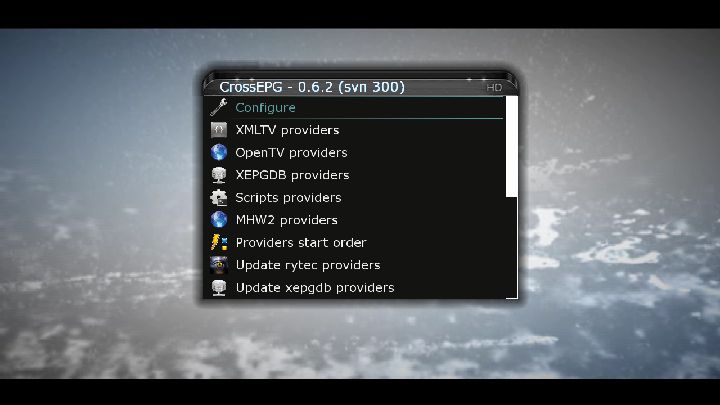
Configure.
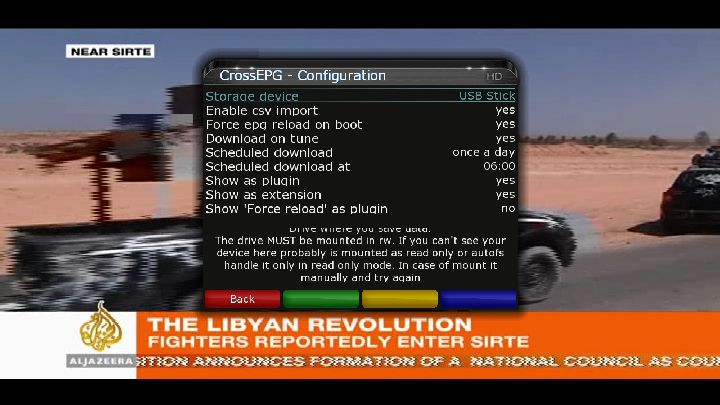
Choose your storage device and a scheduled download for once a day. Press Red/Back.
I use OpenTV providers and find it more stable than BlackHole EPG.
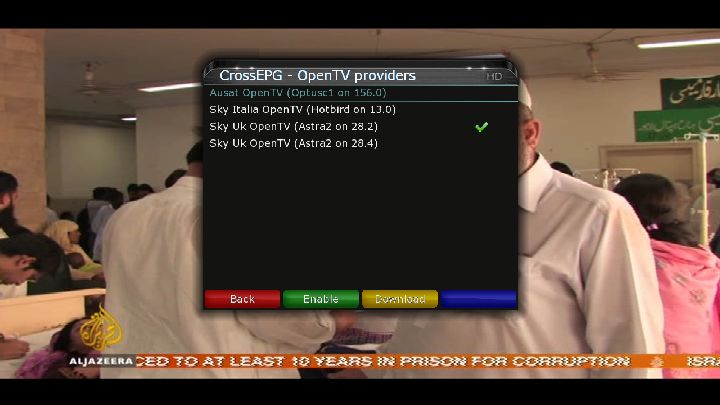
Choose $ky Uk OpenTV (Astra2 on 28.2). Press Green/Enable then Yellow/Download
I saw your friend posting this problem on another forum and it had me puzzled to say the least lol. If you could post his cccam.cfg it would be a big help. Another option would be to use oscam to read the card and see if the problem still exists. If he is not comfortable setting oscam up himself he could just flash one of these images
Open PLI Oscam & CCcam UK Ready EPG Ready Mapped Backup
SifTeam DM-500 Backup Oscam+CCcam
Nemesis skin V4.4 Rihanna CCcam 2.0.11-oscam by Badr Boys
Gemeni 4.7 (no bomb) backup with oscam 1.0 and ccam 2.2.1
Then just ftp in these ready made configs.
How to - CCcam + Oscam Al Jazeera Sport Viaccess 4.0
This is probably the road i would go down.
MGcamd 1.37 for Nabilo E1
The boxkey needs editted so you can view some premium channels.
Download this FTP tool DCC-E2 v1.41
You need to FTP to /etc/tuxbox/config, in this directory is a file oscam.server.
Right click on this file and edit, then delete the line, boxid = yourboxid, save.
Restart the cam from softcam manager.
If you had something to offer you would`nt find it that difficult finding these friendly people.
Google cardsharing and you will find all the places you need.
Once $ky cuts off the subscription the channels will be gone, unless you can find a friendly person who would be good enough to give you a share from their card.
Hi,
Reading trough the tutorial, could you please specify if you need to set up DNS if you already have a routable IP? Can I skip this step if i have routable IP, or should I still do it because of various reasons arround safety or others?
For security reasons it is far better to use a dns address.
Here are two $ky uk ready images that have all essential cams and plugins you need to get started.
sly uk ready blackhole 1.6.3 backup
sly uk ready ViX Team v2.2.100 Vu+DUO backup
Download the image and extract HERE with Winrar.
You will see a directory named vuplus.
Format a USB pen drive to FAT32 then copy and paste the vuplus directory onto it.
Power off the Vu+ with the switch at the back and insert the USB pen drive into the front USB slot.
Power back on from the switch at the back and the image will start flashing, you will see information on the LED when the flash is succesful.
After it has been flashed remove the USB pen drive and power off then on with the switch at the back.
The new image will start loading and the setup wizard will run through some basic steps for network, display, dish settings etc.
Put your card in the top slot, chip side down and start CCcam from the softcam manager.

