
yeah deffo so i guess once its plugged into vhs player and into lapp or tower you play whole of video tape and save at same time on lappy ?
Thats how it works, if you read the link it says it will save to dvd format so ready for burning.


yeah deffo so i guess once its plugged into vhs player and into lapp or tower you play whole of video tape and save at same time on lappy ?
Thats how it works, if you read the link it says it will save to dvd format so ready for burning.
GSU Full ver. 3.94
- fix oscam entitlements (nagra, and more...)
Hi rik & Ten ,
Thankyou sounds easy and great where can i get one from ?
Thanks
carmine
You know know what you are looking for so its up to you to find the best deal, i would go for a uk seller incase of any problems.
Display MoreHi Ten,
Please explain more what would i do with this device ?
you know me a bit slow on the uptake lol.
thanks
carmine
i never seen or used one carmine though i'd guess that you plug the vcr output into that device ! and the device into your Pc and IT will convert the vcr(video)(pal i 625) into some kind of modern AV file that a program on your pc like windows meadia file can play back ! Having gone down that route i expect you can then play those files via your enigma box too !
Rik
I
Just like he said, thanks rik.
Many have reported success using this method,
all credit to n2610 @ cccam forum for this guide.
If somebody has smargo "damaged" by update but the geen LED is lighting after plugging to the USB there is probably chance to bring it back life
Make simple test:
1. insert smargo to USB - green LED should light but system doesn't recognise device.
2. insert some smart card revrserd to the slot to active card detect only - green led should start blink.
3 instert card properly - green led should be dark
If all points pass it means u have some chance to repair smargo.
To repair it u must open the case to have access to the electronic board.
Put the board USB plug up.
At right side u should have small 3 pin transistor and more at rite side 3 holes placed vertically.
We are interested in this small transitor.
It has 3 legs/pins up and 1 down.
We are interested in it's right up leg/pin (base or gate).
Solder small wire to this leg/pin and connect second side to GND.
If you afraid about transistor (normally it has resistors inside) you can use small resistor (~1kB) instead of wire.
I've connected it small capacitor located below r-pack (right side of the capacitor) but u can connect it anywhere u find GND
After that u can connect smargo to the PC and it should be normally detectable.
Run ./srp_update_x86 -b to activate bootloader mode.
Remove and reinsert smargo.
Run ./srp_update_x86 -f to flash reader again.
If u see this message:
start flashing
################################################## ######## done
Please remove and reinsert SmartReader+
wait about 2-3 minutes and then disconnect your smargo reader.
After this process u can remove the wire and smargo should be alive again
Probably not all smargo will get up after this process but is probably the most of them get a cure
Picture shows the two points used in this guide ( red line )
Good Luck !
13.09.2011
Fixed file by gutemine
Here is another cheaper option, i have a friend who used one like this to do exactly what your looking for.
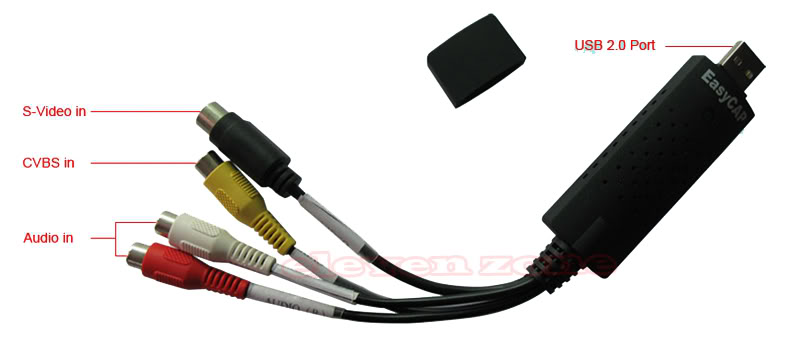
Use this
SMARTCARD CLOCK FREQUENCY: /dev/sci0 3570000
For the card you have you are better to use oscam to read the card, have a look at the link below.
Open PLI Oscam & CCcam UK Ready EPG Ready Mapped Backup
ok i can see cccam now in the box and can start it but i till darn' see ipk and i don't get any channels mate
So you have installed cccam & it is running, no need for ipk files then have you added your config file ?
The worrying thing is the way im reading it looks like it can appear as later versions of cccam too.
MyCam Version Report-> Extra Membership Level (donation fee) (Title)
CCcam 2.0.11-> + 0 euro (Extra I)
CCcam 2.1.0-> + 20 euro (Extra II)
CCcam 2.1.1-> + 20 euro (Extra III)
CCcam 2.1.3-> + 30 euro (Extra IV)
CCcam 2.1.4-> + 20 euro (Extra V)
CCcam 2.2.0-> + 30 euro (Extra VI)
CCcam 2.2.1-> + 30 euro (Extra VII)
No mention of the ecm usage not showing so monitoring this as we do now is the best way to stay safe.
yes i did that but i darn' t see the ipk in the box, What one do i install just the one i want
Yes just the one you need, you can also install this and download the cam from it.
New-TSpanel enigma2 plugin,everything you need for your image
If you clicked the link you would have saw in the notes
QuoteIt Include:
Cccam, scam, sbox, mgcamd ect
To install simply FTP to /tmp, then install using the IPK installer in the VIX Menu under blue button.
Its here mate
Cam pack for ViX Image
Which image are you using?
Dear Moderator
I have already downloaded from megaupload, and unrar by pass "luft4sat", it is wrong. I try with rapidshare, it is also the same problem, Pls help me this problem. Thanks alot
I have seen this on a few sites but all list the password as luft4sat
Maybe this is a better option for you.
HOW TO - CCcam+Oscam Automated Installation for Ubuntu
Have you istalled the usb drivers and nftytool as described at the bottom of this guide.
Are you also running it as a server, if so try disabling cccam and see if the problem still exists.
anybody has cccam 2.2.1 + oscam 1.00 for blackhole ?
Just wondering why you would want to use CCCam2.2.1 with oscam ?
Display Morehello
I have a simple question :
how we car remove that Parent lock of the card
my passwork in the card now is FF FF FF FF , and I set by mistake - when I make settings in Oscam also
see below
c 1 user1 -1 1 127.0.0.1 2695 newcamd (CCcam) 12.09.11 02:32:24 19:17:40 0000:0000 00:01:13 OK
2011/09/12 21:45:31 2BE334B0 h Refresh Server requested by WebIF from 192.168.63.6
2011/09/12 21:49:32 2C6334B0 r card ejected
2011/09/12 21:49:37 2C6334B0 r ***italia card detected
2011/09/12 21:49:38 2C6334B0 r
2011/09/12 21:49:39 2C6334B0 r Maximum frequency for this card is formally 5 Mhz, clocking it to 3.43 Mhz
2011/09/12 21:49:40 2C6334B0 r [videoguard2-reader] parental lock setting: FF FF FF FF
2011/09/12 21:49:40 2C6334B0 r [videoguard2-reader] parental lock disabled
2011/09/12 21:49:40 2C6334B0 r [videoguard2-reader] parental lock setting after disabling: FF FF FF FF
2011/09/12 21:49:40 2C6334B0 r [videoguard2-reader] type: VideoGuard *** Italia (093B), caid: 093B
2011/09/12 21:49:40 2C6334B0 r [videoguard2-reader] serial: XXXXXXXXXXXXXXX, baseyear: 1997
2011/09/12 21:49:40 2C6334B0 r [videoguard2-reader] ready for requests
2011/09/12 21:49:40 2C6334B0 r found cardsystem videoguard2
2011/09/12 21:49:40 2C6334B0 r [videoguard2-reader] ***italia card detected
2011/09/12 21:49:40 2C6334B0 r [videoguard2-reader] type: VideoGuard *** Italia (093B)
2011/09/12 21:49:40 2C6334B0 r [videoguard2-reader] tier: 000b, expiry date: 2011/10/25-00:00:00
2011/09/12 21:49:40 2C6334B0 r [videoguard2-reader] tier: 021a, expiry date: 2011/10/25-00:00:00
2011/09/12 21:49:40 2C6334B0 r [videoguard2-reader] tier: 021b, expiry date: 2011/10/25-00:00:00
2011/09/12 21:49:40 2C6334B0 r [videoguard2-reader] tier: 0222, expiry date: 2011/10/25-00:00:00
2011/09/12 21:49:40 2C6334B0 r [videoguard2-reader] tier: 0226, expiry date: 2011/10/25-00:00:00
2011/09/12 21:49:40 2C6334B0 r [videoguard2-reader] tier: 0228, expiry date: 2011/10/25-00:00:00
2011/09/12 21:49:40 2C6334B0 r [videoguard2-reader] tier: 022e, expiry date: 2011/10/25-00:00:00
2011/09/12 21:49:40 2C6334B0 r [videoguard2-reader] tier: 026b, expiry date: 2011/10/25-00:00:00
2011/09/12 21:49:40 2C6334B0 r [videoguard2-reader] tier: 0295, expiry date: 2011/10/25-00:00:00
2011/09/12 21:49:40 2C6334B0 r [videoguard2-reader] tier: 029a, expiry date: 2011/10/25-00:00:00
2011/09/12 21:49:40 2C6334B0 r [videoguard2-reader] tier: 029b, expiry date: 2011/10/25-00:00:00
2011/09/12 21:49:40 2C6334B0 r [videoguard2-reader] tier: 029c, expiry date: 2011/10/25-00:00:00
2011/09/12 21:49:40 2C6334B0 r [videoguard2-reader] tier: 02f3, expiry date: 2011/10/25-00:00:00
I solved partial the problem, by deliting all the readers , users that I generate in Oscam Web Info.
and I move a emnty folder for Server that I write manually.
this was the only solution to use again the card.
but I want to remove for ever that password from Card.
please give me advaices
thanks
I have read on oscam forum that the way round this problem is removing the boxid line from your configs, oscam can read your boxid directly from the card. Give this a try & let us know how you get on.

