


Have you tried reflashing yet ? If usb version of an image wont flash try using the nfi version with a null modem cable and the Vu+ utility from Benkurd`s toolbox HERE. If you need more help with this let us know buddy..
Posts by master G
-
-
Have you tried disconnecting any usb devices, any internal or external hard disk and booting your Vu+ ?
-
Yes that is a conax card.
-
Display More
here is my server file mate .
[reader]
label = *****
enable = 1
protocol = pcsc
device = 0
group = 1
fallback = 1
BoxID = ********
blockemm-u = 0
blockemm-s = 0
blockemm-g = 1
blockemm-unknown = 1
emmcache = 1,3,2
caid = 09**
ident = 09**:000000
cardmhz = 368
detect = cd
lb_weight = 101and these error i am having in the end of status page.
client timeout=5000 ms, fallback timeout=2000 ms, cache delay=1 ms
Cannot open file "/var/etc/oscam.services" (errno=2 No such file or directory
WARNING: You risk high CPU load and high ECM times with more than 2000 service-id´s!
HINT: --> use optimized lists from Srvid
can't open file "/var/etc/oscam.ird" (errno=2 No such file or directory) irdeto guessing not loadedany idea what i am doing wrong?
Remove this line
I have made a services file get it here
Oscam.services For Sly UK ( sid assign/reject ) -
release 1.03
added fixed modes
added windows config tool
fixes for dreambox models -
{ 0:0:2, 0963:0:0 }
Allows 1 reshare of card, change to 0:0:1 for no reshare.
Provider ID
Blocks this provider, change to 1 to allow access but no reshare -
the S*Y UK ready Nabilosat Oscam+CCcam2.1.3 DM500 Backup
is a Backup IMAGE if you read is not meant to go in flash
you have to upload a proper IMAGE in flash then you can use flashwizard to upload S*Y UK ready Nabilosat Oscam+CCcam2.1.3 DM500 Backup
in memory-stick..just my opinion..DM500 has no usb port for memory stick?
-
Edit the reader in oscam.server.
Code
Display More[reader] label = smargo enable = 1 protocol = mouse device = /dev/ttyUSB0 services = caid = xxxx boxid = xxxxxxxx detect = cd ident = group = 1 emmcache = 1,1,0 blockemm-g = 1 lb_weight = 100Setup smargo in normal mode not dreambox and set the frequency you want using the smargo windows utility
You also have to activate the drivers on the DM800 for smargo via blue button and then add kernel modules. -
You could use oscam as your card reader and CCcam2.1.3 as your server. All the configs are here buddy, if you are interested in using oscam let us know which cards you are trying to share.
-
Device should be 0 ( could be 1,2 )
Here is how i have it entered -
Just add the reader path for the lower slot to your cfg e.g
READER PATH : /dev/sci0
CAMKEY: /dev/sci0 00 00 00 00 00 00 00 00
CAMDATA: /dev/sci0 00 00 00 00 00 00 00 00 00 00 00 00 00 00 00Then block that provider to the peers you do not wish to share it with, e.g block slyuk
F: username password 2 0 0 { 0:0:2, 0963:0:0 } -
sorry for the delay cant seem to find the ip address does the box need to be flashed to get the ip because tried to go into the menu but could not get in is it because the box is unflashed.
If you cannot communicate with the box you will need to flash an image with null modem cable then setup network before you can use flashwizard.
-
chmodd is done by right clicking on the file with your favourite ftp program and changing the file permissions to 755. This tutorial is old now, the easiest method of installing cams on the vix image is using the latest TSpanel.
-
You dont use the serial cable, connect the dm500 to your router and flash over the network..
-
You will find it in the tools section, let us know how you get on buddy...
-
You need to use flashwizard to upload it..
-
Did you extract the image from the rar file first?
-
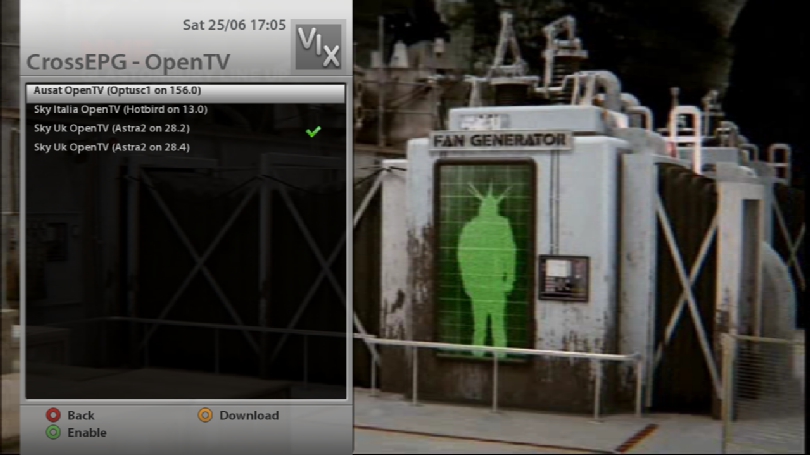
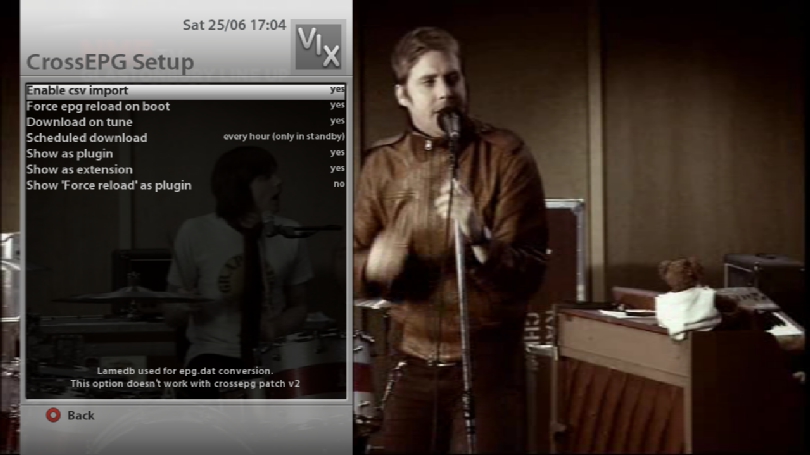
I think the problem is you are trying to download too many providers all at the same time. The dish needs to be pointed at the sat for the epg data to load, thats probably why you need to force reload. I use either BH EPG or Opentv providers on 28.2E only and have no problems at all m8. This is the configuration i use on crossepg;
-
Menu > Setup > System > Customise > Expert, then restart Enigma2.
Menu > Setup > System > Recording paths, change the default movie location to /media/usb/, restart Enigma2. -
hi ten below
i am having all sort of problem with omnikey on my ubuntu 10.04 with sly card.can you please tell me the right process plz so it can work.i did try to do in terminal lsusb and then add that device id in oscam.server but it keep showing device not found.
I had similar problems, i even reinstalled Debian thinking it was a Ubuntu issue then eventually figured it out.
Follow this guideHow to install Omnikey readers on Linux PC
When you reach this step
Code
Display MoreThere look next lines: # if you need to pass arguments to pcscd you should edit the file # /etc/default/pcscd and add a line # DAEMON_ARGS=??your-option? And please change it to: # if you need to pass arguments to pcscd edit to: # /etc/default/pcscd and add a line DAEMON_ARGS=??error?Instead change to this
# if you need to pass arguments to pcscd edit to:
# /etc/default/pcscd and add a line
DAEMON_ARGS="-e"Screen shot of how it should look.
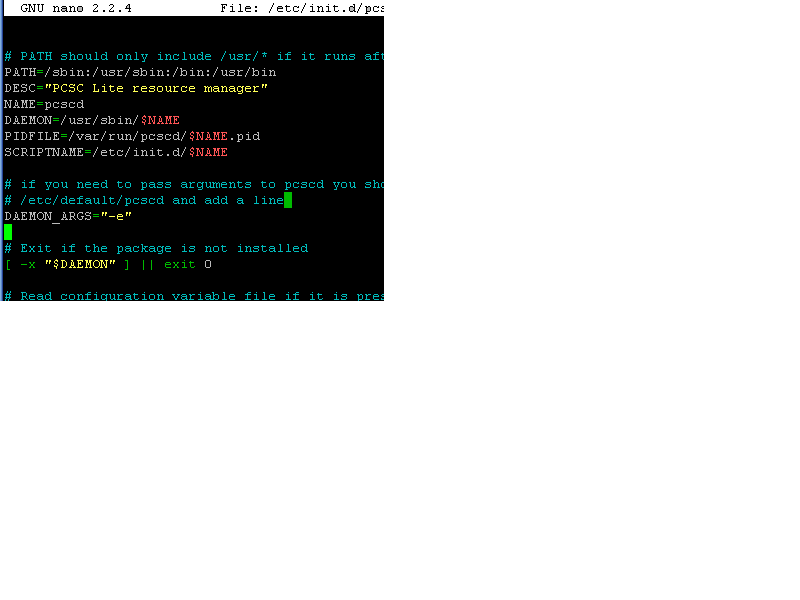
Then continue with the guide and your reader will be seen, i will update the guides here to match this.


