

Posts by master G
-
-
-
Some already should know, but here is a way to adjust the clock speed of your smart card using cccam.
In your cccam.cfg find one of the three lines below:CodeSMARTCARD CLOCK FREQUENCY: / dev/sci0 3400000(Main card slot in box) SMARTCARD CLOCK FREQUENCY: /dev/sci1 3400000 (second card slot in box) SMARTCARD CLOCK FREQUENCY: /dev/usb/tts/0 3400000 (for smargo reader)What ever line you have will depend on which way you are installing the card to the box. If you line had a # at the start of it remove it (if your config does not have any of these line you can add your own)
To overclock it is only a matter of changing the frequency (numbers) at the end of the line.
Example:
This means that the card is working to 5.6 mhz instead of 3.4mhz, using this setting on conax card, It changed the ECM time from 0.33 to 0.27 s
Idealy you want the card running at the correct frequency it was designed to run at. (CCcam has a default speed and runs all cards at the same so you should check what your card is designed to run at and set your frequency accordinly).
If you are getting freeze from your card at the correct speed you can then over clock it. Overclock aims to ensure that the response time of the card is faster, we can see in ECM time, the lower the response time better. There are cards that overclock better than others. If when overclock the card fails to appear in Entitlements, then you will have to reduce the frequency:Before starting see the ECM time of the card, if the overclock does not make improvements there is no reason to overclock it and it is better leave it as it was, increase the frequency gradually to find that work more quickly and is stable with your card, advise starting with a low frequency, for example 1/2mhz 500000. (after each overclock reboot your box)
Here is a few examples of ecm times achieved with a little overclocking
CodeSMARTCARD CLOCK FREQUENCY: /dev/sci0 8200000 (irdeto 0.195 to 0.1370) SMARTCARD CLOCK FREQUENCY: /dev/sci1 5250000 ( nds ECM 0.210 DOWN TO 0.191 SMARTCARD CLOCK FREQUENCY: /dev/sci0 6800000 ( Sky uk 0.147 DOWN TO 0.122) SMARTCARD CLOCK FREQUENCY: /dev/sci1 5600000 (Digialb conax 0.275 down to 0.178) SMARTCARD CLOCK FREQUENCY: /dev/sci1 8300000 ( BULSAT IREDETO 2 PURPLE 0.215 DOWN TO 0.151) SMARTCARD CLOCK FREQUENCY: /dev/sci1 8420000 ( SHOWTIME IREDETO 2 0.225 DOWN TO 0.141)Here is a few frequencies that certain cards should be running at, I do not know which frequency every card should be running at but google should find this for you. If anyone knows anymore post them below and I will add them to the list
-
-
AU Files, Camd3, Camx, cccam, Config Files, EMU, Evocamd, GBox, Keys Directory, Mgcamd, Newcamd, Prgram files, Radegast, Scam
Camx:
Keys Directory: /var/keys/ - Softcam.Key Autoroll.Key
Prgram file : /var/bin/
Config Files : /var/etc/
AU Files : /var/keys/Autoroll.Key
________________________________________
GBox:
Keys Directory: /var/keys - seca,nagra,via,irdeto,conax
Prgram files: /var/bin - gbox
Config Files: /var/keys - gbox_cfg
AU Files: /var/keys/roms/
________________________________________
Camd3:
Keys Directory: /var/keys - camd3.keys
Prgram files: /var/bin - camd3
Config Files: /var/keys - camd3.conf - camd3.config
AU Files: /var/keys/ - seca_hash.bin - seca2_hash_0070.bin
seca2_mask_0070.bin - camd3.keys
________________________________________
Evocamd:
Keys Directory: /var/keys - Autoupdate.Key & Keylist.txt
Prgram files: /var/bin - evocamd
Config Files: /var/keys - camd_cfg
AU Files: /var/keys - Autoupdate.Key - /var/scce/
________________________________________
Newcamd:
keys directory: /var/scce -keylist, ppua, rsakeylist & tpscrypt of
/var/tuxbox/scce (newcamd 6.01, kan oude dir gebruiken)
Program files: /var/bin - newcamd, cardserv, cardspider, betadserv
Config files: /var/tuxbox/config - newcamd.conf, cardserv.cfg, betad.cfg
AU files: /var/scce/ - nagrarom3.bin, nagraram3.bin, nagraepr3.bin,
sttestrom3.bin, stmaprom3.bin, nagrarom7.bin, nagraram7.bin,
nagraepr7.bin, nagrarom10.bin, nagraram10.bin, nagraepr10.bin,
nagrarom11.bin, nagraram11.bin, nagraepr11.bin, rsakeylist
________________________________________
Mgcamd:
keys directory: /var/keys - SoftCam.key & AutoRoll.key
Program files: /var/bin - mgcamd
Config files: /var/keys - mg_cfg
AU files:
________________________________________
Scam:
Keys Directory: /var/keys - seca2,nagra,via, - irdeto,conax
Prgram files: /var/bin - scam
Config Files: /var/keys - softcam.cfg
AU Files: var/keys/ - seca2 - /nagra_rom
________________________________________
Radegast :
keys directory: /var/keys - SoftCam.key & AutoRoll.key
Program files: /var/bin - rdgd, camd.rdgd, netpilot
Config files: /var/etc - radegast.cfg
AU files: Need a patched driver for older conax cards
________________________________________
CCcam:
Keys Directory: /var/keys - Softcam.Key, AutoRoll.key & constant.cw
Program Files: /var/bin - CCcam, capmtserver
Config Files: /var/etc - CCcam.cfg
AU Files: /var/keys - Autoroll.key -
Portforward the ip address of the dreambox.
Make sure the router can see the device on the network first or portforwarding wont work.
Turn on DHCP in the network settings on the dreambox and then open the port. Dont forget to turn off dhcp after you have done this so your ip address stays static.
Set "Server listen port" in cccam.cfg to whatever port you just openned.
Reboot your router and dreambox to confirm the changes.
Then check canyouseeme.org to see if your port is open. -
Forward your chosen port to your dreambox ip address.
-
-
nothing noticable here either but at the same time no complaints about it, love the sid reject function but seens all yours peers need 2.2.0 for this to work.
-
-
Thanks for the replies guys,the only thing that changed was the image,I have been using the same cccam for as long as I can remember,no probs.I also set cccam to autorun at start up.All seems stable at the minute,I would probably put it down to the weather as the stealer says.One other thing I have done is trimmed down the amount of hops 3 I accept,I think I had probably about 4000,don't think this had anything to do with it but was trying anything.
I think this may well have been the problem. -
* Astra 2A, 28.2?E
* (22h16) Sky Digital: A new channel has started in DVB-S2 VideoGuard: Sky Christmas HD (United Kingdom) on 11719.50MHz, pol.H SR:29500 FEC:3/4 SID:3833 PID:513[MPEG-4] /641 English,661 English.
* (22h16) Sky Digital: Sky Showcase HD has left 11719.50MHz, pol.H (DVB-S2 SID:3833 PID:513[MPEG-4] /641 English,661 English), it is no longer transmitted by satellite in Europe.* Astra 2B, 28.2?E
* (22h16) Sky Digital: A new channel has started in DVB-S VideoGuard: Sky Christmas (United Kingdom) on 12285.00MHz, pol.V SR:27500 FEC:2/3 SID:4602 PID:518/646 English,666 English,686 English.
* (22h16) Sky Digital: Sky Showcase has left 12285.00MHz, pol.V (DVB-S SID:4602 PID:518/646 English,666 English,686 English), it is no longer transmitted by satellite in Europe.* Eurobird 1, 28.2?E
* (22h24) Sky Digital: A new channel has started in DVB-S Clear: RedLightZone 2 (United Kingdom) on 11390.00MHz, pol.V SR:27500 FEC:2/3 SID:53590 PID:2343/2344 English.
* (22h25) Sky Digital: A new channel has started in DVB-S Clear: RedLightZone 1 (United Kingdom) on 11390.00MHz, pol.V SR:27500 FEC:2/3 SID:53598 PID:2339/2340 English.
* (22h08) Sky Digital: New frequency for Open Access 3: 11223.67MHz, pol.V (DVB-S SR:27500 FEC:2/3 SID:53146 PID:2316/2391 English- Clear).
* (22h15) Sky Digital: New frequency for Universal Channel UK: 11344.00MHz, pol.H (DVB-S SR:27500 FEC:2/3 SID:53215 PID:2335/2336 English- VideoGuard).
* (22h26) Sky Digital: Open Access 3 has left 11259.00MHz, pol.V (DVB-S SID:52116 PID:2317/2318)
* (22h24) Sky Digital: ChatGirl TV 2 has left 11390.00MHz, pol.V (DVB-S SID:53590 PID:2343/2344 English), it is no longer transmitted by satellite in Europe.
* (22h25) Sky Digital: 40 n Naughty has left 11390.00MHz, pol.V (DVB-S SID:53598 PID:2339/2340 English), it is no longer transmitted by satellite in Europe.
* (22h26) Sky Digital: Monte Carlo Roulette has left 11546.00MHz, pol.H (DVB-S SID:50445 PID:2332/2333 English), it is no longer transmitted by satellite in Europe.* Eurobird 1, 28.2?E
* (15h30) Freesat & Sky Digital: EuroNews has left 12560.00MHz, pol.V (DVB-S SID:54104 PID:2327/2328 English,2329 French,2330 German,2331 Italian,2332 Spanish,2333 Portuguese,2334 Russian,2335 Arabic)
* (15h30) Sky Digital: DBN - Deya Broadcasting Network has left 12524.00MHz, pol.V (DVB-S SID:55111 PID:2334/2335 English), it is no longer transmitted by satellite in Europe. -
Written by SGTFlipFlop and all the credit is rightly his. i take no claim to this guide other than to post it here.
================================================== ===============
Here is how to upgrade your Dreambox with the latest up-to-date Bouquets, Using the App DreamboxEdit, All you need to do is manually edit your Regional channels (BBC & ITV).
Step 1 :- Open DreamboxEdit
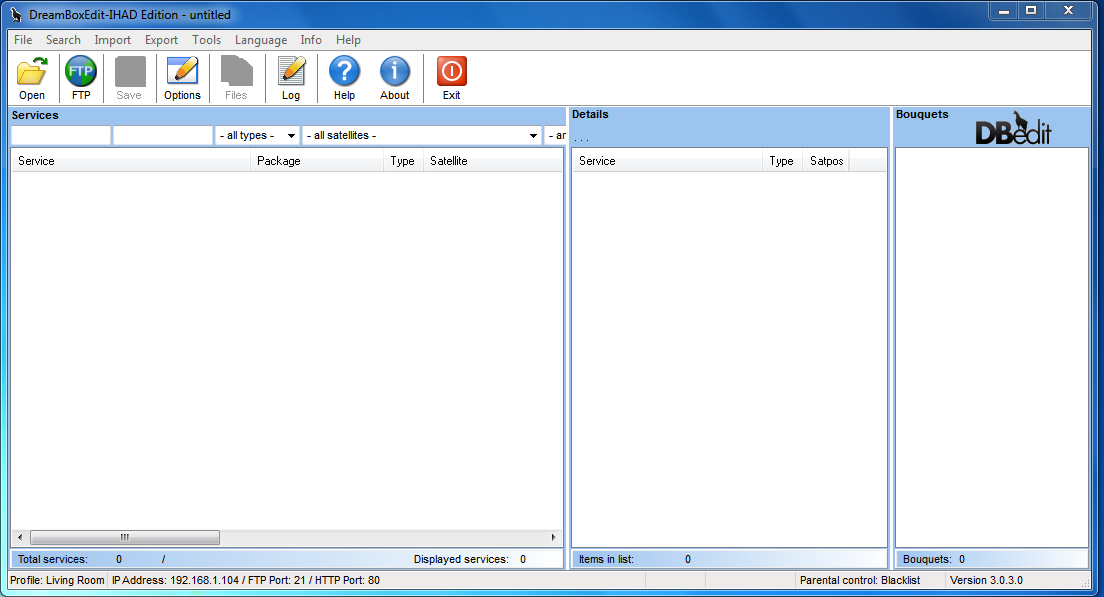
Step 2 :- Now click Options Box, This section will appear
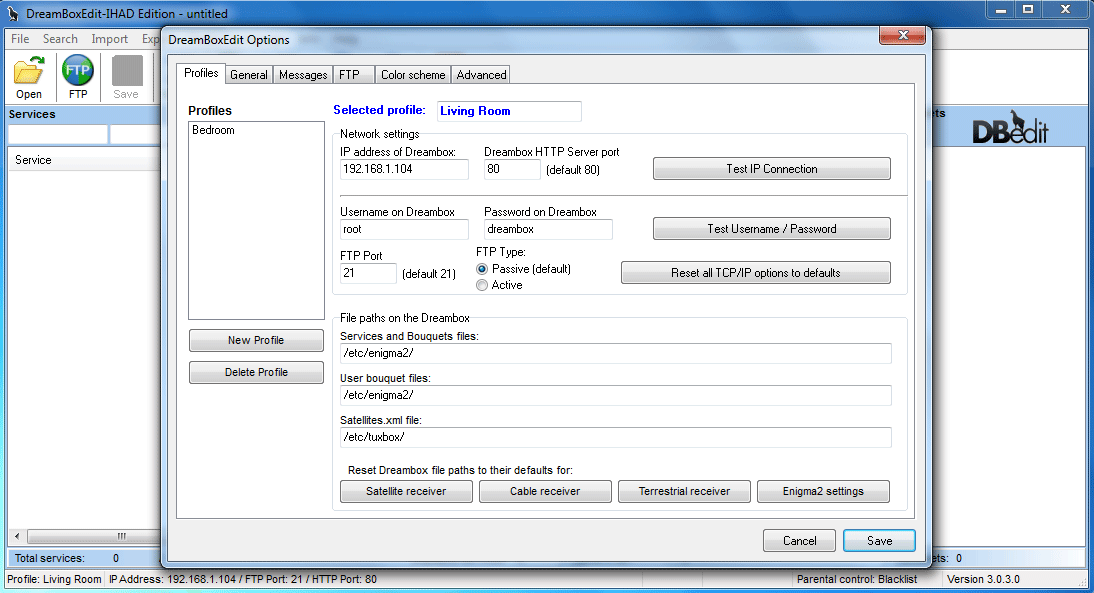
OK time to insert your Dreambox details (Only need to do this once).
IP of Dreambox :- Whatever your IP, Your Dreambox uses to access the Internet (Usually found in Network settings on Dreambox)
Username = root | Password = dreambox | Unless you changed these manually.
Enigma1 = Dreambox 500, 600 Users Click Satellite Receiver at the bottom and should say this :- /var/tuxbox/config/enigma/
Enigma2 = Dreambox 800, 8000 Users Click Enigma2 Settings at the bottom and should say this :- /etc/enigma2/
Click on Advanced Tab and make sure Display ?Reboot Dreambox? option on FTP screen is ticked
Click save and thats you done with this bit.
Step 3 :- Now click Open Icon, Browse your Downloaded Bouquet and click OK, Looks like below
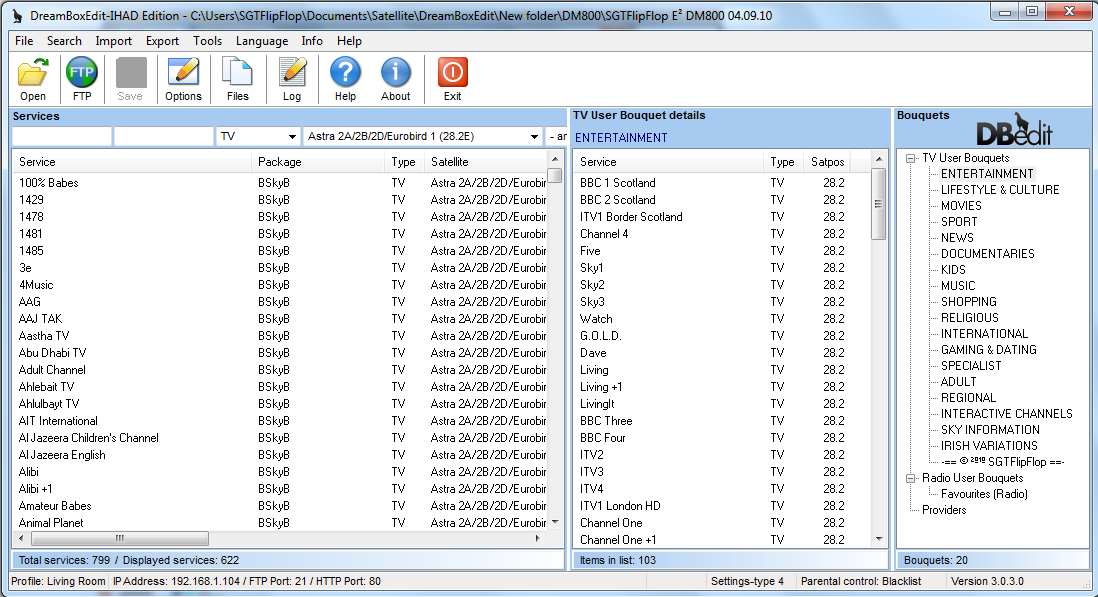
Changing Regional Channels, Find your Regional Channel and drag it across from left column into the middle column and delete the one you don?t want (Do this for BBC & ITV channels) make sure you click save.
Step 4 :- Ready to send files to Dreambox now
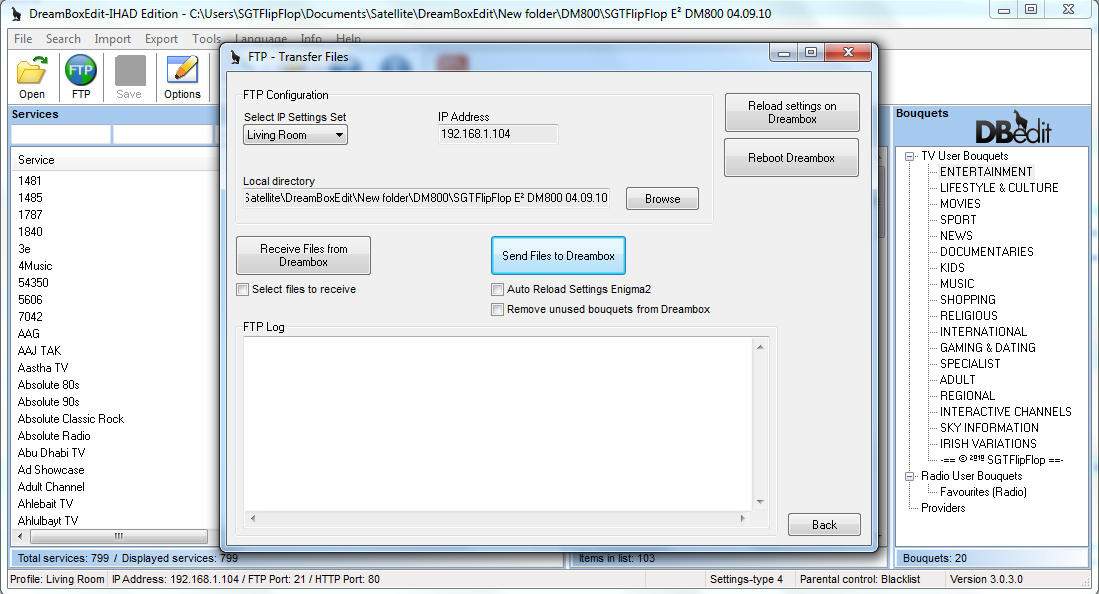
First set out exactly how I have Untick all 3 boxes.
Select IP Settings Set :- Make sure the profile you created is chosen.
Now click Send Files To Dreambox Let it do its job, It should say complete.
Next Reload Settings On Dreambox, Again let it do its job, It should say complete.
Finally click Reboot Dreambox and by now your new settings should be uploaded to your Dreambox
The End.
-
Have you set cccam to run at startup ? It doesnt automatically do that on this image unless you set it.
-
Sorry mate didn't mean to freak you out lol, just ruling out the possibility.
-
First of all check your server is secure, by this i mean google your dns to make sure your lines have not been published on one of these dodgy sites. Also is it possible your internet is dropping momentarily due to the weather we are having at the moment, I have had ip problems yesterday and know of others also.
-
This fix will work in all enigma 2 images
Basically what is happening when the rytec XMLTV importer is not working is that the required python modules are not working.
You arrive at this with some new images, after using:
MENU > SETUP > SOFTWARE MANAGEMENT > SOFTWARE UPDATEor
Using an IMAGE Upgrade..
SIDE NOTE:
You may also loose your path to the HDD in epgdat_importer.py
In your FTP browser goto :
usr/lib/enigma2/python/Plugins/Extensions/EPGImport/ or usr/lib/enigma2/python/Plugins/Extensions/xmlttvimport/Edit this file on the PC (you need to ftp it): (metapad or unix editor in windows like Uedit)
epgdat_importer.pyOn line 11 change the storage place for the epg
tmppath = '/tmp' to tmppath = '/media/hdd' or tmppath = 'media/sda1' for usb pen
Ftp it back to where you got it from.First you need to find out where your EPGimport plugin is located

ie here:
/usr/lib/enigma2/python/Plugins/Extensions/xmltvimport/or here
/usr/lib/enigma2/python/Plugins/Extensions/EPGImport/then edit the enigma2.sh file in Anrakh's post so it says where yours is.
You can find it with your ftp browser - example using FileZilla (A free ftp program avaliable on the net)
OK - Make a note of where the plugin is.
Now we need to edit the enigma2.sh startup script to preload the python modules required.
Navigate to /usr/bin/ with your ftp program
Now DOWNLOAD or EDIT a file called enigma2.sh , you need to add in a whole line of text to preload the module required.
ie
python /usr/lib/enigma2/python/Plugins/Extensions/EPGImport/boot.py
or
python /usr/lib/enigma2/python/Plugins/Extensions/xmltvImport/boot.py
This is what enigma2.sh file looks like in a text editor
#!/bin/sh
/usr/bin/showiframe /boot/backdrop.mvi
cd /home/root
LD_PRELOAD=/usr/lib/libopen.so.0.0 /usr/bin/enigma2
# enigma2 exit codes:
#
# 0 - restart enigma
# 1 - halt
# 2 - reboot
#
# >128 signal
ret=$?
case $ret in
1)
/sbin/halt
;;
2)
/sbin/reboot
;;
4)
/sbin/rmmod lcd
/usr/sbin/fpupgrade --upgrade 2>&1 | tee
/home/root/fpupgrade.log
sleep 1;
/sbin/rmmod fp
/sbin/modprobe fp
/sbin/reboot
;;
*)
;;
esacAnd this is how you need to change it With either EPGImport or xmltvimport in the edited line
#!/bin/sh
python /usr/lib/enigma2/python/Plugins/Extensions/EPGImport/boot.py
/usr/bin/showiframe /boot/backdrop.mvi
cd /home/root
LD_PRELOAD=/usr/lib/libopen.so.0.0 /usr/bin/enigma2
# enigma2 exit codes:
#
# 0 - restart enigma
# 1 - halt
# 2 - reboot
#
# >128 signal
ret=$?
case $ret in
1)
/sbin/halt
;;
2)
/sbin/reboot
;;
4)
/sbin/rmmod lcd
/usr/sbin/fpupgrade --upgrade 2>&1 | tee
/home/root/fpupgrade.log
sleep 1;
/sbin/rmmod fp
/sbin/modprobe fp
/sbin/reboot
;;
*)
;;
esacNow you need to ftp this file back to its location.
In filezilla if you edited it click save, close and select YES to overwrite the original.
If you saved it to your pc then edited it before sending it back to your box you will have to chmod the file to 755 (allow it to run as an executable)
telnet
# chmod 755 /usr/bin/enigma2.sh {press enter}
Credit for this to Mick the original author.
-
No good reason i can think of mate, you should be supsicious of any purple client.
-
Is there any legitmate reason for a name to be purple? or is it basically always bad.
If the name is purple it is because of one of the reasons listed.
The only other thing is when looking under the shares tab you may see , this means the card is not originally from CCcam but remember not all cards can be read by CCcam alone.
 -

nemesis/openembedded-1.6: R?vision/SVN 165
bitbake: R?vision/SVN 1181
Enigma2 : 07.12.2010
Bootloader secondstage: 80r1





