


Have a look HERE for a full tutorial on how to setup this image...
Posts by master G
-
-
Got one of these boxes on sat,might be able to get setting it up today.Was wondering if I have to reboot the box (like the eagle box) with every change I make or can I do the full set up and then reboot?
Full sat scan will work fine mate, good luck setting up. -
This is from another board, not sure what to make of it.
CCcam 2.2.0 fix backdoor
case MSG_CMD_0D:
1960 case MSG_CMD_0E: {
1961 //Unkwn commands, maybe attacking commands. Block this user
1962 if (cl->typ == 'c') //client connection
1963 {
1964 cs_log("%s CCCAM-BACKDOOR COMMANDS DETECTED! BLOCKING USER %s", getprefix(), cl->usr);
1965 struct s_auth *account;
1966 for (account = cfg->account; (account) ; account = account->next) {
1967 if (!strcmp(cl->usr, account->usr))
1968 account->disabled = TRUE;
1969 }
1970 cs_disconnect_client(cl);
1971 }
1972 else //reader connection
1973 {
1974 cs_log("%s CCCAM-BACKDOOR COMMANDS DETECTED! BLOCKING READER %s", getprefix(), cl->reader->label);
1975 cl->reader->enable = FALSE;
1976 cc_cli_close(cl, FALSE);
1977 }
1978 break;
1979 }
1980
1957 1981 case MSG_EMM_ACK: {
1958 1982 cc->just_logged_in = 0;
? ?
3211 3235 int cc_cli_init(struct s_client *cl) {
3212 3236 struct cc_data *cc = cl->cc;
3213 if (cc && cc->mode == CCCAM_MODE_SHUTDOWN)
3237 struct s_reader *reader = cl->reader;
3238
3239 if ((cc && cc->mode == CCCAM_MODE_SHUTDOWN) || !cl->reader->enable || cl->reader->deleted)
3214 3240 return -1;
3215 int res = cc_cli_init_int(cl);
3216 struct s_reader *reader = cl->reader;
3241
3242 int res = cc_cli_init_int(cl); //Create socket
3243
3217 3244 if (res == 0 && reader && (reader->cc_keepalive || !cl->cc) && !reader->tcp_connected) {
3218 cc_cli_connect(cl);
3219 if (cc && cc->mode == CCCAM_MODE_SHUTDOWN)
3220 return -1;
3221
3245
3246 cc_cli_connect(cl); //connect to remote server
3247
3222 3248 while (!reader->tcp_connected && reader->cc_keepalive && cfg->reader_restart_seconds > 0) {
3223 3249
3250 if ((cc && cc->mode == CCCAM_MODE_SHUTDOWN) || !cl->reader->enable || cl->reader->deleted)
3251 return -1;
3252
3224 3253 if (!reader->tcp_connected) {
3225 3254 cc_cli_close(cl, FALSE);
? ?
3232 3261 cs_log("%s restarting reader...", reader->label);
3233 3262 cc_cli_connect(cl);
3234 if (cc && cc->mode == CCCAM_MODE_SHUTDOWN)
3235 return -1;
3236 3263 }
3237 3264 } -
Ive found the Technomate motor to be great would recommend it have installed a few. Would stay away from darkmans motors only came across one but it was crap.
I have used a darkmotor( metal gear version) for over 2 years now without problems, I have heard the technomates can be very noisy compared to others which may be a problem for your neighbours. -
# CCcam team uvadi CCcam v2.2.1
Code
Display More# # Special greets go to all our friends all over the world, you know who you are! # # Specjalne podziekowania dla Ludzi z Polski, dzieki ktorym jest duzo nowych funkcji w wersji 2.0.0 # Ostatnim razem zapomnielismy o nich wspomniec w readme. DZieki Chlopaki! # ###################################################################### # friends # ###################################################################### # syntax for to add a friend user to CCcam with the max up hops limit (default = 5) # sharing of emus (default = 1), allow emm (default = 1), and optional # downshare limits per share (default = no limits) and optional # downshare limits per share based on caid:id:sid # and optional timeslots in which share is valid (to block channels on box of children after 19:00 for instance) # if no timeslot is defined 24 hrs a day is used # emus are shared only one level down, even if no limits given # # max username length 20 # password length 'unlimited' # #F: <username> <password> <uphops> <shareemus> <allowemm> ( { caid:id(:downhops), caid:id(:downhops), ... } { caid:id:sid, caid:id:sid, ... } { begintime-endtime, ... } ) hostname/ip address # # example: # # F: user1 pass1 # # user1 gets all our shares at max 5 hops from us # (our local cards + max five hops away). He can share down to his own # clients. He also receive emu shares (if he has 'yes' behind his C: entry), # and is allowed to send us emm. # # F: user2 pass2 0 1 0 { 0100:000080, 0622:000000:1, 0500:000000:2 } # # user2 gets only our local cards but no 0100:000080. # and our 0622:000000 cards only for himself (1 hop down), # and 0500 cards for himself plus one additional hop down. # He also gets our emus, and is NOT allowed to send us emm (updates). # # F: user3 pass3 5 0 1 { 0:0:3, 0100:000080:1 } # # user3 gets all cards at a maximum of 5 hops away from us, # and get's to share them down two further levels beyond his own level. # But he is not allowed to share 0100:000080 down to other users. # He gets no emus from us, and he is allowed to send us emm. # # F: user4 pass4 5 0 1 { 0:0:3, 0100:000080:1 } { 0100:000080:15df } # # user4 gets all cards at a maximum of 5 hops away from us, # and get's to share them down two further levels beyond his own level. # But he is not allowed to share 0100:000080 down to other users. # He gets no emus from us, and he is allowed to send us emm. # He is also not allowed to view channel 0100:000080:15df # # F: user4 pass4 5 0 1 { } { } { 12:00-17:00, 19:00-20:00 } # # user4 gets all cards at a maximum of 5 hops away from us, # and get's to share them down two further levels beyond his own level. # the share is only valid between 12:00 and 17:00 and between 19:00 and 20:00 # outside these hours the share will not give cw's to the client # # # F: user5 pass5 5 1 1 { } { } { } 192.168.1.1 # # user5 gets all cards at a maximum of 5 hops away from us # user5 is only allowed to connect from the host 192.168.1.1 # ###################################################################### # connections # ###################################################################### # syntax for to add a client connection to other CCcam # add yes on end to use friends emus (non public private key/emu,etc...), # but only works when corresponding F line on server has '1' for <shareemus> # optional limits just like F line, but for incoming shares (ignore shares more than 'uphops' away) # #C: <hostname> <port> <username> <password> <wantemus> ( { caid:id(:uphops), caid:id(:uphops), ... } ) # #note: if {} limits are added, <wantemus> cannot be omitted. Use either yes or no. # # example: # # C: someserver.somedomain 12000 user1 pass1 # C: 192.168.1.2 12000 user2 pass2 # connects to CCcam without use of friends emus # # C: 192.168.1.2 12000 user3 pass3 yes # connects to CCcam, and receives friends emus also. # syntax for to add newcamd server connection # #N: <ip> <port> <username> <pass> <des(14byte)> <nr_of_hops_away (default: 1)> <stealth mode (default: 0)> # # example: # # N: 127.0.0.1 10000 dummy dummy 01 02 03 04 05 06 07 08 09 10 11 12 13 14 # # add a newcamd card, give it an offset of 2 hops, in the share list # # N: 127.0.0.1 10000 dummy dummy 01 02 03 04 05 06 07 08 09 10 11 12 13 14 2 # # stealthy login on newcamd server: # # N: 127.0.0.1 10000 dummy dummy 01 02 03 04 05 06 07 08 09 10 11 12 13 14 1 1 # # stealth modes: 0 = disabled, 1 = mgcamd new, 2 = mgcamd old, 3 = evocamd, 4 = generic # syntax for to add radegast server connection # #R: <ip> <port> <ca4> <id6> <nr_of_hops_away (default: 1)> # # example: # # R: 127.0.0.1 678 0100 000080 # syntax for to add camd3 connection # #L: <ip> <port> <username> <pass> <ca4> <id6> <nr_of_hops_away (default: 1)> # # example: # # L: 127.0.0.1 567 dummy dummy 0100 000080 # syntax for add gbox connection # #G: <pass> <localhost> <localport> <peerpass> <peeraddress> <peerport> # # support optional limits just like C line (ignore shares more than 'uphops' away) # { caid:id(:uphops), caid:id(:uphops), ... } # # example: # # G: AABBCCDD my.address.tv 2500 12345678 peer.address.tv 2500 ###################################################################### # Other config settings # ###################################################################### # server shall listen on this port pro incoming connections # default port is 12000, disable server with parm -s or set port 0 # #SERVER LISTEN PORT : 12000 # server can give some info about server and client connections # and cardinfo using telnet or webbrowser. # # Switch on/off access to info # default is yes # #ALLOW TELNETINFO: no #ALLOW WEBINFO: no # Show extended client info when showing client list # default is yes # #SHOW EXTENEDED CLIENT INFO : no # The webinfo service can be protected with a username and password. # This is switched off by default # #WEBINFO USERNAME : <username> #WEBINFO PASSWORD : <password> # The telnetinfo service can be protected with a username and password. # This is switched off by default # #TELNETINFO USERNAME : <username> #TELNETINFO PASSWORD : <password> # default port for telnet is 16000 # default port for web is 16001 # supported commands: # info # activeclients # clients # servers # shares # providers # entitlements # example use: # echo servers | telnet localhost 16000 # go with your browser to [url]http://ip_CCcam_server:16001[/url] # #TELNETINFO LISTEN PORT : 16000 #WEBINFO LISTEN PORT : 16001 # time in seconds to keep On Screen Display active. # default is 0 (turned off) # #ZAP OSD TIME : 3 # username used to show popup (default : root) #OSD USERNAME : root # password used to show popup (default : dreambox) #OSD PASSWORD : dreambox # port used to show popup (default : 80) #OSD PORT : 80 # Serial reader config. Add as many as you have attached too your system # replaces old name 'PHOENIX READER PATH', but still works. # default is none # optionally add readertype : phoenix,mouse,uniprog,sc8in1,smartreader+ # (when non readertype given defaults to uniprog (e.g. for mastera)) # # SERIAL READER : <device> <type> # # example # #SERIAL READER : /dev/tts/0 # Serial reader smartcard write delay. # Setting to finetune smartcard write speed, optimal setting depends on speed of system, and # speed of card. Default value is calculated, but can overrule by setting. # Use number of microseconds delay between bytes, 0 = no delay, -1 = calculated default # Note: huge difference between values 0 and 1, because of schedular overhead # # SMARTCARD WRITE DELAY : <device> <delay> # # example, 10ms write delay on smartcard in reader attached to /dev/ttyUSB0 # #SMARTCARD WRITE DELAY: /dev/ttyUSB0 10000 # # NOTE on sc8in1; because 8 smartcards are used on the same devicename, use # devicename_0 .. devicename_7 for settings which require devicename to make # settings per smartcard. example /dev/ttyS0_0, /dev/ttyS0_1 .. # example, 8ms write delay between bytes to smartcard on last sc8in1 channel, attached to /dev/tts/0 # #SMARTCARD WRITE DELAY: /dev/tts/0_7 8000 # Smartcard clock speed override # Setting override specified speed for smartcard. # Don't add setting unless you're sure what you're doing. # In 99% of the cases the reader selects the optimal speed. # Adding this setting either slows your card down, or might destroy it. # # SMARTCARD CLOCK FREQUENCY : <device> <freq> # # example # #SMARTCARD CLOCK FREQUENCY: /dev/ttyUSB0 5500000 # if timing should be shown in OSD and debug output # default is no (turned off) # #SHOW TIMING : yes # enables mini OSD which shows server(type), cardreader, keys or fta only # default is no (turned off) # #MINI OSD : yes # turns debugging on and off # default is no (turned off) # #DEBUG : yes # should CCcam try to read and parse newcamd.conf for server connections # default is no (turned off) # #NEWCAMD CONF : yes # configure what EMM blocker you want. Add as many as readers you have attached # default is blocking nothing # # B: /dev/sci0 01 # 00 - nothing # 01 - sa blocked # 02 - ua blocked # 04 - ga blocked # and sum of for combinations # #examples # #B: /dev/tts/0 07 #B: /dev/sci0 01 # disable all EMM readers (clientside setting) # saves lots of CPU, but you won't get any updates anymore # (unless you get updates from your clients) # # default: no # #DISABLE EMM : yes # control how to deal with global (ga) EMM readers (clientside setting) # can avoid global (possibly noisy) emm being sent over the network # shared and unique emm is not affected by this setting # to block all emm, use DISABLE EMM setting instead # # 0 = ignore all global emm # 1 = accept a small amount of global emm # 2 = accept all global emm # # default: 2 (handle all global emm) # # example: seriously reduce the global emm traffic, but allow limited # global emm when a smartcard does not work (possibly because it needs an update) # #GLOBAL EMM : 1 # with this setting you can # allow a client on two hops away # to send the updates to the cardserver # # default : no # #EXTRA EMM LEVEL : yes # with this setting you can # configure how many emm listeners are started. # for example use 2 when recording # and viewing different systems and both need constant updates # # default : 1 # #EMM THREADS : 1 # overrule the nds boxkey (4 byte hex) # # BOXKEY: <device> <byte1> <byte2> <byte3> <byte4> # #example # #BOXKEY: /dev/sci0 00 11 22 33 # set card pin # * please be very careful with this option as you could lock your card * # # PIN: <device> <pin> # #example # #PIN: /dev/sci0 1234 # overrule the i***** camkey (8 byte hex), default 11 22 33 44 55 66 77 88 # # CAMKEY: <device> <byte1> <byte2> <byte3> <byte4> <byte5> <byte6> <byte7> <byte8> # #example # #CAMKEY: /dev/sci0 11 22 33 44 55 66 77 88 # overrule the i***** camdata (64 byte hex) # trailing zero bytes can be omitted # default for unknown ASC's is 11 22 33 44 55 66 77 88 00 00 .. 00, known ASC's have other defaults # # CAMDATA: <device> <byte1> <byte2> <byte3> <byte4> <byte5> <byte6> ... <byte64> # #example, when only the first 15 camdata bytes are nonzero # #CAMDATA: /dev/sci0 11 22 33 44 55 66 77 88 99 aa bb cc dd ee ff # custom add id's for BEEF patched cards # # BEEF ID: <ident1> <ident2> <ident3> <ident4> <ident5> <ident6> <ident7> <ident8> <device> # #example # #BEEF ID: 4101 0 0 0 0 0 0 0 /dev/sci0 # what Softcam.Key should CCcam try to read # defaults to /var/keys/SoftCam.Key # #SOFTKEY FILE : /var/keys/SoftCam.Key # what AutoRoll.Key should CCcam try to read # defaults to /var/keys/AutoRoll.Key # #AUTOROLL FILE : /var/keys/AutoRoll.Key # what constant.cw should CCcam try to read # defaults to /var/keys/constant.cw # file content can be like # # ca4:id6:sid4:pmtpid4:ecmpid4:key16(01 02 03...) # #STATIC CW FILE : /var/keys/constant.cw # in this file you can configure what CAIDs CCcam should prefer or ignore # defaults to /var/etc/CCcam.prio # file content can have ignores (I) and prio lists (P) # # note 1: I line affects both for ecm and emm (receive no emm on ignored systems) # P line only affects ecm choice (emm still received for all available systems, not just the priority system) # # note 2: ident 0 means 'all idents'. So 'caid:0' is the same as 'caid'. # # note 3: for some systems (e.g. nagra (caid 18xx)), the ident is not known at the time the # prio lists are checked. In that case, matching is done on caid only, even if the P line # defines nonzero idents. So for example '1801:401' behaves the same as '1801' in a P line # I lines work differently, they are checked two times, once before ecm or emm is received, again # after ecm or emm are received (and nagra ident should be known) # P lines are only checked once, before ecm received. # # note 4: if a P line contains caid:ident pairs which are not available for the current # channel, that P line is not used for that channel. # Example, channel has systems 626, 1801:401 then P line with "1801,100:96,626" is ignored by that channel, # because channel doesn't have 100:96. # But P line with "1801" works, and also "626,1801" will work for channel # # note 5: P lines are parsed in the order in which they are found in the prio file. # Only the first matching P line is used # # situation 1: ignore allways this caid, all idents, on all channels # I: caid # # situation 2: ignore allways this caid/ident pair # I: caid:ident # # situation 3: ignore this caid/ident pair, on channel 'sid' # I: caid:ident:sid # # situation 4: when both caid1 and caid2 exist for a channel, prefer caid1 over caid2 # P: caid1, caid2 # # situation 5: when caid1:ident1 till caidN:identN exist for a channel, use them in order of this list. # P: caid1:ident1, caid2:ident2, .., caidN:identN # # situation 6: when caid1:ident1 till caidN:identN exist for channel 'sid', use them in order of this list. # Sid on first caid/ident pair identifies sid for which list is used. All other sids ignore this list. # P: caid1:ident1:sid, caid2:ident2, .., caidN:identN # #CAID PRIO FILE : /var/etc/CCcam.prio # # In this file all provider idents are defined # The info from this file is being used in the web interface # format: # <caid><ident> "Provider description" # # PROVIDERINFO FILE : /var/etc/CCcam.providers # # In this file all channel idents are defined # The info from this file is being used in the web interface # format: # caid:ident:sid "Channel description" # # CHANNELINFO FILE : /var/etc/CCcam.channelinfo # write wrong logins to file # defaults is off # #LOG WARNINGS : /tmp/warnings.txt # global setting for stealthy login to newcamd/newcs server, N line can overrule # stealth modes: 0 = disabled, 1 = mgcamd new, 2 = mgcamd old, 3 = evocamd, 4 = generic # default: 0 # #NEWCAMD STEALTH : 0 # load balancing between identical cards, list device names of card readers containing identical cards, # optionally followed by a list of service id's which are to be excluded from loadbalancing # # LOADBALANCE : <device1> <device2> .. <devicen> { <exceptsid1>, <exceptsid2> .. , <exceptsidn> } # # multiple loadbalance groups can be configured, by adding multiple lines # warning: restart is required, when loadbalance group config changes # #example 1: load balance requests for three identical cards # # LOADBALANCE : /dev/ttyS0 /dev/ttyS1 /dev/ttyS2 # #example 2: load balance requests for two almost identical cards, sid 0df3 and 0de1 are only available #on one of the cards, so requests for these sids shouldn't be loadbalanced # # LOADBALANCE : /dev/ttyS5 /dev/ttyS6 { 0df3,0de1 } # in version 1.2.1 and lower there was a problem which could lead to disconnecting clients # in version 1.4.0 network load was significantly reduced # in version 1.7.0 dangerous password bug was fixed # in order to take advantage of these fixes, all clients should upgrade # with this setting you can force that clients at least use a certain version otherwise they are denied when logging in # # default : accept all versions # #example 1: avoid disconnecting clients problem # #MINIMUM CLIENT VERSION : 1.3.0 # #example 2: achieve network load decrease # #MINIMUM CLIENT VERSION : 2.2.0 # #example 3: don't allow potentially wrong passwords (pre 1.7.0 has password bug) # #MINIMUM CLIENT VERSION : 1.7.0 # I***** smartcards: option to disable smart chid checking for i***** smartcards. # Default, only chids advertised by card are accepted. # This avoids a lot of unwanted card traffic # # But if smartcard has hidden/unknown chids, all chids should be tried. # In that case specify 'TRY ALL CHIDS' option for cardreader. # Use with care, enabling option causes more card traffic. # Only use setting when some channels in your subscription don't work without it. # note: if even this setting don't help decode all channels, try using # commandline arg -l, to disable all self-learning features (warning: slower) # #TRY ALL CHIDS : <device> # #example: card in /dev/ttyUSB0 gets ecm for all possible chids, not #just the chids it officially supports # #TRY ALL CHIDS : /dev/ttyUSB0 # perform smartcard post init commands # # POSTINIT : <device> <filename> (<autodelete>) # # send commands in 'filename' to 'device', and delete 'filename' when # optional 'autodelete' argument nonzero # #example: # #POSTINIT : /dev/sci0 /tmp/postinit # #example /tmp/postinit contents: #c134000003000000 #c13201000a # Option to override autodetected dvb api version. Restart needed. # #DVB API: <value> # # <value> -1 = no dvb, 1 = dvb api 1, 3 = dvb api 3 # # WARNING: only use when autodetect fails! # #example, disable nonworking dvb hardware: #DVB API: -1 # Option to set global share limits # #GLOBAL LIMITS: { caid:id(:downhops), caid:id(:downhops), ... } # #example: # #GLOBAL LIMITS : { 0100:000080, 0622:000000:1, 0500:000000:2 } # # all users get no 0100:000080. # and our 0622:000000 cards only for themself (1 hop down), # and 0500 cards for themself plus one additional hop down. # global limits are overridden by client specific limits (see F:) # Option to reject shares with less than required downhops on clientside # #MINIMUM DOWNHOPS: <value> # # default: 0 (don't ignore any shares) # #example: # #MINIMUM DOWNHOPS: 1 # # ignore shares that have less than 1 'downhops' (i.e. can not be shared # further down to other clients) # Option to ignore all shares that go through a certain node # #IGNORE NODE: <nodeid> # #example, ignore two nodes: # #IGNORE NODE: ccd536ab515767ad #IGNORE NODE: aad536ab515761af # The seca handler is used to better support simulcrypt on the same ident # # With this setting you can change the behaviour of how SECA has to be used # This setting is ignored unless SECA2/SECA3 simulcrypt is detected!! # # When disabled CCcam behaves like previous versions # # When "prefer SECA3 over SECA2" is enabled try to use SECA3 ecm first, then SECA2 # # When "Ignore SECA2" is enabled, ignore all SECA2 ecm so a SECA3 card will not get SECA2 request which it cannot handle # # When "Ignore SECA3" is enabled, ignore all SECA3 ecm so a SECA2 card will not get SECA3 request which it cannot handle # # # The following settings can be used # # SECA HANDLER: <value> # <value> : 0 = disabled, 1 = prefer SECA3 over SECA2, 2 = prefer SECA2 over SECA3, 3 = Ignore SECA2, 4 = Ignore SECA3 # # default: 1 # # Example try to use SECA3 ecm first, then SECA2 #SECA HANDLER: 1 # # Example try to use SECA2 ecm first, then SECA3 #SECA HANDLER: 2 # # Example to ignore all SECA2 ecm so a SECA3 card will not get SECA2 request which it cannot handle #SECA HANDLER: 3 # # Example to ignore all SECA3 ecm so a SECA2 card will not get SECA3 request which it cannot handle #SECA HANDLER: 4 # Configure limited list of accepted sids for smartcard # When omitted, all sids are allowed. # Can work together with LOADBALANCE configuration (sids which are not allowed will be automatically left out of the loadbalance) # # SMARTCARD SID ASSIGN : <device> <maxnumberofsids> { <sid1>, <sid2>, ... <sidn> } # # <device> is the reader devicenode # <maxnumberofsids> limits the total number of sids assigned to the card (0 = use length of sid list) # { <sid1>..<sidn> } lists the sids that are assigned to the smartcard, when omitted, <maxnumberofsids> is used to auto assign sids # # when <maxnumberofsids> is larger than the length of the sidlist, the remainder of the sids are auto assigned, till the list reaches <maxnumberofsids> # Check entitlement output for realtime assignment list # # WARNING: when SMARTCARD SID ASSIGN config changes, restart is required before settings take effect # #example1: smartcard in device /dev/ttyUSB0 only handles requests for sids df3, df4, df5 # #SMARTCARD SID ASSIGN : /dev/ttyUSB0 0 { 0df3,0df4,0df5 } # #example2: smartcard in device /dev/ttyUSB0 handles requests for max 5 sids, auto assigned in the order of occurance. A request for a 6th sid will be denied. # #SMARTCARD SID ASSIGN : /dev/ttyUSB0 5 # #example3: smartcard in device /dev/ttyUSB0 handles requests for max 5 sids, 3 of which are df3, df4, df5, remaining 2 are auto assigned # #SMARTCARD SID ASSIGN : /dev/ttyUSB0 5 { 0df3,0df4,0df5 } # Configure list of sids which are not to be handled by smartcard # When omitted, all sids are allowed (or SMARTCARD SID ASSIGN list is allowed, if available) # Don't use together with (fixed) SMARTCARD SID ASSIGN list; use one or the other, depending on which gives the shortest list # Can work together with dynamic SMARTCARD SID ASSIGN list. # Can work together with LOADBALANCE configuration (sids which are rejected will be automatically left out of the loadbalance) # #SMARTCARD SID REJECT: <device> { <sid1>, <sid2>, ... <sidn> } # # <device> is the reader devicenode # { <sid1>..<sidn> } lists the sids that are to be rejected on the smartcard # # WARNING: when SMARTCARD SID REJECT config changes, restart is required before settings take effect # #example1: smartcard in device /dev/ttyUSB0 should not handle requests for sids df3, df4, df5 # #SMARTCARD SID ASSIGN: /dev/ttyUSB0 { 0df3,0df4,0df5 } # Option to overrule the number of sci devices to be opened # #SCIDEVICES: <number> # #example, don't open any sci devices # #SCIDEVICES: 0 # #example, force 2 devices to be opened # #SCIDEVICES: 2 # # When omitted, attempt to open an autodetected number of sci devices # WARNING: restart is required before a new SCIDEVICES limit takes effect -
2.2.1
-added via 3.0 emu (add working *** in SoftCam.Key)
-fixed parsing GLOBAL EMM setting
-fixed occasional freeze (bug since 2.2.0)
-random loadbalance preference
-smartcard fixes -
-
Fixtures in Scotland face possible postponement next weekend after Category One referees voted to strike.
Scottish match officials are upset with the avalanche of flak that has come their way this season.
Officials are concerned that their integrity is constantly being questioned by some clubs and individuals.
And there are increasing fears among referees over personal safety as a result of public criticism.
The decision to take strike action was reached at a referees' union meeting held on Sunday afternoon, with unanimous backing.
There are six Scottish Premier League games scheduled for next weekend. There is also a full card in the Scottish Football League.
The ALBA Challenge Cup final between Queen of the South and Ross County at McDiarmid Park is under threat, as are any Scottish Cup replays.
"Referees are at the end of their tether, and it's not just how it's impacting on them but it's the impact it's all having on their families and business lives," said former referee Kenny Clark.
"Businesses in which referees are employed are being targeted by fans sending hate emails to employers saying things like, 'why are you employing this guy?'"
Celtic have voiced concerns about refereeing standards this season and last and BBC Scotland has also learned that the Glasgow club would welcome the strike.
It is understood Celtic hope that it could lead to a wider independent investigation and want Uefa to intervene in what they think is a refereeing crisis.
On Thursday, Celtic chairman John Reid called for the resignation of referee Dougie McDonald, saying "his position is completely untenable" after he was warned by the Scottish Football Association for lying about his reasons for overturning a penalty award.
In the wake of McDonald's admission of deception, SFA chief executive Stewart Regan has promised an overhaul of how referees are disciplined.
Celtic manager Neil Lennon was critical of the McDonald episode and has since questioned refereeing decisions after defeats to Rangers and Hearts.
And Celtic striker Gary Hooper caused a storm when he said the thought referees "want" to give decisions against his team because they are one of the world's big clubs.
Politicians have also been getting in on the act, with SNP sport spokesman Pete Wishart calling for referees to be forced to declare which team they support.
Clark is in no doubt that it is the pressure from Celtic that has led to the strike action.
"John Reid put the tin lid on it in terms of the meeting today," he added. "His comments have toppled the table over.
"I think what the referees are trying to do is put down a marker and saying to clubs, 'we can't continue like this or we'll end up with no referees!'
"It's only a matter of time before a referee or a member of his family is physically attacked because of how it's being whipped up. Clubs are effectively encouraging it up by what they're doing."
Motherwell are at home to Hearts on Sunday in a match that is scheduled for live television coverage and manager Craig Brown believes strike action would unfairly harm his club.
"It's a radical course of action, a step too far,"
"One of the rules of refereeing is that the non-offending team should not be penalised. I have never publicly criticised referees.
"We would lose gate money and television money if the game is called off and that revenue is vital to a club of our size."
Kilmarnock boss Mixu Paatelainen was more sympathetic, saying: "If it happens, it's disappointing. But there has been too much talk of referees and I don't think that's healthy.
"Referees feel the strain and they might be a little bit more nervous before matches than usual and that maybe affects their ability.
"Hopefully, there is a solution before the weekend but I understand how they are feeling."
Scottish Premier League referees planned to strike over pay in 2008 but the threat was lifted when a review was set up to study their wage demands.
The SFA are not commenting on the matter, with a spokesman saying they have not had any official notification of the planned strike.
A source at the SPL told BBC Scotland: "This is a matter for the SFA and the referees. The SFA have a contract to provide us with officials and we expect them to honour that."
In December 2008, SPL managers jointly agreed to refrain from speaking about refereeing decisions after matches. However, the experiment was short-lived.
-
-
Try this, Press "menu", "setup", "vix"
There you can configure the CROSSEPG or RYVIX EPG. -
23E, 16E ,9E , 4.8E and many gems to be found on others.
You will not regret investing in a motor its worth every penny. -
hi guys
anyone got a E2 bouquet file for sky uk with 19E 13E as well?
thanks in advance
Try this catseye setting HERE
It has nice bouquets for sly uk, ive been using this for a while now..
Just remove the satellites from the list you dont need.. -
Check the download panel on your image for the new cccam,, install direct from their server. Always take a backup of your .cfg file before you make any changes to your setup.
-
Dreambox Edit is one of the key tools to create and manage your channels, favorites and edit satellites. Once installed , start the program and you'll be met with the main screen.
Options
From the list of icons across the top of the screen click 'Options'. This is very important and will need some setup.
The most important part of this is the first tab called 'Profiles'. For the scope of this tutorial we will not be looking at any other tabs in Options.
So , the things you need to pay attention to in options are :-
1. IP Address of Dreambox. - Enter your box IP here.
2. Dreambox HTTP Server port - Very rarely changed from 80.
3. Username on Dreambox - Nearly always 'root'.
4. Password on Dreambox - Standard password is 'dreambox'.
5. FTP Port - Nearly always 21.
6. File paths on the Dreambox.Now, point six has a little more to it. At the bottom of the Options window you'll see 4 buttons. These refer to the Dreambox 'Type' and also to the preset file paths mentioned in point 6. These should be set as follows :
Satellite Receiver - Type 2 = DM500 / 600 / 7000 / 7020
Version 3 Settings (Enigma2) - Type 3= DM7025
New Enigma2 Settings - Type 4 = DM800 / DM8000Type 3 & 4 have the same 'File paths'.
As you click these different buttons you'll see the 'File paths' changing accordingly but you will not see the 'Type' change until you exit the options screen. The type is shown in the status bar at the bottom of the main window.
Its important you get these settings right to match the box your using or you will have trouble transferring your bouquets to and from the box. See the attached images.
FTP
Once you're finished with Options, you can move onto the FTP button, again from the list at the top of the main window.
In here you need to select a folder on your PC where you're going to store your bouquet files for editing. I usually create a folder on my desktop and then select it from here. Once you've made you're folder, click Browse and select it.
Now you have selected the folder we can grab the files from the Dreambox and transfer them to it.
Click 'Receive files from Dreambox'.
Assuming you've scanned the satellites you're interested in, DBedit will now FTP all the required files to your selected folder and open them for editing. Once this completes close the FTP window and move back to the main window.
Now you'll see the main window is populated with the information from your Dreambox.
Main Window
The main window is split into 3 panes.
Left pane = Services
Middle pane = Bouquet contents.
Right pane = Bouquet list.Within the 3 panes of the main window you'll find the Right Click is very powerful and contains the functions you'll use most.
Creating New Bouquets
In the right hand pane right click on 'TV User Bouquets' and click 'Insert New Bouquet.
Enter the name of the bouquet and press enter. Now you have your first bouquet, all be it empty.The middle pane of the main window now shows the contents of your new bouquet. (Or Any Selected Bouquet).
Adding Channels To A Bouquet
In the left hand pane is your list of scanned services from your Dreambox. You'll notice above the services pane you have 2 drop down boxes. Here you can select from the different satellites you've scanned and select different broadcast types, Data , Radio or TV. If you like you can leave both of these choices to display all types and all satellites.
I'm gonna select TV and Astra2 28.2e
This will now filter my services list to display what I've asked for. I can now select channels from the list and drag them into my new bouquet. If I want to select multiple consecutive channels I can hold down the shift key and press the down arrow to select many channels at once.
Or if I want to selet multiple channel but not consecutively I can hold down CTRL and click the channels I want. Once I have them selected they will highlight in blue and I can drag them all together into my new bouquet in the centre pane. You can drag multiple or single selections.
Markers
You can insert 'Markers' into bouquet lists if you like to help describe a channel or a set of channels. In the centre pane simply right click and click 'Insert Marker' Enter the text you want and click ok. You can position the marker in the bouquet by dragging it up and down the list.
You can also rearrange the channel list in a bouquet in the same way by dragging a channel up or down the list.
Save & FTP To Dreambox
Once you have done what you want don't forget the click 'Save' at the top of the main window. Once finished you can click 'FTP' again and this time click 'Send Files To Dreambox' this will send the bouquet you've made to your dreambox. Once complete click 'Reload settings on Dreambox' to have the changes take affect.
-
CCcam 2.2.0 E1 Tar.gz
:download: -
Ftp this file to tmp then do manual install with remote.
CCcam 2.2.0 tar.gz :download: -
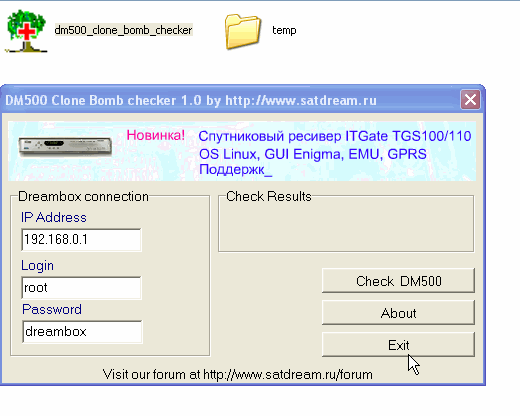
Simple utility to check CLONE BOMB inside DM500
Error message looks likeWARNING-CLONE BOX DETECTED-SYSTEM STOP CONTACT YOUR DEALER
-
the latest firmware for the open box
1. Solve France HD channels cann't be played well
a. upgrade the firmware.
b. edit the replace.list like this:
X: { { 1811 } { 0100 } }
c. update the replace.list by mgcamd
2. Add hungarian ,correct french and russian language
3. solve the cccam's short characters problems, add from 17 to 32
4.Add much more CCCAM accounts,it can support 9 at most
5 Add NEWCAMD Server Setting,it can be taken as server -

This plugin was created in order to check that a dynamic url updater such as noip or inadyn is working correctly.
Enter you dynamic url such as : mystb.dyndns.org and press test. It will look up your current ip and then check if it matches your dynamic ip.Requirements.
1, Enigma 1 based image
2, A valid internet connection
3, Space available for the addonNote: this plugin will work on other images.
Install by putting:
DynamicUrlChecker.cfg to /var/tuxbox/plugins (you dont need to chmod this file)
DynamicUrlChecker.so to /var/tuxbox/plugins (may need to chmod 755 this file)Have fun, the plugin will be avaliable on the YELLOW button when installed.
-
Specifications:
Oe version: 1.6
Kernel version: 2.6.18-7.3
Dreambox Secondstage: #75
Dreambox Dvb drivers: 20100401
Enigma2 CVS: Experimental 02 April 2010
MeoBoot version: 0.96xDm800 only
Skin: Army Acqua HD
WHAT IS NEW ?
UPDATED: drivers
UPDATED: CVS
ADDED: progressbar in channel list by default
FIXED: SOFTWARE MANAGER:
Software manager feed fixed
Software manager disabled image update
FIXED: NFS server status in System Info
FIXED: little bugs in Device Manager
UPDATED: Army Acqua Skin
UNICABLE SUPPORT enabled
Main Function Keys
Button 1xOK = Light Info Skin
Button 2xOK = Extra Info Skin
Button Blue = Dream ELite Blue Panel
Button 1x Blue + 1x Red = Dream Elite Epg Panel
Button 1x Blue + 1x Yellow = New System Monitor Panel
Button Blue-Long-Push = Extensions
Button Green = Dream Elite Green Panel
Button Green-Long-Push = Subservices
Button 1x Green + 1x Red = CCcam Info
Button Yellow = Time ShiftAddons
Dedicated Addons Server
Download and install additional packages from Dream Elite serverInfobar/OSD
Enigma2 Analogic Clock
Channel Orbital PositionAdvanced Tuner Info: Sr Freq Pol Fec
Signal SNR, BER
Infobar Picons
LCD/OLED Picons
Advanced EMU informationDream Elite Panels features
Blue Panel
Extra Setting
Black Hole Cron Manager
OSD Settings
Devices Manager
Kernel Modules Manager
Fast Plugin Settings
Inadyn Settings
Swap File Settings
Hard Disk Setup
Black Hola Mount Wizard
OpenVPN Panel
Samba/Cifs Panel
NFS Server Panel
Telnet Panel
FTP PanelInfo
CCcam Info
Service Info
Enigma2 Settings
AboutMemory
Space
CPU
ProcessAutoCam
Select EMU by Channel
EPG Panel
Global setting
Provider SettingGreen Panel
CCcam info
Fast Plugin
Addons
Addons Download Manager
Manual Install Del packages
Manual Install IPK packages
Addons Uninstall Panel
Dream Elite StatisticsScripts
Many thanks to the Beta Testers Team.
Many thanks to Rytec for all the epg servers providing precompiled Epg.dat for Dream Elite Image (add skyIta and SkyDe).Credits
Many Thanks to Rytec for external epg
E2 Sky Epg loader integration by MaxZ4.
Many Thanks to lukkino (VDR-Italia) for opentv source code.
Many thanks to Reinh@rd for the satellites.xml file.
Many thanks to Seddi for Grab updateATTENTION!
THIS IMAGE HAVE TO BE INSTALLED IN FLASH.
THIS IMAGE CANNOT WORK IN MULTIBOOT WITH DIFFERENT IMAGES IN FLASH. DREAM ELITE TEAM WILL NOT SUPPORT IMAGES NOT INSTALLED IN FLASH.


