


Posts by pheonix

    sorry i was using the default skin as the hd skin which looks good is to big to fit my tv is there a way of resizing it thanx


    The picture appear too large because you have overscan activated on your TV, this stretches every pixel of your picture to 1.05 % it's true size decreasing overall picture quality, either turn this off or adjust the OSD position settings in the ViX image to compensate.


    The best option by far is to TURN OFF overscan. The reason why this only occurs on the ViX image is that we create our skins to their true size every other team adds a little redundancy to compensate for overscan, we will not compromise our image in this way.


    OpenViX 3.0-390 AVAILABLE NOW


    e2-git changelog


    Code
    openvix: build 390
    openvix: build 389
    openvix: build 388
    openvix: build 387
    [MovieSelection] fix grammar of question.


    oe-git changelog


    Code
    openvix: build 390
    openvix: build 389
    openvix: build 388
    [openvix] add base package and use this to install base image, doing this will allow packages to be installed and remove via online update. (reflash maybe required)
    fix openpli distro to build with oe-a
    openvix: build 387
    [BackupManager] fix missing dependancy. thanks to (swiggle, DeGea468) helping in debugging.
    [technomate-dvb-modules] updated to 20121026:


    images can be downloaded directly from the openvix server
    or via a online update
    menu> setup> software update.


    or via a telnet session with the following command


    init 4 && opkg update && opkg upgrade && init 6


    ChangeLogs can also be found here.


    Code
    http://www.world-of-satellite.com/enigma2/feeds/3.0/e2-git.log


    Code
    http://www.world-of-satellite.com/enigma2/feeds/3.0/oe-git.log


    NOTE TO STAFF,


    The above changelog links do NOT link to any other forum but download the changelog directly from the server.

    The EPG in the ViX image is very closely related to the one in CoolEPG and if i do say so my self it's far better. Initially andyblac and cool worked on the Cool EPG together but parted ways as each wanted to take it in a different direction, the result being the ViX EPG and the now closed source Cool EPG. if you want full ViX support for this plugin you will have to ask it's author to provide it, but he has publicly stated in the past that this will not happen.

    There is currently no way to detect if the EPG has corrupted remotely but i would not worry too much and you certainly dont need to check it on a daily or even weekly basis. as for the updates build 390 is available via both online updates and on the OpenViX download server, if you choose the online update option you need not setup again as it will update and patch the version already on the receiver.


    just to add if your setting this up for a relative you will still have to perform a certain amount of maintence as with all Enigma based receivers, they are not plug and play and require a certain level of constant user interaction to keep them going.

    Hi mate, my situation is: dreambox 7020hd, image mount dream elite 4.0.
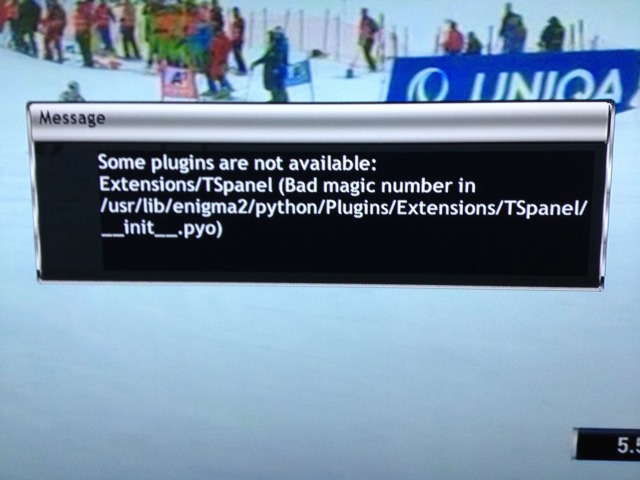
    Yesterday i have tried to istall TS panel 6.6 but it don't work.
    This is warning message on my decoder


    To remove it i've open .ipkg with 7zip and manually delete file to file in FTP way. Is right like i've done?


    At the end i think that ts panel don't work for for OE2 actually.


    There are currently 4 revisions of the panel for the various image architectures make sure your trying the correct version. for OE 2.0 you need the mips32el version.

    Just to add, there were some quite large changes made to the way HDD's and other mounted devices are handled in the image a few builds ago, a small few people ( I have 4 receivers running the latest Builds Of ViX 3.0 and all are fine ) started to suffer from HDD's and Mounted USB devices becoming no longer recognized, anf failing to remount as a result. This has now been fixed in build 390 which was pushed to our server late last night / early this morning so try that version.

    Thanks m8, I tried to setup the box so that the HDD is for recording only & The 4GB USB stick is for EPG & picons.. BUT... Somewhere along the line those settings were ignored & EPG & Picons ended up back on HDD.. Since my last setup did not seem to run smoothly I will try the EPG & picons on HDD.. Will this mean that the HDD will never get to power off because even a channel change will request picons data from the HDD...


    yes thats correct, every time you change channel or pull up the infobar / epg or basically any screen that has a picon displayed the HDD will have to spin up to find that picon, This will cause the HDD to keep spinning almost permanently, it will also drastically slow down channel zap times etc as much as say 4 to 5 seconds per channel change.


    In this scenario, Does the Vu+ sort out this corrupted EPG data itself with a reboot or do I have to manually have to remove old corrupted EPG & re-download it


    no but it does allow you enough time to diagnose a corrupt EPG.dat file and deal with it, for example if you had the EPG saved to the internal flash and it corrupted it could in a matter of hours fill the flash of the receiver to the point where only a full reflash would sort it. To delete a corrupt EPG.dat file you first need to put enigma to sleep using a telnet session as just deleting the file while in normal use will result in the same corrupt EPG.dat file being re-created when the box is powered down.


    This probably answers my second question if I understand it correctly.. Is the EPG & Picons data loaded into flash memory from the HDD on startup? And if so, does this mean that the HDD will be able to spin down when Im switching channels and using EPG?


    The best and fastest place to store picons is on the internal flash of the receiver and a close second being a mounted USB stick, the best place for the EPG.dat file is the HDD with a close second again being a Mounted USB stick.

    there are a few reasons why it is best not to store picons and epg data to the HDD - notably access times and power saving - your HDD will usually go on to power saving after a few minutes - but if you are like me and channel hop, then it will never spin down - on the other hand, if you don't channel hop, then the epg and picons will take a while to appear as the HDD would have to come out of power saving before it shows up. If you are using permanent timeshift, then you might not want to worry about this, but I also think it is a good idea for max performance to ensure that the recording disk is as dedicated as possible.


    Yes this is correct for picons being stored on a HDD but not for EPG data. in fact the HDD is probably the best place for EPG data as it has a tendency to corrupt very easily leading to a very large EPG.dat file which can overwhelm internal flash and USB sticks quite rapidly.


    For the record EPG data is like Bouquets stored in live memory and only read from or written to at boot up and shutdown.

    UPDATE, I found info on this..


    "once the free space gets down to 40GB, the box will delete stuff out of the trashcan to ensure you always have that much space for recordings"


    So this setting is just to make sure that the allocated Space in GB is always reserved, it does not (as I thought) mean that this (40 GB) is the only available space for recordings..


    There is also a option whereby you can specify how long items remain in the trashcan before the system automatically deletes them, for example 7 days.


    OpenViX 3.0-339 AVAILABLE NOW


    e2-git changelog


    oe-git changelog


    images can be downloaded directly from the openvix server
    or via a online update
    menu> setup> software update.


    or via a telnet session with the following command


    init 4 && opkg update && opkg upgrade && init 6


    2012-09-27


    Astra 1N, 28.2°E
    (22h50) BBC & Freesat & *** Digital: New FEC for BBC HD on 10847.00MHz, pol.V: FEC:2/3 ( SR:23000 SID:6940 PID:5500[MPEG-4] /5501 English,5502 English - Clear).
    (22h50) BBC & Freesat & *** Digital: New FEC for BBC One HD on 10847.00MHz, pol.V: FEC:2/3 ( SR:23000 SID:6941 PID:5400[MPEG-4] /5401 English,5402 English - Clear).


    OpenViX 3.0-323 AVAILABLE NOW


    e2-git changelog


    oe-git changelog


    images can be downloaded directly from the openvix server
    or via a online update
    menu> setup> software update.


    or via a telnet session with the following command


    init 4 && opkg update && opkg upgrade && init 6


    OpenViX 3.0-316 AVAILABLE NOW


    e2-git changelog

    Code
    openvix: build 316
    [MoviePlayer] long Info only show simple event view.
    [MoviePlayer] add long Info (epg button on remotes without dedicated info button) to show event info
    openvix: build 315
    [ScanSetup & Scanconfig] fix coloured actions.
    openvix: build 314
    openvix: build 313
    [NetworkSetup] cleanup and to option choose whether to instal Samba Client or not.
    [odinm9] disable hardware accelerated blending until driver supports it.
    [EpgSelection] fix NumberZap whiles in EPG screens.


    oe-git changelog

    Code
    openvix: build 316
    [openmips] add samba client to image build [openaaf] add samba and nfs for box with 128 and more flash
    [gbquad] add preferred version for libgcc to fix gcc-runtime build fails
    openvix: build 315
    openvix: build 314
    openvix: build 313
    [task-base] split samba server and client into 2 packages, as samba client (used to mount windows share's on the STB) requires 12mb of storage space on flash, and as some devices have small flash storage this should only be installed if required.


    images can be downloaded directly from the openvix server
    or via a online update
    menu> setup> software update.


    or via a telnet session with the following command


    init 4 && opkg update && opkg upgrade && init 6


    OpenViX 3.0-312 AVAILABLE NOW


    e2-git changelog


    oe-git changelog


    images can be downloaded directly from the openvix server
    or via a online update
    menu> setup> software update.


    or via a telnet session with the following command


    init 4 && opkg update && opkg upgrade && init 6


    OpenViX 3.0-294 AVAILABLE NOW


    e2-git changelog


    oe-git changelog


    images can be downloaded directly from the openvix server
    or via a online update
    menu> setup> software update.


    or via a telnet session with the following command


    init 4 && opkg update && opkg upgrade && init 6


    Depends on which version you have installed as the original version by LraiZer has not yet implemented the auto schedule feature currently used in the ViX modified version.


    I could not have worded that better my self, and to my knowledge the only boxes at present that can not be revived by a J-TAG or rather there is no public J-TAG available are the Vu range of receivers, and possibly the xtrends too. but then again it's not too easy to truly brick one of these receivers unless you botch a bootloader flash.


    now as far as support goes for the Gigablue goes most of those teams mentioned are OE-Alliance affiliated which increases the potential to 12 fully fledged teams who can easilt provide support, not to mention pli who will no doubt provide support in due course, so for some one to say they have poor support, that person really does not know what there talking about.
