


NO buddy I have not tried it myself. By all accounts it works 100% on BH-VTI-PLI ..
thanks to Terrorman I got this shot :
Posts by cazuela
-
-
Please clarify that it is a HD not SD box!!
If you have the original image then try uploading that first.
I know nothing about the 500HD ,sounds like the image is corrupt and you say CCcam is broken??? CCam cannot be "broken" just misplaced or mis-mapped as far as I know.
if you can enter the box to configs then surely you can replace the CCcam¿? what message do you see when you try to reinstall cccam?
give more info and maybe somebody will come up with more ideas.
BTW- you have been registered since April and you seem to have been too busy to pass by introductions:02: -
are you using DCC to ftp them over?? I have just repeated the action no probs using DCC..
-
Thats great thanks for that
If I use the SID from the channelinfo file will that work?
perfectly as long as its the most updated channelinfo file ;) -
Can´t see anything wrong with any of it buddy, maybe nobody has anything to add to the matter(s)..
-
No need to google it when you have it here : Ferrari Addons Plugins Manager
:cazu: -
BREASTS :
normal ones ( . )( . ), add silicon ( + )( + ), perfectly round ones (o)(o) , very cold ones (^)(^) ,
the granny´s \./\./ and let´s not forget the BIG ones (o Y o),
nor the wee ones (.)(.),
and finally the asymmetrical ones (•)(.)
It doesn´t matter which shape or form they are in!!!!!SAY ┌П┐(◉_◉)┌П┐ to ( . )( . ) cancer !!.
-
Maybe FINALLY you´ll get to introduce yourself at the same time :snicker:
caz -
Glad to hear you are getting better buddy ;)
As far as host loss , go in and setup with the same host as before...
if it was closed then obviously nobody else is using it so its all yours for the taking..
Dont forget to use the updater to keep it alive , go for it and let us know how you get on -
-
time for an update so....:snicker:
-
Code
v3.0;


*Adding two options, either to select "packets size" or to set it automatically
*Adding an option to resume/disable ecm processing while signal is lost
(this was activated on older versions, and was hated in the past due to ecm scan forcing)
*If any problem occurs, the "mdPlug.error.log" file will be generated after closing your dvb-player, but it will be deleted when you restart your dvb-player again.
Code
Display MoremdPlug v.3.1 30-10-2011 (Release Version) - PMT & CAT scan fixed, - Some minor fixes, - vModules implementation : Adding a possiblity for vModules to scan specific pids & gain data, (experimental) Ability to view the transfered information about the current channel, (access to "Programm82" data, channel name, pids, etc..) Check the source at "DynamicLoading.pas" unit for more info. -
@ wizzy - glad you are getting there ;)
All of this and more is well explained in the cardsharing stickies ;) -
sound + video 100% on bh 1.6.6 UNO.. now at 22:50pm
-
just checked now at 12:48pm CET ...no problems with audio or video ;) ¿any problems on other channels??
I have checked both UNO + dm500+ and no problems..¿have you tried both boxes?? -
with Crossepg = no problem with time change.
with BH 1.6.6 = no problem with time change,,
¿¿guess i´m just lucky or you were unlucky?? very strange indeed..
¿anyone else have this problem?? -
Something has just come to my attention :Forum Gateway - Powered by DnP Firewall is a good place to start !!
Now, as far as n3 cards,,,in your case (being in the states) you have 3 options as far as I can tell :1: you subscribe to whichever platform you wish to view(which only partially covers 1 sat )then go about a ci cam.
2: subscribe to a private server in which the both parties agree to help one another ( sharing)
3: subscribe to ( in the states its called:make a donation to ) a scumbag payserver.
*In Europe we abhor these servers as we don´t understand why pay a server which uses others´ cards to benefit economically
when it is possible to simply share each other´s cards.* At least this is the common thinking.
After saying all of this,,, you´ve got PM :43_002:Any information provided on this site is not guaranteed in any way. Some articles may discuss topics that are illegal, so this information is provided for educational purposes only, your use of the content, downloads and files, or any part thereof, is made solely at your own risk and responsibility. Viewing Pay TV without a valid subscription is illegal. !! Linuxsat-Support.com cannot be held responsible for the content of any information stored or posted on this forum.
-
which way have you got it inserted ? try the other way up perhaps..
-
following info I found round the net, I decided to try it out myself, its very straight forward:
ACamd Plugin is one of plugins that used for card sharing in a lot of DVB cards, this is how to set your server settings using ACamd!
primarily this has been tested using a ***star2 card.
1. Download the latest ACamd version 0.6.2.0 from here : :download:2. Extract and place it in Plugins folder (\ProgDVB\Plugins) or (\DVBdream\Plugins\pip00)
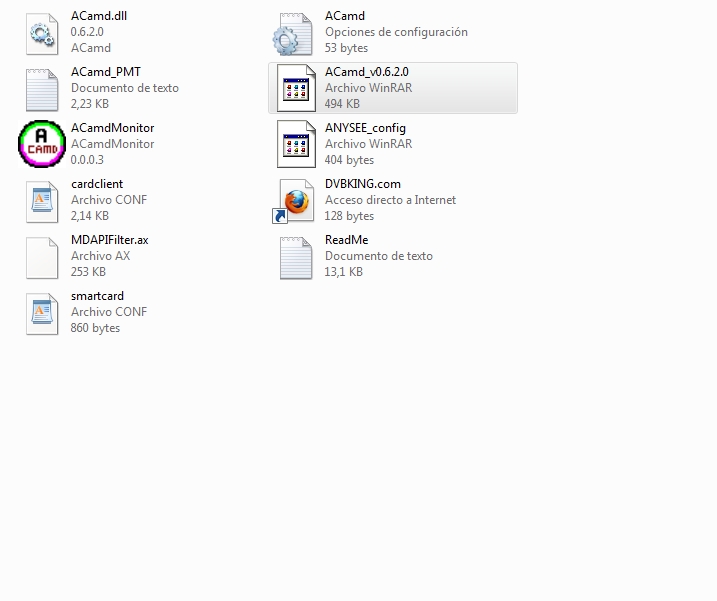
DVBDREAM

progDVB
3. Open cardclient.conf file using Notepad.
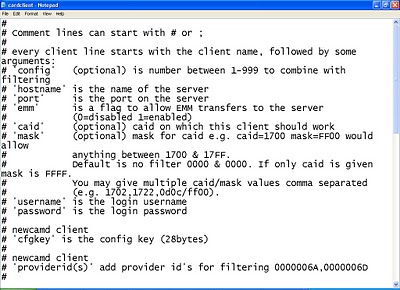
4. Scroll down and look for the line which starts with "newcamd" and change it as :
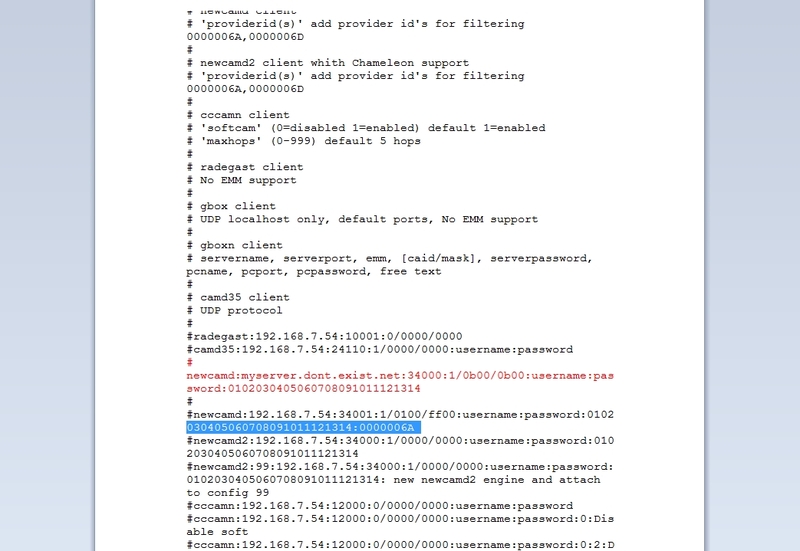
for example this is my server settings : (yes, fake of course!)
Server Type : newcamd
Server Address(IP) & Port : myserver.dont.exist.net:34000
My UserName :Username
My Password :Passhere is the line before changes:
#newcamd:192.168.7.54:34000:1/0000/0000:username:password:0102030405060708091011121314
here is the line after changes : ( with my fake server )
newcamd:myserver.dont.exist.net:34000:1/0b00/0b00:Username:Pass:0102030405060708091011121314
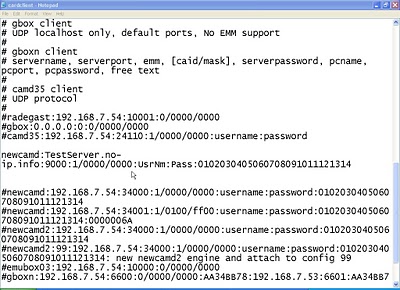
Make sure to remove # from the beginning of the line to make it active !
If you have more than one port , or more than one server you can add as many lines as you want , for example: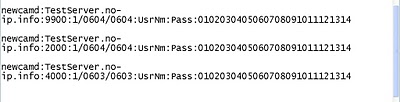
You can change 1/0000/0000 with the CAID of the channel you want , for example OSN network uses 0604 , Al-Jazeera sport uses 0603 ......1/0603/0603
5. Save the file, and start your DVB player.
ACamd supports a wide variety of different servers (cardclients) :
Newcamd
CCcamN
Radegast (no EMM)
Gb*x (localhost no EMM)
Gb*xN (no EMM)
Mb*xN (no EMM)
Camd35 (only EMM for I*****/beta and Seca)
Emubox03 (no EMM) -
Code
Display MoreWatch High Definition TV in the PC – setup with Windows XP Pro+ XP Service Pack 2 ss well as HD Video card with 256 MB (best is 512 Mb). ------------------------------------------------------------------- 1. Install DVB Dream (Note: Do not run it!) 2. Download & Install vcredist_x86.exe from ://www.microsoft.com 3. Download & Install Mpeg2 codecs (Cyberlink DTV+Interviedeo codecs ONLY) 4. Download, unzip and install CoreAVC v 1.6.5.0 2008 5. Download & Unzip the latest Emunation file ( for example 3.0.3.2) 6. In this folder Copy 2 files Microsoft Visual C++2005SP1 and pthreadVC2.dll and paste them into DVB Dream in C: drive. 7. From Emunation folder copy the content of Plugins folder and paste them into pip00 folder (located in Plugins folder). 8. Download and unzip the latest Vplug (exp.vplug 2.01.2). 9. Copy the content of vplug folder you just opened and paste it into pipo00 and close it. 10. In Plugins folder then click on copy_all batch file.(This action will copy the whole content of the pip00 folder in all pipo folders). 11. Close Plugins and DvbDream folder. 12. Plug the power of Genpix***walker-1 as well as the USB plug in your PC. 13. Follow Driver installation procedure. 14. Check for gp1.0.1 file in Device folder located in DDream folder in drive C:. 15. Reset your PC by turning it…..OFF and restart it. 16.Open DVB Dream program and follow instruction for your favor setup. a. Click Options tab click on Video and select Cyberlink DTV codec for video and Interviedeo codecs for audio. On Renders select Generic Video Render and Default Direct Sound Device, as well as CoreAVC v1.6.5.0 2008 for HD. b. In Diseqc setup your switch as well as satellite,LNB,frequency,port etc. c. Click on Channels tab in Manual setup and make your Transponder choices for scan. 17. Scan all possible channels from your satellite.



