


it should only move step by step,,, another thing is if you setup usals from 0º then it will move freely from memorised sat to sat..
Posts by cazuela
-
-
congrats - great to hear and a good lesson for the rest of us ;)
-
try media/usb and look if you can see the "full" hdd (all of it) sometimes it doesnt recognise it depending on size
as most usb automatically seek/encounter ;) -
Its always a good idea to format first ,then MOUNT -> use the circular arrows left/right to change where to mount(path) then save then reboot..
-
¿ is this right? :
Vu+DUONetwork:
Use Interface Yes
Use DHCP No
IP Address 192.168.1.1?????
should it not be the IP of the duo???
don´t want to confuse it more ,but strange that the router IP is in the duo
¿ or have I misunderstood it?? it wouldnt be the first nor the last time ,lol -
I noticed there are some questions about the structure of the back-up proces, I shall try to explain a little. Where I speak about an et9000 you can also read of course an et9100, et9500, et5000 etc.
In this example we make a full backup on HDD (The option Full back-up on HDD/USB), also there is an USB-stick present in the receiver containing a FILE with the name backupstick or backupstick.txt or whatever file containing the word backupstick! Even when the USB-stick contains a file with the name: "this_is_my_backupstick_so_keep_your_hands_off" is a valid USB-stick.
When you start the plugin "Full back-up on HDD/USB" you'll have to be patient, it will take about 5-7 minutes to complete.
What happens is:There are taken some tests to see if you're using this plugin on a supported receiver (of course it is, otherwise it wouldn't install)
Tested is if your machine uses the jffs2 filesystem or ubifs
Tested is if all "building blocks" are present, so the files which are used to build the image, like mkfs.ubifs, mkfs.jffs2, ubinize etc.
There is made a temporary folder to work with
All the necessary files are collected and assembled to form the image (takes a little while)
The image is assembled in the right form and placed in the folder et9000
A copy of the images is copied to the folder with the name: fullbackup-et9000, the folder gets the name of the date-time when the back-up is started, so if the backup is started on 29-09-2011 on 17.15 hrs the name is: 20110929-1715. In this folder is the folder et9000
When a valid USB-stick was found at the end of the back-up process then also a copy will be placed in the folder et9000 on the stick, so ready to use to restore the image.I tried to make a little scheme for the process
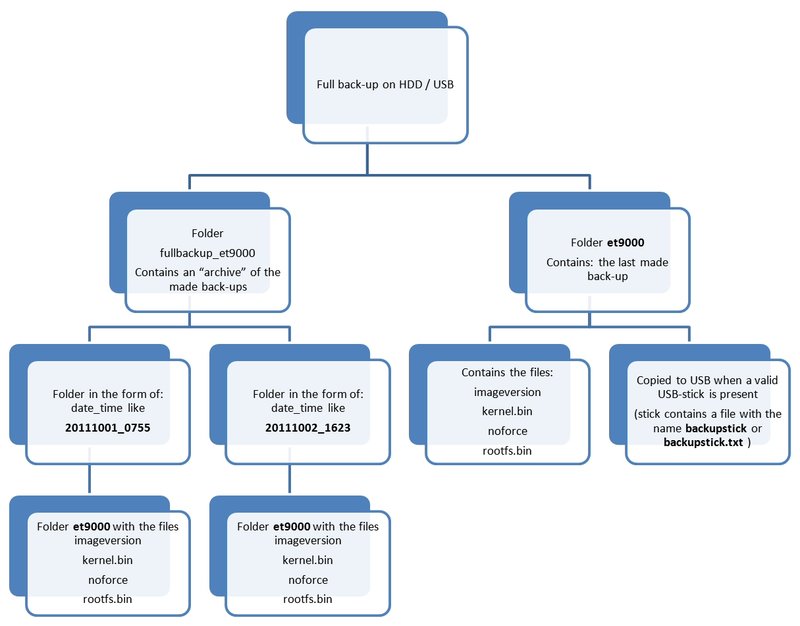
At the moment we are in a period of transition to a new approach to build the images for the et receivers. Therefore at the moment the back-ups are build to be on 2 ways, this is to be compatible with the old and the new bootloaders, it takes some extra space but it is for a short period of time, naturally the user can delete the unnecessary back-up folders if wanted.
In the near future there will be no separate images for et9000, et9100, et9200, et9500, et5000 etc.
The new nomenclature will be et9x00 for the 9000 series, et5x00 for the 5000 series etc., so 1 image for every serie receiversSo all the back-ups will be build in the old fashioned way as following the new method.
Also the partitionstructure will be changed, making it necessary to build a new BackupSuite, therefore in the coming days the BackupSuite will undergo some changes, not visible for the user, the BackupSuite will function as usual.
Also the new structure requires a new flash, when it will be necessary to flash I assume there will be some announcements made on this site or on open-pli.org.
The plugin Full back-up to USB works similar with the same folders and files.
I hope this explanation gives some insight in the back-up procedure.
And last but not least: To restore the image you'll have to place the folder et9000 (or et9x00) on the USB-stick and flash the receiver like a new image.
If you made the back-up directly on the USB-stick, or on HDD with the stick inserted in the receiver, then this stick is ready to use.
thnx TRRman ;) -
"Unable to determine WAN IP is your router setup, gateway etc,,,,LAN is your cable connections ,,WLAN is your wireless (wifi)
so it hasnt anything to do with your box ,,just your router..reset it,unplug it then plug it in again...then check that (oscam/cccam) port is open..
meanwhile get onto them about it.. -
it sounds likeinternal IP changeover but you say your pc can see the vu... so restart everything ¿check what time it logged that response...
¿updater is running synchronised ?? -
Each one is the image ...with all the added parts... unless you want the bare gemini image which is something else..
-
look at teh bottom of post #1 : Attached Files
File Type: rar dreamup_version.rar (6.04 MB, 77 views)
File Type: rar flashwiz_version.rar (6.68 MB, 44 views)this is what you need ,depends on which way you flash your box
-
-
-
-
install TS panel, go to addons-> tunisiasat vuplus addons ->DDamir_subtitle_player_3.08(oe 1.6) and see if that corrects it..
-
http://linuxsat-support.com/vu…Csolo%5Cuno-ultimo-2.html
Since installing these new drivers I have found a bug, when you switch it on,there is no audio,
no matter which channel,no matter which language.SOLUTION : press the MUTE button twice to recover sound ;)
-
change box positions and let us know ;)
-
but a delay of 10 seconds or 10 ms???? on the same frequency ?? never heard of that,especially when the connection is directly to the motor.. must be something about the processing...
but for example there are radios with a "timedelay" so as to synchronise with the sat image being relayed ..
example: athletic bilbao play in bilbao ,the feed from the stadium to the central via sat(madrid) which then has to be broadcast to the viewers via sat channel back to bilbao,, whereas the radio is in realtime....
I´ve searched thru the dm (gemini) + vu(bh) but cant find any possible option ( including Transponder UTC Time Offsets,) -
The official word from the organisation is this:
The UFC are delighted to announce that UFC Live 6: Cruz vs. Johnson, which will host the Bantamweight
Championship fight between Dominick Cruz and Demetrious Johnson live from Washington D.C., will air in the
UK on Premier Sports. The event will be unencrypted to all UK and Northern Irish homes on Channel number
433 on the B***B platform.
In Ireland, UFC Live 6: Cruz vs. Johnson will be live on Setanta Sports 1, unencypted to all Republic of
Ireland satellite homes on Channel number 424 on the B***B platform. Setanta Sports 1 is
also available on the cable as a paid channel on channel number 408.
The fights will be airing from around 2am BST. -
I thought Premier Sports and Setanta should be airing it live on Saturday night ..
-
shamonemf-- you wont find feeds on 28º ..you need to go to 10ºe or 30ºw,, for example..



