Well, using a channel editor like Channelizer, you put the PNGs in the configured folder where you get the picons, and then you update them automatically or assign them one by one...
That's what I did.


Well, using a channel editor like Channelizer, you put the PNGs in the configured folder where you get the picons, and then you update them automatically or assign them one by one...
That's what I did.
here png picons italy for epg.
As soon as the player starts, all timers are reset and stopped.
They are activated upon exit, without affecting playback.
on init
        try:
            for screen in self.session.dialog_stack:
                if hasattr(screen[0], 'proxy_monitor_timer'):
                    screen[0].proxy_monitor_timer.stop()
                    print("[Playstream2] Stopped proxy monitor timer")
                if hasattr(screen[0], 'proxy_watchdog_timer'):
                    screen[0].proxy_watchdog_timer.stop()
                    print("[Playstream2] Stopped proxy watchdog timer")
        except Exception as e:
            print("[Playstream2] Error stopping timers: {}".format(e))
on exit
    def cancel(self):
        """Close the player"""
        print("[Playstream2] Closing player...")
        self.stopStream()
        try:
            for screen in self.session.dialog_stack:
                if hasattr(screen[0], 'proxy_monitor_timer'):
                    screen[0].proxy_monitor_timer.start(10000)
                    print("[Playstream2] Restarted proxy monitor timer")
                if hasattr(screen[0], 'proxy_watchdog_timer'):
                    screen[0].proxy_watchdog_timer.start(60000)
                    print("[Playstream2] Restarted proxy watchdog timer")
        except Exception as e:
            print("[Playstream2] Error restarting timers: {}".format(e))

        # Reset EOF counter
        if hasattr(self, 'eof_count'):
            self.eof_count = 0

        # Cleanup temp files
        if isfile("/tmp/hls.avi"):
            remove("/tmp/hls.avi")

        # Restore aspect ratio
        try:
            aspect_manager.restore_aspect()
        except BaseException:
            pass

self.close()How can I explain what's happening?
This plugin has been around for a long time.
update last.. no block here.. no block her update last..

Believe me, I noticed the crashes, but if you read and compare the player code, you'll see that it's changed a lot ;)
No crashes.
Check in debug what's in your box, maybe some other thread is making requests or blocking the buffer memory.
Regards
P.S. It can't be done any better, and without debugging, I can't answer. 
REMEMBER
CHECK FILE XML FOR EPG.
Belfagor2005/vavoo-player
I put these files on my GitHub, but they might be different from yours.
So, whoever can help, please take a look. If we update them, we won't need to write that the EPG doesn't work.
I've already explained several times how it works and what needs to be done.
I have my own EPG. Besides, I don't care if there's no collaboration.
in your box:
/etc/enigma2
CHECK FILE FOR EDIT/UPDATE/ADD CHANNEL AND SERVICE REFERENCE ID
(This file is the command file; it is used during the (online) match.
It takes priority over the local file, then the online one; otherwise, no match.)
vavoo/vavoo_epg_cache.json at main · Belfagor2005/vavoo
This file, however, has some matches that weren't found. It helps you find them. Can you send me your CORRECT AND UPDATED file?
AND I EXPLAINED THIS ABOVE.
CHECK FILE SIMPLE FOR NOT UN MATCHED CHANNELS:
vavoo/vavoo_epg_unmatched_cache.json at main · Belfagor2005/vavoo
Regards..
ps. Now nobody's complaining about freezing during playback, right? 
Read from here
DON'T USE LIVE LINK PLEASE: EDIT BY MODS
USE OPTIONS FROM REPLY
USE BUTTONS LIKE FOR THANK'S

Hello,
I have OpenATV version 8 alpha running on my VU+ Zero 4k. I tried installing the "Simple Zoom 2.3.2 or 2.3.4" plugin via IPK, and while it installs fine, I can't install the dependencies... I hope E2wizard, the plugin's developer, will release a compatible version soon because I love this plugin.
Thanks again to E2wizard.
what dependencies?
there are no dependences
Package: enigma2-plugin-extensions-simple-zoom-panel
Version: 2.3.4
Section: extra
Priority: optional
Architecture: all
Maintainer: E2W!zard & HIUMAN & Lululla
Description: It is like ZOOM but Simpler, and it also works as a Panel.
Source: enigma2-plugin-extensions-simple-zoom-panel
Homepage: linuxsat-support.com
only this
("Dependencies", [
("CCCAM.CFG/OSCAM.CFG/CCCAMDATAX/OSCAMDATAX", self.installCCCAMDATAX),
("CURL", self.installCURL),
("WGET", self.installWGET),
("Python", self.installPython)
from telnet??
opkg update && opkg install cur
opkg update && opkg install wget
opkg update
opkg install python3
wget https://bootstrap.pypa.io/get-pip.py
python3 get-pip.py
pip3 install requests
on openatv 7.6 (python3)
root@ustym4kpro:~# opkg update
Downloading https://feeds2.mynonpublic.com…stym4kpro/all/Packages.gz.
Updated source 'openatv-all'.
Downloading http://updates.mynonpublic.com…hf-neon-vfpv4/Packages.gz.
Updated source 'cortexa15hf-neon-vfpv4-3rdparty-secret-feed'.
Downloading https://feeds2.mynonpublic.com…hf-neon-vfpv4/Packages.gz.
Updated source 'openatv-cortexa15hf-neon-vfpv4'.
Downloading https://feeds2.mynonpublic.com…el-ustym4kpro/Packages.gz.
Updated source 'openatv-devel-ustym4kpro'.
Downloading https://raw.githubusercontent.…feed/gh-pages/Packages.gz.
Updated source 'enigma2-settings-feed'.
Downloading https://raw.githubusercontent.…feed/gh-pages/Packages.gz.
Updated source 'oe-alliance-picon-feed'.
Downloading https://feeds2.mynonpublic.com…hf-neon-vfpv4/Packages.gz.
Updated source 'openatv-static-cortexa15hf-neon-vfpv4'.
Downloading https://feeds2.mynonpublic.com…ic-ustym4kpro/Packages.gz.
Updated source 'openatv-static-ustym4kpro'.
Downloading https://feeds2.mynonpublic.com…ro/ustym4kpro/Packages.gz.
Updated source 'openatv-ustym4kpro'.
root@ustym4kpro:~#
root@ustym4kpro:~# opkg install python3
No packages installed or removed.
root@ustym4kpro:~# wget https://bootstrap.pypa.io/get-pip.py
--2026-03-19 19:45:30-- https://bootstrap.pypa.io/get-pip.py
Resolving bootstrap.pypa.io... 151.101.0.175, 151.101.192.175, 151.101.64.175, ...
Connecting to bootstrap.pypa.io|151.101.0.175|:443... connected.
HTTP request sent, awaiting response... 200 OK
Length: 2193439 (2.1M) [text/x-python]
Saving to: ‘get-pip.py’
get-pip.py 100%[===================================================================================>] 2.09M 4.54MB/s in 0.5s
2026-03-19 19:45:31 (4.54 MB/s) - ‘get-pip.py’ saved [2193439/2193439]
root@ustym4kpro:~#
root@ustym4kpro:~# python3 get-pip.py
Collecting pip
Downloading pip-26.0.1-py3-none-any.whl.metadata (4.7 kB)
Downloading pip-26.0.1-py3-none-any.whl (1.8 MB)
━━━━━━━━━━━━━━━━━━━━━━━━━━━━━━━━━━━━━━━━ 1.8/1.8 MB 11.9 MB/s 0:00:00
Installing collected packages: pip
Successfully installed pip-26.0.1
WARNING: Running pip as the 'root' user can result in broken permissions and conflicting behaviour with the system package manager, possibly rendering your system unusable. It is recommended to use a virtual environment instead: https://pip.pypa.io/warnings/venv. Use the --root-user-action option if you know what you are doing and want to suppress this warning.
root@ustym4kpro:~#
root@ustym4kpro:~# pip3 install requests
Collecting requests
Downloading requests-2.32.5-py3-none-any.whl.metadata (4.9 kB)
Collecting charset_normalizer<4,>=2 (from requests)
Downloading charset_normalizer-3.4.6-cp313-cp313-manylinux_2_31_armv7l.whl.metadata (40 kB)
Collecting idna<4,>=2.5 (from requests)
Downloading idna-3.11-py3-none-any.whl.metadata (8.4 kB)
Collecting urllib3<3,>=1.21.1 (from requests)
Downloading urllib3-2.6.3-py3-none-any.whl.metadata (6.9 kB)
Collecting certifi>=2017.4.17 (from requests)
Downloading certifi-2026.2.25-py3-none-any.whl.metadata (2.5 kB)
Downloading requests-2.32.5-py3-none-any.whl (64 kB)
Downloading charset_normalizer-3.4.6-cp313-cp313-manylinux_2_31_armv7l.whl (194 kB)
Downloading idna-3.11-py3-none-any.whl (71 kB)
Downloading urllib3-2.6.3-py3-none-any.whl (131 kB)
Downloading certifi-2026.2.25-py3-none-any.whl (153 kB)
Installing collected packages: urllib3, idna, charset_normalizer, certifi, requests
ERROR: pip's dependency resolver does not currently take into account all the packages that are installed. This behaviour is the source of the following dependency conflicts.
streamlink 8.2.1+6.gb56cfa08d requires isodate, which is not installed.
streamlink 8.2.1+6.gb56cfa08d requires lxml<7,>=4.6.4, which is not installed.
streamlink 8.2.1+6.gb56cfa08d requires pycountry, which is not installed.
streamlink 8.2.1+6.gb56cfa08d requires pycryptodome<4,>=3.4.3, which is not installed.
streamlink 8.2.1+6.gb56cfa08d requires PySocks!=1.5.7,>=1.5.6, which is not installed.
streamlink 8.2.1+6.gb56cfa08d requires trio-websocket<1,>=0.9.0, which is not installed.
streamlink 8.2.1+6.gb56cfa08d requires websocket-client<2,>=1.2.1, which is not installed.
trio 0.29.0 requires attrs>=23.2.0, which is not installed.
Successfully installed certifi-2026.2.25 charset_normalizer-3.4.6 idna-3.11 requests-2.32.5 urllib3-2.6.3
WARNING: Running pip as the 'root' user can result in broken permissions and conflicting behaviour with the system package manager, possibly rendering your system unusable. It is recommended to use a virtual environment instead: https://pip.pypa.io/warnings/venv. Use the --root-user-action option if you know what you are doing and want to suppress this warning.
root@ustym4kpro:~#
v.1.9 online..
fix skin, fix search, fix player, fix all :)
I could also cut the name [:11] maybe the first 11 letters... but what's the point :(
If you go to the menu there's a favorite details option... you can see what they are and the weather.

I’d like to ask if it would make sense to make a change to the home menu... let me explain...
On the right-hand side, we see the functions assigned to the coloured buttons on the remote control. Instead of displaying ‘Home’, ‘Favourite 1’ and ‘Favourite 2’, would it make sense to have the name of the selected city appear on these buttons? There might be an issue with long names being cut off, but it seems to me that the city name always appears first, followed by the county or country, and so on... Perhaps two lines could be provided to accommodate any long names...
Clearly, this is just an idea of mine that I wanted to share with everyone helping Lululla to improve and refine the plugin...
Best regards to all
good ideas but
QuotePerhaps two lines could be provided to accommodate any long names.
long names :(
### Version 1.61 (2026-03-19)
- **Cache Format Fix**: Added YELLOW button to fix cache format and remove duplicates
- **HTTP 451 Handling**: Automatic fallback to kool.to mirror when vavoo.to is blocked
- **Enhanced Proxy Monitoring**: Added active stream tracking and token age display
- **Improved Satellite Priority**: Better detection of user-configured satellites
- Fixed EPG cache consistency issues
- Resolved duplicate entry problems in unmatched cache
- Optimized EPG matching performance
- Updated documentation with new features
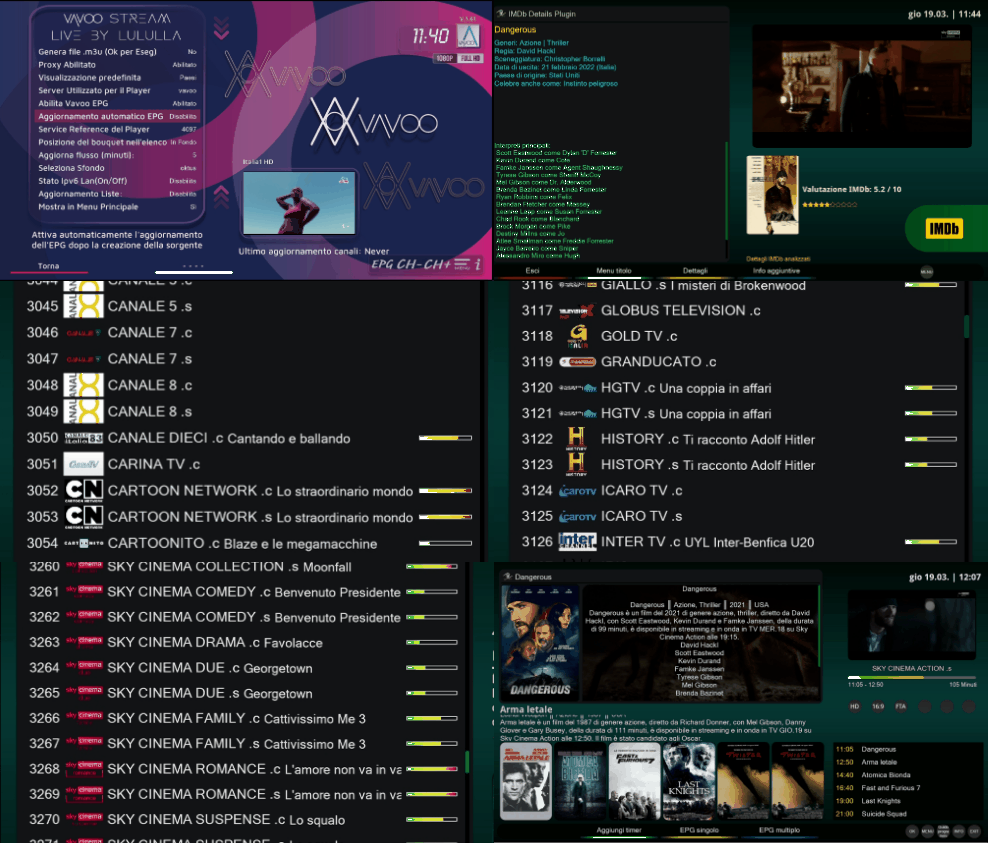
 thank's for coffee... to all
Let's not start! If it says "not found" on one channel, try others first. It means it's not available on that channel. You should finish the service reference work first.
 Display More
...and remember my vavoo it's different :Rolling auf dem Boden lachend:
pasted-from-clipboard.pngHello, how do I get it, like you have?
but you have read it
RE: Vavoo Stream Live - discussion & support

At first , big thanks ( I haven't installed it yet)
Corrections for satellite service references are not difficult to fix. This is more of a problem for cable TV, as the backup can be the same as for satellite. Also, for each channel it is necessary to check the service ID + service reference (sref). I noticed that, for example, for Eurosport, the service ID is eurosport.dk for most countries. Looking at the program schedule for Danish Eurosport, it is not the same program as for other countries. The same applies to Doma tv.hr or tvDoma.sk. The channel name is similar, but they are two completely different channels. It is important what the ID of the service is because the same channel in other countries may have a different program schedule. The same goes for Eleven Sports Polish or Portuguese. Then the epg will not be correct either. I will check all the channels in vavoo_epg_cache.json even though I know there is a lot of work there.
I know I can make life easier for everyone.
I'm trying an advanced version (mine, of course)
Where all countries' matches are shared online.
Good.
1. Press Export bouquet
2. Check online if match exists
3. Check in local mode if match exists
. Find match. and append it to a .json file ;)
4. Put this match (see point 4) online ;)
Of course, my friend, remember that I always update the online files at this time, even every 10 minutes.
So, check the unmatched files first.
PM me a .txt file or something else if you want, and I'll fix it, time permitting.
The same goes for the ids and their extensions (that's also very important.)
We look for the iids in the tyteck file updated a few days ago on my epgimport git (epg-source), which uses both pli and openatv, as well as my epgimport99 plugin.
It couldn't be easier.
Do you think I should make the change I mentioned?
;) · Belfagor2005/vavoo@ff7521d
"Search matches: 1) GitHub online, 2) Local cache, 3) Local matching
...and remember my vavoo it's different :Rolling auf dem Boden lachend:
pasted-from-clipboard.pngHello, how do I get it, like you have?
but you have read it
RE: Vavoo Stream Live - discussion & support
At first , big thanks ( I haven't installed it yet)
Corrections for satellite service references are not difficult to fix. This is more of a problem for cable TV, as the backup can be the same as for satellite. Also, for each channel it is necessary to check the service ID + service reference (sref). I noticed that, for example, for Eurosport, the service ID is eurosport.dk for most countries. Looking at the program schedule for Danish Eurosport, it is not the same program as for other countries. The same applies to Doma tv.hr or tvDoma.sk. The channel name is similar, but they are two completely different channels. It is important what the ID of the service is because the same channel in other countries may have a different program schedule. The same goes for Eleven Sports Polish or Portuguese. Then the epg will not be correct either. I will check all the channels in vavoo_epg_cache.json even though I know there is a lot of work there.
I know I can make life easier for everyone.
I'm trying an advanced version (mine, of course)
Where all countries' matches are shared online.
Good.
1. Press Export bouquet
2. Check online if match exists
3. Check in local mode if match exists
. Find match. and append it to a .json file ;)
4. Put this match (see point 4) online ;)
Of course, my friend, remember that I always update the online files at this time, even every 10 minutes.
So, check the unmatched files first.
PM me a .txt file or something else if you want, and I'll fix it, time permitting.
The same goes for the ids and their extensions (that's also very important.)
We look for the iids in the tyteck file updated a few days ago on my epgimport git (epg-source), which uses both pli and openatv, as well as my epgimport99 plugin.
It couldn't be easier.
Do you think I should make the change I mentioned?

Thank you very much for this great work.

In the ver. 1.60, the infobar remains permanently visible.
no.. press OK..
Ok hyde infobaer
OK - show epg+infobar
;)
...and remember my vavoo it's different 
pasted-from-clipboard.png
the new features on proxi fo epg..
"""
VAVOO PROXY ENDPOINTS (PROXY_HOST:{PORT})
1. /status - Proxy status
   URL: http://127.0.0.1:{PORT}/status
   Description: Returns the current status of the proxy, including initialization, number of channels, addonSig validity, local IP and port.

2. /channels?country=CountryName - Get channels for a country
   URL: http://127.0.0.1:{PORT}/channels?country=Italy
   Description: Returns the list of channels for the specified country. Country names must be URL-encoded.

3. /vavoo?channel=ChannelID - Resolve a channel by ID
   URL: http://127.0.0.1:{PORT}/vavoo?channel=abc123
   Description: Returns a 302 redirect to the stream URL for the given channel ID. This is the primary endpoint for playback.

4. /catalog - Full catalog
   URL: http://127.0.0.1:{PORT}/catalog
   Description: Returns the entire channel catalog in JSON format (all channels with proxy URLs).

5. /countries - List all countries
   URL: http://127.0.0.1:{PORT}/countries
   Description: Returns a list of all unique countries available in the catalog.

6. /refresh_token - Refresh addonSig token
   URL: http://127.0.0.1:{PORT}/refresh_token
   Description: Forces a refresh of the authentication token (addonSig).

7. /health - Monitors proxy
   URL: http://127.0.0.1:{PORT}/health
   Description: Monitors proxy health and restarts it if necessary.

8. /shutdown - Shutdown proxy
   URL: http://127.0.0.1:{PORT}/shutdown
   Description: Gracefully shuts down the proxy server.

9. /epg/<country>.xml - Get EPG for a specific country
    URL: http://127.0.0.1:{PORT}/epg/it.xml
    Description: Returns the EPG data in XMLTV format for the specified country (e.g., it, fr, de). The request is redirected to the corresponding file on GitHub.
"""IP_BOX:4323/epg/it.xml
IP_BOX:4323/epg/pl.xml
...... etc,,..
v.1.60 (py2 not tested)
- EPG data is generated per country and stored in `/etc/epgimport/vavoo_<country>.channels.xml`
- A master source file (`vavoo.sources.xml`) is created for EPGImport
- The player fetches EPG via the proxy redirect to GitHub raw files
- Channel matching uses a persistent cache (`vavoo_epg_cache.json`) with Rytec IDs
- Service references are matched against Rytec database for EPG compatibility
- EPG mapping files are automatically generated for each country
- Location: `/etc/epgimport/vavoo_*.channels.xml`
- Source: `https://raw.githubusercontent.…/vavoo-player/master/epg_<country>.xml`
- Updated automatically via GitHub Actions every 6 hours
## Common Issues
@@ -114,12 +132,15 @@ cat /tmp/vavoo.log
| Bouquets don't open | Ensure proxy is running |
| Stream doesn't start | Proxy should auto-refresh tokens |
| M3U export fails | Verify port 4323 is accessible |
| "No programme found" | Clear EPG cache and re-export bouquet; check country EPG file exists |
| EPG not updating | Verify EPG is enabled in config and GitHub files are accessible |
## Important Notes
- Old bouquets won't work with new system – re-export required
- Proxy runs in background – bouquets work even after closing plugin
- Minimal memory usage (~20-50MB)
- Only `vavoo_proxy.py` needs updates if Vavoo API changes
- EPG cache is now stored in `/etc/enigma2/vavoo_epg_cache.json` (not in /tmp)
- The proxy no longer downloads EPG files locally – uses GitHub redirects
- Use **TEXT button** in main menu to manually refresh proxy token
- Proxy status is displayed in real-time in the main interface
v.1.1.5 online.

