Update file only on first post o f topic.
So that it is less distracting to search for the files and I can add them to the linuxsat-support panel (if you want it)


Update file only on first post o f topic.
So that it is less distracting to search for the files and I can add them to the linuxsat-support panel (if you want it)
ctrl+c - ctrl + v
70W/4127V
PID: 201h Crypt8 : A7BC99AD683AB7DC [E] CW : ???
PID: 265h Crypt8 : D699BAB6D2C83619 [E] CW : 19B2014E2319
please you can use normal font with clear color ?
Thank's
Lululla added a new version:

QuoteDisplay MoreCodeDisplay More## ✨ Features (v1.2) ### Core Features - 📂 **Categorized commands** – quickly find what you need. - ▶️ **Execute any command** with the press of a button. - 🖥️ **Live output monitor** – see command output as it runs. - 📜 **Full scrollable output** – use **UP/DOWN** for line‑by‑line scrolling, **CH+/CH–** for page scrolling (in CommandScreen). In LogViewer, use **UP/DOWN** for lines, **LEFT/RIGHT** or **CH+/CH–** for pages. - 💾 **Save output** to `/tmp/` for later analysis. - 🔄 **Auto‑scroll** (optional) – automatically follows new output. - 🎨 **Color‑coded buttons** – intuitive navigation. - 📋 **Command descriptions** – understand what each command does. ### Advanced Features (New in v1.2) - 🐞 **Debug Mode Screen** – dedicated environment for dangerous / debugging commands that may restart or crash Enigma2. - Predefined debug commands (full debug restart, stop Enigma2, journal logs, screenshot, etc.). - Commands run in background, output saved to persistent logs (`/home/root/logs/debug_*.log`). - Browse, view, and delete logs directly from the plugin. - Works for OE‑Alliance (init 4 / killall / ENIGMA_DEBUG_LVL) and DreamBox (journalctl). - 📄 **Advanced Log Viewer** – inspired by CrashlogViewer. - Shows full log content in a scrollable window. - Switch between **Full Log** and **Error Only** view (with GREEN button). - Scroll line by line (UP/DOWN) or page by page (CH+/CH– or LEFT/RIGHT). - ⚙️ **Fully external command list** – commands are stored in `/etc/enigma2/commandcenter_commands.json`. Edit with any text editor – no plugin code changes needed. - 🛡️ **Automatic backups** – every time you save custom commands or settings, a timestamped backup (`.bak`) is created. Your data is safe. - 🔘 **Manager screen** – easily add custom commands, edit existing ones, or disable predefined commands (toggle with INFO button). - ℹ️ **INFO button works everywhere** – shows version, command details, or toggles disable state. - 📱 **Optimized for all screen sizes** – includes dedicated skins for HD (1280×720), Full HD (1920×1080) and WQHD (2560×1440). Automatically selected based on your screen resolution. - 🌍 **Fully translatable** – uses Enigma2’s locale system (Italian and German included).
Usage
Main Category Screen
- UP / DOWN – navigate through categories.
- OK – open the selected category.
- BLUE – open the Manager screen (see below).
- INFO – show plugin version and info.
- MENU – open the Debug Mode screen (new in v1.2).
Command Screen
- UP / DOWN – select a command from the list.
- GREEN / OK – execute the selected command.
- LEFT / RIGHT – scroll the output area one page up/down (using pageUp/pageDown).
- CH+ / CH– (PageUp/PageDown) – scroll the output area one page up/down.
- YELLOW – clear the output area.
- BLUE – save the current output to
/tmp/command_output_YYYYMMDD_HHMMSS.txt.- INFO – show the full command and its description.
- RED – go back to category list.
Manager Screen
- UP / DOWN – browse all commands (predefined + custom).
- OK – edit the selected command.
- GREEN – add a new custom command (enter command and description).
- YELLOW – edit the selected command.
- BLUE – delete a custom command or disable a predefined command (opens confirmation).
- INFO – toggle the
[DISABLED]state for predefined commands only (disabled commands won’t appear in the main list).- RED – exit the manager.
Debug Mode Screen (NEW in v1.2)
- UP / DOWN – select a debug command.
- GREEN / OK – run the selected debug command (confirmation required).
- YELLOW – toggle between command list and log browser.
- BLUE – delete the selected log file (when in log browser).
- INFO – view the content of the selected log file (opens Log Viewer).
- RED – exit debug screen.
What is Debug Mode for?
Some commands (like
init 4 ; killall -9 enigma2 ; ENIGMA_DEBUG_LVL=4 enigma2) will restart or crash Enigma2. Normal execution would immediately close the plugin and you would lose the output. Debug Mode runs such commands in a detached background script, saving all output to a persistent log file in/home/root/logs/. After Enigma2 restarts, you can come back to Debug Mode, press YELLOW to see the list of logs, select one and press INFO to view it in the dedicated Log Viewer.
Log Viewer Screen (NEW in v1.2)
- UP / DOWN – scroll the log text line by line.
- LEFT / RIGHT or CH+/CH– – scroll page by page.
- GREEN – switch between Full Log and Error Only view (automatically extracts tracebacks and errors).
- RED / OK / CANCEL – close the viewer.
See my reply and try.
Hi,
Thank you for providing the debug log. I've reviewed it carefully, but unfortunately **it does not show the problem you described** (no signal when changing channels).
What the log actually shows:
- A normal boot of your Vu+ Ultimo4K with OpenATV 8.0.0-beta.
- The skin being loaded is **MetrixHD**, not Aglare (so this log is from a session where Aglare wasn't active, or after you switched skins).
- The session ends with a normal shutdown (no errors, no channel switching, no signal loss).
Therefore, this log is not useful for diagnosing your issue. We need a proper debug log captured **while the problem is happening**.
**Please follow these steps:**
1. Stop Enigma2:
`init 4`
2. Start Enigma2 manually with full debug output:
`enigma2 > /tmp/debug.log 2>&1`
3. Reproduce the problem:
Change channels several times until you get the "no signal" and it doesn't come back.
4. Once the problem occurs, press `Ctrl+C` to stop Enigma2, then restart it with `init 3`.
5. Attach the **entire `/tmp/debug.log`** file here.
**In the meantime, you can try these tests:**
- Does the problem also happen with the default skin (MetrixHD or OpenATV default)?
→ If **no**, then the issue is almost certainly with the **Aglare skin** (incompatibility with your OpenATV version, missing updates, or a bug in the skin's channel change handling).
- Update Aglare to the latest version compatible with OpenATV 8.0.
- Temporarily disable any plugins that affect channel zapping (e.g., AutoBouquetsMaker, EPG refresh, or other channel list managers) to see if there's a conflict.
Let me know the results, and please provide the new debug log. Then we can look deeper.
Best regards
Lululla added a new version:
QuoteDisplay More## Changelog – Command Center Plugin v.1.1
Below are the main improvements and fixes made to the plugin compared to the initial version.
### External command file (JSON)
- **Before:** Predefined commands were hard‑coded in `plugin.py`. Any change required editing the code and restarting Enigma2.
- **Now:** All predefined commands are stored in `/etc/enigma2/commandcenter_commands.json`.
- On first run the plugin creates this file from `default_commands.json` (shipped inside the plugin folder).
- You can freely edit `commandcenter_commands.json` (via FTP or any text editor) to add, remove or modify commands and descriptions – no Python changes needed.
- If the file gets corrupted or deleted, the plugin automatically recreates it from the defaults.
### Automatic backups of user configurations
- **Before:** Changes to custom commands, disabled states and modifications were saved without any backup.
- **Now:** Before saving `/etc/enigma2/commandcenter_custom.json` or `/etc/enigma2/commandcenter_config.json`, the plugin creates a timestamped backup (e.g. `.20260526_123456.bak`). You can restore a previous version if something goes wrong.
### Fixed navigation in ManagerScreen
- **Before:** Arrow keys (up/down) did not work inside the `Manager` screen – impossible to scroll through the command list.
- **Now:** The `ActionMap` has been corrected by adding the `DirectionActions` and `InfoActions` contexts and the proper actions (`up`, `down`, `pageUp`, `pageDown`). Focus is also forced on the list when the screen opens.
### INFO button works everywhere
- **Before:** The INFO remote key had no effect in any screen.
- **Now:**
- `CategoryScreen` → shows plugin version and a short info message.
- `CommandScreen` → shows the full command and description of the selected item.
- `ManagerScreen` → toggles the `[DISABLED]` state for predefined commands.
### Scroll command output
- **Before:** After executing a command, long output could not be scrolled.
- **Now:** In `CommandScreen` you can navigate the output area with:
- **LEFT / RIGHT** → scroll one line up / down.
- **CH+ / CH– (PageUp / PageDown)** → scroll one full page.
- Auto‑scroll (when enabled) still works as before.
### Skin support for HD, FHD and WQHD
- **Before:** Only a generic skin existed, not optimised for different resolutions.
- **Now:** Three skin folders (`skins/hd`, `skins/fhd`, `skins/wqhd`) contain tailored XML files.
- **HD (1280×720)** – compact layout.
- **FHD (1920×1080)** – larger, more readable.
- **WQHD (2560×1440)** – fully uses big screens.
The plugin automatically detects the screen width and loads the appropriate skin.
### Other minor fixes
- Fixed JSON syntax: predefined command lists now use `[]` instead of `()`.
- Added debug print messages (can be removed if not needed).
- Better error handling: corrupted config files are renamed with a `.corrupt` extension.
- Screen titles now show the plugin version for easier support.
---
## Notes for the user
- **Customising predefined commands:** Edit `/etc/enigma2/commandcenter_commands.json` (keep valid JSON syntax). Reopen the plugin to see changes.
- **Restoring a backup:** In the same folder you will find files like `commandcenter_config.json.20260526_123456.bak`. Remove the timestamp part to restore.
- **Custom commands:** Use the **BLUE** button in `ManagerScreen` → `Add Custom`. They are saved in `/etc/enigma2/commandcenter_custom.json`.
- **Disabling a predefined command:** In `ManagerScreen`, select a predefined command and press **INFO** to toggle `[DISABLED]`. Disabled commands won’t appear in the main list.
- **Scrolling long output:** After running a command, use **LEFT/RIGHT** for line‑by‑line scrolling and **CH+/CH–** for page scrolling.
- **Reporting issues:** Check Enigma2 logs (`/home/root/logs`, `dmesg`, `journalctl`) for any plugin errors.
---

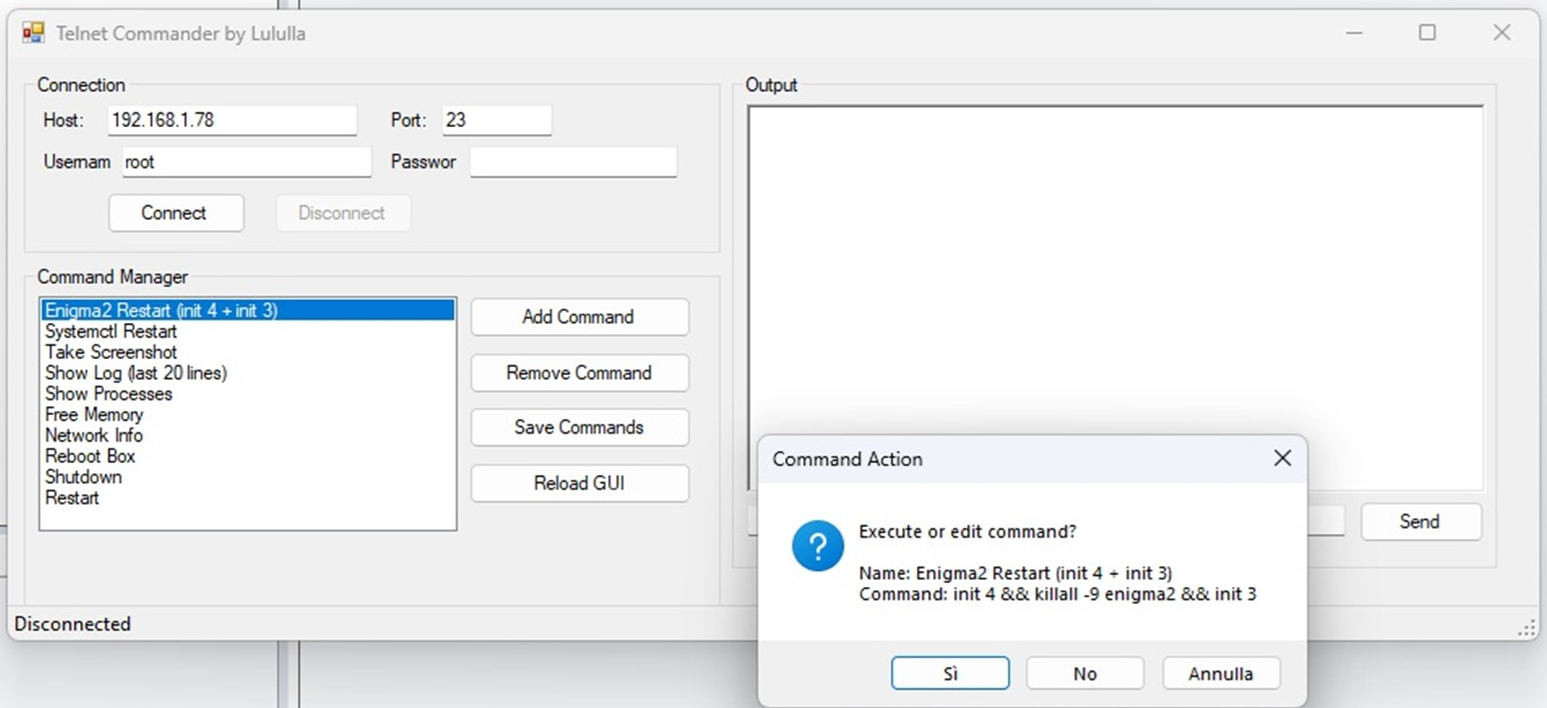
What I mean is that you can save various commands in this Telnet Commander and have them readily available there.
LIST COMMANDS
COMMANDS = {
    "📁 System Info": [
        ("uname -a", "Kernel information"),
        ("uptime", "System uptime"),
        ("free -m", "Free memory (MB)"),
        ("cat /proc/meminfo", "Memory details"),
        ("df -h", "Disk space usage"),
        ("df -aTh", "Disk space with FS type"),
        ("blkid", "Block device UUIDs"),
        ("cat /proc/cpuinfo", "CPU info"),
        ("cat /proc/version", "Kernel version"),
        ("hostname", "Hostname"),
        ("who -a", "Logged users"),
        ("lsof", "Open files (may take time)"),
    ],
    "⚙️ Process Management": [
        ("ps aux", "Process list"),
        ("ps | grep enigma2", "Enigma2 processes"),
        ("killall -9 enigma2", "Kill Enigma2 (restart GUI)"),
        ("killall -9 python", "Kill all Python processes"),
        ("killall -INT ffmpeg", "Stop ffmpeg"),
        ("top -n 1 -b", "Real-time processes (one shot)"),
        ("lsof | wc -l", "Count open files"),
    ],
    "🌐 Network": [
        ("ifconfig", "Network configuration"),
        ("ip link", "Network interfaces"),
        ("ip route | grep default", "Default gateway"),
        ("netstat -tulpn", "Listening ports"),
        ("ping -c 1 8.8.8.8", "Ping Google DNS"),
        ("wget -q -T 1 -t 1 --spider http://www.google.com", "HTTP connectivity test"),
        ("arp -n", "ARP table"),
        ("hostname -I", "Local IP addresses"),
    ],
    "📦 Package Management": [
        ("opkg update", "Update package list (opkg)"),
        ("opkg list-installed", "Installed packages (opkg)"),
        ("opkg list | head -20", "First 20 available packages"),
        ("opkg install <name>", "Install package (replace <name>)"),
        ("opkg remove <name>", "Remove package"),
        ("apt-get update", "Update (apt)"),
        ("apt list --installed | head -20", "Installed apt packages"),
        ("dpkg -l | head -20", "dpkg list"),
    ],
    "📦 Package Search (opkg)": [
        ("opkg update", "Aggiorna lista pacchetti"),
        ("opkg list | grep -i ssl", "Cerca pacchetti SSL"),
        ("opkg list | grep -i dvbcsa", "Cerca pacchetti dvbcsa"),
        ("opkg list | grep -i pcsc", "Cerca pacchetti pcsc"),
        ("opkg list-installed | grep -i ssl", "Pacchetti SSL installati"),
        ("opkg list-installed | grep -i pcsc", "Pacchetti pcsc installati"),
        ("openssl version", "Versione OpenSSL"),
        ("ls -l /usr/lib/libss*.*", "Trova libreria SSL"),
        ("opkg install libcrypto-compat", "Installa libcrypto-compat"),
    ],
    "📂 Filesystem": [
        ("ls -la /etc/enigma2/", "Content of /etc/enigma2"),
        ("pwd", "Current directory"),
        ("cd /tmp && ls -la", "Content of /tmp"),
        ("find /etc/enigma2 -name '*.tv'", "Find TV bouquets"),
        ("du -shc /home/root 2>/dev/null", "Space used by /home/root"),
        ("mount", "Mount points"),
        ("cat /etc/fstab", "Filesystem table"),
        ("lsattr -d /etc", "Attributes of /etc"),
    ],
    "🔧 OSCam Tools": [
        ("find /usr/bin -name 'oscam*' -type f", "Cerca file oscam in /usr/bin"),
        ("ls -la /usr/bin/oscam*", "Dettaglio file oscam"),
        ("find /usr/bin -name 'oscam*' -type f 2>/dev/null", "Cerca ricorsiva oscam"),
        ("find /usr/bin -name 'oscam*' -o -name '*oscam*' -type f 2>/dev/null", "Cerca con wildcard estesa"),
        ("find /usr/bin -name 'oscam*' -type f 2>/dev/null | wc -l", "Conta file oscam trovati"),
        ("ps aux | grep oscam | grep -v grep", "Verifica se oscam è in esecuzione"),
        ("find / -name '*oscam*' -type f 2>/dev/null | head -20", "Cerca oscam in tutto il sistema (lento)"),
        ("find /usr/bin -name '*oscam*' -type f -exec file {} \\;", "Cerca script oscam"),
        ("find /usr/bin -name 'oscam*' -type f -executable", "Cerca eseguibili oscam"),
    ],
    "🗜️ Compression/Archive": [
        ("tar -czf /tmp/backup.tar.gz /etc/enigma2", "Backup settings (tar.gz)"),
        ("tar -xzf /tmp/backup.tar.gz -C /", "Restore backup"),
        ("unzip -l /tmp/file.zip", "List zip contents"),
        ("unrar l /tmp/file.rar", "List rar contents"),
        ("7za l /tmp/file.7z", "List 7z contents"),
        ("gzip -d /tmp/file.gz", "Decompress gz"),
        ("xz -d /tmp/file.xz", "Decompress xz"),
    ],
    "🎬 Media/Streaming": [
        ("ffmpeg -version | head -1", "FFmpeg version"),
        ("ffmpeg -i /media/hdd/movie/recording.ts -frames:v 1 screenshot.jpg", "Extract screenshot from video"),
        ("showiframe /usr/share/enigma2/backdrop.mvi", "Show MVI bootlogo"),
        ("killall -INT ffmpeg", "Stop running ffmpeg"),
    ],
    "🕹️ Enigma2 Specific": [
        ("wget -qO- http://127.0.0.1/web/servicelistreload", "Reload channel list (webif)"),
        ("init 3", "Restart GUI (alternative)"),
        ("systemctl restart enigma2", "Restart GUI (systemd)"),
        ("grep -i 'error' /home/root/.enigma2/enigma2.log | tail -20", "Last Enigma2 errors"),
    ],
    "📸 Screenshot": [
        ("grab -q -s jpg > /tmp/screenshot.jpg", "Screenshot JPG"),
        ("grab -p -s png > /tmp/screenshot.png", "Screenshot PNG"),
        ("dreamboxctl screenshot -f /tmp/screen.png", "Screenshot using dreamboxctl"),
    ],
    "🛠️ Utilities": [
        ("date", "Date and time"),
        ("date -s '2025-01-01 12:00:00'", "Set date/time (example)"),
        ("hwclock --systohc", "Sync hardware clock"),
        ("md5sum /etc/enigma2/settings", "MD5 of settings file"),
        ("sha256sum /etc/enigma2/settings", "SHA256 of settings file"),
        ("which python", "Python path"),
        ("echo -e 'Hello\\nWorld'", "Test echo with escape"),
        ("sync", "Sync disk buffers"),
    ],
    "🔗 Symlink & Architecture": [
        ("ln -sf /usr/lib/enigma2/python/Plugins/Extensions/ /", "Crea symlink Extensions"),
        ("ln -sf /usr/share/enigma2/ /", "Crea symlink share"),
        ("TARGET=$(find /media -maxdepth 1 -type d ! -name 'media' -exec mountpoint -q {} \\; -print | head -n 1) && [ -n \"$TARGET\" ] && ln -sf \"$TARGET\" /hdd && ln -sf \"$TARGET/picon\" /usr/share/enigma2/picon && ln -sf \"$TARGET/picon\" /picon && echo \"Creato per: $TARGET\"", "Crea symlink automatica per HDD/picon"),
        ("dpkg --print-architecture | grep -iE 'arm|aarch64|mips|cortex|sh4|sh_4'", "Architettura box (dpkg)"),
        ("opkg print-architecture | grep -iE 'arm|aarch64|mips|cortex|h4|sh_4'", "Architettura box (opkg)"),
    ],
}info:
WE CAN ADD OTHER COMMANDS IF YOU WANT, EVEN FOR CAMs (OSCAM..),
INSERT YOUR COMMANDS HERE AND I WILL INSERT THEM INTO THE PLUGIN.
INSTALL FROM TELNET
Lululla added a new file:
QuoteDisplay More[Release] Command Center – Run Telnet/Shell Commands on Enigma2
Command Center is a plugin for Enigma2-based receivers that allows you to execute system commands directly from your remote control. Commands are organized into categories, and you can see the live output on screen – no need for a PC or SSH terminal.
Features
- Predefined commands grouped by category (System Info, Process Management, Network, Package Management, Filesystem, Compression, Media, Enigma2 Specific, Screenshot, Utilities).
- Execute any command with a single button press.
- Live output monitor – view command output as it runs.
- Scrollable output area – review long results.
- Save output to /tmp/ for later analysis.
- Optional auto-scroll follows new output.
- Easy to extend – add your own commands by editing the COMMANDS dictionary.
Installation
- Copy the plugin folder to:
/usr/lib/enigma2/python/Plugins/Extensions/CommandCenter- Set permissions (if needed):
chmod 755 /usr/lib/enigma2/python/Plugins/Extensions/CommandCenter/plugin.py- Restart Enigma2 (GUI restart).
Usage
- Launch the plugin from the Extensions or Plugin menu.
- Choose a category (e.g., System Info, Network).
- Select a command – the status bar shows the command description.
- Press the green button (Run) to execute.
- Watch live output in the right panel.
- Use yellow (Clear) to erase output, blue (Save) to save to /tmp/, or the info button to see the command description.
- Red button (Back) returns to category list or exits.
How to Add Your Own Commands
Edit the
COMMANDSdictionary insideplugin.py. Each category is a key; the value is a list of tuples(command, description).Example:
text
Code"My Custom Category": [ ("echo Hello World", "Prints Hello World"), ("ls -la /tmp", "List content of /tmp") ]
Credits
- Plugin development and adaptation by Lululla.
- Thanks to the Enigma2 community.
License
GNU General Public License v3.0
Download
GitHub Repository – Command Center
Compatibility
Works on all Enigma2-based receivers (OpenPLi, OpenATV, OpenVision, Pure2, etc.).
Screenshots
(Add your screenshots here)
Support
For issues or feature requests, please open an issue on GitHub.
Or in this topic too.
Enjoy using Command Center!
Lululla , do you have Telnet Manager as a separate plugin? If not, it might be worth creating one, because it’s a very useful tool.
Best regards
putty ?
Install setup 4242 first Ian update from software
Since I have already worked on epgimporter, after years of not being updated and I see that many teams use it and everyone considers it a good base, I believe that:
I think it would be enough to modify epgdat_importer.py
Which is the entry point before creating the epg.dat file ;)
You don't need to translate epg.dat; it's a binary file.
An example of code to modify the epgdat_importer.py file to automatically translate titles, subtitles, and descriptions into English, automatically detecting the original language.
# At the beginning of the file, together with the other imports
from .translate_epg import translate_text   # or from translate_epg import translate_text

class epgdatclass:
    def __init__(self):
        # ... (the rest of the original __init__) ...
        # Set the target language (e.g. 'en' for English)
        self.target_lang = 'en'   # <--- Change here if you want another language

    def importEvents(self, services, dataTupleList):
        '''This method is called repeatedly for each bit of data'''
        if services != self.services:
            self.commitService()
            self.services = services

        # --- TRANSLATION BLOCK ---
        translated_programs = []
        for program in dataTupleList:
            # program is a tuple: (start, duration, title, subtitle, description, ...)
            title = program[2] if len(program) > 2 else ""
            subtitle = program[3] if len(program) > 3 else ""
            description = program[4] if len(program) > 4 else ""

            # Translate only if the text is not empty
            # and is not already in the target language (optional)
            if title and isinstance(title, str):
                translated_title = translate_text(
                    title,
                    target_lang=self.target_lang,
                    use_cache=True
                )
            else:
                translated_title = title

            if subtitle and isinstance(subtitle, str):
                translated_subtitle = translate_text(
                    subtitle,
                    target_lang=self.target_lang,
                    use_cache=True
                )
            else:
                translated_subtitle = subtitle

            if description and isinstance(description, str):
                translated_desc = translate_text(
                    description,
                    target_lang=self.target_lang,
                    use_cache=True
                )
            else:
                translated_desc = description

            # Rebuild the tuple with translated texts
            # (preserving the remaining elements)
            program_list = list(program)
            program_list[2] = translated_title
            program_list[3] = translated_subtitle
            program_list[4] = translated_desc
            translated_programs.append(tuple(program_list))
        # --- END TRANSLATION ---

        # Now use translated programs
        for program in translated_programs:
            if program[3]:
                desc = program[3] + "\n" + program[4]
            else:
                desc = program[4]

            self.epg.add_event(
                program[0],
                program[1],
                program[2],
                desc
            )

# ... (any original code after the loop, if present) ...You can add an option in the EPGImport configuration menu to enable or disable English translation, without having to manually edit the code each time.
# In EPGConfig.py, make sure the option is defined
# and globally accessible
# ... (other configurations) ...

if hasattr(config.plugins, "epgimport") and hasattr(
    config.plugins.epgimport,
    "translate_to_english"
):
    translateToEnglish = config.plugins.epgimport.translate_to_english.value
else:
translateToEnglish = False # Default value if the option does not existThe addition should be made at the point where the plugin's other configurations are read, such as `filterCustomChannel`.
Add the Menu Entry (plugin.py)
Edit the `plugin.py` file to add the new option to the configuration menu. You can do this inside the function that builds the configuration entries list (`getConfigList`). Insert something like:
# In plugin.py, inside the configuration entries list:
from .EPGConfig import translateToEnglish
# ...
config.plugins.epgimport.translate_to_english = ConfigYesNo(default=False)
config_list.append(
    getConfigListEntry(
        _("Translate EPG to English"),
        config.plugins.epgimport.translate_to_english
    )
)
The most important step: modify `epgdat_importer.py` to read this configuration and translate data only if the option is enabled. You will need to import both the translation module and the new configuration variable.
# In epgdat_importer.py
from .translate_epg import translate_text
from .EPGConfig import translateToEnglish  # Import the configuration variable

class epgdatclass:
    # ... (__init__ method) ...

    def importEvents(self, services, dataTupleList):
        # ... (existing code) ...
        if services != self.services:
            self.commitService()
            self.services = services

        # Determine whether translation is enabled ONLY ONCE before the loop
        # This avoids reading the configuration file for every event
        do_translate = translateToEnglish  # translateToEnglish is True/False

        # --- TRANSLATION BLOCK (OPTIONAL) ---
        translated_programs = []
        for program in dataTupleList:
            # If translation is NOT enabled, use original data unchanged
            if not do_translate:
                translated_programs.append(program)
                continue

            # ... (then the translation logic you already wrote) ...
            # Extract, translate, and rebuild the tuple
            # ...
            translated_programs.append(translated_program)
        # --- END BLOCK ---

        # Now use the programs (translated or original)
        for program in translated_programs:
# ... (the rest of the code for adding events) ...This is just an example, not tested or anything else. Just to give you a sense of direction.
Attached my python code translate_epg
well..
Maybe we can discuss it...
Google Translate's APIs are slow, translating word by word takes a while...
But there are so many of us developers, the idea could be feasible.
Lululla added a new version:
QuoteDisplay More### MOD v4.2.4.3 – Lululla
**New Features & Improvements**
- **Auto-update version comparison fix**
The update check now correctly compares semantic versions using `System.Version`. Previously any version difference (even if the online version was older) would trigger an update request. Now the update is offered only when the online version is strictly greater than the installed one.
- **Rulers visibility fix**
Rulers (horizontal and vertical) are now properly shown when the application starts and when a skin is opened. The 'Rulers' button in the designer toolbar reflects the correct state (checked when visible). Rulers disappear automatically when the skin is closed.
- **Translation coverage extended**
Language support has been increased to cover approximately 95% of all UI strings, including every entry in the keyboard shortcuts help window. Missing translations fall back to English gracefully.
- **Minor stability improvements**
General code cleanup and small bug fixes to enhance the overall user experience.
Changes in this release
v.4.2.4.3 (a905d04)

The holy grail is something that will translate an entire EPG dat and then save it so that the translated EPG then lasts for about a week.
Now if you could find something to do that then that would be awesome.
details ??
:)
change skin... and test it
Reflash your box..
Install new image from zero..
;)