Posts by Lululla

    [Tool] Auto Translation Generator for C# projects – extract & translate GetTranslation strings into 90+ languages


    Hi everyone,


    I needed a tool that could extract all the strings to translate from the C# files and create the appropriate language files.


    I developed a small Windows tool that automatically extracts all GetTranslation("...") keys from any C# project (WinForms, WPF, etc.) and translates them into 95+ languages using Google Translate (free API). It then generates the corresponding .lng files ready to be used in your application.


    🚀 **Features**

    - Scans recursively all .cs files in the selected project folder.

    - Finds every string inside GetTranslation("...") – custom regex can be adapted.

    - Uses Google Translate (free) to translate each string into all supported languages.

    - Persistent cache: avoids re-translating the same text multiple times (saves time and bandwidth).

    - Option to choose output folder; otherwise creates a "languages" subfolder inside the project.

    - GUI with real-time log, progress bar, Start/Stop buttons.

    - Preserves existing translations in .lng files (only adds new keys).

    - Removes obsolete keys (keys no longer in the code) – optional but recommended.


    ⚙️ **How to use**

    1. Download the attached .exe (or compile from source – see GitHub link).

    2. Run the executable (no installation required).

    3. Select the root folder of your C# project (the one containing all .cs files).

    4. (Optional) Choose a custom output folder for the .lng files.

    5. Click "Start Translation".

    6. Wait – first run may take a while depending on the number of keys and languages (cache speeds up subsequent runs).

    7. Find all your .lng files in the output folder, ready to be embedded or distributed.


    📁 **Output format**

    Each language gets its own file, named according to the language (e.g. Italiano.lng, Deutsch.lng, English.lng). The format is:


    pasted-from-clipboard.png


    Changelog – Version 1.1

    English

    New Features:

    • Language selection dialog – Choose which languages to translate instead of processing all 95+ every time.
    • "Select Languages" button – Opens a checklist with all available languages (Select All / Unselect All buttons included).
    • Performance improvement – Translation time now proportional to the number of selected languages (much faster when only a few needed).

    Changes:

    • Removed hardcoded full language list from main form; now managed via selector.
    • Improved cache handling – cache remains valid across different language selections.

    Bug fixes:

    • Fixed occasional UI freeze during long operations.
    • Better error handling for network timeouts.

    Credits: Lululla © 2026 – Support: linuxsat-support.com


    pasted-from-clipboard.png

    Lululla added a new version:

    ### MOD v4.2.4.2 – Lululla


    **New Features & Improvements**

    - **PropertyGrid category collapse**

    The '0 XML attributes' category is now automatically collapsed by default, keeping the property view tidy and focused on standard attributes.

    - **Shift+arrow key movement**

    Holding Shift while moving a widget with arrow keys now moves by 10 pixels instead of 5, allowing faster repositioning. Ctrl+arrow remains 1 pixel for fine tuning.

    - **Magnetic snapping (M key)**

    When moving a widget with the mouse, its edges snap to other widgets or screen borders within a 6-pixel threshold. Press M to toggle (ON/OFF), with status displayed in the global status bar. Magnetic snap is applied before grid snap when grid is enabled.

    - **Keyboard Shortcuts help window**

    Added a dedicated help window (`FHelp`) listing all keyboard shortcuts and mouse actions, accessible from the `?` menu → `Keyboard Shortcuts`. The window content is fully translatable via `GetTranslation`.


    ### MOD v4.2.4.1 – Lululla


    **New Features & Improvements**

    - **Auto‑update**


    - Added `Check for updates` entry under the `?` (Help) menu.


    - Compares the current version with a `version.txt` file hosted on GitHub.


    - If a newer release is available, the browser opens to the release page for manual download.


    - No external dependencies – works with standard .NET `WebClient`.

    - **Stability & refinements**


    - Fixed missing references and assembly issues for the update mechanism.


    - Updated changelog and translations for the new feature.

    Lululla added a new version:

    Lululla added a new file:

    share or update version too

    v4.2.4.0 MOD by Lululla

    - **Resolution rescaling**: ComboBox with all common resolutions (720p, 1080p, 1440p, 2160p) and automatic rescaling of positions, sizes, fonts and images.

    - **Hybrid Preferences**: PropertyGrid for main settings + ListView for raw key/value properties. Keeps all your original settings and supports dynamic language switch.

    - **cDesigner zoom enhancements**: Zoom range extended from 0.35x to 10x (was 0.4x-2.0x). Added getAttributes() and getAttribute() methods for future multi‑selection.

    - **Colors dialog**: No changes needed, already identical to ATV version.

    - **Fonts dialog**: Not modified (your existing version is stable).

    - **sGraphicRectangel**: Added support for selective corner rounding (e.g., '30;topLeft,topRight') and unified gradient rendering.

    - **Stability**: Fixed missing using for XmlNode in cDesigner.


    ======================================

    No, I don't think I'm done yet.

    I'll release a setup installer.

    We'll see later.

    Depending on your testing.

    I think it's pretty complete now and 90% functional.

    We just need to share the information with the various teams. If they make any changes, they can add or update them.

    Captain, I think he'll let me know if there are any changes and/or if the ATV changes are correct.

    My work is done for now, and now I'm dedicating myself to my family, who needs it in this particularly difficult time.


    coming soon zip file

    ### MOD v4.2.3.9 – Lululla


    **New Features (ported from OpenATV version)**


    - **Add OpenATV Element menu**:

    - New menu (under "Element") and toolbar button to quickly insert OpenATV‑specific elements: `Panel Reference`, `Inline Panel`, `Stack`, `Rectangle`, `Applet`, `Constant Widget`, `Layout`.

    - Custom icons and full translation support.


    - **Missing panel logging**:

    - Logs each missing panel reference only once (with context) to avoid spamming the log file.


    - **Double‑click on colors/fonts**:

    - Directly opens the Colors or Fonts dialog instead of switching to the Code tab – much faster editing.


    - **Convert wizard**:

    - Double‑click on any `<convert>` node opens a simple dialog to edit its content.

    - Full undo/redo support via the command queue.


    - **Editor change tracking suppression**:

    - Prevents false "unsaved changes" flags when switching tree nodes.

    - The flag is now set only when the user actually types in the editor.


    - **Raw XML attributes in PropertyGrid**:

    - A new category **"0 XML attributes"** appears in the PropertyGrid for any selected element.

    - Shows all XML attributes that are not handled by standard properties (custom or unknown attributes).

    - For `<convert>` nodes, a `value` property is also available to edit the inner text.


    - **Auto‑save before switching tabs**:

    - When leaving the **Code** tab for the **Designer** tab, the editor content is automatically validated.

    - If the XML is valid, changes are applied silently and the tab switches.


    pasted-from-clipboard.png

    pasted-from-clipboard.png

    pasted-from-clipboard.png

    Release v1.73(c41719c)

    Changes in this release

    • Update translations via workflow (4f640e3)
    • Apply auto PEP8 aggressive fixes (77a9750)
    • update some var @Qu4k3 (7d55e52)
    • Update translations via workflow (ae075fd)
    • Update bouquet_manager.py (717766b)
    • Update translations via workflow (816d19f)

    v4.2.3.8 MOD by Lululla

    • - **Background fallback fixed**: Restored background image loading (background.jpg, background1920.jpg, etc.) by improving `cDataBase.getPath()` to search in the `skins` folder next to the executable. Background now works correctly for all resolutions.
    • - **Image path resolution**: Enhanced `getPath()` to look for images in multiple locations (project folder, skin folder, `skins` folder, and executable folder). This ensures all pixmaps and background images are found even when opening skins from network paths or relative folders.
    • - **CornerRadius string support**: `cornerRadius` attribute now accepts string values like `30;topLeft,topRight`. The numeric part is extracted for rendering; the full string is preserved in XML.
    • - **BackgroundColor gradient tolerance**: `backgroundColor` attribute now accepts gradient syntax (e.g. `red,green,vertical`) without throwing "invalid color" errors. Gradients are saved correctly to XML (preview not implemented).
    • - **Fallback images for widgets**: Improved loading of default images for render types (picon, pig, xtraposter, etc.) by searching in `skins` folder. Added missing mappings for `posterx`, `weather`, `boximage`, `genre`.
    • - **Stability fixes**: Fixed `NullReferenceException` in `sGraphicWidget.updateObject` and other runtime crashes. Restored original `sGraphicImage` constructor to avoid missing dimensions for background.
    • - **Code cleanup**: Removed duplicate constructors in `sGraphicImage`, unified image loading logic, and restored original `drawBackground()` method for reliability.


    pasted-from-clipboard.png


    If you'd like, you can buy me a beer to celebrate this development; I'll toast you.

    It's not mandatory.

    ### ****** ## MOD v4.2.3.7 – Lululla


    **New Features**


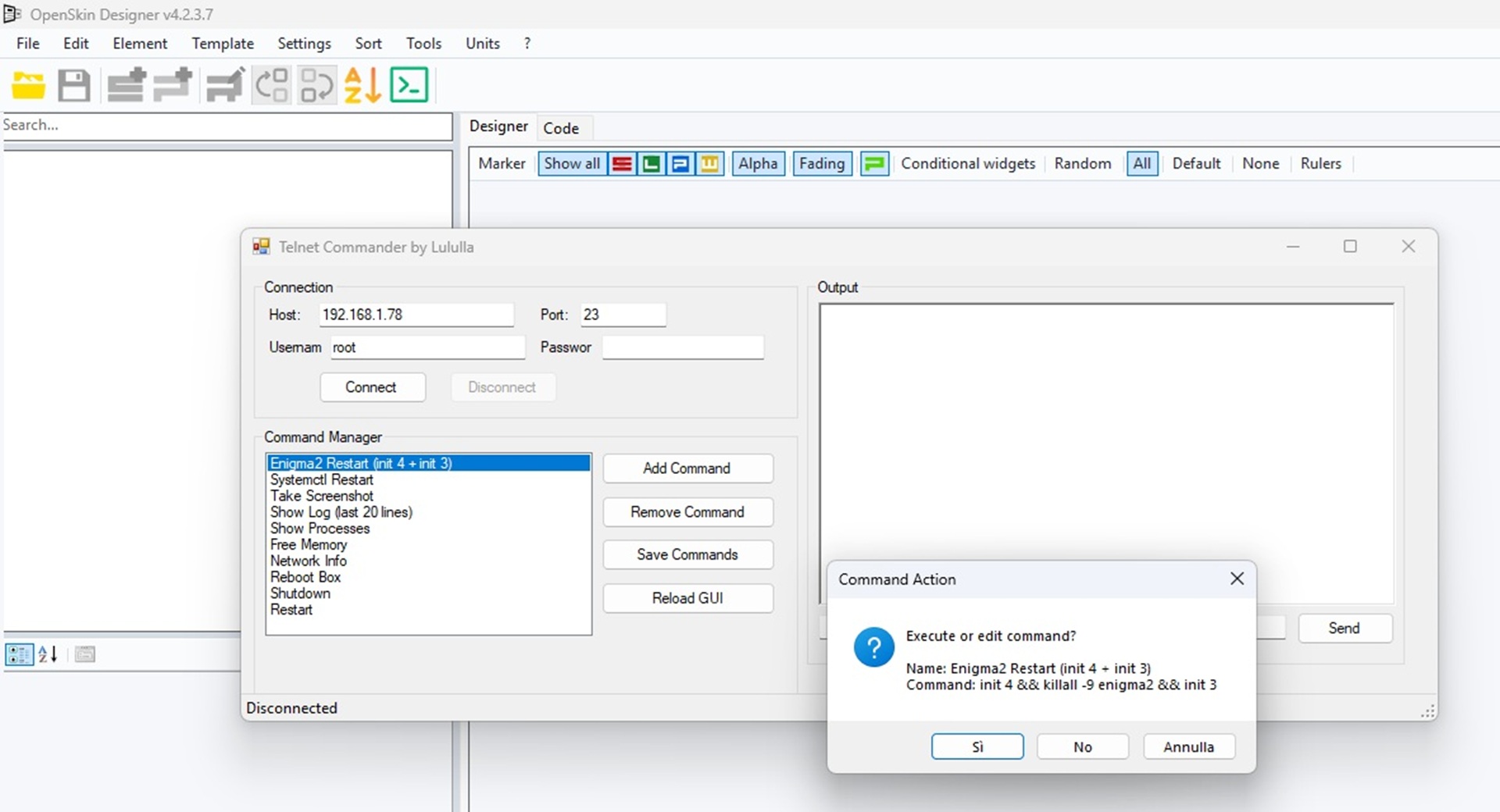
    - **Telnet Commander**:

    - Added standalone Telnet module to connect to Enigma2/DreamOS boxes.

    - Execute common commands (init 4, killall -9 enigma2, systemctl stop/start, screenshot, tail logs, reboot, halt, etc.).

    - View real-time command output in a dedicated monitor (RichTextBox).

    - Custom commands can be added, removed, and saved/loaded from `Telnet/TelnetCommands.xml`.

    - Dedicated toolbar button (`telnet.png`) opens a resizable, user‑friendly window.

    - Supports user/password authentication (default: root / your box password).


    - **Translation updates**:

    - Added Italiano, English, Deutsch, Français, Español, Português, Polski, Português, Türkçe, Русский, العربية, Shqip, 中文(简体), 中文(繁體) translations for all Telnet strings and the new gradient properties.


    If you'd like, you can buy me a beer to celebrate this development; I'll toast you.

    It's not mandatory.

    sure.. in setting configure direct link ftp of enigma.. simply.. load skin.. all screen are show--


    355012-pasted-from-clipboard-png


    At this moment I cannot make changes, unfortunately due to a serious problem in the family, concerning health. My wife is not well. But I really hope to return. Now rest and test, then we will do other things if you want. Now I can only read (every now and then) what you write. But I believe there has been a huge development from where we had left off until now... and thanks always for the beer.

    Regards

    next version...

    But.. live edit.. if not possible..


    Code
    init 4
    init 3


    I believe that the problem is the system cache for the libraries, I don't think that reloadskin() or anything else can do what I would like to do...


    But I don't know, maybe Captain who knows the enigma code develop... could prove me wrong.. Then it could also be done. Naturally, after backing up the open skin (I remind you that the program now saves the open skin every 5 minutes)