
hi
im in the prosess of getting all the files for my duo when it comes. which is the best and latest channel list for a motorised duo system.
I would go with Catseye - http://linuxsat-support.com/en…e-e2-settings-file-4.html


hi
im in the prosess of getting all the files for my duo when it comes. which is the best and latest channel list for a motorised duo system.
I would go with Catseye - http://linuxsat-support.com/en…e-e2-settings-file-4.html
let me know if it works for you sat100...I've yet to find a restart script that either does anything at all or doesn't make the system worse!!
Using the latest 3.4
Not really the answer you want but I'd reflash to 1.6.7 B2 (not B3)
Clean image, manual TS Panel install, (grab softcam and LiveFootball therein) and report back...
You could do that in 20 mins and a good guess says both of your niggles disappear!
Few annoying problems that continue to piss me off!
Livefootball addon doesn't work 100% for me. All I get it 'Processing Data' when I try and see the satellite data. It does show me the matches that are on though. Maybe I need to change the attributes
manually?
What version are you using? Might be an idea to remove and download a 3.4 ipk to install manually (or install from TS Panel?)
I was having issues upgrading from 3.3 to 3.4 so totally removed it and did the whole thing manually!
I have created a set of Astra 28E VFD picons (HD channels only) for the Vu+ Ultimo.
All picons are 110x40px
Unzip and place in your 'piconlcd' directory!
All suggestions and feedback appreciated! I'll keep these up to date as new channels are launched and logos change!
Examples -



Edit - someone asked me if I could tell them how I created them...its much easier to *show* so I've created a video -
[video=youtube_share;UwnZ7fLJS30]
[/media]I'll do another couple for harder ones if you fancy giving it a go yourself!! (Note to graphic designers - yes...its very basic lol)
Here is a small video showing picons on the display -
[video=youtube_share;SwhXw756mwA]
[/media]
hi could you please tell me are these file ok to use if im using oscam+ccam 213 without mgcam
yes...they should work fine!
also when i enter the box keys do they have a space between?
You don't even need to enter boxkeys with newer versions of OSCam!
also the passwords test1 etc i assume i change these ?
Yes...change them to something more memorable!
OK...hopefully it helps someone else in the future lol
Its called the 'service reference'
I've managed to do it manually, this is for BH image -
1. go to the channel in question
2. hit blue for 'Black Hole Blue Panel' and then yellow for 'Info'
3. hit 2 for 'Service Info'
4. the service reference will be displayed, eg. C4 HD is 1:0:19:52D0:814:2:11A0000:0:0:0
5. to use this for a picon you just put an _ where a : exists ie. 1_0_19_52D0_814_2_11A0000_0_0_0.png
Such a lot of work eh?! Makes you appreciate the picon developers a bit more!
Could someone tell me if there is a website that lists channel ID's? ie. 1_0_19_F12_7ED_2_11A0000_0_0_0 is channel 5 HD...
At the minute I'm looking through 1k picons to find the ID...not exactly time efficient lol
I've looked on lyngsat and kingofsat but can't see anything to help!
TIA!
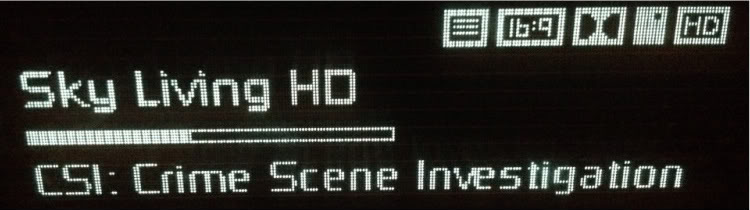
Heres my skin_user.xml mod!
If a picon exists for a channel, it is displayed....if there is no picon then just the text for the channel name is displayed,
I've removed the clock and increased the length of the program name to avoid clipping and scrolling!
WIP of course! just replace the skin_user.xml file in /etc/enigma2/ and picon_default.png in your piconlcd path!

Does anyone know if theres a picon builder for the Mac?
My main laptop is a Mac so it would be handy to have one for it rather than a Windows PC...
Anything out there?
I'm thinking of creating my own 28E regular and lcd picons....
ya updating tru vix panel on box,using vix 2.3 as released in november by phoenixusing same bootloader dat accompanied it,im just gona leave it til it crashes again ,,cause iv no doubt it will,,,thanks again for the help and support
I would download the full 2.3 with the 3.1.1 kernel and do a proper flash (like Caz says!)
I see other people reporting issues so an erase and reflash would be your best option!
Just to update this...the Ultimo is also MODE 2 - If you want to use a universal remote, change to MODE 1!
Thanks Sandman - just tried ping lite - no joy there.
Also tried Terminal as suggested and got back "ping: cannot resolve bm750.local: Unknown host" , so it looks like the box isn't responding?
hmm...looks that way :-S
totally unplug it and leave it an hour...then stick a USB in the front with BH 1.6.6 and cross your fingers!
you can also plug a serial / null modem cable into it (if you have one) and see if it outputs anything when turned on....
In fact..scrub that!
If you're using a Mac...open a terminal and type 'ping bm750.local'
hopefully thats the address of your Vu+!
I WAS able to access using IDreamX ( a mac version of DCC), but to do so I need the IP address of the box and this varies each time it's rebooted. Do you know if there is a way to identify the IP address directly via DCC - web browser i.e. without access to Network configuration on the Settings menu?
You could try a lan scanner from a PC - Advanced LAN Scanner 1.0 (Free) - Fast, Small, easy-to-use and highly configurable network scanner for Win32 which uses multithreading so you can scan more than 1000 elements per second!
this will tell you what IPs are active and you can eliminate your usual PC's & other devices!
If you have an iPhone 'Ping Lite' will allow you to do this as well!
I now can't re-flash the box, it's stuck on 'starting' and won't respond to USB inserted in either front or back port. I'm now at a total loss as to what to try? Any suggestions please?
Ta
I've had to reflash my Duo 3 times since yesterday...I get the 'starting' with red light lit and it gets no further regardless of what is done until its been reflashed again!!
I've read about removing devices etc and a power supply safety feature but nothing makes any difference....
What version of BlackHole are you running? I'm beginning to wonder if 1.6.7 is cursed!!
You could also use teamviewer, connect to his PC and update that way...
If you go the FTP route...use a non specific FTP port so its not easily scanned!
Cheers sandman just tried that and he pops up no probs
Its a routing issue then....unlikely you'll be able to go out and back in with your DNS!
just remember to change it when you give it back to him!
You've him connected on your lan at the minute...if you change the DNS to your internal IP does it work?
spent most of the day yesterday fiddling with da thing every time i got same results,everything works perfect until i do software update,then it just wont restart,iv it al setup again now without updating software so just gona leave it.dya think il be facing problems down the line if my software aint up to date....
miltown,
when you say 'software update' are you talking about updating Vix to the latest version from within the panel? Your profile says you're using Vix 2...what version have you loaded? (2.3 came out on Christmas day!)
I can't see you having problems if you never upgrade again...latest software will bring bug and stability fixes as well as new features but you could say 'if it ain't broke...don't fix it'!!

