


this is the last night build from today
OpenELEC-Generic.x86_64-devel-20141118085455-r19660-g8289ef0
Posts by snifferdsx
-
-
yeah this one works :thumb:
-
xdinity works agian yesterday was navix gone too
-
navix and xfinity are gone too
-
this link dont works more
This Account Has Been Suspended -
here is can you read the full doc http://www.linuxmint.com/documentation.php
read it :) is very usefull
-
uodates
6c3d4b021d6.pngkeyboard layouts works again :)
OpenELEC-Generic.x86_64-devel-20141021160931-r19445-g75e8cd3 -
this version use kodi 14.0 alpha 5
i use it for pvr
the pvr addons workstvheadend 3.9.1847
34ce8128f3236358b7080cc53.jpgnow you can use the sam picon then for the dreambox and so

this i like from kodi 14.0 the view options
the keyboard layout dont works here
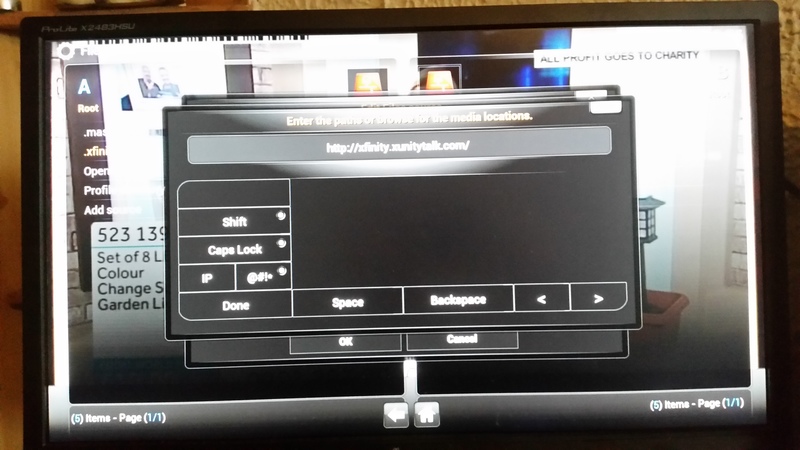
OpenELEC-Generic.x86_64-devel-20141019175807-r19406-gbef5be3
-
As we already mention in last alpha4 release post, the first beta release is nearing pretty fast. At this moment we are only waiting for one more final change to happen and then we are good to go. We are only talking a week or two at most. About three weeks have past since but, yet we haven’t sat still. The list of changes and improvements continues to grow.
Although we also said feature freeze was in affect, we still found some things that were worth including in the upcoming release. These changes had little impact on stability or have been tested quite thoroughlyLocalised keyboard support
Although the changes are small the effects for user can be quite big as they can now use a localized keyboard. Thanks to several non team members the list of available keyboard keeps growing. Due to the growing list we now also list them alphabetical using the English language names.
DXVA-HQ scaling for videos (Windows)
Since this feature might cause some issues for certain video cards, it was decided that users who actually want to use this feature, you will have to enable this through the advancedsettings.xml file. Of course this is for the more advanced users to worry about. Though it’s worth mentioning this changes as it could affect some of you.
Faster channel switching for PVR
For those that use the PVR capabilities have experienced that channel switching not always is as fast as you want it to be. This should now be some what improved and will switch channels a bit faster. Although there is likely still some gain to be made for the future.
Raspberry Pi audio resampling
The Pi’s GPU supports high quality re-sampling, format conversion and up/down mixing.
This PR creates a factory for different re-sample implementations, moves the current one into ResampleFFMPEG, and adds a ResamplePi GPU accelerated implementation.Add MMAL decoder and MMAL renderer for Raspberry Pi
DVDs with menus do not work well with omxplayer (the main R-Pi internal player). For this the R-Pi uses the normal internal player from Kodi which offers better support for software decode for SD codecs like divx3, msmpeg, sorenson spark etc. Also omxplayer doesn’t support alsa, so can’t be used with USB and I2S sound cards. Internal dvdplayer may behave better with dodgy timestamps and packet loss, e.g. with live TV. So for this support was added to dvdplayer using the MMAL api. This offers hardware acceleration, saves the processing cost of YUV->RGB conversion, saves the memory cost of the RGB textures for video frames and allows high quality (cubic) scaling.
iOS 8 runtime fixes
Due to the release of iOS 8 some new problems showed up up the new Apple OS. Some of these issue are listed below and have been fixed- Orientation of our layer is borked when compiled against ios8 sdk and running on ios8 runtime (apple finally fixed the 90° based coordinates)
- Because of 1 orientation on external screen is messed up too when compiling against ios8 sdk and running on ios8 runtime
- On ios 8 runtime (independent of used SDK) the textfield above the native keyboard is hidden
- On ios 8 runtime (independent of used SDK) VTB HW decoder crashes on seek
- Several fixes concerning Airplay. It might still be possible that not all function like you want it to. Please know that our main developer for this part tries his best. Hopefully you understand that we are limited in both manpower and capabilities due to Apple constraints.
Update Windows power management functionsOur code still contained some functions that dated back to the Windows XP release. Now that we have dropped support for that OS a while ago it was also time to update the function. It is most likely most of you won’t notice it on normal usage. Due to these changes the support for the newer Windows version has improved a bit. One extra function has been added. When you have pending Windows updates that requires a reboot, it now gives you the possibility to install them if you reboot from within Kodi. Do note it will not force install any updates that you haven’t enabled.
Improvement in file handling system
This is really under the hood code changes that has greatly improved the code handling for several of the file systems we handle. Mainly stability and possible error handling.
Dolby Atmos surround sound
For the users who own the Transformers – Age of Extension Bluray (to name one), would have noticed that TrueHD playback didn’t work. This is caused because the Bluray includes the new Dolby Atmos sound for the TrueHD track. Our devs backported a fix from FFMPEG to at least retrieve the normal audio channels for playback. The actual Dolby Atmos functionality is of yet not supported.
Extending JSON-RPC even more
JSON-RPC is a remote procedure call protocol encoded in JSON. It allows any program to communicate to Kodi by sending certain commands and possibly retrieve data back. This is the main method that remotes like our official iOS remote uses to connect to Kodi. With these additions, these remotes become even more capable of controlling your favourite in house media center.
Several other fixes done:
- * Fixed T9/SMS text input
- * Updated several PVR add-ons to include fixes done
- * SSA Subtitle fixes
- * Added settings for preferred Bluray playback method. “play main movie”, “show disc menu” or “show simplified menu”
- * Fix non loading of external subtitles for ISO files and Bluray directories
- * Fix for importing some add-on modules that depended on other modules
- * A lot more small fixes and tweaks.
Past changes since Gotham 13.xFor a brief list of other features and improvements you can read the following: alpha2, alpha3, alpha4
Add-onsAs for this Helix release, so far there have only been small things changed in regards to add-ons. So we are happy to say that almost all add-ons that worked in Gotham, will also work in Helix. There are of course some exceptions, however this should be only be a minimal amount.
SkinsHelix compatible skins in our repository at the moment are: Aeon Nox 5, Transparency!, Conq, Nebula and Black Glass ****.
As of this release all other skins that have not been updated, will become incompatible. We hope that our dedicated skin developers will find the time to update these when we near final release. A big thank you them all for their continues effort.
ConclusionDue to the fact that we are nearing the beta release, we have stopped publishing new alpha release. However it is still possible to try out the latest changes and fixes we have mention over the past months. Through the entire year we daily build a bleeding edge version for users and developers to download and try. These so called “nightly builds” should normally considered somewhat unstable and not recommended for daily use. However since we are nearing beta they are actually the most stable version you can find for the upcoming 14.0 version. Should want to download and install the most recent build, please visit our download page as mentioned below. You will notice that you can still see “XBMC” in certain areas as we are still in transition to the new name, which takes time and needs to be done carefully. Enjoy.
- * Official Kodi 14.0 development downloads
- * Raspberry Pi versions can be found on the forum
Get involved to the communityGetting involved is quite easy. Simply take the plunge and start using these 14.0 Helix builds. If you use these builds, we encourage you to report problems with these builds on our forum first and after if asked submit bugs on Trac (following this guide: How to submit a bug report). Do note that we need detailed information so we can investigate the issue. We also appreciate providing support in our Forums where you can, or donate to the XBMC Foundation if you like. For a current FAQ on Kodi 14, visit our Helix FAQ. You can of course also foll0w or help promote Kodi on all available social networks. Read more on the get involved page.
Disclaimer:
http://xbmc.org or http://kodi.tv is the only official place anything XBMC/Kodi related. This includes news, announcements, information or XBMC/Kodi downloads. There are of course manufacturers who also provide support with customized XBMC/Kodi versions, tailored for their devices. Should you have purchased from them it would be wise to first check, if it’s a known issue with that specific version. Any other third-party websites, offering you XBMC/Kodi installations, or people offering you pre-installed devices, are not officially supported by Team XBMC and may contain unwanted and unsupported additions, changes and add-ons. Installing these versions is at your own risk. XBMC/Kodi does not provide any media content on it’s own and comes with no add-ons installed regarding this. Should you have problems please contact the correct add-on developer or website should you experience any issues.Source: xbmc.org http://xbmc.org/kodi-14-0-helix-nearing-beta-release/
-
ok you can use oscam i works with oscam too works with tvheadend
-
i add some pic in a album http://linuxsat-support.com/album.php?albumid=29
in this album you see sreenshot from linux mint 17 with xbmc and pvr -
hi all
i still compile nigthbuild and try them but, in the nightbuilds missing the tvheadend server add-on and the simpletv add-on have problems too that is why i dont post it
it have to many problems, sorryi use now linux mind 17 with xbmc 13.2 and HTS Tvheadend 3.9.1540~g962f99c works fine :)
i will post the nigthbuild again when all works again
-
Kodi 14, which we gave the code name “Helix“, is shaping up to be what is often called a “stability” release. As of this moment we have entered feature freeze.
What does this actually mean for the users
For the average user, this means a couple things. First, you could be expecting to see Kodi Beta releases coming out in the very near future. Second, given our fairly well documented open development cycle, there should be very few surprises from then until the release of Helix. By definition, the features you see now are the same features you will see when Helix is released with the possible exception of some smaller updates in the default skin Confluence. One downside you may notice is that due to changes done during development we have bumped the minimum requirements for skins. As of now there are already several skins which are Helix ready. Still most skin authors will wait till beta releases are up before they start making changes to make their skin compatible with Helix. We please ask your understanding for this process. Although we don’t like it either it is deemed necessary for the continues improvements we are making. For now and in the future.
So if you’d like to see what Kodi 14.0is going to look and feel like, go ahead and install the last available alpha monthly or even a nightly build which you can find in the links to at the bottom of this post. We’ve are happy and very thankful for those that are already been using these builds. Their testing and feedback helps us creating an even better and more stable entertainment experience for all of you. As always, it’s important to remember that the alphas are definitely alpha software that you use at your own risk.
Some of the features
This upcoming release consist mostly of the continues improvements we have started since the Frodo and Gotham releases. This means that many developers are actually trying to improve the code of which Kodi exists. Over the years many new features were added, and this created a more complex product to maintain. With this Helix release many actually focussed on making the core program less complex again, while keeping features and even adding several more. As such the entire list of changes will likely not be so interesting for the average users. As such we’ll only list several of the changes that are noticeable.
* Ability to increase font size in Confluence skin
* Add 5.1 PCM playback for Android.
* Improved MusicBrainz matching from tags
* Ability to choose between auto-update, notify or off for updating add-ons. This is a global setting for all add-ons.
* Extend JSON-RPC which is used for by a variety of services and remotes
* VP9 video codec now uses software multi-threading. This codec has no hardware support yet.
* Simplifying and improving core code.
* Choose to disable/notify/auto-update when add-on updates are available.
* International keyboard layout
* Update PVR add-ons
* Redesign of the PVR windows
* Various improvements to the Audio Engine, with the OSX platform as great beneficiary.
* Improvements to the GUI skinning engine
* Extended JSON-RPC interface
* Countless smaller and larger bug-fixes throughout the program and vast improvements in every area. This should improve memory usage, stability, speed and user friendliness.
* Add-ons are still compatible up to the Frodo/Gotham versions (excluding skins)
* FFmpeg upgrade, this means Kodi will now be capable of playing back h.265 (also known as HEVC) and VP9 video codecs and 4K video.
* Better UPnP compatibility between Kodi clients or third-party applications
* Massive speed boost with scanning library or doing a clean.
* Changed the Touch skin be a re-designed re-Touched skin. This of course only applies for touch enabled devices.
* Support for sub-channels in PVR
* Update sqlite which brings some improved library speed
* Add support for DSD audio
* Add mouse support in Bluray menus
* Add support for EGL/GLESv2 when using X11
* 4K playback on Android using AMLcodec
* Support for the Freescale i.MX6 SystemOnChip
* Replaced Touch skin with re-Touchedsource http://xbmc.org/kodi-14-0-code…ix-enters-feature-freeze/
-
Display More
How to access to ftp without internet connection to stb? Azbox Elite HD
I don't have internet connection to the stb, and i was tries to acess, but i can't.
I'm use this setting:
username: root
pass: azbox
port: 22
and ip adress 192.168.1.1port 22 is ssh the azbox have no password if you want use ssh then you must login
then type passwdQuotepasswd
Changing password for sniffer.
(current) UNIX password:
you get like this, if you set your password you can use ssh if you not want use ssh use normal ftp (port 21)and ip adress 192.168.1.1 this your gateway not your ip number you can find it in networks
use menu button then system then networks -
here the x86_64 version
-
http://www.nero.com/eng/downlo…ownload-linux4-update.php
here can you download it this is the last versiehttp://en.wikipedia.org/wiki/Nero_Linux
-
-
this is a blocklist for in bittorrent
List Information
List name: level1
Author: Bluetack
Author's website: bluetack.co.uk
Author's description:
Companies or organizations who are clearly involved with trying to stop filesharing.
Companies which anti-p2p activity has been seen from.
Companies that produce or have a strong financial interest in copyrighted material.
Government ranges or companies that have a strong financial interest in doing work for governments.
Legal industry ranges.
IPs or ranges of ISPs from which anti-p2p activity has been observed.List Details
Popularity:
Last update: 09/06/2014
Number of ranges: 237933
Number of IPs: 787663338https://www.iblocklist.com/list.php?list=bt_level1
other lists --> https://www.iblocklist.com/lists.php -
this play is also for Debian 6 and 7 and ubuntu Ubuntu 11.10 t/m Ubuntu 13.04:
-
Meet your new favourite piece of hardware.
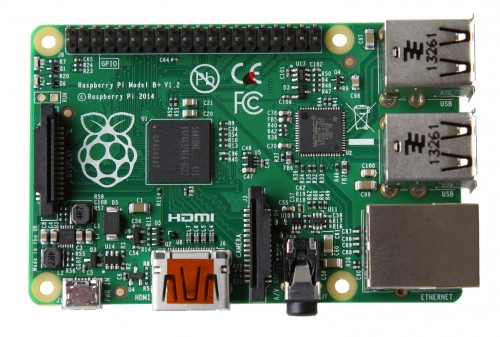
QuoteIn the two years since we launched the current Raspberry Pi Model B, we’ve often talked about our intention to do one more hardware revision to incorporate the numerous small improvements people have been asking for. This isn’t a “Raspberry Pi 2″, but rather the final evolution of the original Raspberry Pi. Today, I’m very pleased to be able to announce the immediate availability, at $35 – it’s still the same price, of what we’re calling the Raspberry Pi Model B+.
 Quote
QuoteThe Model B+ uses the same BCM2835 application processor as the Model B. It runs the same software, and still has 512MB RAM; but James and the team have made the following key improvements:
read more http://tinyurl.com/ku7fbvo

