


🎬 CiefpSRTplayer v1.0
Advanced SRT overlay player for Enigma2
Advanced SRT subtitle player for Enigma2 with manual and automatic synchronization,
FPS conversion and advanced subtitle position selection.
The plugin uses real playback time (PTS) for precise subtitle synchronization,
with EPG reference as an auxiliary/fallback time source on live channels.
🔹 Main features
✅ Automatic subtitle alignment according to current playback time
✅ EPG reference for live channels (fallback if playback is not available)
✅ Manual offset adjustment (CH+ / CH-)
✅ FPS conversion (23.976 ↔ 24 ↔ 25)
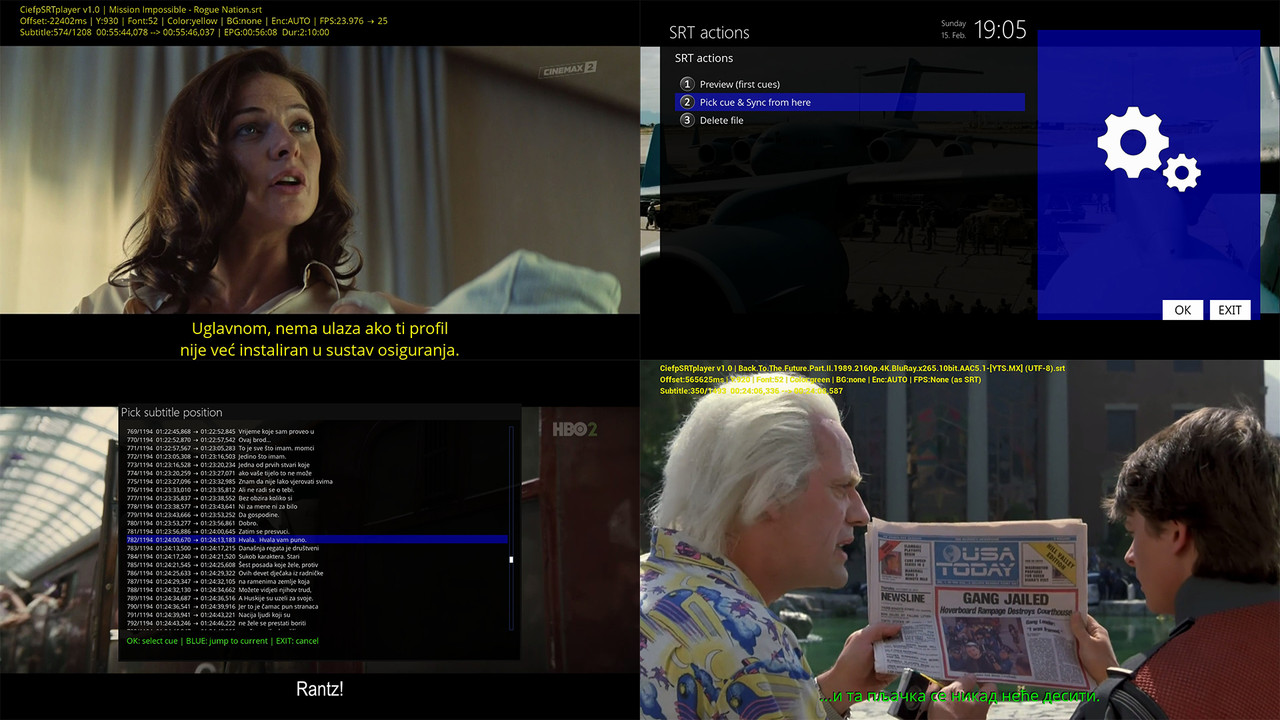
✅ Cue Picker – direct subtitle position selection
✅ Preview SRT file (first few cues)
✅ Delete SRT files from File Explorer
✅ Informative status display (Subtitle position, EPG time, duration…)
✅ Does not remember the last subtitle (always manual file selection)
✅ Page navigation in Cue Picker (left/right – full page)
CiefpSRTplayer allows precise manual and automatic adjustment of SRT subtitles during playback.
Supports offset, FPS correction, EPG reference, cue picker and advanced file explorer.
🎮 Controls
⏱ Time synchronization
- CH+ / CH- → Manually move subtitle time (fine sync forward / backward)
- LEFT arrow → Offset in minus (subtitles are displayed earlier)
- RIGHT arrow → Offset in plus (subtitles are displayed later)
📌 Minus offset = subtitles are displayed earlier
📌 Plus offset = subtitles are displayed later
🎞 FPS control
BLUE → Change FPS mode (cyclic – goes in a circle through all options)
# FPS modes:
- None (as SRT)
- 23.976 → 25
- 25 → 23.976
- 24 → 25
- 25 → 24
📌 FPS mode changes the subtitle playback speed
📌 Offset only moves the subtitles linearly (does not change the speed)
🔤 Subtitle appearance
- GREEN → Increases font size
- RED → Decreases font size
- UP arrow → Moves subtitles up
- DOWN arrow → Moves subtitle down
📊 Information
YELLOW → INFO / Status display
Displays:
- File name
- Current subtitle number (e.g. 207/839)
- Subtitle time (start → end)
- Current playback time
- EPG elapsed time
- Program duration
- Offset
- FPS mode
- Encoding
- Font and position
📂 File Explorer (YELLOW in browser)
- Preview of first cues
- Pick cue & Sync from here
- Delete file
Quick positioning according to current playback time
💡 Note on EPG time
On some channels, the EPG may deviate by a few minutes from the actual broadcast.
This depends on the channel/operator itself and is not related to the plugin.
The plugin uses the real playback time when available, and the EPG only as an auxiliary reference.
✅ Note
The plugin no longer saves the previous subtitle file in the settings.
After starting, a new file must be selected.
..:: CiefpSettings ::..


-
Version 1.0
- ciefp
- 6.2 kB
- 81 Downloads

