

reboot your gui - openatv caches skins now

Aglare FHD by MNASR
- odem2014
- Thread is marked as Resolved.
-
-

reboot your gui - openatv caches skins now
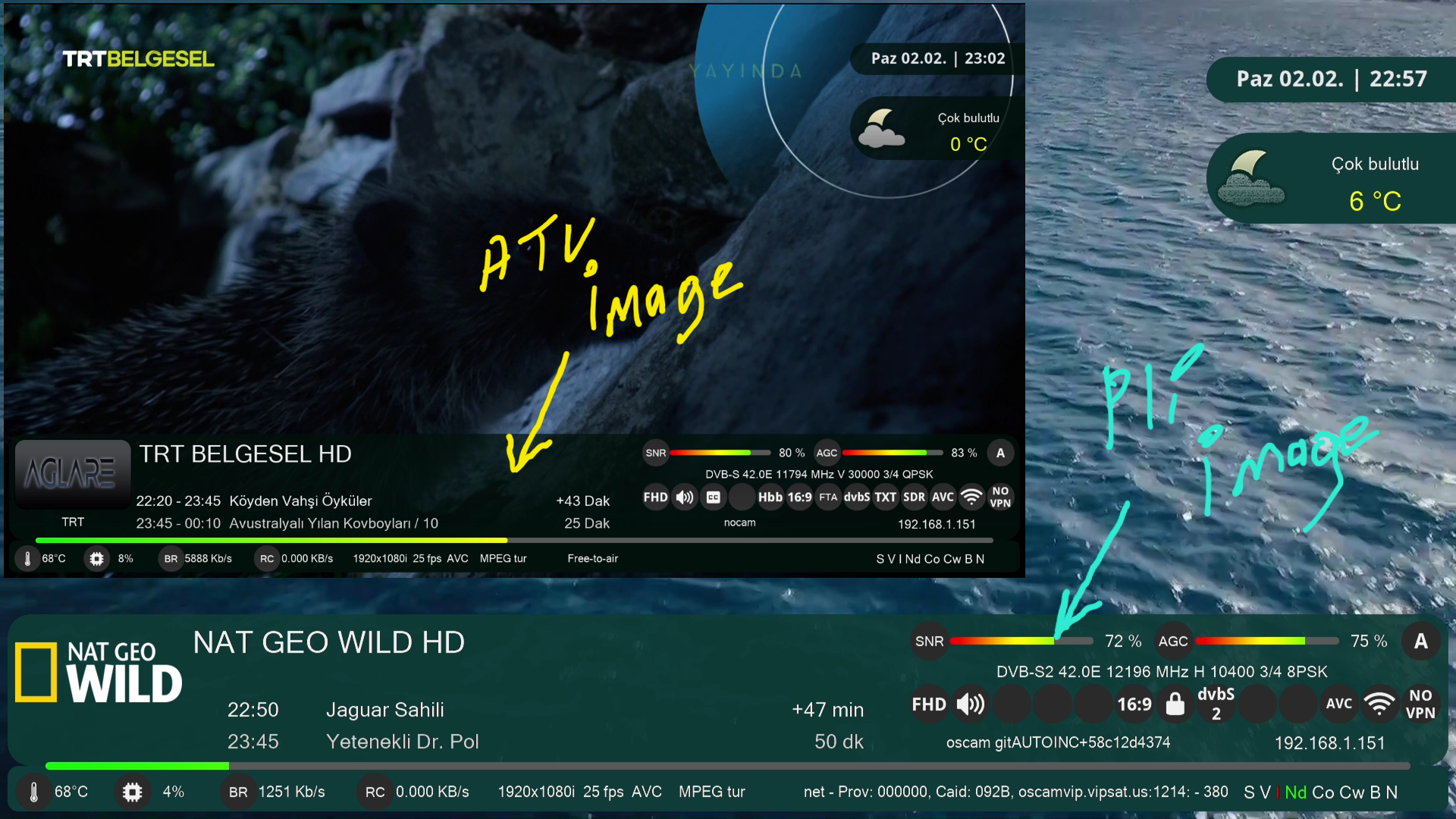
I restarted it but it didn't work. It's just that there is no green color in the notification panel.
-

reboot your gui - openatv caches skins now
I restarted it but it didn't work. It's just that there is no green color in the notification panel.
I think The logical reason is that the green color code in ipk of pli is not the same as oATV !! you can test another color and if it look same in both image, sure the issue in the color code
-

reboot your gui - openatv caches skins now
I restarted it but it didn't work. It's just that there is no green color in the notification panel.
I think The logical reason is that the green color code in ipk of pli is not the same as oATV !! you can test another color and if it look same in both image, sure the issue in the color code
Other colors work fine. Green color is only like this in the information panel.
-
In OpenATV there are two colors Green and Green2 in the skin settings.
-
In OpenATV there are two colors Green and Green2 in the skin settings.
Green2 works fine. The problem is in the Green color information panel.
-
It is a matter of color hex code, you can use Green2 ,
Many users like green color in atv so I added Green2
-
It is a matter of color hex code, you can use Green2 ,
Many users like green color in atv so I added Green2
My first choice is Green, my second choice is Green2. Is there any chance you can fix it? Otherwise I will have to use Green2
Thank you for this beautiful work
-
Display More
It is a matter of color hex code, you can use Green2 ,
Many users like green color in atv so I added Green2
My first choice is Green, my second choice is Green2. Is there any chance you can fix it? Otherwise I will have to use Green2
Thank you for this beautiful work
I don't understand what do you want to be fixed .
If you want light green use Green2
If you want dark green use Green
-
Display More
Display More
It is a matter of color hex code, you can use Green2 ,
Many users like green color in atv so I added Green2
My first choice is Green, my second choice is Green2. Is there any chance you can fix it? Otherwise I will have to use Green2
Thank you for this beautiful work
I don't understand what do you want to be fixed .
If you want light green use Green2
If you want dark green use Green
When I choose dark green, the information panel does not turn green. Shouldn't it be green? But it turns black.
-
Correct the icon for FTA channels in the infobar. In my case it says FTP for FTA channels. And make the display-FTA bold.
-
This is a translation error for the language you are using in enigma2.
Correct the translation and you will have it correct.

-

Correct the icon for FTA channels in the infobar. In my case it says FTP for FTA channels. And make the display-FTA bold.
LOL! Are you giving orders now?
You're either very young, or no one taught you how to make requests KINDLY, especially when they come for FREE!
Btw, that 'FTA' is not an icon, it's a text inserted into the 'skin.xml' file like this:
<eLabel name="" position="1554,534" size="52,52" backgroundColor="mcolor4" halign="center" valign="center" transparent="0" cornerRadius="26" font="Regular; 28" zPosition="1" text="FTA" />
So there is no way it can be different in yours unless someone has changed it, or indeed it's a translation mismatch.
-
Hello,
is it possible to change weather of the SecondInfobar like this ? Thank you!
Original skin.xml
skin.xml mod:
-
Hello, what is the name of the information bar color in the skin.xml file?
-
How to change this bootlogo screen during reboot?
I uploaded the bootloog.mvi and other .mvi files to usr/share and bootlogos during the boot changed but I can't change rebbot screen.
-
That screen is called QuitMainloopScreen.
Search the skin.xml files for it. And replace the code or pixmap reference to another 1920x1080 png
pasted-from-clipboard.png
A simpler versionCode<screen name="QuitMainloopScreen" flags="wfNoBorder" position="fill"> <ePixmap pixmap="backgrounds/reboot.png" position="0,0" size="1920,1080" alphatest="blend" zPosition="10"/> <widget name="text" position="center,780" size="1080,150" font="Regular;36" foregroundColor="#ffffff" transparent="1" halign="center" zPosition="11"/> </screen> -
Display More
That screen is called QuitMainloopScreen.
Search the skin.xml files for it. And replace the code or pixmap reference to another 1920x1080 png
pasted-from-clipboard.png
A simpler versionCode<screen name="QuitMainloopScreen" flags="wfNoBorder" position="fill"> <ePixmap pixmap="backgrounds/reboot.png" position="0,0" size="1920,1080" alphatest="blend" zPosition="10"/> <widget name="text" position="center,780" size="1080,150" font="Regular;36" foregroundColor="#ffffff" transparent="1" halign="center" zPosition="11"/> </screen>Thanks for the response, i will give a try.
Another question, is it possible to make the Quick Zap channel and picon line smaller, like left top cornet of the screen.
-
 Display More
Display More
Display MoreThat screen is called QuitMainloopScreen.
Search the skin.xml files for it. And replace the code or pixmap reference to another 1920x1080 png
pasted-from-clipboard.png
A simpler versionCode<screen name="QuitMainloopScreen" flags="wfNoBorder" position="fill"> <ePixmap pixmap="backgrounds/reboot.png" position="0,0" size="1920,1080" alphatest="blend" zPosition="10"/> <widget name="text" position="center,780" size="1080,150" font="Regular;36" foregroundColor="#ffffff" transparent="1" halign="center" zPosition="11"/> </screen>Thanks for the response, i will give a try.
Another question, is it possible to make the Quick Zap channel and picon line smaller, like left top cornet of the screen.
Everything is possible provided that you know the target screen, and modify it
-
Everything is possible provided that you know the target screen, and modify it
And how will ı do it :)
 ">
">Enigma2 skins for oe-alliance based images.
Enigma2 skins for OpenATV, OpenDroid, OpenEight, OpenHDF, OpenNRF, OpenSPA, OpenViX and Pur-E2 images.
Participate now!
Don’t have an account yet? Register yourself now and be a part of our community!

