


AI-powered instant translation plugin (AISubtitles) by Ammarbary
- ammarbary
- Thread is marked as Resolved.
-
-
The initial idea for audio translations is excellent.
Of course, it is possible to have an accurate and smooth translation in all languages for now.
My suggestion would be for this player to be integrated into Enigma and for channels to be switched, and not to be like some media player, of course, if possible.
Once again, all praise to the author for the idea.
-
 Display More
I am going to tell you off now ammarbary
Whats the point of asking for help from more experienced coders then obfuscating all your code.
Yes its a simple obfuscate that is easily decompiled, but it is still annoying.
The whole point of enigma2 community is you keep your code open, so others can read it, assist with it, make sure there is nothing dodgy in it. And other people can learn from it.
This is not a plugin I would ever use, but I like the idea of this plugin.
So I was going to have a look at your source code. (Yes I have it now), and address some of the issues some people are reporting.My friend, I apologize for encrypting the latest version, although I know it won't be difficult for professionals to decrypt.
However, I did this because of those with weak souls who steal the efforts of others, claim them as their own, and modify and republish them under different names.
I mentioned in my first post that the plugin is free, and I welcome any modifications from professionals to help develop it. But after what happened, I decided to take this path.
I will send you a private message so we can discuss the matter further.
-

all done BUT no change...... Openpli
-
The plugin is now showing me Translate...
Unfortunately, I don't see any subtitles.
-
This is where I am currently at offline with tweaking ammarbary's code.
Corrected Icon
pasted-from-clipboard.png
Split out the entire code into smaller workable files. This is just the way I work, and is easier to maintain and debug
plugin, settings, subtitles overlay
pasted-from-clipboard.png
Added the font m-plus-rounded-1c to be used by the plugin screens
This is a font I use in a lot of my plugins and has a good mutli language character list. Will work well on the settings page Language choice.
Changed the language choice options to be the native language option and reduced the list to main languages
pasted-from-clipboard.png
Removed the set list of fonts that can be used for subtitles. If a font is selected that doesn't exist on the system, it will crash.
Instead I read the usr/share/fonts/ folder and dynamically add these as font choices for use as the subtitles font.
Removed autostart for now.
It wasn't wrapped around an enabled settings, so would always run. This would also break the default functionality of the red button.
I think the current implementation would also create a modal popup crash.
Grog key is read from file if it doesn't already exist in settings file.
Removed the named colours and replaced with hex values. If the named colours don't exist in the users skin, the plugin will crash
Wrapped all text in a translatable label, so .po files can be created.
Settings page
Completely simplified the settings page code. It was massively over complicated trying to do things that there is already built in functions that do the same thing.
Redesigned the settings page to be a bit more standard layout.
Changed all the wording and options - removed headers as headers just adds complication.
Changed the font size option to be fully user choice. From 21 to 72 in steps of 3.
Fixed the green button (save)
Added in a dreambox settings skin alternative as it uses slightly different elements.
pasted-from-clipboard.png
Now for the real work. Got to now see how the audio is being read. How groq API works.
And work out why its a little slow and completely crashes after a short while.
Overall if this is your first plugin - I haven't changed that much code. Just standardised it.
I am not sharing anything with my experiments at the moment. Until I have finished looking at this original code. -
I have make it for macos mpv iptv
may be can help
import time
import sounddevice as sd
import numpy as np
from openai import OpenAI
import queue
import threading
import os
import io
import wave
def pcm_to_wav_bytes(pcm_bytes):
buf = io.BytesIO()
with wave.open(buf, "wb") as wf:
wf.setnchannels(1)
wf.setsampwidth(2) # int16
wf.setframerate(SAMPLE_RATE)
wf.writeframes(pcm_bytes)
buf.seek(0)
return buf
GROQ_API_KEY = "gsk_xxxxxxxxxxxx"
WHISPER_MODEL = "whisper-large-v3"
TRANSLATE_MODEL = "llama-3.1-8b-instant"
ASS_FILE = "live.ass"
BLACKHOLE_DEVICE_ID = 4 # BlackHole 2ch
SAMPLE_RATE = 16000
BLOCKSIZE = 512
CHUNK_SECONDS = 1.0 #
# ===============================================
client = OpenAI(
api_key=GROQ_API_KEY,
base_url="https://api.groq.com/openai/v1"
)
audio_queue = queue.Queue()
start_time = time.time()
# ---------- ASS ----------
def sec_to_ass(t):
h = int(t // 3600)
m = int((t % 3600) // 60)
s = t % 60
return f"{h}:{m:02}:{s:05.2f}"
def ass_init():
header = """[Script Info]
PlayResX: 1920
PlayResY: 1080
ScriptType: v4.00+
Collisions: Normal
[V4+ Styles]
Format: Name,Fontname,Fontsize,PrimaryColour,OutlineColour,BackColour,Bold,Italic,BorderStyle,Outline,Shadow,Alignment,MarginL,MarginR,MarginV,Encoding
Style: Default,Arial,42,&H00FFFFFF,&H00000000,&H64000000,0,0,1,3,0,2,40,40,80,1
[Events]
Format: Layer,Start,End,Style,Text
"""
with open(ASS_FILE, "w", encoding="utf-8") as f:
f.write(header)
ASS_DELAY = 1.3 #
def write_ass(text, duration=2.0):
now = time.time() - start_time - ASS_DELAY
if now < 0:
now = 0
start = sec_to_ass(now)
end = sec_to_ass(now + duration)
line = f"Dialogue: 0,{start},{end},Default,{text}\n"
with open(ASS_FILE, "a", encoding="utf-8") as f:
f.write(line)
os.utime(ASS_FILE, None)
# ---------- AUDIO ----------
def audio_callback(indata, frames, time_info, status):
if status:
return
audio_queue.put(indata.copy())
def audio_capture():
with sd.InputStream(
device=BLACKHOLE_DEVICE_ID,
samplerate=SAMPLE_RATE,
channels=1,
dtype="int16",
blocksize=BLOCKSIZE,
callback=audio_callback
):
while True:
time.sleep(0.1)
# ---------- TRANSLATE ----------
def translate_to_de(text):
resp = client.chat.completions.create(
model=TRANSLATE_MODEL,
messages=[
{
"role": "system",
"content": "Output ONLY the translation."
},
{
"role": "user",
"content": text
}
],
temperature=0.2
)
return resp.choices[0].message.content.strip()
# ---------- GROQ WORKER ----------
def groq_worker():
buffer = b""
last_send = time.time()
while True:
try:
data = audio_queue.get(timeout=1)
except queue.Empty:
continue
buffer += data.tobytes()
if time.time() - last_send < CHUNK_SECONDS:
continue
last_send = time.time()
if len(buffer) < SAMPLE_RATE * 1.0:
continue
try:
wav_file = pcm_to_wav_bytes(buffer)
result = client.audio.transcriptions.create(
file=("audio.wav", wav_file, "audio/wav"),
model=WHISPER_MODEL
)
text = result.text.strip()
if text:
ru = translate_to_ru(text)
print("RU:", ru)
write_ass(ru, duration=2.2)
except Exception as e:
print("Groq error:", e)
buffer = buffer[-SAMPLE_RATE // 2:]
# ---------- MAIN ----------
if __name__ == "__main__":
print("🎬 mpv → BlackHole → Groq → live.ass (1.5s latency)")
ass_init()
threading.Thread(target=audio_capture, daemon=True).start()
groq_worker()
-
 Display More
I have make it for macos mpv iptv
may be can help
import time
import sounddevice as sd
import numpy as np
from openai import OpenAI
import queue
import threading
import os
import io
import wave
def pcm_to_wav_bytes(pcm_bytes):
buf = io.BytesIO()
with wave.open(buf, "wb") as wf:
wf.setnchannels(1)
wf.setsampwidth(2) # int16
wf.setframerate(SAMPLE_RATE)
wf.writeframes(pcm_bytes)
buf.seek(0)
return buf
GROQ_API_KEY = "gsk_xxxxxxxxxxxx"
WHISPER_MODEL = "whisper-large-v3"
TRANSLATE_MODEL = "llama-3.1-8b-instant"
ASS_FILE = "live.ass"
BLACKHOLE_DEVICE_ID = 4 # BlackHole 2ch
SAMPLE_RATE = 16000
BLOCKSIZE = 512
CHUNK_SECONDS = 1.0 #
# ===============================================
client = OpenAI(
api_key=GROQ_API_KEY,
base_url="https://api.groq.com/openai/v1"
)
audio_queue = queue.Queue()
start_time = time.time()
# ---------- ASS ----------
def sec_to_ass(t):
h = int(t // 3600)
m = int((t % 3600) // 60)
s = t % 60
return f"{h}:{m:02}:{s:05.2f}"
def ass_init():
header = """[Script Info]
PlayResX: 1920
PlayResY: 1080
ScriptType: v4.00+
Collisions: Normal
[V4+ Styles]
Format: Name,Fontname,Fontsize,PrimaryColour,OutlineColour,BackColour,Bold,Italic,BorderStyle,Outline,Shadow,Alignment,MarginL,MarginR,MarginV,Encoding
Style: Default,Arial,42,&H00FFFFFF,&H00000000,&H64000000,0,0,1,3,0,2,40,40,80,1
[Events]
Format: Layer,Start,End,Style,Text
"""
with open(ASS_FILE, "w", encoding="utf-8") as f:
f.write(header)
ASS_DELAY = 1.3 #
def write_ass(text, duration=2.0):
now = time.time() - start_time - ASS_DELAY
if now < 0:
now = 0
start = sec_to_ass(now)
end = sec_to_ass(now + duration)
line = f"Dialogue: 0,{start},{end},Default,{text}\n"
with open(ASS_FILE, "a", encoding="utf-8") as f:
f.write(line)
os.utime(ASS_FILE, None)
# ---------- AUDIO ----------
def audio_callback(indata, frames, time_info, status):
if status:
return
audio_queue.put(indata.copy())
def audio_capture():
with sd.InputStream(
device=BLACKHOLE_DEVICE_ID,
samplerate=SAMPLE_RATE,
channels=1,
dtype="int16",
blocksize=BLOCKSIZE,
callback=audio_callback
):
while True:
time.sleep(0.1)
# ---------- TRANSLATE ----------
def translate_to_de(text):
resp = client.chat.completions.create(
model=TRANSLATE_MODEL,
messages=[
{
"role": "system",
"content": "Output ONLY the translation."
},
{
"role": "user",
"content": text
}
],
temperature=0.2
)
return resp.choices[0].message.content.strip()
# ---------- GROQ WORKER ----------
def groq_worker():
buffer = b""
last_send = time.time()
while True:
try:
data = audio_queue.get(timeout=1)
except queue.Empty:
continue
buffer += data.tobytes()
if time.time() - last_send < CHUNK_SECONDS:
continue
last_send = time.time()
if len(buffer) < SAMPLE_RATE * 1.0:
continue
try:
wav_file = pcm_to_wav_bytes(buffer)
result = client.audio.transcriptions.create(
file=("audio.wav", wav_file, "audio/wav"),
model=WHISPER_MODEL
)
text = result.text.strip()
if text:
ru = translate_to_ru(text)
print("RU:", ru)
write_ass(ru, duration=2.2)
except Exception as e:
print("Groq error:", e)
buffer = buffer[-SAMPLE_RATE // 2:]
# ---------- MAIN ----------
if __name__ == "__main__":
print("🎬 mpv → BlackHole → Groq → live.ass (1.5s latency)")
ass_init()
threading.Thread(target=audio_capture, daemon=True).start()
groq_worker()
Unfortunately, it wasn't helpful. Although it seemed promising, after testing, it didn't add anything useful to the plugin.
Thanks for trying to help -
work great on opbh
-
Why not put it on GitHub…?
-
-
1.I added the `.usr lib enigma2 pyton plugin` file without doing anything else.
2.I also added the other file to `.etc enigma2` by manually entering the keys. I got this error.
What should I do?
-
I try againe on open atv 7.5.1 on vuzero4k not working even when i install curl
-
This worked well for me on Open ATV 7.5.1 on the Octagon SF 8008
-
I have observed that the plugin works better and faster with IPTV channels.
It is in fact so fast, that sometimes translation comes even before it's spoken!
This made me think that maybe the iptv address is being used for a direct connection, rather than waiting for sound files being sent over.
If true, this could be a good thing for free channels, but wouldn't it be risky for paid subscriptions? (double connection)
Probably just my imagination, and will be corrected by the author, to whom I'd like to thank once more for this
 work!
work! -
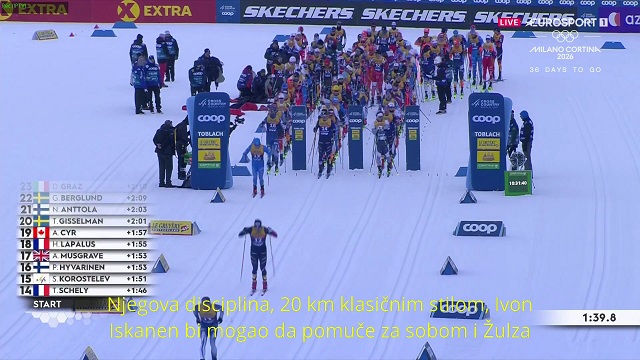
Octagon SF8008 openatv working well on many images openatv 7.6 & 7.5.1, pure2,openbh,openvix,egami (language croatian,serbian)
-
any short key to active subtitles on channels or video playing
-
You can add a shortkey button with Hotkey
-
"Sample Subtitle Preview Text." This text appears in the subtitle section. Which file do I need to modify to create the subtitles? Not everyone is an expert in this area.
-
trying with openatv 7.6 dream two , loaded all keys, installed curl , still nothing shown on the screen , arabic translation
-

where to find api key ??
-

Get community help for all other Enigma2 plugins
This is your forum for support, questions, and guides for plugins not covered in our specialized sections. Support for uncategorized and miscellaneous Enigma2 plugins. Find help, troubleshooting, and discussions for plugins that don't fit other forum categories.



