lines on spiderbox don't look like that mate, and i cant add the 256 at the end if the details either

Sly Uk not updating
-
- Videoguard2 Cards OSCam
- chris1975
- Thread is marked as Resolved.
-
-
lines on spiderbox don't look like that mate, and i cant add the 256 at the end if the details either
Ok sorry i have never saw a spiderbox in action, you could use the line in the technomate instead to try and update the card.
-
Ok sorry i have never saw a spiderbox in action, you could use the line in the technomate instead to try and update the card.
Do i add this line with my existing line already in my newcamd.list file or remove existing line or does it go somewhere else?
Regards
Chris
-
Replace the existing line or if you use cccam as client it can just be pasted into your CCcam.cfg.
-
Chris what version of Mgcamd are you using on your technomate and has the mgcamd bin been chmodded to 755? I assume it has if your getting pictures mind you, Mgcamd 1.35a should update your card nicely!
-
Chris what version of Mgcamd are you using on your technomate and has the mgcamd bin been chmodded to 755? I assume it has if your getting pictures mind you, Mgcamd 1.35a should update your card nicely!
Hi mate I am using a debian linux server, TM has mgcamd 1.35a running
Replace the existing line or if you use cccam as client it can just be pasted into your CCcam.cfg.
I tried replacing the existing line in newcamd.list but box no longer cleared
So i made it look like this
CWS = IP-Of_Debain_Server 10000 spiderbox spiderpass 01 02 03 04 05 06 07 08 09 10 11 12 13 14 256
Will this do the same thing or will I be best of using my line in newcamd.list and add the N line to cccam.cfg ?
Regards
Chris
-
The example you posted earlier had the port listed at 19000, so to make them connect the details must match. (add or edit)
-
The example you posted earlier had the port listed at 19000, so to make them connect the details must match. (add or edit)
N: 192.168.0.000 19000 spiderbox spiderpass 01 02 03 04 05 06 07 08 09 10 11 12 13 14 256 <<< Nothing clears
CWS = 192.168.0.000 19000 spiderbox spiderpass 01 02 03 04 05 06 07 08 09 10 11 12 13 14 256 <<< everything clears as normal
-
I just tested what i posted earlier and it connects fine using CCcam on the client box, can you post your full configs please.
-
Oscam.Conf
[global]
usrfile = /var/log/oscamuser.log
logfile = /var/log/oscam.log
cwlogdir = /var/log/cw.log
clientmaxidle = 60
nice = -19
maxlogsize = 2500
saveinithistory = 1
dropdups = 1[monitor]
hideclient_to = 15
appendchaninfo = 0[newcamd]
port = 19000@0963:000000
key = 0102030405060708091011121314
mgclient = 1[webif]
httpport = 1005
httpuser = user
httppwd = pass
httprefresh = 10
httpallowed = 127.0.0.1,192.168.0.1-192.168.1.202
httphideidleclients = 1oscam.server
[reader]
label = ***_uk
protocol = smartreader
enable = 1
device = 004:002
caid = 0963
ident = 0963:000000
group = 1
emmcache = 1,3,2
blockemm-unknown = 1
blockemm-u = 0
blockemm-s = 0
blockemm-g = 1
lb_weight = 101
ecmwhitelist = 0963@000000:3E,4F,42,44,45,47,4E,53,54,56,61,67,62,68,69,6A,6B,6E,6D,6F,71,72,73,77,78,79,7A,7C,7D,7E,80,8BOScam.user
[account]
user = update
pwd = update
description = for local mgcamd or DVBAPI
group = 1
uniq = 1
au = ***_uk
caid = 0963[account]
user = user1
pwd = pass1
group = 1
au = 1
caid = 0963
ident = 0963:000000
keepalive = 1tm connects using mgcamd 1.35a with the following line in newcamd.list
CWS = 192.168.0.000 19000 user1 pass1 01 02 03 04 05 06 07 08 09 10 11 12 13 14 wan newcs <<< if i replace this line with the 1 you posted earlier then nothing clearsI am running debian squeeze running oscam
hope this helps
-
-
-
Previous was typo error
This is what I have
OScam.user
[account]
user = update
pwd = update
description = for local mgcamd or DVBAPI
group = 1
uniq = 1
au = ***_uk
caid = 0963N: 192.168.0.000 19000 update update 01 02 03 04 05 06 07 08 09 10 11 12 13 14 256
this do's not allow me to connect and clear any channels
should I leave my cws line in newcamd.list as this is how I view channels
& add N line to cccam.cfg ?
my channels don't clear if I use N line only in newcamd.list and newcamd.list is needed to clear for mgcamd in my technomate 500 super
-
Ok this how I now have it set up
[account]
user = update
pwd = update
description = for local mgcamd or DVBAPI
group = 1
uniq = 1
au = ***_uk
caid = 0963[global]
usrfile = /var/log/oscamuser.log
logfile = /var/log/oscam.log
cwlogdir = /var/log/cw.log
clientmaxidle = 60
nice = -19
maxlogsize = 2500
saveinithistory = 1
dropdups = 1[monitor]
hideclient_to = 15
appendchaninfo = 0[newcamd]
port = 19000@0963:000000
key = 0102030405060708091011121314
mgclient = 1[webif]
httpport = 1005
httpuser = 88888
httppwd = 88888
httprefresh = 10
httpallowed = 127.0.0.1,192.168.0.1-192.168.1.202,
httphideidleclients = 1[dvbapi]
enabled = 1
user = update
au = 1[reader]
label = ***_uk
protocol = smartreader
device = 004:002
caid = 0963
ecmwhitelist = 0963:3E,4F,42,44,45,47,4E,53,54,56,61,67,62,68,69,6A,6B,6E,6D,6F,71,72,73,77,78,79,7A,7C,7D,7E,80,8B
detect = cd
mhz = 480
cardmhz = 357
ident = 0963:000000
group = 1
emmcache = 1,3,2
blockemm-unknown = 1
blockemm-g = 1
lb_weight = 101Technomate newcamd.list blank, cccam.cfg gile has N: 192.168.0.100 19000 update update 01 02 03 04 05 06 07 08 09 10 11 12 13 14 256
Box now running as cccam
Is this all correct and is there anyway of finding out if this will now automatically update?
-
-
Thanks m8 I will change it an reboot in the morning
Cheers again for your help
How oftern do the dates change?
Is there anyway of knowing card will update before it happens?
-
I now have these files and mods up and running :)
Under AU in webinfo I occasionally get ACTIVE instead of on, I take it from this that it means all is good to go ?
Cheers
Chris
-
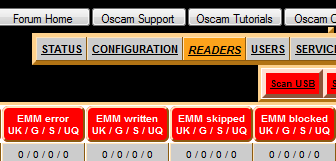
Leave it on a subscribed channel when your not watching, you will see if emm is being blocked or not by clickinjg the readers tab in oscam web info.
-
Hiya mate card has updated and this is what I can see on webinfo but not quite sure what i should see lol
-
-
Hi mate, I know how to see entitlments what I was meaning was wasn't sure how to see emm and understand it
-
Your resource for OSCam softcam