


Keep your current cccam.cfg adding the nline from this one to it, also disable any lines in your own cfg relating to the card reader ( dev/sci0 )
Posts by master G
-
-
Which provider is it?
Make sure this line is in your cccam.cfgYour receiver will also need to tuned to a channel your card opens to receive the emm, i do not recommend taking emm from a peer but this is another option.
Some cards also require these lines in your cfg, it will do no harm to add them. -
Could you post your debian CCcam configs & logfile, you should find the log in emu/log.
Hide all sensitive info ( ports, passwords,boxkey ect )
-
-
-
From the oscam log you have given it looks like its reading the card ok, without any errors to go on its hard to know whats going wrong.
-
That log shows oscam is reading the card ok.
Is the card definately activated ?
If so CCcam will read this card perfect.
Try using in CCcam first before adding any configs for oscam, that way you will know for definate if you have entitlements or not.
-
Is DHCP turned on in the network settings on this box to create the ip address ?
-
The recommended frequency for viaccess is 6800000, so try adding below to your CCcam.cfg.
SMARTCARD CLOCK FREQUENCY: /dev/sci0 6800000
-
Are you using oscam+CCcam2.1.3 as a combo or separate emulators ?
If they are separate you will need to edit the CCcam script so it starts both.
-
This may help you understand what the numbers do better,
-
HowTo updating bootloader:
download attached file
unzip attached file
format USB flash drive in with fat
create directory /vuplus/duo at flash drive
copy file to directoy /vuplus/duo at flash drive
shutdown VU+ STB
disconnect all USB devices
connect USB flash drive to VU+ STB
power on VU+ STB
wait for message "Please remove USB" at VFD
disconnect USB flash drive
power off VU+ STB
flash new imageTHX an @plnick
-
NEW VERSION V.4.0
Change log v.4.0 :-
Crash (GS) problems corrected.
New sites - Pro 7, TV2dk, NRK-nett
Updated/improved - German sites Rtl, Vox, Sat1, Clipfish
Youtube - Favourites enabled, many more videos (thanks to kalehrl from ihad)
Turkwebtv - urls updated (thanks to niendorfer from turkeyforum.com)
Adult Videos(18+) - Parental Control possible -
I looked on kingofsat & see no services being transmitted on this tp, does this explain it for you.
Badr 4 / Badr 5 / Badr 6 (26°E) - All transmissions - frequencies - KingOfSat -
Try updating your satxml file using the link on the navbar then scanning again.
-
dreamote lite 1.1.9
-

Dcc E2
Dcc E1
DreamUP 1.3.3.8
DreamBoxEdit 4.1.0.1
Dreamset 2.34
DreamScreenShot
FlashWizardPRO
CCcamtoolbox Ver 0.12
Cccam Lines Manager v1.3
cccam2oscam
-CSCC-
CCCE
Oscam Config Creator²3.5.0.118
Dreambox CCcam Editor (Put **** directly to dm without any ftp program) -
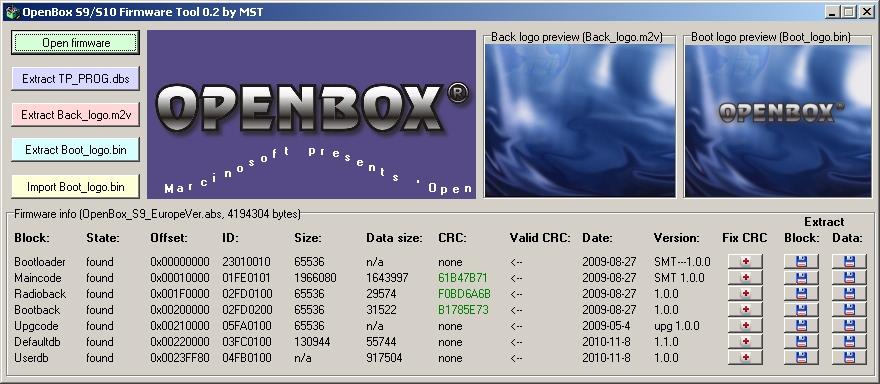
What's new:
- boot logo preview for firmwares with pure m2v boot logo format file
- block CRC checking with fix ability
- additional block info: block ID and versionFull description below:
This tool allows you to:
- analyze Openbox S9/S10 firmware file (*.abs)
- extract channel list to TP_PROG.dbs file (so you can extract list from .abs edited with SetEditHD100 tool)
- preview and extract background logo file (Back_logo.m2v)
- preview and extract boot logo file (Boot_logo.bin) (preview is not working for firmwares with non pure m2v format boot logo)
- replace your boot logo with extracted from another firmware (Boot_logo.bin)
- check block's CRC and fix it
- extract whole blocks and blocks's data onlyThings that tool cannot do, but maybe be able to do in future:
- decrypt maincode, for example to get firmware release date
- handle/decrypt boot logo for some firmwares with non pure m2v format -
Well pikesat let me have the honour of banning you as we wont tolerate payservers here.
-
Why the need for all these cards ?

