


I´m taking it One step further ,
This user should be banned for various reasons ,too many to write;
He hasn´t read nor abided site rules.WRONG
This is his first post in wrong place. WRONG
Posts by cazuela
-
-
no trouble shooting thread ,,but there is a searchbar top right which led me to this thread : http://linuxsat-support.com/en…rt/15052-no-ca-found.html
-
This quide work in all wifi receivers like Vu+ Ultimo ,Sunray sr4 etc or if you have your second receiver conected in your router with your wifi usb pen drive.
Many times we like watch our favorite program in other room like bedroom but we don't have in other room cable from our twin lnb also our wives hate many cables in the house :)
So with this quide you don't have that problems.
What we need:
A)2 receivers
a. conected with lan cable
b. conected with wifiB)in wifi receiver installed nstream player v 0.4 vu
Codehttps://hotfile.com/dl/159345625/620b22a/enigma2-plugin-extensions-nstreamplayer-v0_4-vuplus-mipsel.rar.htmlC)one xml edit program like xml Marker
D)Notepad++ program
E)our pc
F)and our router
Who to setup:
In wifi receiver we install nstream player plugin v0.4 vu (version 0.3 crash)
In our pc on internet explorer (in address place) we write ip from lan reciever and when we have webinterface on screen right click on stream (small tv screen icon) our browser download one stream file
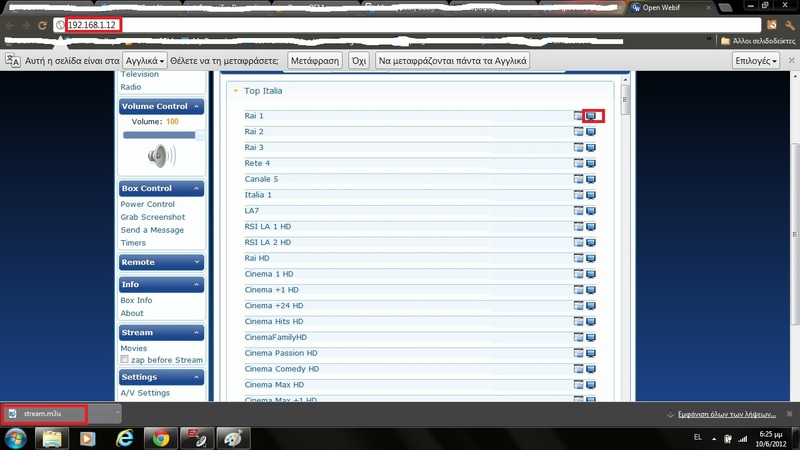
now with Notepad++ program we open this file (right click on downloaded file /open with notepad) we copy ip and port
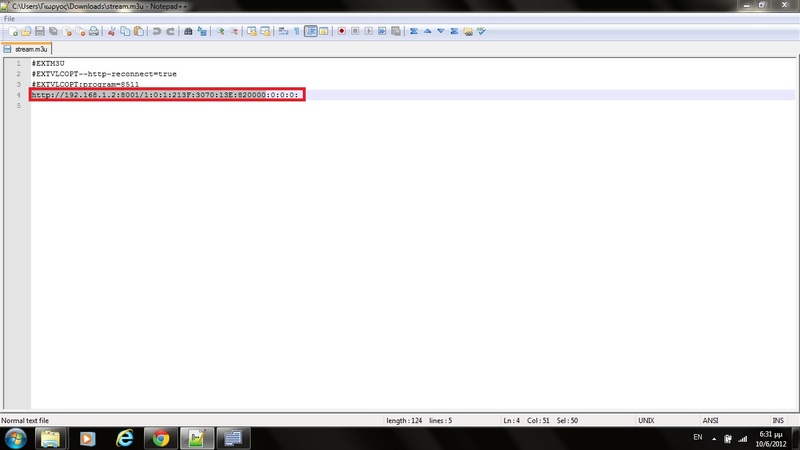
now with DCC program we conect with wifi receiver and we are going to usr/lib/engma2/python/plugins/extensions
and open nstreamplayer folder we need file with name nstreamplayer.xml we take one copy from this xml to our pc and we open it with xml Marker program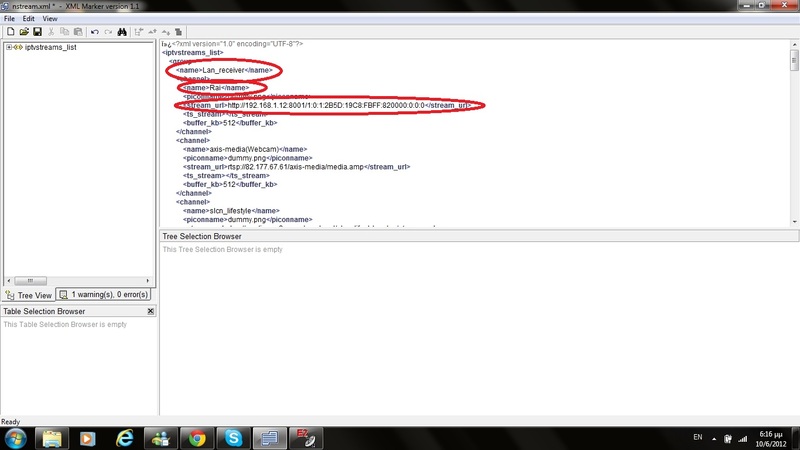
and now we edit it like that :
in stream url we paste ip and port from Notepad++ copy and in channel name we write our channel from lan receivernow you can watch all channels from this transponder but you can change channel from lan receiver
I want say big thanks to eolos68 from Greek GSF Team for his help
Good luck.
Have fun sat gr ;) -
[e2 plugin] dvb time (oe1.6 - oe2.0)
QuoteDisplay MoreThe plugin can: the transponders set set set 1st manual/automatic examination of the systemzeit with the transponder time 2nd manual
examination of 3rd manual/automatic time as systemzeit the systemzeit by a ntp server 4th manual/automatic the systemzeit over ntp server
5th the systemzeit per input over the remote control* sd, xd and hd skin ready * speak de and English (translations are welcome, *. behind lies in the plugin)
after installation (over bp or manually per database) and E2 new natured the plugin is under attitudes/system or if turned on in the hauptmenü to find
thank at goods mine for the crazy aid and preparatory work
achja and the plugin runs also in other images as a GP2
Update version 0.2 * E2 zeitupdate can now a/out of turned become * händling "automated" (if zb the ntp autostart activates is and dvb autostart activates becomes, becomes ntp autostart automatically deactivates etc.)
update version 0.3 * Spanish translation added (thx@titovich)
update version 0.4 * can under oe1.6 and oe2.0 become installed
Thx JackDaniel
-
But wouldn´t it be nice if....
with so many softcams these days, we´re spoilt for choice.
for the "No, Don´t Spoil them + No Answer Gets Really Answered" cards ,,wouldn´t it be nice,,,,, -
v1.0: 10.06.2012
Quotev1.0:
10.06.2012 - Künstler A-Z removes, cleanup code and button fix
Thx dirtylion
-
If yuou still do not understand ,let me show you where : http://linuxsat-support.com/introductions/
start there ,then we can direct you to a possible solution... -
I guess he means that the box did not accept it as it isnt patched or updated kernel ,etc...
i have stripped this ipk down + remounted and it still works perfectly on UNO 1.7.3 ;) -
We won´t write to strangers ,so make the effort to introduce yourself in introductions please!!
You have not patched your clone box before loading an image ¿ have you?? You need to do this first.. -
Permanent Recording Plugin, weil mich das Permanent Timeshift Gejammere immer noch aufregt !
QuoteDisplay MoreHi!
After me the eternal Gejammere after that permanently Times notebook already on the alarm goes have I once in all quiet thought like one the problem also solve could.
In principle I have revive let therefore the old extension of the Orwell simply again always everything to receive what one just views!
Therewith can yes one as required and simple pressure on the videos key everything rewind, can stop, regard touched time staggered without the Timeshiftknopf generally to have. One needs and Timeshiftsave (Plugin) then also no, rename simple reception and remove that [PR] in the name or passes to retain to shift the receptions out of the PR directory out of around the receptions.
One can would feel look at pause wants the respectively current PR reception with the Times notebooks/recesses respectively, and if one the receptions immediately so like in the Times notebook must one simply 2x recess press.
LG gutemine
-
Try this prog as kegsie suggests : http://linuxsat-support.com/showthread.php?t=7962&highlight=NCF-sim2
-
restart router then in your admin of router check see if the dmIP is recognised. for external connection..
But you should be able to search for the internal IP of DM through DCC either ways as long as its connected to router correctly through rj45.. -
Nlines are added to a client CCcam.cfg as clines are...with their corrrect order, meaning just add them as they have been given to you..
for example :QuoteN: host.dns 34000 linuxsat support 01 02 03 04 05 06 07 08 09 10 11 12 13 14
There´s no more to that as a client..Any information provided on this site is not guaranteed in any way. Some articles may discuss topics that are illegal, so this information is provided for educational purposes only, your use of the content, downloads and files, or any part thereof, is made solely at your own risk and responsibility. Viewing Pay TV without a valid subscription is illegal. !! Linuxsat-Support.com cannot be held responsible for the content of any information stored or posted on this forum.
-
Quote
I have tried to connect to Dreambox Control Centre, but socket error prevents access.
use the search for ip for box on DCC then when you see it accept it... then restart DCC...
As far as NO CA FOUND ,,there are a few posts which I think that fellow members have already pointed you to ¿?
-
temp file is in volatile/tmp on Pli based images...
-
Remember to open the same port that you have in your CCcam.cfg >( for example default is LISTEN TO PORT 12000 but this needs to be changed to your choosing ) then open the same port in your router to serve externally ,, this is not neccessary if you are just client....
Everything you need is in the cardsharing section..read all the stickys.....
to learn how to configure the CCcam.cfg , configure lines ,C,N,etc,,,
DCC is the prog to use to communicate ( FTP +Telnet) with the box,,
CS studio is the one to view your connections,etc..
A quick test would be to write the box internal IP in your browser ( 192.x.x.xx:16001) the port 16001 will prob ask you for user + password(the one you have in your .cfg
)ahhh that reminds me,,,uncomment the listen to port ( meaning eliminate the # infornt of the line) restart image.. and you should be done..
All of this is in the cardsharing section stickys.... -
-
09.06.2012 --> Alle Picon´´s fertig
Turksat 42° -
update 09.06.12
-
Letztes Update 09.06.2012
Thx Pich



