Not working on BH 2.07 on my Duo.
:(


Not working on BH 2.07 on my Duo.
:(
is it normal for not all the streams to work?
Only a handful seem to work for me, using Vu Duo and blackhole.
Are these as good as dedicated IP boxes? Was considering one of these or the Mag250. Not to worried about sat reception as I have my Vu for that!
Agree with those saying Samsung, love mine to bits, the Smart side is excellent because I can chuck in my DNS settigns and watch things like BBC I player etc that arent available in my country.
Samsung is supposed to have a great interface with their phones, but as I use an Iphone I couldnt tell ya!
I hope people give Enda the red card! cant stomach watching that Leech in the stands lapping up his free ticket.
anyone having issues logging in today?
Site is loading up slow, then it says GEO blocked despite updating Overplay.
Then my account got locked out for multiple login attempts!
Had it reset now with their moody email response and had to resort to using the VPN service instead of the DNS.
Anyone else having issues?
Try using the inbuilt AutoBouquetMaker plugin in the image to automate the process of creating and maintaining a region specific *** uk channel list.
Sent from my GT-I9300 using Tapatalk 2
Hi, thanks but I'm looking at updating my transponders for European sats, namely 19e and 13e.
Hi all,
How do I update my Channel Transponders on a Vu Duo? I understand I cant do a blindscan so I need to update my transpoders list to the latest.
How do I do this?
Using Vix with the latest updates.
Thanks.
Its Vix for me too,
Its much simpler to set up and I find the remote setups more practicle than With Blackhole. With BH I end up having to use multiquick button to get some sort of normal button control but with Vix its pre setup for you.
What about all the other networks showing the EPL of 13e?
*** Calcio for instance? If they can continue to show EPL why can JSC?
Have a 90cm dish in Ireland and I am using a dual lnb for Irish Saorsat. Pick up the channels with no issues but im not picking up anything else on 9e.
Should I be able to and if so why cant I?
Thanks.
You certainly can share with a dreambox 500 and indeed the blackbox. Its was the first box I purchased and I shared between 3 others, 1 for my dad and 2 for the kids. My dad now has the blackbox as a 2nd box as I upgraded to a Vu Duo.
The only thing I would say to be wary of is that the Sly sharing days could soon be over especialy for premium channels so be bare this in mind.
I wish Man Utd would do this, then I could dump *** sports.
Having both the solo and Duo I can honestly say the best thing you could do is pay a few quid extra and get the Duo.
I find the Solo slower and because you cant use an internal hard drive, a real pain in the rear!
Good box, but compared to the Duo not as good. Go for the Duo, you wont regret it.
Out and about today I had to stop and take a picture of this dish. Strange place for a dish I thought, would they even get a Signal with all that shrubbery !
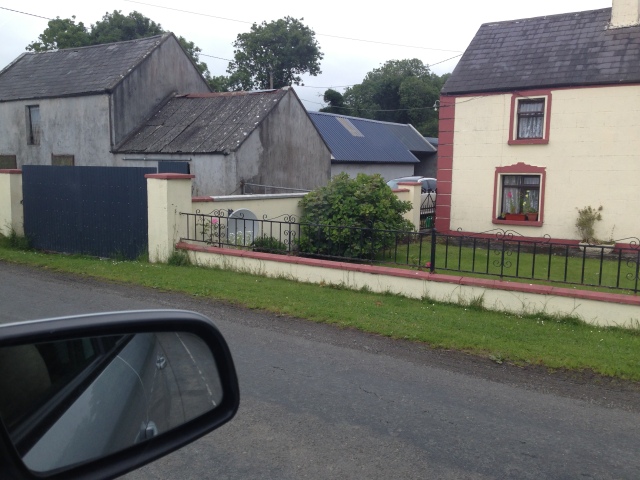
Anyone else have any strange dish pictures? lol
try browsing to /etc/enigma2 - there should be a file called 'automounts.xml' - edit this file to set it to what it should be.
Many Thanks Musogeek, that worked perfect, by amending the correct file name through automounts.xml also fixed the issue using the box for mounting as-well. Everything is now back to normal!
In case anyone else has the same issue, the problem I had was that I tried to mount a folder using the below file name;
Sport & Music
In automounts.xml the script had highlighted the & symbol blue so it either didnt like the & or it just didnt like the space between.
All back to normal now thanks to musogeek!
Have you verified that you are connected to the network? Can you use the network browser to try to rescan available networks?
Im deffo connected to the network as I can still see My Duo Hard Drive on my solo and I did a network test that came back fine.
But I cant scan with Network Browser as Its simply not there, as soon as I enter Network mount the only thing showing is the red circle to exit.
Im guessing that when the box crashed it turned something off, that has to be manually turned back on.
If they can keep the price below €20 then they have a winner, anything above that then I cant see them winning over many subscribers!
My big question is how ill *** approach this, talk is that Subs are going up in Sept and Irish viewers will have lost the ESPN package that was included for free to make up the price difference in UK and irish subs.
Hi guys,
I was attempting a network mount on my Duo and the box crashed, now when I go into the Network mount option there is nothing there!
Im using the Vix 3.0 software with latest updates.
I tried the same thing with my Solo which is also using the Solo Vix 3.0 software and this box crashed, again after a reboot the network mount option is no longer there!
I can go all the way into Network and mount but instead of displaying my network it simply shows the red exit button and nothing else.
I had a previous network mount that still works, connecting my Solo to the Hard Drive of the Duo with a lan cable, that still works but it wont display for me to change.
I was attempting to connect my boxes to my PC but entered the wrong name for the mount, this resulted in the crash.
No matter how many times I reboot the boxes nothing changes. I even tried a new Skin on both, unplugged the box from the wall but still no network mount options appear on either box.
Any ideas?
Thanks.
And you are here because....... you like linux receivers, and you have the dm800se / hd because its pretty.
The clue is in the word Sharing.

