


Posts by musogeek

    what bits have you tried and what bits do you not understand? I went through this myself a few months ago and managed to get it working internally - you need to make sure the vlc web interface is used as per the instructions to that VLC can read your receiver web interface, switch the channels and recode so it is small enough to stream on your network.
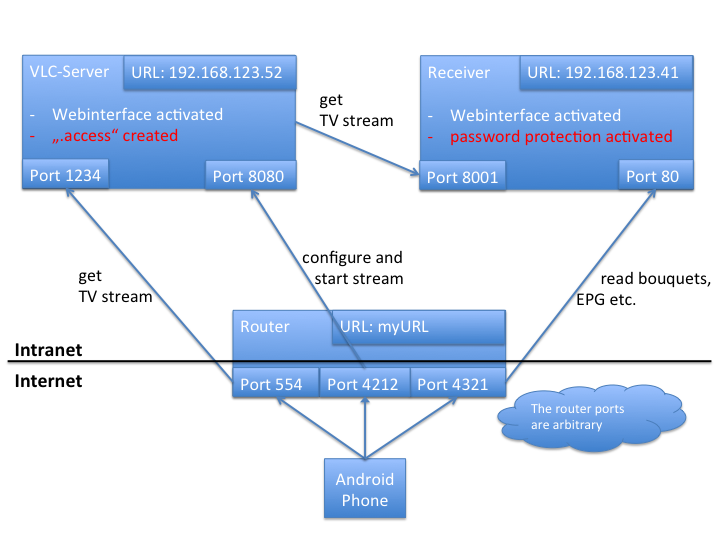


    as per the avove illustration - there are 3 ports that need forwarding - you need to forward 2 to your vlc server IP (the computer running vlc) and one to the reciever.


    Code
    http://dreampro.zey.de/en/vlcinternet.html


    It really is all there. If you keep your PC on while you are away you don't need to worry about wake up packets.

    First post an introduction here - Introductions


    When you join, you accept the rules - posting an intro before asking for help is part of these rules!


    Once you have posted an intro we could do with seeing configs and logs.

    requested was the startup log - you have gone past this and have only shown the activity after the requests. Restart your server and there will be logs output with regards to the card initialising - and post these as well - as per request.:sheep:

    Don't think the password is possible - but look in your plugin feeds for Multi Quick Button plugin, with this you can remap your remote buttons. Out of curiosity why would you need to do this?

    Certainly more economical using a pen drive for timeshift - I don't use permanent timeshift and only use it occasionally so I keep it on the hard drive, the problem being it takes a few seconds to spin up from sleeping before it pauses. If you use a USB pen drive, there is a minimum size as far as I could see, trying to get a 1GB working reported that it was too small, not tried 2GB but for permanent timeshift use 4GB min - fast good quality drives are a must.

    Consider a TP-LINK Technologies TP-LINK TD-W8960N Wireless router - it is the best router I have had when it comes to configuring - easy to set up - port forwarding never any issues - all other settings are easily accessible. The advanced options such as directing different external ports to a specified internal port, adding exceptions to the firewall based on IP and port and other options. There may be other routers that can do what this one can, but I have found this the easiest to set up.

    picons are stored in flash - if you have a USB stick it would be best to download a set and install to USB instead - you need to go to menu - setup - system - epg - settings and chose to save EPG to usb stick - also go to menu - setup - system - epg - crossepg - set your epg settings for daily scheduled updates - and i always choose to force epg reload on boot

    need full oscam configs (user/server/conf) to get a better idea as to what is going on - also need to know how you are set up - are you using oscam on a server or on local receiver - are you using dvbapi? are you using oscam/cccam - please elaborate so we can help you - don't post any sensitive stuff - hash this out.

    yes possible and easy to do - you just need to add another reader entry on oscam.server for your second card, and again you can send this to CCcam with CCcam or newcamd protocol. Once you get the card, have a quick search using the search tool and you should be able to get enough info on it - if you need further help, then post in the forum and we will get you sorted in no time!

    there are a few reasons why it is best not to store picons and epg data to the HDD - notably access times and power saving - your HDD will usually go on to power saving after a few minutes - but if you are like me and channel hop, then it will never spin down - on the other hand, if you don't channel hop, then the epg and picons will take a while to appear as the HDD would have to come out of power saving before it shows up. If you are using permanent timeshift, then you might not want to worry about this, but I also think it is a good idea for max performance to ensure that the recording disk is as dedicated as possible.

    If you are using my backup then you are best running the autobouquets plugin and doing a full scan and update the channel lists, considering I made this backup a few weeks ago now - no need to use any other lists if you are just using sly UK as this will sort it out for you.

    Hi mate - probably can answer all your q's here


    The latest revision has 512mb ram so should fair better.


    Code
    http://elinux.org/RPi_Distributions


    above link has details of all the operating systems, and it is clear which ones use XBMC.
    If you are looking to use this as an XBMC multimedia centre, then you have a few options - xbian, raspbmc and openelec
    These all use XBMC - and this can work fairly well. I have found that openelec performs the best as it has a very small footprint - however, with most things stripped out, it is difficult to do anything else - for example, installing Oscam


    Raspbmc is the most popular, and I think has the edge of the bunch but I am settling for openelec for the time being


    All 3 systems are really simple to install. You can use lots of things to power it - an old smartphone charger, a powered hub, or even the USB port of your TV


    You can get a smartphone app for controlling xbmc with android, or you can get a cheap media center remote as i have that works well, or indeed a wireless keyboard/mouse


    you could also do with buying the mpeg2 licence - think it costs £3.60


    hope this helps