
I confirm your findings.
Reported to coders... ;)


I confirm your findings.
Reported to coders... ;)
Re-scan helps?
How did you set it up? Precisely?
How to Flash Zgemma Star H Series HD Linux Enigma2 Receivers
The trick is usually to find a compatible USB stick...
Change the USB stick. Best under 8GB, although Traveller 16GB should work, too.
I wrote the procedure somewhere here, it should be straight forward...
I don't have the box with me any more - noforce file? Change to force.
I am demonstrating this on SurfShark because one can have unlimited number of devices protected with their service!
NordVPN has a limit of only 6 devices, so for me it was a no-brainer, given the number of Enigma2, Android and laptops and PCs we have in my family...
SurfShark have Android and Windows special and easy to use apps for VPN and in those one can use IKEv2 encryption, which takes away only about 10% from your full internet connection speed.
With Enigma2 one must use OpenVPN, for now, and the procedure is carefully described below...
https://satellitedirect4u.com/…nigma2-unlimited-devices/
PREPARATION
Pay attention when you sign up and note the following:
"Surfshark provides you with separate login and password for OpenVPN connection."
You can find them in your account, at the bottom of the page!
"...get Surfshark service credentials. Those are the credentials, different from the ones that you use to log in to our website or the app. To find them, go to the login page of our website, here https://account.surfshark.com/ and log in.
Once you log in, go to Devices -> Manual, scroll down to the bottom of the page. You will find your service credentials there."
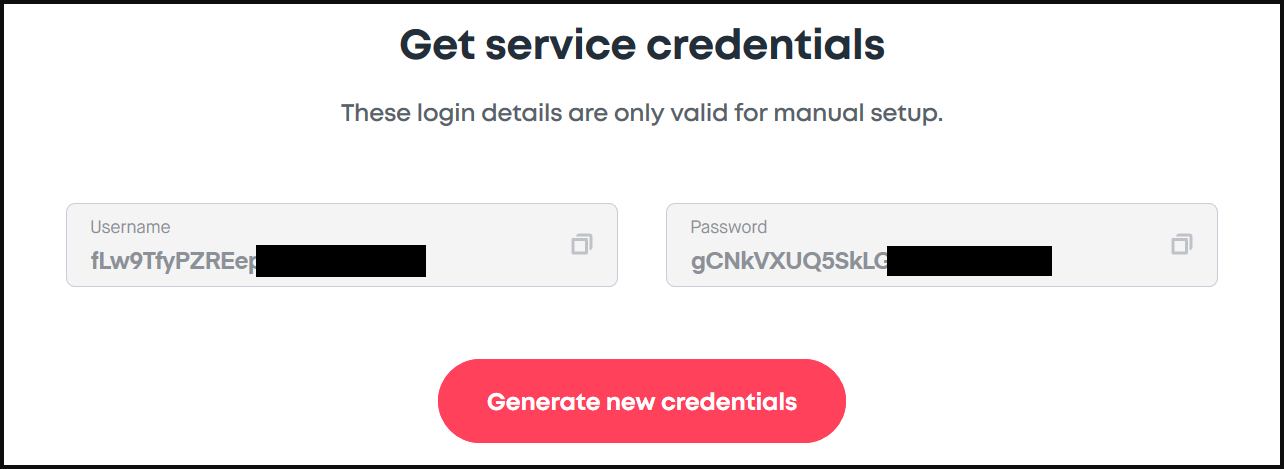
So, you do not use your normal credentials, which you use with your Windows or Android Surfshark apps (your email and password you chose). With NordVPN they are the same but not with SurfShark!
Network settings in Enigma2
Do not use automatic DHCP but manually set preferred servers in:
Network > Device Setup > choose your interface (LAN= eth0 or WLAN = wlan0) > Nameserver settings > add the following:
1.1.1.1
1.0.0.1 > Save and go back to it and yellow button to add another
8.8.8.8 > Save and as above...
8.8.4.4 > Save
Install the OpenVPN Plugin for Enigma2
MENU > Setup > System > Network > OpenVPN setup > confirm.
The tutorial
Prepare your SurfShark files from ovpn file given to you by SurfShark...
Here is the end result, my client.conf (minus the bits that one is not to show publicly)...
Please, make sure you do it exactly as described by
-opening an ovpn file using Notepad++, then
-editing it as below (with your full details, obviously, not the way I am demonstrating it below, since I have changed some bits with XXXX):
client
dev tun
proto udp
remote XXXXX.XXXX.surfshark.com XXXX
resolv-retry infinite
remote-random
nobind
tun-mtu 1500
tun-mtu-extra 32
mssfix 1450
persist-key
persist-tun
ping 15
ping-restart 0
ping-timer-rem
reneg-sec 0

remote-cert-tls server

auth-user-pass password.conf

#comp-lzo
verb 3
pull
fast-io
cipher AES-256-CBC

auth SHA512

(...it continues here with various long keys...)And here is my password.conf containing my edited username and password - they are given to you when you create an account with SurfShark VPN:
Once edited in Notepad++ go to: File > Save As... > Save as type (drop down menu) > All types > client.conf (and password.conf) > Save.
Send them away
Start FileZilla Client on your PC > connect it to your STB > choose etc folder > right click on it > Create directory > write "openvpn" (without the "" signs) > OK.
Now, right click on it > Attributes to > 755. Close FZC (confirm to close if needed).
(From experience I would advise you to close it to make sure you will see the changes you made.)
Start FZC, connect to your STB and find the new folder, open it/get inside it.
Now, send the 2 files just created on your PC ==> into openvpn folder in your STB.
Give them attributes to 644 and confirm if needed.
Reboot your STB.
Start the OpenVPN service
Once up, go to System > Setup > Network > OpenVPN plugin and start the plugin, plus make it autoconnect/autostart on E2 reboot, if you wish it so... Hit the Exit button a few times...
You must be patient at this point. If you have done it all correctly eventually you will be connected to OpenVPN SurfShark. First sign to watch out for is loss of a TV channel image, if you were on CS. Usually, this happens when you lose the connection that is typical, before you have gained a VPN connection. Once it is up again - it should be "it"... You should see colours on your TV again... via your VPN, not your ISP's network!
If it doesn't work, you may need to reboot your STB with the VPN plugin running/on autostart...
Now, check your STB's IP address via pManager > Network... again...
Once you connect to VPN Surfshark your IP address will change to 2 types:
-VPN's internal network which looks like 10.x...
-usual IP address of the VPN server (for London it starts with 5.xxx...) - usually quite different from one's normal IP address given to one by one's ISP (which you should have noted before you started this VPN business, for reference).
It's safe to CS or stream now... ;) And it is possible to watch YIFY-FNC, for instance. Don't forget to tip the coder, then send him a PM with your name/donation details, so you get your KUD number for higher resolutions...:rasta2bigsmoke0gf1:
See post no. 2...
1) Streamlord is working!!!
Sometimes it gives BSOD (who knows what they are doing at their website...). This morning/afternoon it worked really well and then right now (5 AM) is gave BSOD.... In that case RESTART E2 and try again - it is working at my end!!!
2) Since Extreme code collapse these guys selling IPTV services are moving to Stalker...
(Install it from Plugins > green button > Extensions > stalker-qt, then go to Plugins > Stalker Setup and see...
Activate it in MAIN MENU, so you can go to it quickly and easily, once you set it up properly...)
However... (Speaking of PurE2 now, because this one I have tested......)
For the moment, Stalker is not the same in H7 (full-on with Ministra) and H9 series (no Ministra...).
In other words, these binaries are not the same for all boxes, even if they are written for a specific processor/SoC.
In Plugins > Stalker Setup > Use Stalker MAC > "Yes" = one can over-ride STB's MAC. "No" would mean using your STBs MAC.
In H7 > Plugins > Stalker Setup > one can activate Ministra protocol and have it all the easy way....
Mind you, not that I recommend it... But if you do use all that - and IN ANY CASE(!!!) - USE VPN services to protect yourselves!!!
On the other hand, if you bought any of those services you have left the digital financial trail and so... good luck with that...
3) I RECOMMEND WE ALL BUY A SMARTCARD SATELLITE SERVICE FROM A LEGIT PROVIDER IN OUR RESPECTIVE COUNTRY!!!
In that case it's a win-win situation! I mean, even if we exchange across borders (CS), THIS HOBBY OF OURS CAN SURVIVE AND WE CAN HAVE IT FOR A LONG TIME TO COME!!! OTHERWISE, WE WOULD KILL IT OFF!!!
Who knows what went wrong, these things sometimes happen...
Never have I heard that remote stopped working after flash expander was installed and flash expanded...
I would recommend re-flashing but no flash expander is necessary, probably, depending on how much stuff you want to install...
If you do the structuring of PurE2 carefully, as I explained elsewhere, i.e. if you send EPG, picons, buffering and cache etc. (it must be set in each plugin separately, I'm afraid, like E2iStream, YIFY, Look Movie etc.) to the USB stick, plus make a larger SWAP file on it - perhaps it will be enough... Make a note: SWAP MANAGER 2 from Plugins > green button > Systemplugins (because that SWAP file will be PERMANENT, unlike the built-in one)!
If not, then MultiMiniBoot perhaps?
Good luck!
Both should be OK. Try and see...
Relatively soon, we hope, 6.4 will come...
To install into first of four partitions, which Edision OS mio 4K and 4k plus models have natively, one should:
-download PurE2 image: http://pur-e2.club/OU/images/index.php?dir=6.3/edision/
-unzip it on a USB memory stick formatted in FAT32
-edit the noforce file name into force and
-plug it into Edision OS mio 4K, which is unplugged from the electricity
-hold POWER button and plug the Edision OS mio 4K/4K PLUS back into electricity
-you will see ascending numbers on LCD... - let go of the POWER button
-"restore image" will be shown on TV screen: image will be flashed and then automatically the box will reboot
-take the USB stick out of the USB port quickly at that point (when all is black on TV screen).
===============TO INSTALL INTO PARTITIONS 2 - 4, when one already has an image in partition 1==============
In OpenATV I did not see a possibility to install PurE2 into another partition, which is poor...
In PurE2 it's like this:
MENU >Setup > Software Management > Flash online/local >
yellow button to choose which partition to use for flashing >
blue button to choose whee from to flash (online or loacal/USB media which contains an image) >
flash...
======================================WHEN YOU ARE DONE=======================================
MENU > pManager > Plugins > Download most used plugins > install FFMpeg, NTFS support and exFAT, too - and restart.
Go to MENU > Plugins > green button > SystemPlugins > ServiceApp > Restart.
Go to MENU > Setup > System > ServiceApp > Enigma 2 playback system = serviceapp
Also: Player = exteplayer3
Restart E2.
If you use IPTV channels then "difficult" ones should work. If not, put it back to "Original in ServiceApp.
I recommend installing OpenVPN plugin from Network, too!
MENU > pManager > Cam Manager > Install CamD > ...
Good luck!
Delfi:
"Current state of the affairs:
We are slowing 6.2 updates (except for some boxes that simply do not work with 6.3 like e4hd, etc, or for some where Kodi might be an issue) and focusing on 6.3 as well as working on 6.4.
There have been some new drivers for sf8008, new kernel/drivers for OSmio4k and there is a trial 6.3 build for OSmio4kplus. 6.2 ffmpeg got some fixes, 6.3 ffmpeg and gstreamer updated (as always, your propensity and need for reflash might vary)
Filme-fnc, serien-fnc, iwaatch-fnc, radio-fnc, lookmovies-fnc, lookseries-fnc and yify-fnc seem to work rather fine.
Feeds updated, we are working on some e2 enhancements."
Not for the time being or at least pretty unlikely, since the plugins coder moved countries and it may take some time for him to settle sufficiently in his new job, town, country and mindset - to get back to the hobby, sorry... :(
Agreed, I noticed it, too... Will ask the coders... ;)
Thanx to Captain:
"Flash Enigma2 / Recovery E2 Image
Ihr möchtet eine andere SD Karte Karte Verwenden oder E2 Startet nicht, hier gibt es die Lösung:
Vorbereitung:
1) Vorbereiten USB Stick , Format mit FAT32
2) Downloaden des Image von hier. openATV Nightly Downloads
3) File entpacken und den Ordner dinobot auf den USB Stick kopieren
4) USB Stick an einen USB Port an der Seite einstecken.
5) Box einschalten und wenn im Display "Menu" steht an der Fernbedienung die Taste Grün drücken
nun wird das Image Installiert wie hier im Video:"
So, a usual job, except...
-when you plug in the power cord you will see MENU on the front display (LED)
-press the GREEN button on your remote control and wait for it to be finished...
I just got HiTube 4K COMBO (4K HDR Ultra HD) STB, which is apparently the same HW (it uses the same image) as Dinobot u55...
Thanx to Reisser!!!:thumbup:
=================CLONES===============
DINO, IZIBOX, MAXYTEC, HITUBE (as far as I "know") are all the same, more or less...
I use PurE2 for it and you can find them - v. 6.2 and 6.3 - here (in various sections - if none is available for your machine, use an equivalent Dinobot one):
Dinobot PurE2 images: http://pur-e2.club/OU/images/index.php?dir=6.3/dinobot/
Izibox: http://pur-e2.club/OU/images/index.php?dir=6.3/izibox/
etc.
http://pur-e2.club/OU/images/index.php?dir=6.3/dinobot/
PurE2 also has v. 6.2.
We are also working on our own build, i.e. v. 6.4 - not public yet...
I'd put it down to linguistic misunderstanding, let's say...;)
'Move the skin' you said, then 'touch it'... neither words are actually technically usable in this context, sorry...:cool1:
But we agree on quality of the skin... :thumbup:
OSCam etc. masters of ours have to add these to OSCam etc. GIT, then we'll have it...
Sorry... We don't have the expertise... and very few do!
OSCam Emus updated!
Not sure if AFN is AU (no luck so far... I will leave it or a few hours on AFN Sports...)...

